
What if the most exhausting part of your workday could be finished before you even put your truck in gear? You’re already familiar with the “reporting debt” that piles up by Friday. It’s a mountain of unfiled logs and a camera roll full of mystery photos that lack any context. Finding a better daily construction report app is no longer a luxury; it’s a necessity to stop the cycle of memory-based reporting that leads to inaccuracies and hours of stolen personal time. You know that documentation is vital, but the manual data entry is a relentless drain on your energy.
Stop drowning in paperwork and start leading with a visual-first strategy. This guide reveals how to eliminate manual entry entirely by using automated photo documentation. We’ll show you how to transform raw site photos into professional, auto-labeled PDF reports in seconds using voice-to-text technology. Snap, sync, and succeed! Discover how to gain real-time visibility into project progress, organize your jobsite data instantly, and finally close out your day the moment you leave the site. It’s time to restore order to the chaos of onsite documentation and reclaim your evenings.
Key Takeaways
- Adopt a visual-first philosophy to eliminate text-heavy logs, erase reporting debt, and ensure absolute site accuracy.
- Automate your photo labeling to slash manual data entry and finally end the cycle of office overtime.
- Master real-time documentation to build instant stakeholder trust and keep your project momentum moving forward.
- Scale your field oversight using a daily construction report app that provides remote visibility through live photo feeds.
- Generate professional PDF reports instantly and leverage aerial measurements to close out every jobsite faster than ever!
The Evolution of Field Logs: Why Your Daily Construction Report App Must Be Photo-First
Paper logs are dead, and text-heavy digital forms are dying. In 2026, the industry has shifted toward a “photo-first” philosophy. This isn’t just about taking more pictures; it’s about making visual evidence the backbone of your entire project record. Your daily construction report app should function as a high-speed data capture tool rather than a digital typewriter. When you prioritize imagery, you transform raw site conditions into actionable data instantly. This shift protects your bottom line. Visual documentation provides an airtight defense against disputes and litigation by replacing vague descriptions with undeniable, high-resolution proof. Effective Construction management requires a verifiable record of every milestone. If your current process relies on typing out descriptions at the end of a ten-hour shift, you’re leaving your business vulnerable to memory gaps and human error.
The High Cost of Reporting Debt
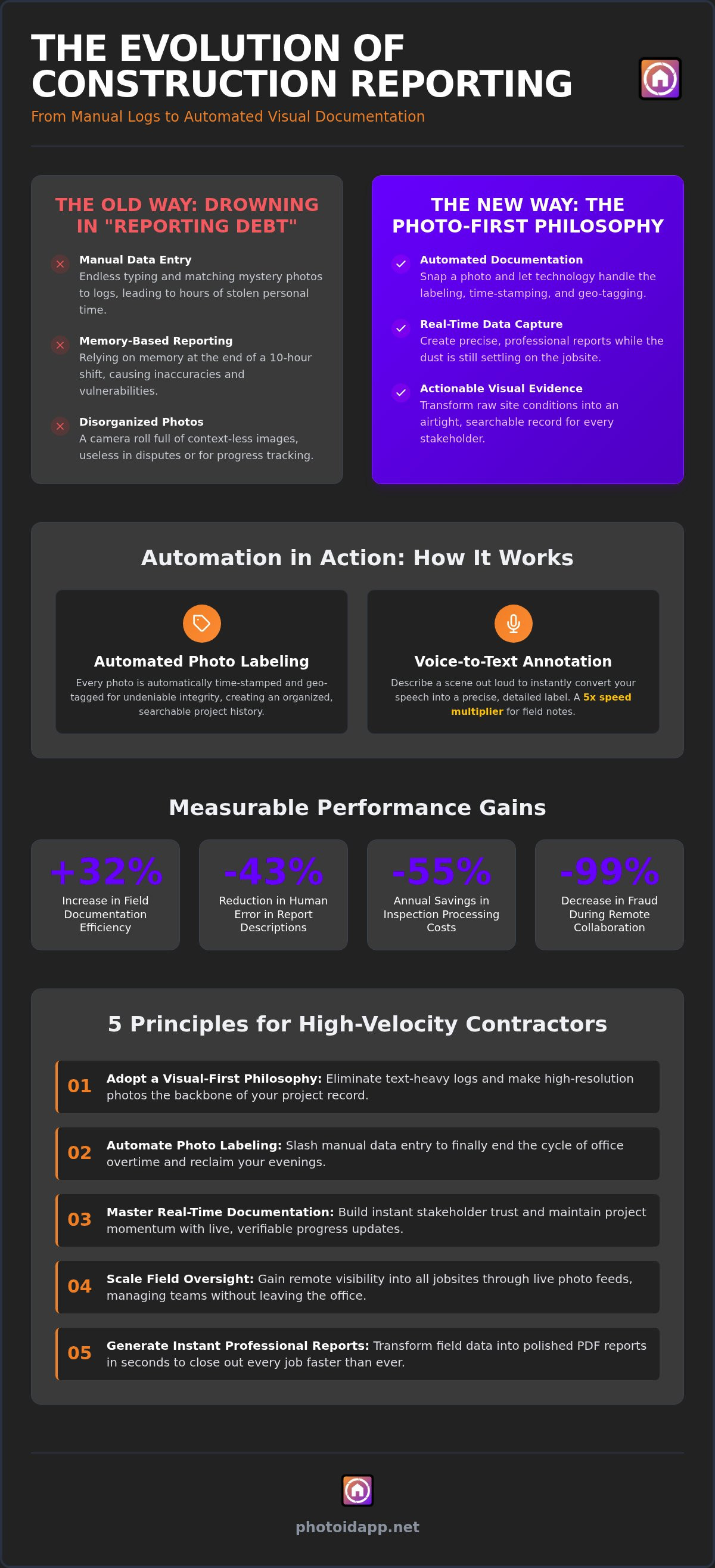
Stop letting “reporting debt” eat your profits. Reporting debt is the backlog of unfiled logs and unorganized photos that haunts every project manager on Friday afternoon. Research shows that using a visual-first daily construction report app can lead to a 32% increase in field documentation efficiency. When you delay reporting, you rely on memory. Memory is a liability. “I’ll do it later” is the most expensive phrase in construction because it leads to inaccurate logs and lost billable hours. Capture the data while the dust is still settling. Documenting site conditions in real-time ensures that your reports are professional, precise, and finished before you leave the jobsite. Don’t wait. Snap, label, and sync!
Moving Beyond Simple Photo Attachments
Your phone’s standard camera roll is a black hole for project organization. Photos without context are useless in a dispute. In 2026, standard attachments aren’t enough. You need visual evidence that is automatically time-stamped and geo-tagged to ensure its integrity. This level of detail has been associated with a 99% decrease in fraud during remote capture collaboration. Move beyond simple “before and after” shots. Link every image directly to specific project milestones and daily progress goals. By capturing data through imagery, you create a searchable history of the build. This organized approach ensures that every stakeholder has total visibility without you having to send a single manual email. Turn your jobsite into a transparent, high-velocity environment where the photos do the talking for you!
How Automated Photo Labeling Eliminates Office Overtime
Stop spending your nights hunched over a laptop. The traditional method of matching site photos to report descriptions is a massive time sink that drains your energy and your profits. In 2026, a high-velocity daily construction report app handles the heavy lifting for you. Automated photo labeling works by capturing context the moment you press the shutter. By the time you walk off the jobsite, your photos are already organized, labeled, and ready for review. This shift is a core component in accelerating growth in construction technology, where speed and data transparency are the new industry standards.
Artificial intelligence has evolved to do more than just store files. Modern AI identifies site conditions and categorizes imagery based on project phases or specific hazards. This automation reduces human error in report descriptions by 43% and ensures that site locations are always accurate. Whether you’re managing one crew or ten, the results remain consistent. You no longer need to interpret a subcontractor’s vague notes; the visual evidence speaks for itself. This level of automation is associated with a 55% annual savings in inspection processing costs, allowing you to reallocate those hours toward growing your business.
Voice-to-Text: Talking Your Way Through a Jobsite
Safety and efficiency must go hand-in-hand on an active site. Hands-free documentation allows you to maintain situational awareness while capturing critical data. Simply snap a photo and describe the scene out loud. The software converts your speech into a precise label instantly. Voice-to-text labeling is a 5x speed multiplier for field documentation. It creates immediate context for every image, ensuring that “IMG_802.jpg” becomes “Northwest Corner Foundation Crack – Phase 2” before you even put your phone away. No more typing with dirty gloves. No more memory-based reporting at the end of the day!
Custom Templates for Standardized Documentation
Consistency is the key to scalable oversight. You must ensure every report contains the same high-quality data points, regardless of who is behind the camera. Use Building Custom Inspection Templates for Faster Reporting to guide your field crews through every required shot. These templates function as a digital checklist that prevents missed documentation. When your team follows a standardized path, you receive a uniform stream of data that makes office review a breeze. This structured approach eliminates the back-and-forth phone calls and missing information that usually cause project delays. Ready to reclaim your evenings? Start your PHOTO iD Mobile App Subscription and experience the power of instant documentation.
Real-Time vs. End-of-Day Reporting: A Performance Comparison
Stop waiting until the end of the shift to start your paperwork. Batch reporting is a relic of the past that creates a massive bottleneck in your operations. When you use a high-velocity daily construction report app, you transition from “doing reports” to “capturing results” in real-time. The performance gap is staggering. A field professional using instant generation spends roughly 10 minutes documenting site conditions as they work. In contrast, a contractor relying on traditional batch reporting often wastes 2 hours every night trying to reconstruct the day from memory. That’s 10 hours of lost personal time every week! Real-time data doesn’t just save time; it builds immediate stakeholder trust. When clients and adjusters see live updates, they see a professional who is in total control of the jobsite. For businesses that require similar transparency for their online services, statuspulse.ai offers a robust solution for uptime monitoring and public status pages.
Transparency is the fastest way to accelerate your payment cycles. Proactive documentation ensures that everyone is on the same page from day one. It also serves as your primary defense for compliance. Adhering to OSHA construction safety standards is much simpler when every hazard and mitigation effort is timestamped and labeled the moment it’s identified. Don’t leave your safety record or your revenue to chance. Capture the data, prove the work, and get paid faster!
Generate a professional PDF before you even put your truck in gear. The modern workflow allows you to compile every labeled photo, voice note, and site detail into a polished document with a single click. You can share these reports directly from the mobile app to clients, adjusters, or project owners instantly. This “one-click” efficiency is designed to satisfy IICRC documentation standards, ensuring your work meets the highest industry requirements without the manual struggle. It’s about working smarter, not harder. Snap, sync, and share!
Integration with Industry Standard Tools
Clean data is the fuel for accurate estimates. Your field documentation must feed directly into the tools your office uses to avoid redundant data entry. PHOTO iD eliminates this friction by providing Verisk-compatible documentation that integrates seamlessly with Xactimate. This integration ensures that the information captured in the field is exactly what the estimator needs to close the file. By reducing the gap between field documentation and office estimating, you eliminate the back-and-forth questions that usually stall project momentum. Ready to experience a seamless workflow? Start your subscription today and see the difference that high-velocity data can make for your team.
Scalable Field Oversight: Managing Teams Without Leaving the Office
Centralized Dashboards for Project Managers
Reviewing daily progress shouldn’t feel like a chore. A high-velocity dashboard provides a visual timeline of your entire project portfolio, allowing you to spot trends at a glance. You can filter data by specific crew, date range, or project phase to find exactly what you need in seconds. The team management dashboard serves as the single source of truth for your entire field operation. This centralized view eliminates the confusion that usually derails project meetings. You have the data. You have the proof. You have the control. Review, filter, and finalize your oversight with total confidence!
Maintaining Standards Across Subcontractors
Consistency is the enemy of chaos. When you onboard subcontractors to your reporting system, you set the bar for quality from day one. Use custom templates to dictate exactly which shots every sub must document before they leave the site. This ensures your data remains uniform across every project, regardless of who is behind the camera. By requiring visual evidence for every milestone, you drastically reduce disputes regarding “who did what” on the jobsite. If a sub claims work is finished, you don’t have to take their word for it. You see the labeled, time-stamped evidence in your feed immediately. This level of transparency protects your reputation and your profit margins. Ready to scale your operations without the stress? Start your PHOTO iD Mobile App Subscription today and master your field oversight.
Implementing PHOTO iD: The High-Velocity Solution for Modern Contractors
Don’t settle for bloated project management suites that slow you down. In 2026, agility is your greatest asset. PHOTO iD stands out as the best construction management software for visual documentation because it prioritizes field speed over office complexity. While other platforms bury your data in sub-menus, this daily construction report app puts the evidence front and center. You can go from downloading the app to generating your first professional report in under 10 minutes. This high-velocity approach gives you a massive competitive advantage in a tight market. You respond faster, document better, and close out jobs with surgical precision.
Accuracy isn’t just about what you see on the ground. By leveraging aerial roof and wall measurements, you add a layer of indisputable data to your daily reporting. This integration ensures that your progress logs are backed by precise dimensions, leaving zero room for measurement disputes. It’s time to stop guessing and start documenting with total confidence. Snap, sync, and succeed!
Beyond Simple Photos: Aerial and Virtual Tools
Your documentation needs to be as dynamic as your jobsite. Integrating aerial measurements into your daily progress reports allows you to track material usage and installation progress with bird’s-eye clarity. If you hit a technical snag, use virtual inspection tools to bring in an expert consultation without the cost of travel. These tools, combined with specialized inspection templates for roofing and home inspections, ensure that every niche requirement is met. You aren’t just taking pictures; you are building a comprehensive digital twin of your project’s progress.
The ROI of Saved Time
Time is the only resource you can’t buy more of, so stop wasting it. Implementing a high-velocity daily construction report app translates to a massive return on investment. Industry data shows that field leads save between 5 to 10 hours per week by eliminating manual photo organization and data entry. Over a year, that’s hundreds of hours reclaimed for higher-value tasks. Better documentation also leads to higher referral rates and a 43% decrease in adjuster management costs. Professionalism pays. Start your high-velocity reporting journey with PHOTO iD today and experience the power of instant, automated documentation!
Take Command of Your Jobsite Documentation
The days of drowning in unorganized photos and manual data entry are finally over. By adopting a visual-first daily construction report app, you transform documentation from a Friday afternoon nightmare into a daily competitive advantage. You’ve seen how automated labeling and real-time report generation can reclaim ten hours of your personal time every week while building absolute trust with project stakeholders. It’s about working smarter, moving faster, and leaving the jobsite with your paperwork already finished. Don’t let reporting debt weigh down your operations another day.
PHOTO iD is the game-changing partner you need to restore order to the chaos of onsite documentation. Leverage our Voice-to-Text Labeling Technology and Instant Photo Report Generation to create professional results in seconds. Because our system is fully Xactimate and Verisk Compatible, your field data integrates seamlessly with your office estimating tools. Stop letting paperwork steal your evenings and start leading with high-velocity efficiency. You have the tools, the tech, and the talent to dominate your market! Take the first step toward a more organized, profitable future right now.
Streamline your daily reports with PHOTO iD today!
Frequently Asked Questions
What is the best daily construction report app for small businesses in 2026?
PHOTO iD is the premier daily construction report app for small businesses that prioritize speed and visual accuracy. Unlike complex enterprise software that requires extensive training, this platform allows field leads to document site conditions instantly. It’s designed to stop the cycle of office overtime by automating the most tedious parts of reporting. Small teams benefit from professional, auto-labeled reports that build client trust without the high cost of manual data entry.
How does automated photo labeling save time on the jobsite?
Automated photo labeling eliminates the need to manually sort through hundreds of mystery images at the end of your shift. By capturing context the moment you snap a picture, the software organizes your files into a logical project timeline. This proactive approach has been shown to increase field documentation efficiency by 32%. You spend less time typing and more time managing the build. Your documentation is finished before you even leave the jobsite!
Can I generate a daily construction report as a PDF from my phone?
Yes, you can generate a professional PDF report directly from your mobile device in seconds. The instant photo report generation feature compiles all your labeled images, voice notes, and site data into a polished document with one click. This allows you to share progress with clients or adjusters before you even put your truck in gear. It’s the ultimate tool for closing out the day’s documentation while the details are still fresh.
Does PHOTO iD integrate with Xactimate for insurance claims?
PHOTO iD is fully compatible with Xactimate and Verisk, making it a powerful partner for insurance-heavy projects. The app feeds clean, organized data directly into your estimating software, which reduces friction between field documentation and office claims processing. This integration ensures that your visual evidence meets industry standards, helping to accelerate payment cycles and reduce dispute times. It’s the high-velocity solution for contractors who need to bridge the gap between site and office seamlessly.
Is voice-to-text labeling accurate for construction terminology?
Voice-to-text labeling is highly accurate and specifically designed to handle technical construction and inspection terminology. It functions as a 5x speed multiplier, allowing you to describe site conditions hands-free while maintaining situational awareness on active jobsites. Whether you’re documenting foundation cracks or roofing materials, the software converts your speech into precise, professional labels. This technology ensures that every photo has immediate context, eliminating the need for dirty gloves to ever touch a smartphone keyboard.
How do I manage multiple crews using one construction reporting app?
You can manage multiple crews through a centralized team management dashboard that provides real-time visibility into every active project. This single source of truth allows project managers to monitor progress, identify safety bottlenecks, and review photo feeds without traveling between sites. By filtering data by crew or project phase, you maintain absolute accountability across your entire portfolio. It’s the most efficient way to scale your field oversight and ensure every team follows your documentation standards.
What features should I look for in a daily log app for contractors?
When selecting a daily construction report app, prioritize features that eliminate manual data entry. Look for automated photo labeling, voice-to-text capabilities, and instant PDF generation. A visual-first platform ensures that your documentation is undeniable and easy to digest. Additionally, ensure the app offers custom inspection templates and a robust team management dashboard for scalable oversight. These tools transform your reporting from a clerical burden into a high-velocity asset that protects your profit margins.
Can I use PHOTO iD for aerial roof measurements and daily reports together?
Absolutely. PHOTO iD allows you to leverage aerial roof and wall measurements alongside your daily progress reports in one seamless workflow. This integration provides a comprehensive digital record that combines ground-level photo evidence with precise dimensions. It’s particularly effective for roofing and exterior contractors who need to track material installation against accurate site data. Using these specialized tools together ensures that your reports are both visually compelling and mathematically accurate, providing total transparency for every stakeholder.