

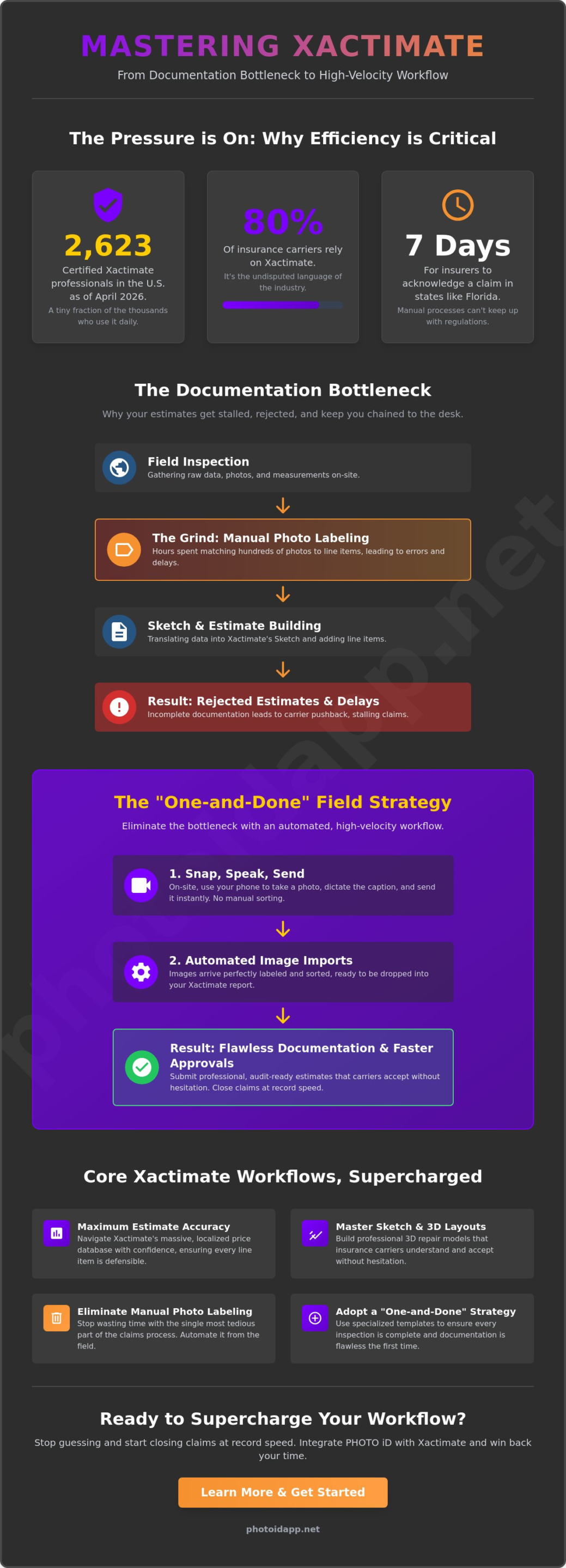
Did you know that as of April 2026, only 2,623 professionals in the United States hold an official certification for xactimate? While thousands use the software to process property claims, very few have mastered the efficiency required to stay ahead of tightening state regulations. In Florida, insurers now have just 7 days to acknowledge a claim. The pressure to deliver accurate, professional estimates has never been higher for field adjusters and contractors.
You likely feel the grind of manual photo labeling and complex sketching keeping you chained to your desk long after the inspection ends. It is a common frustration that leads to rejected estimates and exhausted teams. We will show you how to master the latest 2026.3.1000 version and eliminate the documentation bottleneck for good. You will discover how to reduce claim cycle times and improve accuracy instantly. This guide breaks down pricing, certification, and the high-velocity workflows you need to spend less time at the desk and more time in the field.
Key Takeaways
- Learn why xactimate is the undisputed industry standard and how to navigate its massive database for maximum estimate accuracy.
- Master the Sketch and Line Item workflow to build professional, 3D repair layouts that insurance carriers accept without hesitation.
- Identify the documentation bottlenecks that stall your claims and learn how to eliminate manual photo labeling from your daily routine.
- Adopt a “one-and-done” field strategy using specialized templates to ensure every inspection is complete and documentation is flawless.
- Discover how to instantly automate your image imports using the Snap, Speak, Send method to close claims at record speeds!
What is Xactimate? The Standard for Property Claims Estimating
Think of xactimate as the central nervous system of the property insurance world. Developed by the tech giants at Verisk, this software suite is the gold standard for estimating building damage and repair costs. It isn’t just a suggestion; it’s the language of the industry. Nearly 80% of insurance companies and adjusters across North America rely on it to process claims every single day. If you want your estimates accepted, you must speak this specific language. It transforms raw field data into professional, line-itemed reports that move the needle.
The platform functions as a critical bridge. It connects the physical destruction found during a field inspection to a final, fair financial settlement. By utilizing a massive, localized pricing database that receives updates every month, the software ensures that a gallon of paint in Miami or a square of roofing in Seattle costs exactly what it should in that specific market. As of April 2026, the latest version 2026.3.1000 provides the most refined data yet. It empowers you to build accurate, defensible estimates that stand up to intense carrier scrutiny. Stop guessing and start calculating with precision.
The Role of Verisk in the Claims Ecosystem
To understand the software, you must understand its origins. It is part of the broader ecosystem managed by Verisk Analytics, a data-driven powerhouse that provides risk assessment tools worldwide. Verisk maintains the industry-standard price list for materials, labor, and equipment by surveying thousands of suppliers and contractors. This creates a level playing field for everyone involved. When you use Xactimate alongside XactAnalysis, you’re plugging into a network that prioritizes data transparency and audit-ready files. This connection allows for seamless communication between the field and the desk. It ensures that every line item is backed by real-world market research, giving you the confidence to stand behind your numbers.
Who Uses Xactimate and Why?
The user base is diverse but shares a single, driving goal: high-velocity accuracy. Independent adjusters use it for rapid field reporting to hit those tight state deadlines, like Florida’s 7-day acknowledgement rule. Restoration contractors rely on it to justify complex repair costs to carriers, ensuring they get paid fairly for every hour of labor. Staff adjusters use the platform to maintain consistency across massive claim volumes. It provides a structured, predictable framework that reduces friction and eliminates guesswork. Use it to build trust. Use it to close files. Use it to win back your time.
How Xactimate Works: From Site Visit to Final Estimate
The journey from a damaged property to a paid claim starts the moment you step on-site. Mastering the xactimate workflow is about speed, precision, and order. It begins with the Sketch phase. You aren’t just drawing boxes; you’re building a digital twin of the loss. This 2D or 3D layout serves as the foundation for every single dollar you’ll justify in the final report. Once the footprint is set, you populate it with specific repair tasks known as Line Items. This structured approach ensures that no detail is overlooked and every cost is accounted for before you even leave the driveway.
The Power of Sketch and Aerial Measurements
Don’t waste time on a ladder when you don’t have to. The Sketch tool allows you to visualize complex roof lines and interior structures with surgical accuracy. By integrating aerial measurements, you can import precise exterior dimensions directly into your project. This reduces human error and keeps you safe on the ground. 3D modeling takes it a step further by helping you identify hidden project costs, such as high-ceiling paint charges or complex wall intersections. When you visualize the loss in three dimensions, you eliminate the “oops” moments that lead to unpaid supplements later. Efficiency is the name of the game here.
Navigating the Price List and Line Items
The database is vast, and to move fast, you need to master the shorthand. Use category codes like WTR for water mitigation, CLN for cleaning, or RFG for roofing. Each code pulls from a live database of material, labor, and equipment costs in xactimate. While the software provides a massive baseline, groups like United Policyholders in their guide Xactimate Demystified point out that these numbers require professional oversight to ensure they match real-world market rates. You are the expert; the software is your tool.
To really accelerate your output, lean on Macros. These are pre-set lists of line items for common repair scenarios, like a standard kitchen flood or a hail-damaged roof. Instead of clicking fifty times, one click loads everything you need. You can then customize quantities while staying compliant with carrier guidelines. The final result is a professional, itemized estimate that looks clean and gets approved. If you want to make this process even faster, you can streamline your field documentation to feed your estimate the data it needs instantly. A Picture is Worth a 1000 Words, but only if it’s organized and ready to back up your line items!
The Documentation Bottleneck: Why Estimates Stall
You have finished your sketch. You have added your line items. You think the hard part is over. It isn’t. The real bottleneck starts the moment you open the image tab in xactimate. Disorganized, unlabeled field photos are the absolute number one reason your estimates stall. If a reviewer at XactAnalysis can’t see the proof, they won’t pay the claim. It is that simple. This manual entry phase is a massive time-sink that keeps you at your desk until midnight while your competition is already onto the next job.
Manual labeling also creates a dangerous memory gap. When you finally sit down to label photos three days after the inspection, the details start to blur. You find yourself staring at a water-damaged ceiling, trying to remember if it was in the master bedroom or the hallway. Guessing leads to inconsistent documentation. Inconsistency leads to rejected estimates. You lose credibility with the carrier and money for your client. You can’t afford to let administrative bloat dictate your success.
The High Cost of Manual Photo Labeling
Let’s look at the hard data. A standard residential claim easily requires 200 photos to document the loss properly. If you spend just 30 seconds per photo naming it, writing a description, and organizing it into the correct room, you’ve just burned 1.6 hours of your life. That is 1.6 hours of pure desk time for a single claim. On a heavy CAT deployment with 30 claims on your plate, you are looking at 48 hours of unpaid administrative work. This isn’t just a math problem; it’s a psychological burden that leads to burnout and under-indemnification. Your time is worth more than manual data entry.
Meeting IICRC and Carrier Documentation Standards
Carriers don’t just want pictures; they demand compliance. Every photo needs a clear, descriptive label that justifies your specific line items in xactimate. If you are billing for water mitigation, you must provide proof through moisture mapping water damage documentation and thermal imaging results. IICRC S500 standards require rigorous documentation of dry-down progress. Without standardized templates, it’s too easy to miss a critical “before” or “after” shot. Missing documentation is the fastest way to get a “kickback” from a reviewer. Use a structured system to ensure every room is documented fully the first time. Stop the back-and-forth. Close the file. Move to the next one!
Optimizing Your Xactimate Workflow for Maximum ROI
Efficiency in the field is your highest-leverage asset. To maximize your return on investment, you must adopt a “one-and-done” mentality. This means you document the entire loss fully while you are still standing on the property. Leaving a site with incomplete notes forces you to rely on a fading memory later. It’s a recipe for supplements and delays. By finishing your field documentation before you put the truck in gear, you ensure that your work in xactimate is purely about data entry, not data discovery. This shift alone can save you hours of back-and-forth communication with the desk.
Leveraging technology is the only way to stay competitive in 2026. Use voice-to-text tools to capture descriptions in real-time as you walk the loss. If you wait until you get to the hotel or the office, you’ve already lost the race. Integrating automated photo labeling allows you to bypass the manual entry phase that usually kills your momentum. When you automate the repetitive tasks, you free up your brain to focus on the complex line items that actually drive claim value. Work smarter, not harder.
Build Custom Inspection Templates
Don’t wander through a property aimlessly. Create a logical flow that starts at the exterior and moves systematically through the interior. A standardized photo sequence for roofs, kitchens, and bathrooms ensures you never miss a critical angle. During high-stress CAT events, your brain is under fire. Templates act as a safety net. They reduce your mental load by telling you exactly what to capture next. When your photos follow a predictable pattern, importing them into xactimate becomes a streamlined process rather than a chaotic puzzle. Consistency builds speed. Speed builds profit.
Real-Time Data Sync and Cloud Collaboration
Leverage the power of the cloud to bridge the gap between the field and the office. Using Xactimate Online allows for real-time estimate updates that your entire team can see. Managers can use team dashboards to review field work instantly, catching errors before they become permanent. This reduces travel time and “desk lag” significantly. Imagine a desk adjuster starting the estimate while the field team is still on-site. It’s not just a dream; it is the new standard for 2026. By syncing data instantly, you eliminate the wait times that usually kill your claim cycle metrics. To further reduce those cycle times, understanding how xactanalysis tracks and manages claim assignments can give your team a decisive edge in the field-to-office pipeline.
To truly supercharge this workflow, you need to bypass the most tedious task in the industry. Stop typing photo descriptions manually. You can automate your photo labeling today and send organized, labeled images directly into your estimate. This eliminates the manual entry phase entirely. Snap the photo, speak the description, and send the data. It is the fastest way to turn a field inspection into a finished file!
Supercharge Xactimate with PHOTO iD Integration
Stop fighting the documentation bottleneck. You have already seen how manual photo labeling can steal 1.6 hours from every single claim. It is time to take that time back. PHOTO iD acts as the high-velocity front-end for xactimate, automating the most tedious part of your workflow before you even leave the jobsite. By the time you sit down to finalize your estimate, the heavy lifting is already done. This isn’t just a tool; it is your game-changing partner in the field. A Picture is Worth a 1000 Words, but only if you don’t have to type them all out by hand!
Our “Snap, Speak, Send” mantra is the secret to closing claims at record speeds in 2026. You capture the damage, speak the description, and send the organized gallery directly to your file. It is a seamless process that removes the friction between physical inspection and digital reporting. You can reduce your total documentation time by up to 50% per claim. That is half your administrative day returned to you instantly. Don’t just work harder; work with technological authority.
Automated Photo Labeling: From Field to Estimate
Voice-to-text labeling is the end of desk-side typing. As you walk through a loss, you simply describe what you see. The app captures your voice and converts it into professional, carrier-ready labels instantly. This eliminates the “memory gap” and ensures your documentation is 100% accurate every time. You can generate instant photo reports that meet the strictest carrier requirements with a single tap. Every image includes a mandatory timestamp and GPS tag to prevent fraud and satisfy internal audit teams. It is professional, it is fast, and it is bulletproof.
Seamless Export to Xactimate and XactAnalysis
The import process is effortless. You don’t have to worry about dragging and dropping hundreds of files or renaming images one by one. You simply import your PHOTO iD galleries directly into your project. The photos arrive pre-labeled, organized by room, and ready for review. This integration maintains high-resolution image quality so reviewers can see every detail, yet it optimizes file sizes to ensure your xactimate project doesn’t become bloated or slow. You get the clarity you need without the technical headaches. It is the ultimate way to maintain a professional edge while moving at the speed of a jobsite.
Take control of your schedule and eliminate the administrative bloat that holds you back. Streamline your Xactimate workflow with PHOTO iD today! Stop typing. Start sending. Close more claims!
Master Your Workflow and Reclaim Your Time
Success in property claims in 2026 requires more than just technical skill. It demands a commitment to high-velocity efficiency and surgical precision. You now recognize that while xactimate is the brain of the estimating process, your documentation is the heartbeat. Manual photo labeling and disorganized files are the biggest threats to your cycle times and your sanity. You don’t have to stay chained to a desk to produce professional, audit-ready estimates. You have the tools to work smarter and finish faster.
Join the thousands of field professionals who have already eliminated the documentation bottleneck. Our Snap, Speak, Send technology allows you to document the loss in real-time and reduces your total documentation time by 50%. This isn’t just about saving minutes; it’s about reclaiming your life and scaling your business with confidence. Take control of your inspections and leave the administrative grind behind forever! It is time to restore order to your workday and focus on what really matters.
Stop manual labeling and start closing claims faster with PHOTO iD!
The path to a faster, more profitable workflow is right in your pocket. Go out there and dominate the field!
Frequently Asked Questions
What is Xactimate and why is it used in insurance?
Xactimate is the industry standard software for estimating property damage and repair costs. It is used by nearly 80% of insurance carriers and adjusters to ensure localized pricing accuracy for materials and labor. By providing a common language and a massive database of over 10,000 line items, it creates a transparent environment for insurers and contractors to settle claims fairly and quickly.
How much does an Xactimate subscription cost in 2026?
As of April 2026, Xactimate Professional costs approximately $149 per month or $1,200 when billed annually. If you need the advanced features of Xactimate Pro, the annual cost is $2,690, while the monthly option sits at $350. Xactimate Standard is available for $2,390 per year. These prices provide access to the latest 2026.3.1000 version and its monthly localized price list updates.
Can I use Xactimate on a mobile device for field inspections?
Yes, you can utilize Xactimate Mobile on tablets and smartphones to sketch and estimate while on-site. This mobile functionality allows you to capture dimensions and add line items in real-time, which syncs instantly with your cloud-based projects. It is a powerful way to reduce “desk time” by completing the bulk of your technical work while you are still at the property.
How do I import photos into Xactimate efficiently?
The most efficient way to handle images is to use an integrated field documentation app that automates the labeling process. While you can manually upload files through the Image tab, this often leads to a documentation bottleneck. By using a partner app, you can import pre-labeled and organized galleries directly into your estimate. This saves you from the 1.6 hours usually lost to manual typing for every 200 photos.
What is the difference between Xactimate and XactAnalysis?
Xactimate is the tool used to create the actual repair estimate, while XactAnalysis is the management and reporting platform used to assign claims, track adjuster performance, and audit estimates for compliance. Carriers use XactAnalysis to assign claims, track adjuster performance, and audit estimates for compliance. Think of one as the “workstation” and the other as the “command center” that oversees the entire claim lifecycle from start to finish.
Does Xactimate offer automated photo labeling?
No, the core software does not currently offer a native feature for automated photo labeling or voice-to-text descriptions. You must type every description manually within the platform unless you integrate a specialized tool like PHOTO iD. Automating this task is the single best way to reduce your administrative load and meet the strict 7-day acknowledgement deadlines found in states like Florida.
How long does it take to learn Xactimate for new adjusters?
Most new adjusters require 40 to 80 hours of dedicated study to become proficient in sketching and line item entry. Formal training is highly recommended, as there are currently only 2,623 certified professionals in the United States. You can take a 3-day in-person Level 1 certification prep course for about $400 or opt for self-paced online training to master the software’s steep learning curve.
Can Xactimate integrate with other inspection apps like PHOTO iD?
Yes, it integrates seamlessly with specialized inspection apps to streamline your field documentation. Using the Snap, Speak, Send method allows you to capture and label photos instantly before exporting them into your estimate. This integration eliminates the need for manual data entry and helps you close claims 50% faster. It is the ultimate way to supercharge your workflow and restore order to your jobsite documentation!