

What if you could finish your Xactimate photo reports before you even left the jobsite? Industry data shows that field workers spend up to 40% of their day manually labeling and organizing images, a practice often called the “second shift.” You know the frustration of staring at a folder of 200 unlabeled photos and wondering which water stain belonged to the guest bathroom. It’s time to streamline Xactimate photo workflow and reclaim your evenings. It’s exhausting, it’s inefficient, and it’s entirely unnecessary.
This 2026 field guide will show you how to master high-velocity claims documentation by eliminating manual entry and cutting your reporting time by 50%. We’re moving beyond the old habit of “shoot now, label later.” Instead, you’ll discover how to capture data-rich, pre-labeled photos that make your estimates build themselves. We’ll cover automated labeling, instant report generation, and the exact steps to deliver professional, carrier-ready photo sets. Let’s transform your onsite chaos into digital precision!
Key Takeaways
- Stop paying the “Administrative Tax” of manual labeling and learn how to close claims faster with high-velocity documentation.
- Master the essential metadata and labeling standards required for carrier compliance and precise estimate line items.
- Implement five practical steps to streamline Xactimate photo workflow by utilizing real-time field documentation techniques.
- Compare manual versus automated strategies to see how voice-to-text technology effectively eliminates the exhausting nightly second shift.
- Use custom inspection templates to generate instant, professional photo reports that are ready for immediate estimate inclusion!
The Manual Bottleneck: Why Your Current Xactimate Photo Workflow is Failing
Every field professional pays an “Administrative Tax.” It is the unpaid, exhausting hours spent hunched over a laptop at 9:00 PM, dragging files and typing repetitive descriptions. If you don’t streamline Xactimate photo workflow now, you are bleeding profit. Modern estimation relies on the high-speed data standards set by Verisk Analytics, the parent company of Xactware. Manual labeling is no longer just a slow habit; it is a barrier to your growth. It creates a massive bottleneck that delays claim cycles and frustrates carriers.
Disorganized photo sets lead directly to “scope creep” and missed line items. When your documentation is a chaotic mess of 200 unlabeled images, you lose track of the details. You forget the specific damage in the guest closet or miss the pre-existing condition on the roof. Every missing or misidentified photo is a lost dollar in your estimate. High-velocity claims documentation ensures that every piece of evidence is captured, labeled, and ready for the estimate before you even put your truck in gear.
The Hidden Cost of “Office Hours”
Field workers spend up to 40% of their workday on documentation. This “second shift” kills your morale and invites dangerous data entry errors. Manual labeling leads to physical fatigue and mental burnout. Photo fatigue is the primary barrier to scaling an adjusting firm. It slows your rhythm, drains your energy, and caps your earning potential. You should be inspecting more properties, not typing “view of damaged ceiling” for the hundredth time tonight! Stop the manual madness and start automating your output.
Carrier Expectations in 2026
Carriers no longer accept “good enough.” In 2026, the industry standard has shifted toward real-time transparency and GPS-verified data. They demand instant documentation to support “instant estimates.” Manual uploads and delayed reporting are now major compliance risks. If your photos lack a verifiable digital breadcrumb trail, you risk rejections, audits, and lost contracts. Speed is the new currency in the claims world. Capture. Label. Sync. Do it all in the field to stay ahead of the competition!
Cycle-time delays don’t just annoy carriers; they destroy your profitability. A claim that sits on your desk for three days because of “photo backlog” is a claim that isn’t getting paid. Accelerate your process, eliminate the manual bottleneck, and deliver professional results every single time.
Xactimate Photo Standards: Metadata, Labels, and Compliance
Compliance is the backbone of a successful claim. To streamline Xactimate photo workflow, you must move beyond simply taking pictures. You need to capture evidence that stands up to the most rigorous audits. Carriers and third-party administrators use automated tools to scan your documentation for specific markers. If those markers are missing, your estimate is dead on arrival. High-resolution damage verification isn’t just about clarity; it’s about providing undeniable proof of loss that survives the Xactanalysis review process.
The industry is experiencing a massive digital transformation in construction and restoration. This shift means that manual processes are being replaced by data-rich workflows. Every photo must tell a complete story through its metadata. This includes GPS coordinates, timestamps, and compass headings. These digital signatures provide the transparency carriers demand. They prove you were at the property, at the right time, looking in the right direction. It’s about building a defensible file from the very first click!
GPS and Timestamp Verification
Localized metadata is your best defense against fraud and rejections. Photos without embedded GPS data are often flagged as compliance risks. Automated data capture ensures that your evidence is secured the moment you press the shutter. Don’t leave your compliance to chance. Capture. Verify. Protect. Using a professional photo app ensures that every image is automatically stamped with the critical data required for carrier approval. This eliminates the need for manual verification and keeps your files audit-ready at all times.
Labeling for Logic: Matching the Estimate
Your photo labels must mirror your estimate’s structure. Organize your documentation by room, phase, and material type to create a logical flow. This isn’t just about being neat; it’s about speed. When a desk adjuster can see the “Before, During, and After” sequence clearly, they approve line items faster. A structured labeling system prevents unnecessary supplements and disputes. It turns your photo set into a roadmap for the entire claim. Follow this simple pattern for every room:
- Overview: Show the entire space and the relationship of damages.
- Detail: Zoom in on specific material failures and measurements.
- Verification: Capture model numbers, serial tags, and material IDs.
Consistency is key. When your labels match your estimate line items, you eliminate the guesswork. This level of organization makes the Xactanalysis audit a breeze. It proves your expertise and builds trust with every carrier you serve. Professionalism starts with the photos!
Manual vs. Automated: Comparing Field Documentation Strategies
Stop treating manual labeling as a mandatory part of the job. It isn’t. The gap between manual and automated workflows is the difference between profit and burnout. Industry data confirms that automated photo labeling can reduce report generation time by 50% for professional adjusters. When you streamline Xactimate photo workflow, you aren’t just saving time; you’re reclaiming 10 to 15 hours every week. That is time you can spend on more inspections or with your family. Automation isn’t a luxury; it’s a competitive necessity in 2026.
Accuracy rates tell an even more compelling story. Thumb-typing on a small screen in the rain or heat is a recipe for disaster. Voice-to-text technology eliminates the typos and vague descriptions common with manual entry. It allows you to speak your findings naturally while your hands stay free to move a ladder or hold a tape measure. This shift to voice-driven data capture ensures that your documentation is precise, professional, and consistent across every claim file. Fast. Accurate. Reliable.
The Problem with Native Mobile Annotations
Native mobile tools often struggle under the weight of high-volume claims. Small screen limitations lead to the “fat finger” error problem, where simple annotations become a frustrating chore. Connectivity issues during live sync with Xactimate Online can also stall your progress in the field. Native tools are excellent for small, surgical tweaks to an estimate. However, they aren’t designed for bulk labeling during a catastrophe response. Relying solely on native annotations for 200 photos will drain your battery and your patience!
The Power of Automated Labeling
Modern automation uses AI-driven categorization to pre-sort your gallery before you even open your laptop. This technology creates team-wide documentation standards that don’t depend on an individual’s experience level. Whether it is a rookie’s first day or a veteran’s tenth year, the photo sets look identical and professional. Integrating a high-performance home inspection app into your toolkit ensures that your team follows the same high standards on every job. It creates a unified voice for your brand.
Modern photo apps require minimal hardware. Any current smartphone becomes a high-velocity reporting engine when paired with the right software. You don’t need expensive cameras or specialized tablets. You just need a system that works as fast as you do. Streamline Xactimate photo workflow by letting the software handle the heavy lifting. Capture the damage, speak the description, and let the automation build your report in real-time. This is the future of field documentation!
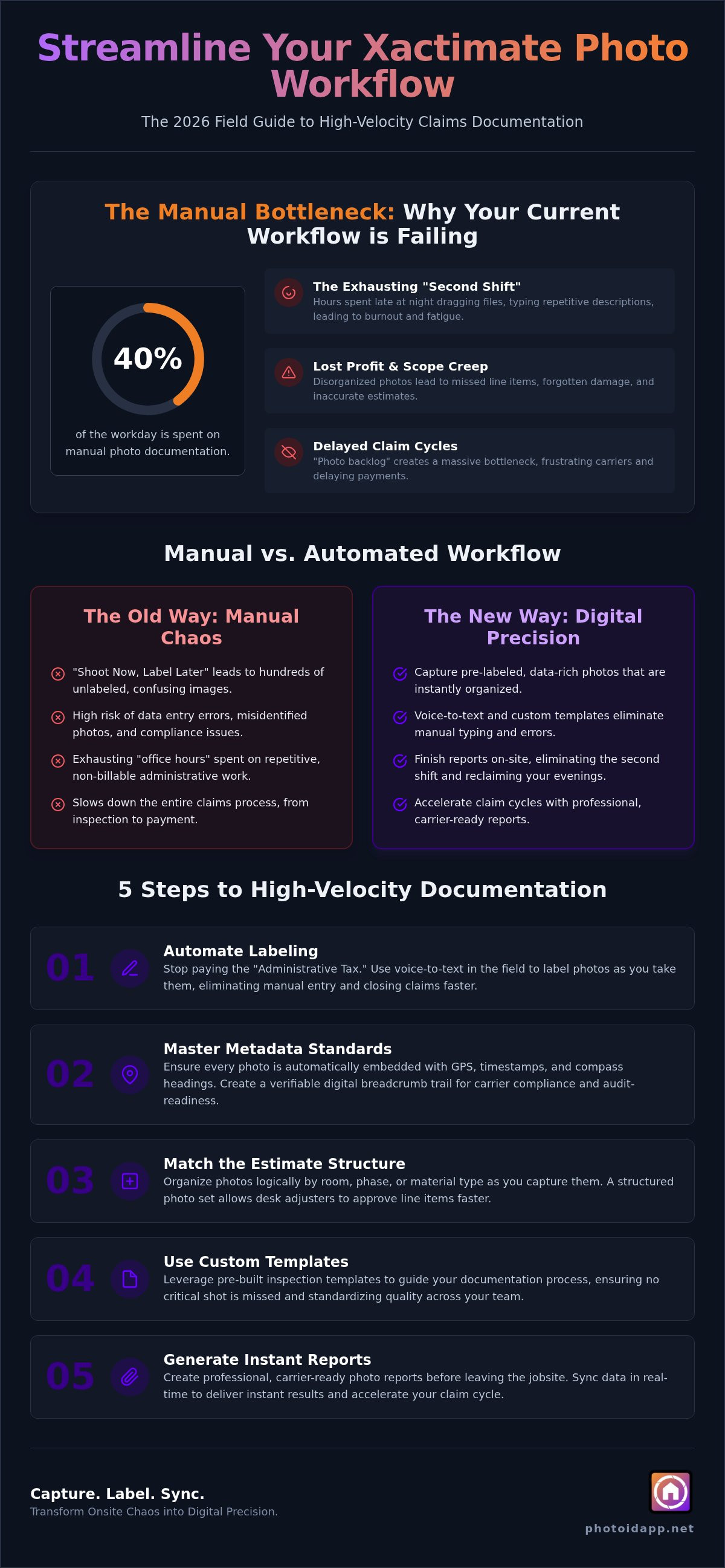
5 Steps to Streamline Your Xactimate Photo Workflow Today
Stop guessing and start winning. You need a repeatable system that works as hard as you do. To streamline Xactimate photo workflow, you must move from a reactive “snapshot” mindset to a proactive data-capture strategy. This five-step framework transforms your field time into high-velocity production. It ensures that every photo you take is pre-labeled, organized, and ready for immediate estimate inclusion. Follow these steps to kill the “second shift” forever!
- Step 1: Implement a standardized inspection template. Use a digital guide that forces a logical room-by-room flow. This prevents missed shots and ensures consistency across every claim.
- Step 2: Utilize voice-to-text for real-time field descriptions. Speak the damage while you see it. Describe the scope, the material, and the cause of loss without ever touching a keyboard.
- Step 3: Leverage automated photo labeling for bulk organization. Let the software categorize your gallery by room and phase. This eliminates the manual “drag and drop” nightmare.
- Step 4: Generate instant photo reports for immediate review. Verify your documentation before you leave the driveway. Catch errors while you are still onsite to avoid costly return trips.
- Step 5: Batch-import pre-labeled photos into Xactimate. Drag your organized folders directly into the estimate. The labels and descriptions are already there, saving you hours of manual entry.
Mastering Voice-to-Text in the Field
Clear communication is your secret weapon. When dictating in noisy environments, keep your phone close and speak in short, punchy phrases. Use industry-specific keywords like “point of origin” or “resulting water damage” to trigger automated labels within your app. This level of precision ensures your report is professional and carrier-ready. Voice-to-text eliminates the need for evening data entry, allowing you to finish your work before you even get home!
Bridging the Gap to Xactimate
The final hand-off to your estimating software is where the time savings really add up. Instead of uploading raw, messy image files, export organized PDFs or pre-labeled folders. Map your photo folders to match your Xactimate sketch levels for a seamless transition. If you are new to the platform, check out our guide on what is Xactimate to master the setup. Organization at this stage prevents supplements and speeds up the entire approval process.
Ready to reclaim your time? Start using the PHOTO iD app today and experience the power of a fully automated workflow. Don’t let manual labeling slow you down. Capture. Label. Done!
Leveraging PHOTO iD for High-Velocity Xactimate Reporting
The PHOTO iD mobile app is the high-performance engine your business needs to streamline Xactimate photo workflow. It is the ultimate bridge between the physical jobsite and the digital estimate. By automating the most tedious parts of documentation, you transform your smartphone into a professional reporting tool. Custom inspection templates ensure that every claim is “Xactimate-ready” from the moment you step through the front door. This isn’t just a minor improvement; it’s a fundamental shift that allows you to reduce claim cycle times by 40% through automated documentation.
These custom templates do more than just organize; they act as a digital checklist. They guide your team through the inspection, ensuring that no detail is overlooked. This consistency is what makes your files “Xactimate-ready” every time. When every photo is already labeled and categorized, the import process becomes a simple batch action. You save time onsite and in the office. It is a win-win for your team and your bottom line!
Real-Time Collaboration and Oversight
Real-time collaboration is the secret to scaling your operations. The team management dashboard allows you to sync field photos instantly for immediate office review. During high-volume catastrophe events, this oversight is critical. You can manage large teams, track progress, and provide virtual inspection options for rapid assessment. The dashboard acts as your central command center. Whether you are managing five adjusters or fifty, you have a bird’s-eye view of every active claim. You can spot documentation gaps before they become problems. This eliminates the “wait and see” period, moving your files from the field to the desk adjuster in seconds. Sync. Review. Approve!
The Results: Faster Approvals and Higher ROI
Efficiency drives profitability. Organized, metadata-rich reports lead to significantly fewer carrier rejections and audits. When your documentation is professional and consistent, you build a reputation for reliability. This allows you to maximize your fee schedule earnings by increasing your daily inspection volume. You aren’t just working harder; you are working smarter to streamline Xactimate photo workflow. This proactive oversight ensures that every file meets carrier standards before it ever leaves your system. It’s about maintaining quality at scale without sacrificing speed. Stop the manual struggle and embrace the future of claims documentation. Capture, Label, and Done, Get Started with PHOTO iD today!
Reclaim Your Time and Scale Your Success
You don’t have to choose between high-volume inspections and accurate documentation. The “second shift” of manual photo labeling is officially over. By moving to an automated system, you eliminate the exhausting administrative tax and ensure every file remains carrier-compliant. It’s time to streamline Xactimate photo workflow and focus on what really matters: closing claims and growing your business. You’ve mastered the standards, you’ve seen the five steps, and now you have the partner to make it a reality.
Trusted by thousands of adjusters nationwide, PHOTO iD was founded by Ken Perry, the “Claims Coach,” to solve the real-world frustrations of field professionals. Our software provides seamless integration with Xactimate-ready formats, ensuring your reports are professional and audit-proof from the very first click. Stop struggling with disorganized galleries and start delivering high-velocity results. Streamline Your Workflow, Start Your Free PHOTO iD Trial Today! Take the leap, transform your process, and finish every job with confidence!
Frequently Asked Questions
How do I import photos from PHOTO iD into Xactimate?
Export your pre-labeled photo reports or folders from the PHOTO iD app and drag them directly into the Xactimate photo tab. Because PHOTO iD generates organized, metadata-rich files, you don’t need to manually label them once they are inside the estimate. You can export as a professional PDF report or a ZIP file of labeled images. This ensures your estimate stays organized and compliant with carrier requirements without any manual data entry.
Can I use voice-to-text labeling with Xactimate Mobile?
You should use PHOTO iD’s native voice-to-text labeling feature to capture descriptions in the field before importing your data into Xactimate. While Xactimate Mobile has basic annotation tools, they often require manual typing or complex navigation. PHOTO iD allows you to speak naturally while you inspect the property. This captures high-velocity documentation that syncs to your dashboard, making the final import to Xactimate seamless and much faster than native tools.
Does PHOTO iD support GPS and timestamp metadata for carrier compliance?
Yes, PHOTO iD automatically embeds GPS coordinates and timestamp metadata into every photo you capture. This is a critical requirement for carrier compliance and anti-fraud verification in 2026. By securing this digital evidence at the moment of the inspection, you provide verifiable proof of loss. This automation eliminates the risk of file rejections due to missing localized data, protecting your files during rigorous Xactanalysis audits and carrier reviews.
How much time can I save on my Xactimate photo workflow using automation?
Professional adjusters report reducing their documentation time by 50% when they streamline Xactimate photo workflow through automation. This typically saves 10 to 15 hours per week by eliminating the “second shift” of manual labeling at night. Instead of typing descriptions, you generate instant photo reports in the field. This efficiency allows you to increase your daily inspection volume and maximize your earning potential on every fee schedule you handle.
What is the best way to organize photos for a large property claim?
Organize your photos by room, phase, and material type using custom inspection templates. For large property claims, it is best to follow a logical flow consisting of overview shots, detail shots, and verification shots. PHOTO iD automates this by pre-sorting your gallery into folders that match your Xactimate sketch levels. This structured approach prevents missed line items and makes it easy for desk adjusters to approve your scope without requesting additional information.
Can I create custom inspection templates for specific carrier requirements?
Yes, you can build custom inspection templates tailored to the specific guidelines of any carrier or TPA. These templates act as a digital roadmap, ensuring your team captures every required photo for a particular claim type. This level of customization ensures consistency across your entire firm. Whether you are documenting a roof claim or a complex water loss, your reports will always be compliant and “Xactimate-ready” before you ever leave the jobsite.
Is automated photo labeling accurate for technical restoration terms?
PHOTO iD is designed specifically for the property claims industry, so it handles technical restoration jargon with high precision. The voice-to-text engine recognizes industry keywords like “point of origin” or “category 3 water loss.” This accuracy is vital to streamline Xactimate photo workflow effectively. It ensures your descriptions are professional and technically sound, which builds trust with carriers and significantly reduces the likelihood of supplements or disputes during the approval process.
How does the team management dashboard help with Xactimate projects?
The team management dashboard provides real-time oversight of all active field inspections from a centralized office location. It allows you to review photos and labels as they are captured, which is essential for large-scale catastrophe response. You can spot documentation gaps immediately and provide instant feedback to field adjusters. This collaborative bridge ensures that every file is perfect before it is imported into Xactimate for final estimating, keeping your claim cycle moving forward.