
Why are you still spending three hours at your kitchen table labeling photos after a six-hour inspection day? You know the grind. You’re 200 photos deep, your fingers are cramped, and the risk of mislabeling a critical defect rises with every minute of “homework” you do. Finding the right dictation software for home inspectors is no longer a luxury. It’s a vital survival strategy for the modern field professional who values both their time and their accuracy.
It’s time to stop typing and start talking. This 2026 guide shows you how to slash your reporting time by 40% using advanced voice-to-text photo labeling. You’ll learn how to finish reports 50% faster, automate your organization, and maintain surgical precision in your technical documentation. We’ll break down the latest mobile-first tools, the “Snap, Speak, Send” workflow, and the specific technology that restores order to your onsite documentation. Reclaim your evenings, eliminate manual errors, and scale your business. Let’s dive into the future of high-velocity reporting.
Key Takeaways
- Slash your reporting time by 40% and reclaim your evenings by replacing manual typing with high-velocity voice-to-text labeling.
- Master the “Snap, Speak, Send” workflow to organize hundreds of inspection photos instantly while you’re still in the field.
- Understand why specialized dictation software for home inspectors is superior to generic apps for capturing technical property details.
- Eliminate manual labeling errors and post-inspection “homework” using automated photo organization and custom templates.
- Learn the best practices for speaking to AI in noisy environments to ensure your technical documentation stays sharp and accurate.
What is Dictation Software for Home Inspectors?
Stop fighting your thumb on a cracked screen. Modern dictation software for home inspectors is no longer just a digital notepad; it’s a sophisticated AI engine that converts your spoken words into structured, professional data. In 2026, this technology has moved beyond simple speech recognition into context-aware systems that understand the difference between a “GFCI outlet” and a “PVC pipe.” It eliminates the friction of manual typing, especially when you’re squeezed into a crawlspace or balanced on a ladder.
The Evolution of Field Documentation
Documentation has undergone a massive transformation. We’ve moved from paper clipboards to digital keyboards, and finally to AI-driven voice recognition. The rise of specialized AI means the software now recognizes complex technical jargon that would baffle a standard consumer app. Standard smartphone dictation often fails in the field because it lacks the property-specific vocabulary required for a defensible report. It can’t handle the background noise of a running HVAC unit or the muffled acoustics of an attic. Modern professionals now demand tools that integrate voice commands directly with the camera interface. This ensures every photo is labeled the moment it’s captured, creating a seamless link between visual evidence and verbal description.
Why Voice-to-Text is Non-Negotiable in 2026
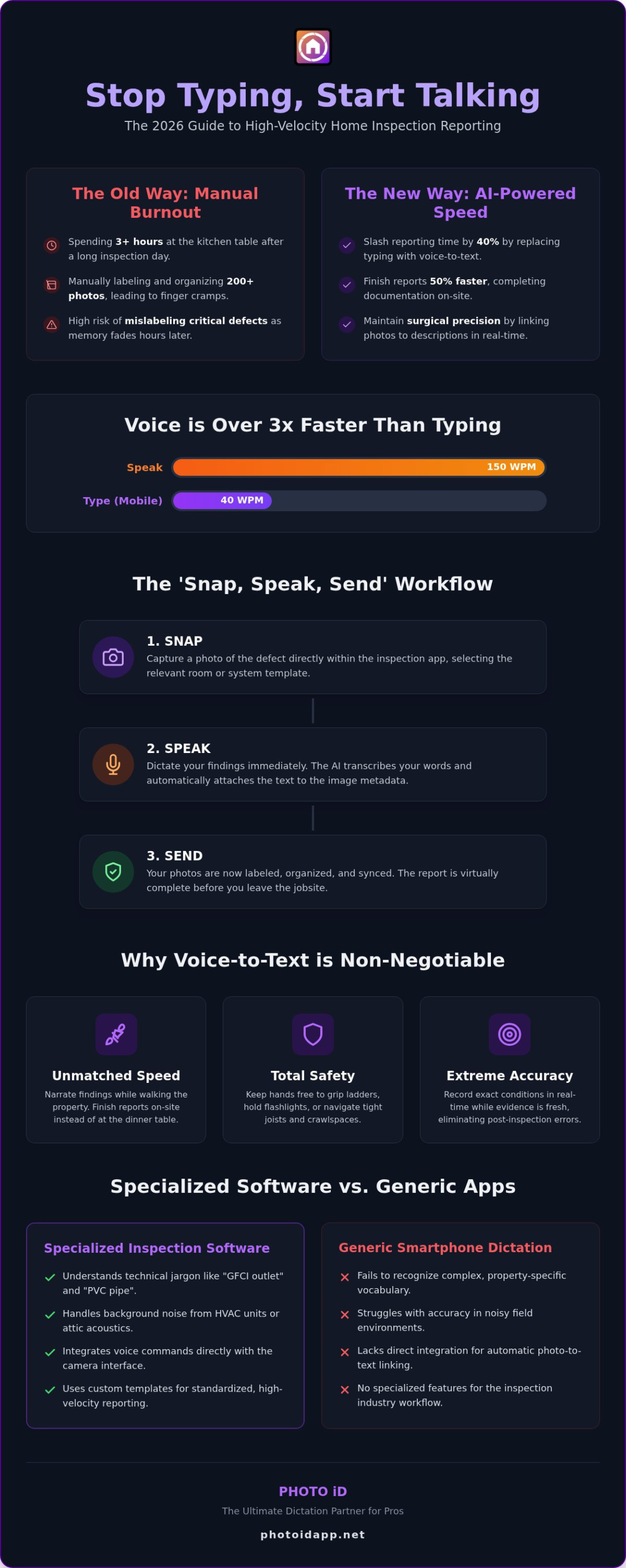
The competitive environment of 2026 requires speed, safety, and accuracy. You can speak roughly 150 words per minute. Compare that to the average mobile typing speed of 40 words per minute. This massive increase in documentation velocity means you finish reports onsite rather than at the dinner table. It turns a grueling post-inspection process into a streamlined onsite victory.
- Unmatched Speed: Narrate your findings while you walk through the property.
- Total Safety: Keep your hands free to grip ladders, hold flashlights, or navigate tight joists.
- Extreme Accuracy: Record the exact condition of a furnace or roof deck while the evidence is right in front of you.
Waiting until you get back to the truck to label 200 photos is a recipe for errors. Your memory fades, and details blur together. Using high-quality dictation software for home inspectors allows you to capture the nuance of a defect in real-time. It’s the difference between a generic note and a high-precision technical observation. Adopt the “Snap, Speak, Send” workflow to maintain your professional edge and keep your business moving forward. This is about more than just convenience. It’s about optimizing your most valuable resource: your time.
The ‘Snap, Speak, Send’ Workflow: How Voice-to-Text Labeling Works
Imagine finishing your last inspection of the day and actually being finished. No more late nights at the computer. No more scrolling through hundreds of unsorted images. The “Snap, Speak, Send” mantra isn’t just a catchy phrase; it’s a fundamental shift in how dictation software for home inspectors operates in 2026. This workflow moves the entire reporting process from the office to the jobsite, ensuring your documentation is complete before you even reach your truck.
The process is incredibly straightforward. Open your app and select the relevant room or system template. Snap the photo of the defect immediately. While the camera interface is still active, dictate the label or description. The AI doesn’t just transcribe your voice; it automatically attaches that text to the image metadata. This creates a permanent, searchable link between the visual evidence and your professional assessment. This level of technical precision mirrors the reliability standards discussed in FDA guidance on voice recognition, where data integrity and real-time entry are critical for accurate inspection records.
Automated Photo Labeling vs. Manual Entry
Manual entry carries a hidden cost that eats your profits. Sorting 200 photos every night takes roughly two hours of unpaid “homework.” PHOTO iD eliminates this burden by using voice to categorize images instantly. By labeling as you go, you reduce the human error that happens when details fade hours after the inspection. You won’t have to guess if that water heater leak was in the basement or the utility closet. The software does the heavy lifting, allowing you to focus on the house instead of the keyboard. You can experience this efficiency firsthand with automated photo labeling that organizes your findings in real-time.
Custom Templates for High-Velocity Reporting
Consistency is the hallmark of a professional firm. Custom templates allow you to pre-set common findings that trigger with a single voice command. This standardizes the language across your entire team, ensuring every report meets your high standards. You can even link specific voice labels to industry standards, such as IICRC guidelines for water damage or local building codes. This structured approach to dictation software for home inspectors ensures that your reports are not only fast but also legally defensible and easy for clients to read. It’s about working smarter, moving faster, and delivering a superior product every single time.
Standalone Dictation Apps vs. Integrated Inspection Software
Selecting the right dictation software for home inspectors is a strategic business decision, not just a tech upgrade. You have two main paths: standalone voice apps or integrated inspection platforms. Standalone apps like generic voice-to-text tools offer basic flexibility. They let you record anywhere, but they leave you with a mountain of unorganized text and a separate folder of unsorted photos. Integrated software like PHOTO iD solves this by creating a direct link between the voice, the photo, and the final report.
Evaluate your ROI by looking at the hours saved, not just the monthly subscription. If you slash your reporting cycle time by 40%, you aren’t just saving minutes; you’re gaining the capacity to take on more jobs or get home earlier. This is the difference between a tool that costs you money and one that generates profit. For pros using Xactimate or Verisk, compatibility is king. Integrated tools ensure your voice-labeled photos flow seamlessly into these industry-standard platforms without manual re-entry. It is about building a bridge between your field work and your final documentation.
When to Choose a Specialized Inspection App
Generic tools crumble under the pressure of a high-volume business. Choose a specialized inspection app if you regularly take more than 50 photos per job. At that scale, manual labeling is a profit killer. You also need a specialized solution if your clients expect instant photo report generation. Professionals managing a team require a central dashboard for oversight. This allows you to monitor progress and ensure every inspector follows the same protocol for brand consistency. Stop managing files and start managing your business.
The Pitfalls of Generic Voice Tools
Consumer-grade voice tools often fail the technical test. They lack specific industry vocabulary and frequently trip over terms like “efflorescence,” “flashing,” or “swale.” This forces you to spend more time correcting the AI than it saves you in typing. It’s a frustrating cycle that negates the benefits of dictation.
- Zero Organization: Generic tools cannot group photos by room or system automatically.
- Export Friction: Moving data from a basic notes app into a professional report format is a manual nightmare.
- Context Blindness: Standard AI does not know you are looking at a foundation crack; it just sees a text string.
Don’t settle for tools that only do half the job. A dedicated dictation partner understands your field, recognizes your technical jargon, and respects your time. Choose efficiency over generic convenience every time.
Best Practices for Dictating Inspection Reports in the Field
Don’t let a windy roof or a noisy HVAC unit ruin your data. High-quality dictation software for home inspectors requires more than just the right app; it requires field-tested habits to ensure your reports stay sharp. Start by investing in a professional noise-canceling headset. It filters out background chaos, ensuring the AI captures your specific observations instead of the construction crew next door. Speak in clear, punchy sentences. Short declarations help the software distinguish technical terms from casual filler, leading to higher transcription accuracy.
Review and edit your labels before you leave the property. This ensures 100% accuracy while the defect is still right in front of your eyes. Leverage Voice-to-Text Labeling to describe defects the moment you spot them. This real-time capture eliminates the confusion that happens during late-night report editing. By verifying your data onsite, you protect your professional reputation and eliminate the need for follow-up visits. It’s about getting it right the first time, every time.
Mastering the Field Survival Guide
Empty rooms create echoes that can confuse standard microphones. Position your mic close to your mouth and speak at a steady, confident volume. If you make a mistake, use the “Actually” rule. Simply say the word “Actually,” followed by the correction. Modern AI recognizes this as a correction pivot and updates the text without you needing to stop or tap the screen. Maintain a consistent professional tone throughout your walk. Your dictated notes often go straight into the final report, so speak with the client’s perspective in mind.
Organizing Your Workflow for Speed
Choose a strategy that fits your rhythm. A “Room-by-Room” approach is excellent for thoroughness in residential settings, while “System-by-System” helps you stay focused on specific components like plumbing or electrical. Use custom inspection templates to prompt your voice notes. These templates act as a digital checklist, ensuring you don’t miss a single vent or outlet. You can learn more about building custom inspection templates for faster reporting to further accelerate your daily output.
Ready to transform your field efficiency and reclaim your evenings? Get started with a PHOTO iD Mobile App Subscription today and experience high-velocity reporting first-hand!
Why PHOTO iD is the Ultimate Dictation Partner for Pros
Choosing the right dictation software for home inspectors means finding a tool that speaks your language. PHOTO iD is built specifically for the high-volume photo needs of modern property experts. Our AI doesn’t stumble over technical terms like “cripple stud” or “counter-flashing.” It’s optimized for property and construction terminology, ensuring your voice-to-text labels are accurate the first time. This level of specialization allows you to slash your reporting cycle time by 40%, transforming your business from a manual grind into a high-velocity machine.
Scale your operation without the chaos. If you manage a team, our centralized management dashboard provides total oversight of every field asset. You can monitor progress, verify quality, and ensure brand consistency across every report. Instant report generation means your work is truly done the moment you leave the site. No more late nights. No more manual sorting. Just professional, polished results delivered with the speed your clients demand.
Seamless Integration with Your Current Tools
Efficiency shouldn’t come with a steep learning curve. Our photo organization software works seamlessly with industry-standard platforms like Xactimate. This ensures your field data flows directly into your estimates without friction or re-entry. You’ll export reports that look professional, stay organized, and remain easy for clients to read. Maintaining high documentation standards does more than just save time; it protects your business from liability. By capturing clear, timestamped, and voice-labeled evidence, you create a defensible record of every condition you encounter.
Get Started with High-Velocity Documentation
Ready to reclaim your evenings? Stop the post-inspection homework and start living the “Snap, Speak, Send” lifestyle. Downloading the PHOTO iD app is the first step toward a more profitable and less stressful career. You can set up your first custom template in under five minutes. Once your templates are live, your voice notes will trigger specific findings instantly. Experience the relief of a “no-homework” inspection day. Download the app today, start your free trial, and see why thousands of pros trust PHOTO iD as their primary dictation software for home inspectors.
Take Command of Your Inspection Workflow
The era of spending your nights tethered to a keyboard is over. By adopting the “Snap, Speak, Send” workflow, you transform onsite documentation from a chore into a massive competitive advantage. You’ve seen how specialized technology captures technical details with surgical precision, ensuring your reports are both faster and more accurate. The right dictation software for home inspectors doesn’t just save time; it restores order to the chaos of a busy jobsite.
Join thousands of field professionals nationwide who have already reclaimed their evenings. Founded by industry veteran Ken ‘The Claims Coach’ Perry, PHOTO iD is engineered to reduce claim cycle times by up to 40%. It’s time to stop the manual sorting and start scaling your business with confidence. You’ve got the expertise. Now, it’s time to get the tools that work as hard as you do.
Scale your business with PHOTO iD and start your free trial today!
Frequently Asked Questions
Is dictation software accurate enough for technical home inspection terms?
Yes, modern AI is highly accurate. PHOTO iD is specifically optimized for property and construction terminology. It understands technical jargon like “cripple stud,” “GFCI,” and “efflorescence” without hesitation. This precision ensures your reports remain professional and technically sound. Stop worrying about typos and start trusting the tech. It is built to recognize exactly what you see and say on the jobsite.
Do I need an internet connection to use voice-to-text in the field?
No, professional inspection apps utilize local on-device processing for core dictation features. This allows you to stay productive in basements, attics, or remote areas without a signal. Your voice-to-text labels are captured instantly and stored locally on your device. Once you return to an area with connectivity, the app automatically syncs your data to the cloud. Work anywhere without limitations or downtime.
Can I use dictation software for home inspectors on both iPhone and Android?
Yes, you can use dictation software for home inspectors on both major platforms. PHOTO iD is available as a mobile app for both iPhone and Android users. If your device hardware needs maintenance to support these high-tech tools, iRepairMan London offers specialized repair services to keep your smartphone in peak condition. This ensures that your entire team stays synchronized regardless of their device preference. You get the same high-velocity reporting, automated labeling, and instant report generation on any modern smartphone. It’s about accessibility and power in the palm of your hand.
Voice-to-text labeling embeds data directly into the image metadata. Taking notes requires a second step where you manually match text to photos later. This creates a massive bottleneck in your workflow. By labeling as you go, you slash your reporting time by 40%. You finish the job onsite. You go home without a mountain of digital paperwork waiting for you. Snap, speak, and finish.
Will dictation software work in noisy environments like a construction site?
Yes, especially when you pair the app with a high-quality noise-canceling headset. Modern AI algorithms are designed to filter out background chaos like running HVAC units or nearby construction saws. These systems focus on your voice frequency to ensure clear transcription. You stay productive even in the most loud and chaotic environments. Maintain your professional edge without letting site noise slow your documentation down.
Can I integrate my dictated reports with Xactimate or other estimating tools?
Yes, integration is a core feature of professional platforms. PHOTO iD works seamlessly with industry-standard tools like Xactimate. This connectivity ensures that your voice-labeled photos and descriptions move directly into your estimating software. It eliminates manual re-entry and reduces the chance of costly errors. Build a faster, more reliable bridge between your field inspections and your final professional documentation. Streamline your entire claims and reporting process.
Is my data secure when using cloud-based dictation apps?
Yes, professional inspection platforms prioritize high-level encryption and secure cloud storage. Your findings, photos, and client data are protected against loss or unauthorized access. This creates a secure, defensible record for your business that you can access from any device. Cloud storage also acts as an automatic backup, ensuring you never lose a report due to a damaged phone. Protect your data and your reputation.
How much does professional dictation software for inspectors cost in 2026?
Professional dictation software for home inspectors typically operates on a recurring subscription model. This ensures you always have access to the latest AI updates, technical vocabulary improvements, and secure cloud storage features. While costs vary across the industry, the investment pays for itself by reclaiming hours of your time every single week. Focus on the ROI of finishing reports onsite. It is a small price for total documentation freedom.