
The biggest bottleneck in your business isn’t the physical walkthrough; it’s the hours lost at your desk every night piecing it back together. Real property inspection efficiency isn’t achieved by rushing through crawlspaces or skipping attic checks. It is won on the move. When you capture structured, pre-labeled data directly during the walkthrough, your documentation finishes before you ever put your truck in drive.
You know the daily grind: juggling separate cameras, paper notepads, and measuring tapes, only to spend hours sorting hundreds of mystery photos and fixing manual entry errors. You shouldn’t have to sacrifice your evenings just to generate clean, dependable reports. In this field guide, you’ll discover battle-tested strategies, automated mobile workflows, and modern tools designed to cut your total turnaround time in half without sacrificing reporting accuracy. Get ready to standardize your field capture, organize site photos instantly, and deliver complete inspection reports right from the property line.
Key Takeaways
- Uncover where field hours vanish into late-night desk work to unlock genuine property inspection efficiency.
- Master a structured exterior-to-interior routing loop that eliminates backtracking and standardizes data capture across your entire team.
- Leverage automated photo labeling and voice-to-text input to document critical defect details instantly without breaking your stride.
- Replace disconnected clipboards, cameras, and notepads with modern mobile platforms engineered for seamless offline field capture.
- Generate complete, high-quality inspection reports before leaving the property line so your workday ends when the walkthrough does.
The Anatomy of Property Inspection Bottlenecks: Where Hours Disappear
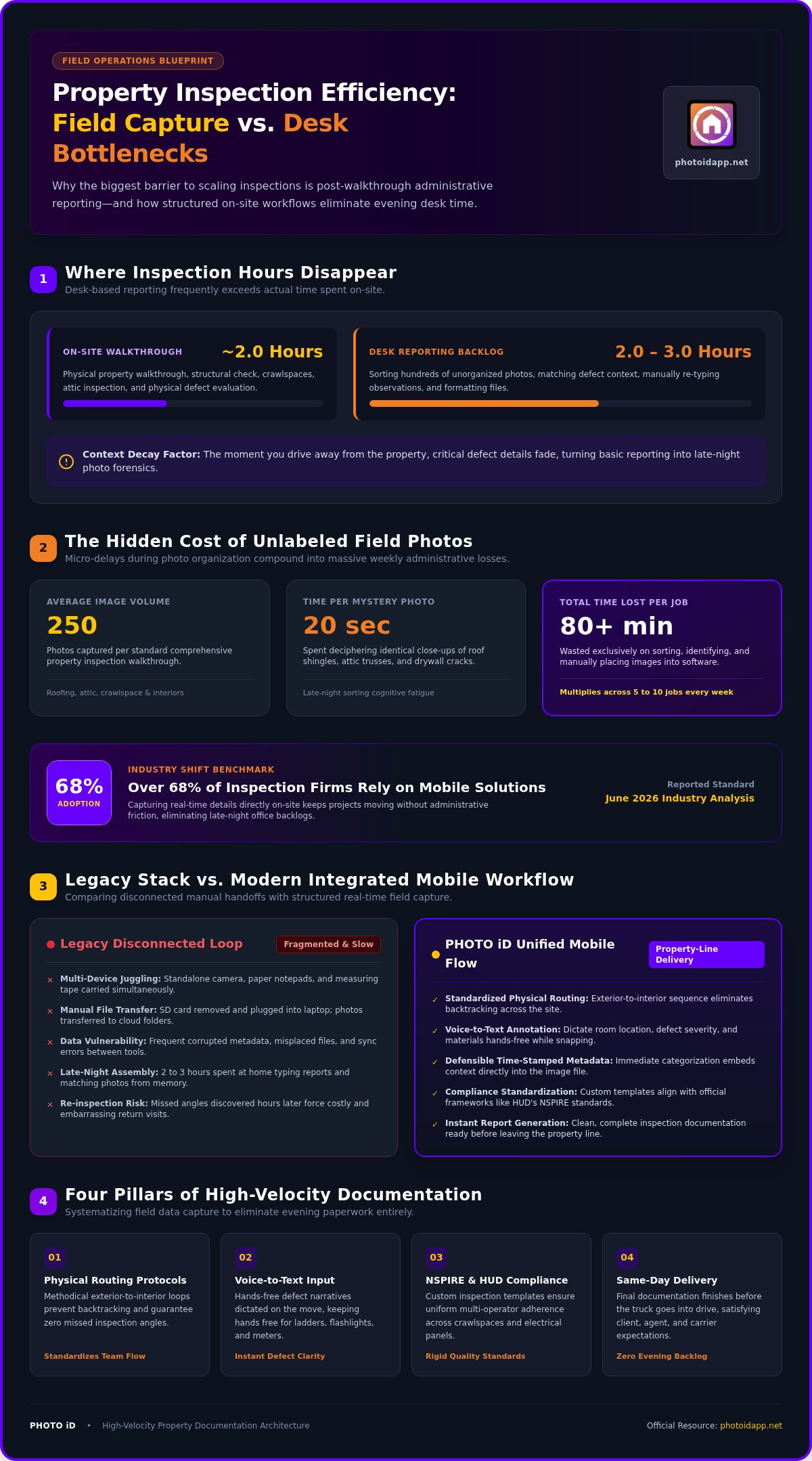
A standard residential walkthrough takes roughly two hours on-site. Yet, the real grind begins after packing up the truck. Desk-based administrative reporting regularly devours an additional two to three hours each evening. When desk time outpaces field time, your property inspection efficiency hits a hard ceiling. This evening backlog is the single greatest barrier to growing your business. You can’t book more daily jobs when every completed site visit triggers an avalanche of late-night paperwork.
Expectations have shifted. Clients, agents, and carriers now expect same-day report delivery, punishing slow manual routines. When you photograph hundreds of components during a standard home inspection, severe context decay sets in the moment you drive away. Without immediate organization, critical defect details fade, turning basic reporting into hours of frustrating photo forensics.
The True Cost of Unlabeled Field Photos
Sifting through an unsorted camera roll drains billable hours fast. Spending just 20 seconds deciphering and placing each photo across a 250-image inspection wastes over 80 minutes per job. Multiply that across five or ten inspections a week. Staring at identical close-ups of roof shingles, attic trusses, or drywall cracks late at night induces severe cognitive fatigue. Worst of all, realizing hours later that you missed an important angle forces costly, embarrassing site reinspections that erode client trust.
Disconnected Software Stacks vs. Integrated Workflows
Juggling fragmented tools creates massive operational drag. Consider the typical legacy loop: snap images on a standalone camera, transfer files via SD card to a laptop, upload folders to cloud drives, and manually format them inside desktop software. Every handoff invites corrupted metadata, misplaced files, and sync errors. Protecting your property inspection efficiency demands a unified mobile workflow. Capture the defect, label it instantly on-site, and feed structured data directly into your reporting ecosystem without touching a desktop computer.
Core Pillars of High-Velocity Property Documentation
Eliminating office paperwork begins with structured data capture right on the property. When you systematize how you gather field data, evening reporting tasks vanish. True property inspection efficiency relies on strict physical routing protocols, moving methodically through every structure without doubling back. According to a June 2026 report, over 68% of inspection firms now rely on mobile-enabled solutions precisely because capturing real-time details on-site keeps projects moving without administrative friction.
Hands-Free Context Capture in Real Time
Typing lengthy notes on a smudge-covered phone screen while balancing on a crawlspace sill kills your momentum. Voice-to-text annotation solves this immediately. Speaking your observations embeds rich defect narratives directly into the photo file at the exact moment you snap the shutter. You capture precise context instantly while keeping your hands free for ladders, flashlights, and moisture meters.
- Instant clarity: Dictate room locations, defect severity, and component types in seconds.
- Defensible data: Eliminate ambiguity with time-stamped, categorized images that prevent costly client disputes.
- Richer context: Document complex material flaws effortlessly without slowing your walking pace.
Standardizing Quality with Custom Inspection Templates
Whether you’re adhering to strict protocols like the official federal standards for property inspections under HUD’s NSPIRE framework or managing standard private client walkthroughs, consistency is essential. Custom inspection templates guide inspectors through rigid, room-by-room workflows. They ensure that crawlspaces, electrical panels, and exterior elevations receive identical scrutiny on every single job.
For multi-inspector operations, templates protect your reputation by standardizing documentation standards across your entire team. Every team member captures photos in the exact same sequence with uniform labeling. Exploring a dedicated home inspection app guide helps clarify how standardized inputs simplify multi-operator workflows. When your field team captures structured data automatically, you supercharge your property inspection efficiency and deliver flawless reports every time. To see how these automated workflows fit your business, take a look at how PHOTO iD unifies on-site capture and reporting.
Step-by-Step Blueprint for Maximizing Onsite Inspection Efficiency
Doubling your speed requires an ironclad operational routine. When every movement follows a repeatable, disciplined system, hesitation disappears. Real property inspection efficiency comes from treating every site visit as an integrated process where data capture happens in lockstep with physical discovery. Follow this five-step blueprint to streamline your jobs:
- 1. Digital pre-intake: Sync property specs, square footage, parcel data, and client details into your mobile template before turning the ignition key.
- 2. Continuous loop routing: Follow a single, uninterrupted route from the perimeter inward to eliminate wasted footsteps.
- 3. Pre-categorized photo capture: Tag images instantly into room folders using automated labeling and hands-free voice notes.
- 4. Real-time driveway QA: Audit required photographic proof on your mobile dashboard before pulling away from the curb.
- 5. Instant report generation: Compile, format, and dispatch the completed inspection report straight from the jobsite.
Optimizing the Physical Walkthrough Route
Backtracking drains your energy and burns daylight. Start your physical evaluation at the street, examine the grounds, and complete an unbroken clockwise loop around the exterior envelope. Capture elevations, foundation walls, and drainage grading in a single pass. For roof evaluations, pairing mobile capture with aerial measurement tools detailed in our roof software guide saves massive ladder time. Once inside, move systematically level by level. Check all mechanical, electrical, and plumbing fixtures in sequence. This methodical flow keeps you aligned with strict federal regulations on property inspections without wandering back and forth across rooms.
Driveway Delivery: Finalizing Reports Before Leaving
Ditch the habit of saving paperwork for the desk. While parked in the driveway, review your app’s automated checklist to confirm that every mandatory component has clear, labeled visual proof. Next, tap once to generate a clean, comprehensive PDF. Delivering the finished product to your client before leaving the curb cements your professional authority, transforms your overall property inspection efficiency, and guarantees your evening stays completely your own.
Evaluating Property Inspection Tech Stacks: Legacy Tools vs. Modern Mobile Platforms
Carrying bulky gear bags packed with standalone digital cameras, paper clipboards, and extra batteries belongs to a bygone era. Every separate device introduces another potential point of failure on the jobsite. Maximizing your property inspection efficiency requires consolidating your tools into a single, high-performing mobile workflow. When evaluating modern platforms, focus on three non-negotiable criteria: dependable offline functionality in basements and remote zones, rapid background cloud synchronization, and an intuitive interface designed for fast, one-handed field operation. For commercial real estate professionals seeking specialized software to oversee properties beyond field inspections, you can discover Petram.app (Rezone) to support broader portfolio operations.
Legacy Hardware vs. All-in-One Smartphone Capability
Juggling multiple pieces of hardware eats up valuable time and exposes you to avoidable risks. Dead camera batteries and corrupted SD cards stall inspections without warning. Modern smartphones eliminate this friction entirely. High-resolution camera sensors, automated GPS tagging, and precise timestamps turn your mobile device into a dedicated inspection camera. Cloud-backed storage ensures that every captured photo remains secure, eliminating the risk of lost data from misplaced memory cards.
Integration with Claims and Construction Estimating
Field documentation never exists in isolation. Restoration contractors, property managers, and insurance adjusters depend on structured, pre-labeled images to scope repairs quickly and accurately. When photo libraries arrive disorganized, closing cycles stall and repair approvals drag on for weeks. Learning how to connect structured photo data directly to scoping workflows, as explored in our Xactimate guide, accelerates claim reviews significantly.
Tying mobile field data into broader project management pipelines, detailed throughout our construction management software guide, keeps field crews and desk estimators in continuous sync. Centralized team management dashboards give project managers immediate visibility across concurrent job sites, driving enterprise-level property inspection efficiency. Ready to replace obsolete hardware with a purpose-built mobile ecosystem? Equip your team with PHOTO iD today and transform your daily field operations!
Scaling Inspection Volume and Business Profitability with PHOTO iD
Growing a field services company usually means hitting an administrative wall. You take on more jobs, only to drown in late-night documentation. PHOTO iD breaks that ceiling. Engineered by industry veterans, this mobile platform integrates automated photo labeling, instant report generation, and aerial roof and wall measurements into a single handheld workflow. You expand your service capabilities safely from the ground while capturing defect data at double the speed. Transitioning your field crew takes days, not weeks, setting a new standard for property inspection efficiency across your business.
Eliminate the Evening Paperwork Shift
Reclaim your personal life without turning down profitable jobs. Automated photo labeling and voice-to-text input transform raw jobsite images into fully categorized inspection albums before you pack your tools. This immediate organization allows you to scale from two inspections a day to four without logging a single minute of overtime at home.
- Double your daily capacity: Cut total reporting turnaround time by over 50%, letting you book additional jobs each week.
- Boost client retention: Deliver polished, comprehensive PDF reports straight to clients and agents before leaving the site.
- Protect gross margins: Eliminate administrative overtime hours and keep your team focused on revenue-generating field evaluations.
Empowering Multi-Inspector Teams and Field Visibility
Scaling a multi-inspector operation requires tight quality control. The centralized team management dashboard provides instant visibility into active site visits across your service territory. Project managers can review field progress in real time, catching missing photos or incomplete sections immediately. Custom inspection templates enforce standard operating procedures across every crew member, ensuring that newly hired inspectors capture data with the precision of seasoned veterans. Stop sacrificing your evenings to disconnected, manual workflows. Snap, speak, and send your way to higher profitability and peak property inspection efficiency. Ready to reclaim your time? Discover PHOTO iD mobile inspection software today!
Reclaim Your Evenings and Elevate Field Productivity
True property inspection efficiency means walking off the jobsite with your reporting already finished. By replacing disjointed cameras, paper notes, and manual desktop upload routines with an integrated mobile workflow, you protect your schedule while delivering superior documentation. You don’t have to choose between thorough field evaluations and free evenings.
Founded by industry veteran Ken Perry, “The Claims Coach,” PHOTO iD was engineered specifically to solve the relentless chaos of site documentation. With patented automated photo labeling, rapid voice-to-text transcription, aerial roof measurements, and real-time team dashboards, you hold the ultimate field reporting engine right in your hand. Step into a faster, cleaner, and far more profitable operation today. Streamline your inspection workflow with PHOTO iD and finish your reporting before you leave the driveway!
Frequently Asked Questions
How much time can automated photo labeling save during a property inspection?
Automated photo labeling cuts post-inspection report compilation time by 50% to 70%, saving between one and two hours per assignment. Instead of manually sorting, renaming, and placing hundreds of site photos at your desk, the software indexes each image in real time during your walkthrough. This massive boost to property inspection efficiency lets you deliver reports from the field and double your daily inspection capacity without working overtime.
Can mobile property inspection software function without an active internet connection?
Yes, modern mobile inspection platforms are built with offline-first capabilities. You can capture photos, dictate voice notes, and fill out room templates in basements, rural sites, or thick concrete structures without cell service. All photo metadata and notes store locally on your smartphone. Once your device reconnects to Wi-Fi or cellular data, the app automatically syncs your files securely to the cloud dashboard.
Will switching to a mobile inspection app compromise the detail of my reports?
No, mobile capture actually improves detail and report clarity compared to traditional methods. Capturing notes directly in front of the defect eliminates memory lapses and context decay that happen hours later at an office desk. With voice-to-text input, you record nuanced technical observations instantly. Built-in custom inspection templates also enforce strict quality standards, ensuring you never skip mandatory elevation shots, crawlspaces, or utility panels.
How does voice-to-text labeling handle noisy field environments or mechanical rooms?
Advanced mobile voice engines isolate close-range vocal frequencies even around running HVAC compressors or heavy equipment. Pairing your smartphone with a standard noise-canceling Bluetooth headset or lapel mic ensures crisp audio transcription in noisy conditions. You can quickly speak defect codes, component measurements, and locations without shouting. If background hum is unusually loud, you can still select pre-configured defect tags with a single tap on your mobile screen.
What hardware do inspectors need to run modern inspection documentation apps?
You only need a standard iOS or Android smartphone or tablet equipped with a quality camera. Modern mobile processors handle photo tagging, GPS logging, and cloud synchronization natively. You don’t need heavy gear bags, separate digital cameras, or SD card readers. Adding a protective drop-proof case, a compact neck strap or belt clip, and a portable power bank ensures your device powers through a full day of field visits.
How do automated inspection reports integrate with insurance estimating workflows?
Mobile platforms export structured photo packages organized by room and defect category, making scoping seamless for estimating teams. Instead of handing off hundreds of loose image files, the software generates neatly categorized PDF summaries and structured data folders. Adjusters and estimators can drop these organized photos directly into estimating platforms like Xactimate. This clean alignment eliminates back-and-forth revisions, speeding up claim cycles and maximizing overall property inspection efficiency.
Can custom inspection templates be standardized across a multi-inspector company?
Yes, centralized team management dashboards allow administrators to deploy uniform templates across every field device instantly. Firm owners can build standardized walkthrough sequences, mandatory photo checklists, and custom branding rules from a desktop portal. When field inspectors log into the mobile app, their templates update automatically. This ensures identical reporting formats, thorough defect capture, and consistent brand quality across every job, regardless of which inspector handles the site visit.