
You didn’t become a field adjuster to spend your nights hunched over a laptop, manually typing labels for hundreds of inspection photos. It’s a grueling reality for many: the sun goes down, but the documentation grind is just heating up. Spending two or three hours every single night on manual data entry isn’t just exhausting; it’s a massive drain on your earning potential. We understand that inconsistent labeling and weak photo evidence are the primary drivers of claim delays and frustrating denials. You need a solution that works as hard as you do in the field.
Discover how a professional xactimate photo documentation app can eliminate manual labeling and sync your field photos perfectly with your estimates for faster approvals. This is about more than just taking pictures. It’s about capturing, labeling, and organizing data in real time. We will show you how to leverage voice-to-text automation and custom templates to finish reports onsite, improve your estimate accuracy, and drastically reduce your claim cycle times. Get ready to transform your workflow from a chaotic bottleneck into a high-speed engine of efficiency. Stop the grind, start the sync, and reclaim your time today.
Key Takeaways
- Eliminate the nightly documentation grind by using an xactimate photo documentation app to sync labeled evidence directly with your estimates.
- Capture, label, and organize onsite using voice-to-text technology to finish your reports before you leave the driveway.
- Master the “Macro to Micro” sequence to provide the undeniable evidence carriers demand for immediate claim approval.
- Deploy standardized templates and automated workflows to transform chaotic field notes into professional, structured reports instantly.
- Slash claim cycle times and boost your daily inspection capacity by replacing manual data entry with high-velocity digital tools.
The Crisis of Manual Photo Documentation in Xactimate
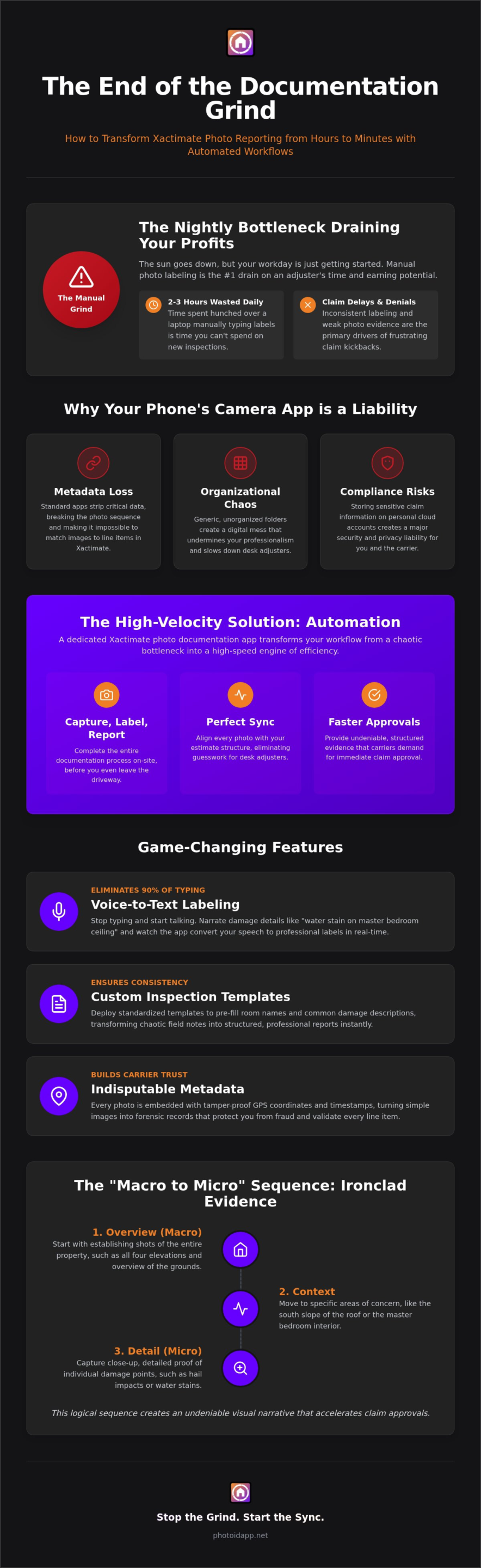
Xactimate photo documentation is the essential bridge between your field observations and financial reimbursement. It is the digital proof that turns a damaged roof into a paid claim. For independent adjusters and restoration pros, manual labeling is now the primary bottleneck in the workflow. It’s a manual grind that drains your energy and kills your hourly rate. You aren’t just taking photos; you’re building a legal and financial record. If that record is disorganized, the entire claim stalls.
This inefficiency creates the report backlog phenomenon. It’s that stack of unfinished files sitting on your desk every Friday night. Documentation delays stall the entire claim cycle, frustrating carriers and homeowners alike. When you’re forced to sort through hundreds of generic files, photo fatigue becomes inevitable. You start missing small details. You overlook secondary damages. Those missed details represent lost revenue that you can never get back. A dedicated xactimate photo documentation app is no longer a luxury; it’s a survival tool for the modern adjuster.
Why Generic Photo Apps Fail the Xactimate Test
Standard smartphone galleries are designed for family photos, not for Construction estimating software. They fail because they lack structured metadata retention. When you upload photos from a personal gallery, the sequence often breaks, creating total chaos when you try to match images to specific line items. You waste hours hunting for that one specific shot of the flashing or the baseboard. It’s a disorganized mess that makes you look like an amateur.
- Metadata Loss: Standard apps don’t preserve the orientation and context needed for professional reports.
- Organizational Chaos: Unorganized folders make it impossible to maintain a clear narrative of the loss.
- Compliance Risks: Storing sensitive carrier data on personal cloud accounts is a major security liability.
The High Cost of Inefficient Documentation
Time is your most valuable asset. Every hour you spend typing labels in your home office is an hour you aren’t conducting a new inspection. It’s a simple math problem: more time spent on old files means less time for new business. Poor photo quality and vague labeling also trigger carrier revisions. These kickbacks force you to redo work you’ve already finished, effectively cutting your pay in half for that file. You can’t afford to work for free.
Professionals in 2026 are moving toward High-Velocity Documentation. This approach focuses on speed, accuracy, and seamlessness. By using a specialized xactimate photo documentation app, you can label as you go and sync instantly. This eliminates the office work entirely. Inspect, label, and report. That is the rhythm of a modern, profitable claims professional. Don’t let manual entry hold your business back. Stop the chaos and start the flow today.
How Automated Documentation Integrates with Xactimate Workflows
Integration is the heart of a high-velocity workflow. It isn’t just about storing images; it’s about aligning every captured detail with your financial output. A dedicated xactimate photo documentation app ensures your visual evidence mirrors your estimate structure room by room. This alignment eliminates the guesswork for desk adjusters and speeds up the entire approval process. Capture the data once and use it everywhere.
Every photo you take carries critical weight. GPS coordinates and tamper-proof timestamps validate claim authenticity instantly. Carriers trust data they can verify without a phone call. This metadata turns a simple image into a forensic record. It protects you from fraud and ensures every line item in your estimate is backed by hard, indisputable evidence. Trust the data. Verify the loss. Get paid faster.
Voice-to-Text: The Adjuster’s Secret Weapon
Stop typing and start talking. Voice-to-text technology allows you to narrate the damage while you walk the loss. High-impact algorithms convert your speech into professional labels in milliseconds. You can document a “water stain on master bedroom ceiling” or “hail impact to soft metal” without ever touching a keyboard. It’s fast, accurate, and incredibly efficient.
Custom inspection templates take this speed to the next level. These templates pre-fill room names and standard damage descriptions based on the property type. Voice-to-text eliminates 90% of manual typing during an inspection. This hands-free approach keeps your eyes on the property and your hands on your ladder. You stay safe while the app handles the heavy lifting of data entry.
Syncing Field Data with Estimating Software
The transition from field to office should be seamless. Automated organization mirrors the logical structure of a professional Xactimate estimate. Photos are automatically sorted into folders by room or category as you take them. This organization allows for lightning-fast line-item entry back at your desk because your photos are already in the correct order.
Consistency is king for large teams. When every field professional uses the same naming conventions, the desk adjuster doesn’t have to play detective. You reduce the friction between field capture and final approval. The app compiles your labeled photos into a structured PDF that imports directly into the Xactimate image tab. This creates a professional report that stands up to carrier scrutiny every time. Experience the power of automated photo labeling to see how much time you can save on your next file.
Essential Features of a Professional Xactimate Photo App
Generic gallery apps are built for vacations, not for high-stakes insurance claims. A professional xactimate photo documentation app provides business-critical tools that transform your field data into a structured financial record. Automated labeling is the cornerstone of this shift. Instead of a folder full of files like “IMG_4021,” your reports feature clear, descriptive labels like “Living Room – Water Damage to Baseboard.” This immediate clarity justifies your estimate line items and eliminates the need for desk adjusters to guess what they are looking at.
Visual proof is the most powerful tool in your arsenal. Use in-app annotation to draw arrows, circles, or text boxes directly on the image while you are standing in front of the damage. This highlighting makes it impossible for carriers to overlook the evidence, which is essential for justifying supplements. Back at the office, the team management dashboard provides real-time oversight of every field project. You can track progress, review photos, and ensure quality control without ever leaving your desk. It is about maintaining total command over the chaos of onsite documentation.
Custom Templates for Standardized Reporting
Forgotten photos are profit killers. One missed shot of a roof pitch or a water heater serial number requires a costly, time-consuming return trip to the site. Custom templates eliminate this risk by creating a “forced-workflow” capture sequence. Every inspection follows a standardized, carrier-approved path that ensures no detail is overlooked. You can tailor these templates for specific claim types, such as fire, wind, or moisture mapping water damage. This structured approach makes training new adjusters fast and foolproof, ensuring consistent results across your entire team.
Metadata and Compliance Readiness
Carriers in 2026 demand indisputable proof to prevent fraudulent submissions. Every photo captured within a professional xactimate photo documentation app includes embedded EXIF data. This metadata contains precise GPS coordinates and tamper-proof timestamps that validate exactly when and where the damage was recorded. Carriers prefer PDF reports with this embedded data because it builds immediate trust in the claim’s authenticity. By using these tools, you ensure your documentation meets IICRC certification standards and stands up to the most rigorous audits. It’s a professional standard that protects your reputation and your revenue.
Field Documentation Best Practices for Faster Approvals
Speed without structure is just chaos. To get claims approved on the first submission, your photo set must tell an undeniable story. Professional adjusters use the “Macro to Micro” sequence to build this narrative. Start with an overview shot to establish the scene. Follow with a medium shot to show the scope of the damage. Finish with a close-up that captures the specific detail. This three-part rhythm provides the context carriers demand. It eliminates the “where am I looking?” questions that stall your payments.
Consistency is your best friend in the field. Use labels that match Xactimate’s internal room and category naming conventions exactly. If your estimate says “Master Bedroom,” your xactimate photo documentation app should say “Master Bedroom.” This alignment makes the desk adjuster’s job effortless. Don’t forget to document pre-existing conditions. Capturing old wear and tear limits your liability and keeps the focus on the current loss. For structural claims, leverage aerial roof and wall measurements to provide the high-level context that ground photos often miss.
Sequencing Your Inspection for the Estimate
Start with the address and four-corner exterior shots. This identifies the risk and establishes the property’s perimeter immediately. Once inside, move room-by-room in a clockwise direction. This maintains a logical spatial flow that mirrors how you’ll write the estimate later. Label specialty items like HVAC units or high-end custom finishes the moment you see them. Capturing these details onsite prevents the confusion that leads to forgotten line items and lost revenue.
Annotation and Justification
Don’t let subtle damages get overlooked. Use in-app arrows and text boxes to point out faint hail hits or small moisture stains. This visual annotation justifies your findings and makes the evidence jump off the page. It is especially critical during the mitigation or demolition phase when “hidden” damages are uncovered. Clear photo evidence is the only way to support supplements and change orders effectively. If the carrier can’t see the problem, they won’t pay for the solution. Protect your profit margins and start your PHOTO iD subscription today to master high-velocity documentation.
Scale Your Inspections with PHOTO iD’s High-Velocity Workflow
Scaling your business requires more than just working harder; it requires working smarter. PHOTO iD is the definitive home inspection app designed to handle the high-velocity demands of 2026. This platform transforms your mobile device into a powerful documentation engine. You can inspect, label, and report before you even leave the driveway. This immediate turnaround isn’t just a convenience; it’s a game-changer for your professional reputation. Delivering structured, carrier-ready reports within minutes of finishing an inspection gives you a massive professional edge. Experience the profound relief of a zero-backlog workflow. No more late nights. No more weekend catch-up sessions. Just pure, efficient production.
The claims industry moves fast, and your technology must keep pace. Using a specialized xactimate photo documentation app allows you to take on more files without increasing your stress levels. You provide better data, faster results, and higher accuracy for every stakeholder involved. This is how you grow a sustainable, profitable inspection business in the modern era. Stop chasing your tail and start leading the pack.
Built by Adjusters, for Adjusters
We know the field because we’ve lived in the field. The expertise of “The Claims Coach” Ken Perry was central to developing this platform. PHOTO iD is built to withstand the grit, the rain, and the chaos of actual job sites. It addresses the specific frustrations of property inspections that generic apps ignore. We focus on the practical realities of your workday. Our commitment to continuous innovation ensures that you always have the most advanced tools at your fingertips. We don’t just build software; we build solutions for real-world problems.
Getting Started with PHOTO iD
Don’t let complex technology slow you down. Our onboarding process is simple, direct, and incredibly fast. You can move from your initial download to your first completed report in under 10 minutes. For larger firms, the team management dashboard provides instant visibility into every active project. You can manage teams, review data, and ensure compliance from one central location. It’s time to take control of your schedule. Reclaim your nights and weekends starting today. Download the xactimate photo documentation app and witness the power of true automation. Your future self will thank you.
Master Your Field Workflow and Reclaim Your Time
The era of manual photo labeling is over. You’ve seen how a professional xactimate photo documentation app can transform your daily grind into a streamlined engine of efficiency. By mastering the “Macro to Micro” sequence and leveraging voice-to-text automation, you can finish your reports onsite and reclaim your personal time. This isn’t just about software; it’s about restoring order to the chaos of field work. It’s about working smarter, faster, and better every single day.
Our platform is built by industry veterans who understand the grit of the jobsite. Used by thousands of adjusters nationwide, PHOTO iD is proven to save up to 50% of reporting time through automated labeling and instant report generation. Stop the nightly data entry. Start closing files faster and scaling your business with confidence. You deserve a workflow that supports your growth instead of holding you back.
Start Your High-Velocity Documentation Journey with PHOTO iD Today!
You have the tools and the strategy. Now, take the final step toward a zero-backlog future. We are your partner in productivity, and we’re ready to help you thrive! Inspect, label, sync; it’s that simple!
Frequently Asked Questions
Is PHOTO iD directly integrated with Xactimate?
PHOTO iD is designed to sync perfectly with your estimation workflow by mirroring the room and category structure used in your estimates. As a specialized xactimate photo documentation app, it allows you to export organized, labeled photo reports that import directly into the image tab. This eliminates the need for manual dragging, dropping, and typing within the estimating platform itself. It’s the bridge that connects field reality to financial data.
How does voice-to-text labeling work in loud environments?
Our voice-to-text labeling technology uses advanced algorithms to ensure high accuracy even on busy, chaotic jobsites. You can narrate damages while standing near running equipment or in high-wind conditions on a roof without losing clarity. This feature is your primary tool for reducing office time because it captures the narrative in real time. Speak the damage, let the app transcribe the label, and keep your eyes on the loss.
Can I create custom templates for different types of inspections?
Yes, you can build and deploy custom inspection templates tailored to any claim type or carrier requirement. Whether you’re handling a standard wind loss or complex fire damage, these templates ensure your team follows a standardized sequence every time. This consistency prevents missed photos and reduces the need for costly return trips. Standardize your workflow, train new adjusters faster, and deliver professional results across every project you handle.
Does the app work offline in areas with poor cellular service?
PHOTO iD is built for the rugged realities of the field and works seamlessly in areas with poor or no cellular service. You can capture photos, use voice-to-text, and organize your files while completely offline. Once you return to an area with a stable connection, the app syncs your data to the cloud automatically. This ensures that your documentation process never stops just because the signal does. Inspect, label, and sync!
What file formats are supported for exporting reports?
The app generates professional, high-resolution PDF reports that are ready for immediate submission to carriers. These reports include all your labels, annotations, and metadata in a structured format that mirrors a professional estimate. You can also export organized photo sets as ZIP files to maintain flexibility in your reporting. This variety ensures your documentation meets the specific compliance needs of every client and platform without extra steps.
How does the team management dashboard help firm owners?
The team management dashboard gives firm owners real-time oversight of every active project across their entire roster. You can monitor inspection progress, review photo quality, and manage user permissions from a central office. This visibility allows you to catch errors before they become denials and ensures a consistent standard of work. It’s the ultimate tool for scaling your operations without losing quality control or wasting time on phone calls.
Are the photos and data stored securely in the cloud?
Every photo and data point you capture is stored securely in our encrypted cloud environment. This centralized storage protects sensitive carrier data and ensures you have a permanent, tamper-proof record for every claim. You don’t have to worry about losing files on a personal device or dealing with unorganized local folders. Access your documentation anytime, anywhere, and maintain a professional, compliant record of every loss you inspect.
Does PHOTO iD support aerial roof and wall measurements?
Yes, PHOTO iD supports aerial roof and wall measurements to provide a comprehensive view of structural damage. This feature allows you to integrate high-level context with your ground-level detail for a more accurate estimate. It’s a vital part of a professional xactimate photo documentation app strategy in 2026. Use these measurements to justify your scope and provide the indisputable proof that carriers require for structural claims today.