
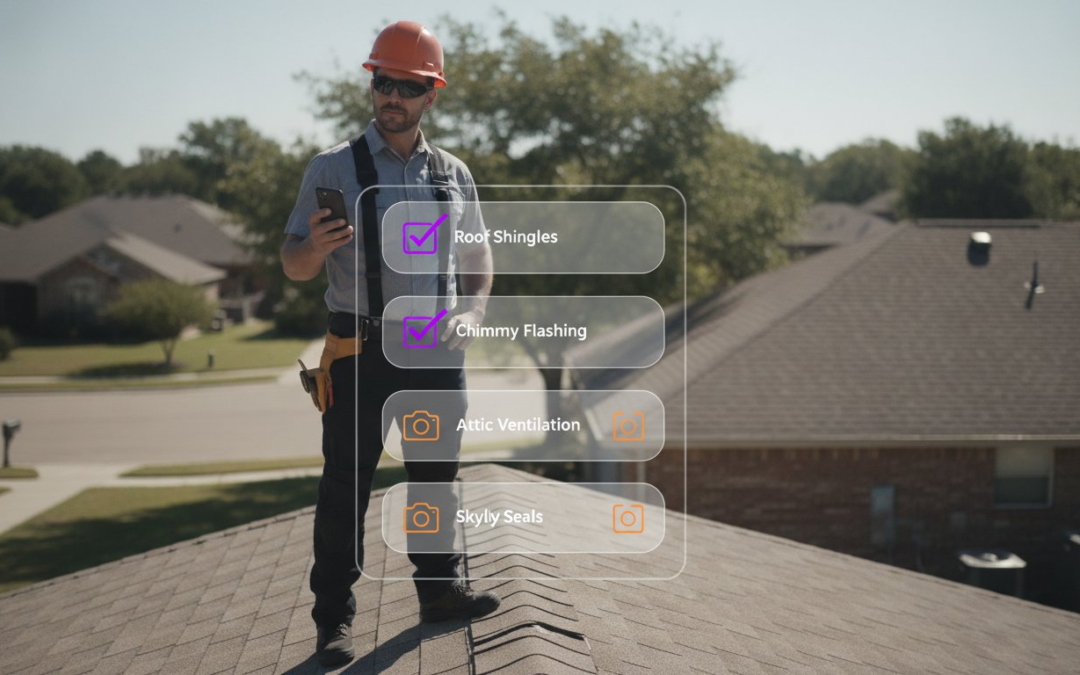
If you are still manually labeling photos in 2026, you are not just working hard; you are losing money on every single claim. It is time to stop the bleeding. Most field professionals spend more time on reports than the actual inspection itself. This happens because they lack the right custom inspection templates to drive their workflow. You face inconsistent data and manual labeling errors that lead to frustrating claim denials. It is exhausting, repetitive, and completely unnecessary. You need a system that is fast, fluid, and flawless.
We agree that your expertise belongs on the jobsite, not behind a keyboard. This article teaches you how to leverage these templates to automate photo labeling and slash your report generation time by 50%. You will learn to standardize documentation, eliminate human error, and restore order to the chaos of onsite data. We are diving into the strategies for automated report generation, zero-touch labeling, and total team synchronization. A picture is worth a thousand words, but only if you don’t have to type them yourself! It is time to capture, catalog, and conquer your workload right now.
Key Takeaways
- Stop the bleed of wasted hours by ending manual photo labeling and report-writing marathons that delay your claims.
- Master the build of your custom inspection templates using logic-based branching to show only the data fields you need.
- Ensure perfection on every jobsite with required photo prompts that prevent missed angles and documentation gaps.
- Dominate your niche by tailoring digital workflows for roofing or water mitigation to capture precise aerial and moisture data.
- Slash your reporting time by 50% and deliver professional results to your clients before you even pack up your gear.
Why Generic Inspection Templates Are Killing Your Efficiency
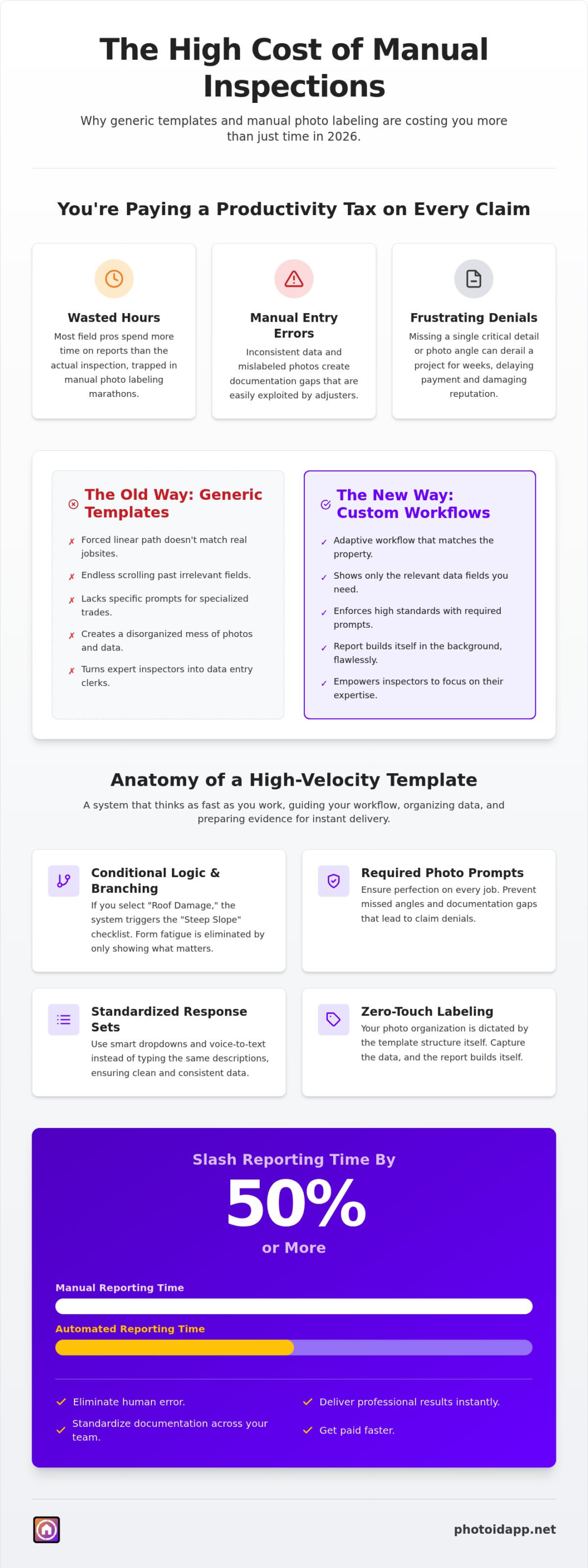
A custom inspection template is a tailored digital framework built specifically for high-velocity field data capture. In 2026, the industry has moved far beyond simple “paper-on-glass” applications that merely replicate old physical forms. If you are still using generic software, you are paying a productivity tax on every single job. These static forms force you into a linear path that rarely matches the chaos of a real jobsite. You need a system that adapts to the property, not the other way around.
The hidden cost of manual photo labeling is the primary reason field pros find themselves trapped in report-writing marathons. When your template doesn’t automatically organize your visual evidence, you spend hours in the office trying to remember which shingle belonged to which slope. This manual entry is a recipe for disaster. It leads to inconsistent data, missing evidence, and ultimately, rejected insurance claims. The 2026 standard demands a transition to intelligent, logic-driven workflows that eliminate the guesswork from the moment you step out of your truck.
The Problem with One-Size-Fits-All Documentation
Standard templates fail because they ignore the unique requirements of different claims. When a form forces you to scroll past twenty irrelevant fields just to find the one you need, friction wins. This clunky experience discourages your team from being thorough. High-velocity documentation requires a precise checklist that only shows what matters for the specific site. Rigid forms kill momentum. They turn an expert inspector into a data entry clerk, slowing down the entire cycle and frustrating everyone involved in the claim.
Missing a single critical detail can derail a project for weeks. Generic software often lacks the specific prompts needed for specialized trades like roofing or water mitigation. If your team isn’t prompted to capture the right angle, they won’t. This inconsistency creates gaps in your documentation that insurance adjusters will exploit to deny claims. Stop settling for “good enough” and start using tools that enforce high standards across your entire team.
Bridging the Gap Between Field Work and Final Reports
There is a massive disconnect between onsite photo capture and office-based report assembly. You take fifty photos, but without a structured flow, those images become a disorganized mess the moment they hit your hard drive. Your documentation should be a seamless interaction. Using custom inspection templates ensures that your photo organization is dictated by the template structure itself. You capture the data, and the report builds itself in the background. It is fast, it is clean, and it is professional.
Custom inspection templates serve as the rigid spine of a professional report, ensuring every piece of visual evidence and data point aligns perfectly with the final output. This structure allows you to move from the physical walk-through to a finished document without the need for manual sorting. You save time. You reduce errors. You get paid faster. Stop fighting your tools and start using a digital partner that works as hard as you do!
The Core Components of a High-Velocity Inspection Template
A high-velocity documentation system is more than a digital checklist. It’s a dynamic automation engine. To achieve maximum speed in 2026, your custom inspection templates must do the heavy lifting for you. This means moving beyond static text boxes and into a world of automated triggers and intelligent prompts. You need a template that thinks as fast as you work. It should guide your workflow, organize your data, and prepare your evidence for instant delivery.
Standardized response sets are the first pillar of efficiency. Instead of typing the same descriptions repeatedly, use smart dropdowns and voice-to-text integration. This reduces manual entry and ensures your data is clean, consistent, and ready for review. When your team uses the same terminology, your quality control becomes effortless. It’s about creating a unified voice for your entire operation. You don’t just save time; you build a reputation for precision and professionalism.
Conditional Logic and Branching Workflows
Form fatigue is real, and it kills onsite productivity. High-velocity templates solve this through conditional logic. If you select “Roof Damage” as the claim type, the system should automatically trigger the “Steep Slope” safety checklist. If the damage is “Water Mitigation,” the template shifts to moisture mapping and psychrometric readings. This real-time adaptation ensures that field adjusters only see the fields that matter for that specific property. You stay focused, stay safe, and stay productive.
By hiding irrelevant sections, you keep the interface clean and the momentum high. You don’t have to scroll through 50 empty fields to find the one you need. This smart branching ensures that your team follows the correct protocol every time, regardless of the claim complexity. If you want to see how this works in the field, check out our mobile app subscription for a seamless experience. It is the fastest way to turn a complex site visit into a structured, professional record.
The Anatomy of a Photo-First Template
In the inspection world, photos are the ultimate evidence. A high-velocity template must be built around visual documentation. This starts with integrating specific photo placeholders for every critical inspection point. Instead of just “taking pictures,” your team is fulfilling template requirements. This “photo-first” approach ensures that no critical angle is ever missed onsite, protecting you from claim denials and costly rework. You capture the truth, one click at a time.
Automated labeling triggers are the secret weapon here. When you select a specific placeholder, the custom inspection templates pre-fill the photo metadata with pre-defined labels. This completely eliminates the need for manual captions. Combine this with voice-to-text labeling to fulfill requirements at 3x the speed of traditional methods. You capture the image, speak the details, and move on to the next task. It’s fast, fluid, and flawless documentation that builds the report as you go! Stop wasting hours on administrative tasks and start moving at the speed of the jobsite.
Industry-Specific Templates: From Roofing to Water Damage
Generic forms are the enemy of field speed. They don’t know the difference between a leaky pipe and a hail-damaged roof, forcing you to wade through irrelevant clutter. To dominate your niche in 2026, you need custom inspection templates that speak the language of your specific trade. Specialized tools ensure you capture every necessary data point without the friction of a one-size-fits-all approach. Focus your documentation, eliminate the noise, and get the job done right the first time.
Roofing and Exterior Documentation Templates
Roofing inspections demand absolute precision. You can’t afford to miss the pitch, the number of layers, or the specific type of shingle damage. Your template should prompt for these essential fields automatically. By integrating aerial roof and wall measurements directly into your workflow, you eliminate the need for manual climbing and measuring. This keeps your team safe and your data accurate.
High-resolution photo support is non-negotiable for exterior assessments. You need to see shingle granularity and gutter slope in crystal clear detail to prove your case. A specialized roofing template ensures you have the visual evidence needed for wind uplift or hail impact claims. It turns a quick walk-around into a bulletproof record. Capture the damage, document the pitch, and move to the next slope!
Water Damage and Mitigation Workflows
Water claims are won or lost on the strength of your documentation. You must prove IICRC compliance at every stage of the drying process to ensure full reimbursement. Use custom inspection templates designed specifically for moisture mapping and psychrometric readings. Track your equipment locations and run times with a single tap. This structure makes it easy to organize “before and after” photos within the same digital framework, providing a clear narrative of the restoration progress.
Speed is your greatest asset in mitigation. Linking your templates to your claims estimating software streamlines the entire process. You capture the data onsite, and it flows directly into your estimate without manual double entry. This seamless transition reduces errors and gets your invoices paid faster. Stop fighting with paper and start moving at the speed of the drying cycle.
Residential home inspections require a different rhythm, necessitating a system-by-system breakdown from the foundation to the HVAC. Commercial PDI templates go even further, standardizing large-scale multifamily assessments across hundreds of units simultaneously. Whether you are in a crawlspace or a high-rise, your template should be your expert guide. It ensures total consistency across your entire team, regardless of the property type or claim size. Capture the truth, build the report, and deliver the results!
How to Build and Optimize Templates for Maximum Field Speed
Building high-velocity custom inspection templates is a strategic exercise in workflow architecture. You are not just digitizing a paper form. You are creating a roadmap for efficiency. To start, map your physical walk-through to the digital template flow. If you always inspect the exterior perimeter before entering the crawlspace, your template should follow that exact sequence. This alignment reduces cognitive load and keeps your momentum high as you move through the property.
Next, identify your “High-Frequency” fields. These are the data points you capture on every single job, regardless of the claim size. Prioritize these fields at the top of your template to minimize scrolling. Once your structure is set, replace every possible text box with voice-to-text enabled fields. This transition allows for hands-free entry and keeps your eyes on the damage, not the screen. Follow these steps to refine your process:
- Pilot and Refine: Run your new template on a single project first. Gather feedback from the field and adjust the logic to fix any bottlenecks.
- Deploy and Scale: Roll the optimized template out to the entire team. This ensures every inspector is following the same high-velocity protocol.
- Monitor Consistency: Use a centralized team management dashboard to track documentation quality in real-time.
If you are ready to stop wasting time on manual setup, start building your custom report builder today. It is the fastest way to turn your field expertise into a standardized, scalable documentation engine.
Designing for the Mobile Professional
Field work is physically demanding. You are often on a ladder, in a dark attic, or squeezed into a tight crawlspace. Your app interface must reflect this reality. Big buttons and minimal typing are non-negotiable requirements for mobile-first design. Structure your templates for one-handed operation so you can document findings while maintaining a three-point stance for safety. True efficiency relies on zero-touch data entry where the software anticipates your next move based on the property type.
Minimalist design leads to maximum speed. Every extra tap is a second wasted. By reducing the number of interactions required to capture a data point, you free your team to focus on the inspection itself. You want a tool that feels like a partner, not a chore. Keep it simple, keep it fast, and keep it focused on the visual evidence!
Leveraging Voice-to-Text within Your Templates
Voice-to-text is the ultimate tool for high-velocity documentation. It allows you to “speak” the report as you walk the property, eliminating the need for a separate note-taking phase later. To get the best results, phrase your template prompts to elicit clear, report-ready responses. Instead of a generic “Notes” field, use specific prompts like “Describe shingle granule loss” or “Detail basement moisture levels.”
Training your team to use these prompts effectively will slash your office time. When you speak the details onsite, the automated labeling engine attaches that data directly to the photo metadata. You finish the inspection, and the report is already 90% complete. This is how you restore order to the chaos of onsite documentation. Stop typing, start talking, and watch your productivity soar!
Transform Your Reporting with PHOTO iD’s Custom Template Engine
PHOTO iD is the game-changing partner you need to restore order to your onsite documentation. We don’t just offer tools; we provide an authoritative, high-velocity documentation engine designed for the modern field professional. By leveraging custom inspection templates, you eliminate the friction of manual entry and move directly to professional results. Our platform turns every field interaction into a digital asset, ensuring that your expertise is captured with absolute precision.
The transition from manual chaos to automated efficiency is seamless. By utilizing voice-to-text labeling and pre-set response sets, you can reduce your documentation time by 50%. You capture the evidence, speak the details, and the system handles the rest. This isn’t just about saving an hour; it’s about long-term resource optimization that scales with your business. Stop fighting your workflow and start mastering it!
Instant Photo Report Generation
The true power of a digital framework lies in the final output. With PHOTO iD, your template data automatically populates a final PDF report as you work. This means no more office marathons or late-night sorting sessions. You gain a massive professional advantage by delivering a polished, comprehensive report to your client before you even leave the jobsite. It builds trust, speeds up the claim cycle, and sets you apart from competitors who are still stuck in the paper age.
Speed and simplicity are the core of our mission. When you use the best home inspection app of 2026, you are choosing a mobile-first solution that prioritizes clarity over complexity. Your photos are organized, your labels are accurate, and your reports are instant. Capture, catalog, and conquer your workload with a single tap. It is the most efficient way to turn physical evidence into professional documentation.
Team Management and Quality Control
Consistency is the backbone of a successful inspection firm. Our custom inspection templates ensure that every team member follows the exact same standard, regardless of their experience level. You set the requirements, and the template enforces them. This eliminates documentation gaps and protects your business from the liability of missing evidence. When your team moves as one, your reputation for quality becomes your greatest marketing tool.
Our centralized team management dashboard allows you to review field photos and labels in real-time. You can spot errors, provide feedback, and approve reports from anywhere in the world. It is total project oversight without the need for constant phone calls or site visits. You stay in control, your team stays productive, and your clients stay happy. Ready to experience the relief of technological efficiency? Build your first custom inspection template with PHOTO iD today!
Master Your Workflow and Reclaim Your Time
You’ve seen the hidden costs of generic forms and the power of logic-driven workflows. In 2026, the standard for excellence is high-velocity documentation that works as hard as you do. By implementing custom inspection templates, you eliminate the report-writing marathon and ensure every team member delivers bulletproof evidence. You don’t just save time; you build a reputation for unmatched precision and professional speed.
It’s time to leverage automated photo labeling for zero manual entry and use voice-to-text integration for incredible field speed. These tools don’t just organize your data; they transform it into instant reports that accelerate your claim cycles and get you paid faster. Capture the truth, catalog the damage, and conquer your workload today. You have the expertise. We have the engine. Let’s get to work!
Start Automating Your Inspections with PHOTO iD Now!
Frequently Asked Questions
What are custom inspection templates?
Custom inspection templates are dynamic digital blueprints that replace static checklists with a tailored framework for high-velocity data capture. They provide the architectural structure for your field documentation, ensuring every site-specific detail is captured in a logical sequence. These templates act as a digital guide, directing your focus toward critical evidence while filtering out the noise of irrelevant data fields. It is about turning your unique expertise into a scalable, repeatable engine for success.
How do custom templates speed up the reporting process?
These templates eliminate the traditional office-based report-writing marathon by organizing and labeling your data in real-time. As you move through a property, the template structures your photos and notes according to the final report layout. This means your documentation is 90% complete the moment you step off the jobsite. You save hours of administrative labor, reduce claim cycle times, and deliver professional results to your clients faster than ever before.
Can I use voice-to-text with my inspection templates?
Yes, voice-to-text is fully integrated into our custom inspection templates to enable a completely hands-free documentation experience. You simply speak the details of the damage while capturing images, and the system automatically attaches that data to the photo metadata. This eliminates the need for manual note-taking and keeps your eyes on the property. It is a fluid, speak-as-you-go workflow that keeps your momentum high and your documentation accurate.
Are these templates compatible with major estimating software?
They are built to bridge the gap between onsite field work and final claim estimates. The structured data and labeled photos you capture flow seamlessly into industry-standard estimating platforms, ensuring your visual evidence matches your line items perfectly. This synchronization reduces human error and prevents the friction of manual double entry. By streamlining this data transfer, you ensure your estimates are accurate, professional, and ready for immediate approval.
Do I need technical skills to build a custom inspection template?
No technical background or coding knowledge is required to use our custom report builder. The interface is designed for the busy professional, featuring intuitive drag-and-drop tools that let you map your physical walk-through to a digital flow in minutes. If you can navigate a smartphone, you can build a high-velocity template. We provide the technological relief so you can focus on your specialized labor and assessment expertise.
How do custom templates improve team consistency in the field?
They enforce a standardized documentation protocol across your entire workforce, ensuring every team member follows the same high-velocity standards. By using custom inspection templates, you eliminate the risk of missing evidence and inconsistent data that leads to claim denials. You can monitor every project in real-time from a central team management dashboard to maintain total quality control. It turns every inspector into a tech-savvy ally for your business.
Can I add required photo fields to my inspection templates?
Yes, you can integrate mandatory photo placeholders for every critical inspection point to ensure no angle is ever missed. The app enforces these requirements, preventing the inspector from completing the section until the necessary visual evidence is captured. This built-in compliance tool protects your business from liability and costly site revisits. You capture the truth, fulfill the requirements, and deliver a bulletproof record of the property condition every single time.
Is it possible to clone and edit existing templates for different projects?
Cloning is a core efficiency feature that allows you to scale your operations rapidly without starting from scratch. You can take a proven template, duplicate it, and refine the logic for a different property type or specific client requirement. This flexibility allows you to build a comprehensive library of specialized workflows for roofing, water damage, or commercial PDIs. You save time on setup and maintain total control over your documentation standards!