
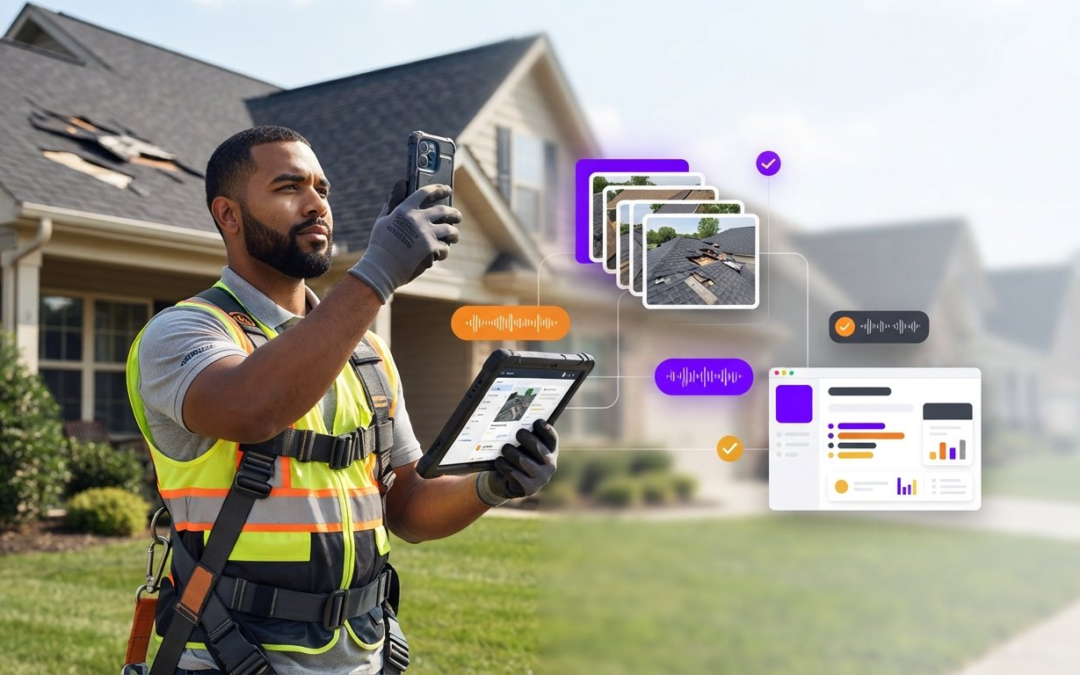
It’s 10:00 PM, and while the rest of the world is asleep, you’re hunched over a laptop, manually dragging hundreds of JPEGs into folders. You’ve already spent eight hours in the field, but your workday is only halfway done because of the dreaded “second shift.” This manual bottleneck is the single biggest drain on your productivity and your sanity. It’s time to stop the grind. By leveraging a high-performance inspection photo report generator app, you can finalize your documentation before you even leave the jobsite driveway.
We understand the frustration of carrier rejections and supplement denials caused by missing metadata or disorganized photo sheets. You need a partner that restores order to the chaos of onsite documentation. This guide shows you exactly how to eliminate manual labeling, slash your claim cycle times, and sync jobsite data directly with your Xactimate estimates. We’ll dive into the automated workflows, voice-to-text engines, and seamless X1 imports that are defining the industry in 2026. Get ready to reclaim your evenings, impress your carriers, and master the fastest field-to-office pipeline ever built!
Key Takeaways
- Stop wasting time on the “second shift” by identifying the hidden financial costs of manual photo organization.
- Deploy a mobile-first inspection photo report generator app to automate labeling and categorization while you’re still on the jobsite.
- Master the seamless transfer of structured data into Xactimate to eliminate manual data entry and reduce carrier rejections.
- Leverage voice-to-text technology to create detailed, AI-driven damage descriptions that keep your claims moving fast!
- Increase your daily inspection capacity and overall ROI by adopting tools built specifically by adjusters for adjusters.
The Claims Cycle Bottleneck: Why Manual Photo Entry is Costing You
The “second shift” isn’t just a nuisance; it’s a profit killer. Every hour you spend at your kitchen table renaming files is an hour you aren’t inspecting new properties or growing your business. Traditional camera rolls are the enemy. They turn a simple site visit into a digital jigsaw puzzle. When you rely on a standard phone gallery, you’re forced to sort, remember, and label hundreds of identical images long after you’ve left the jobsite. This manual process is slow, expensive, and prone to mistakes that trigger carrier rejections. Stop the madness. Capture, categorize, and close your files while you’re still on-site.
The Financial Impact of Documentation Delays
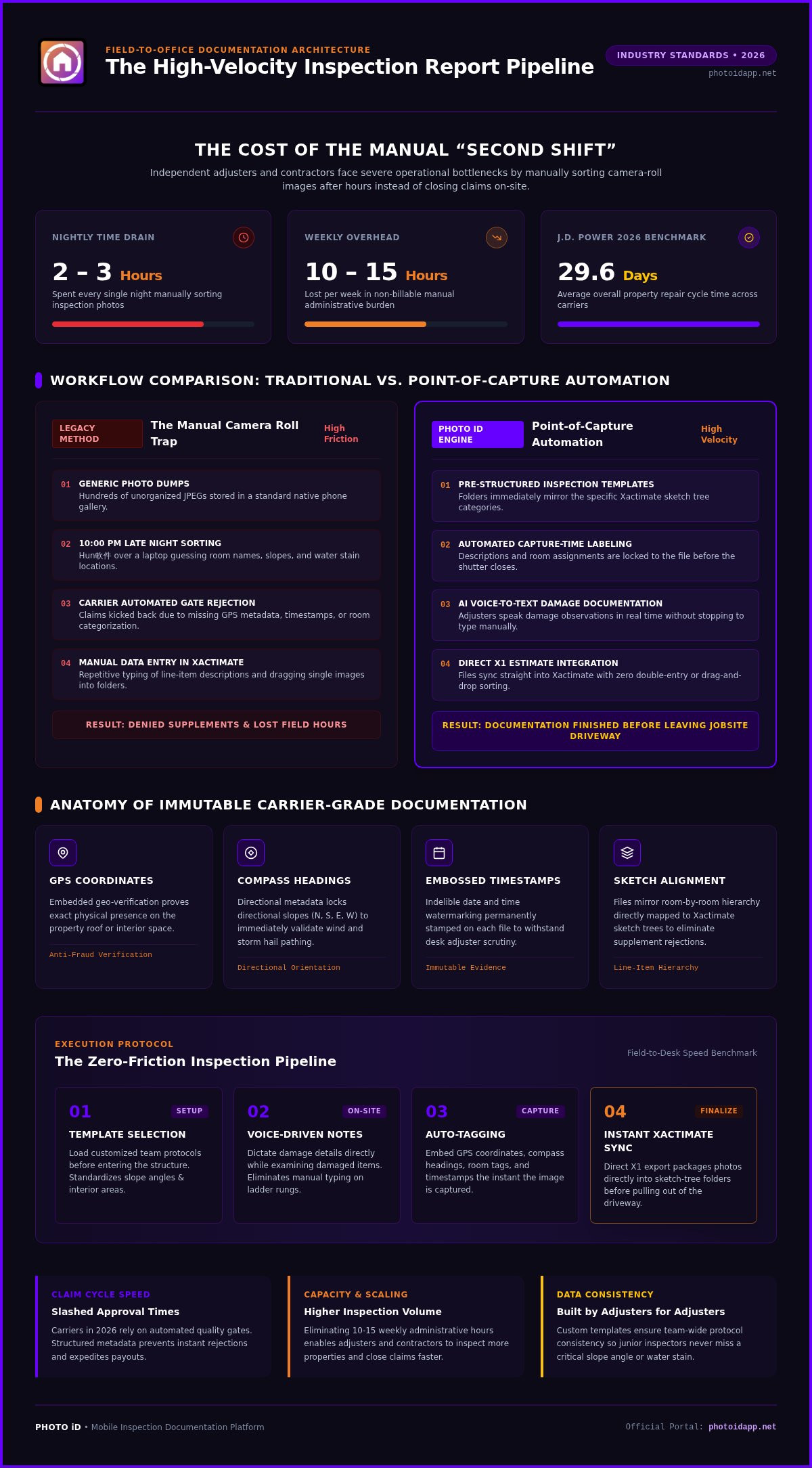
Industry data shows that independent adjusters spend an average of two to three hours every single night manually organizing inspection photos. That’s ten to fifteen hours a week of administrative overhead. For a busy contractor, this bottleneck limits how many jobs you can actually close. You can’t scale a business built on manual data entry. By switching to a dedicated inspection photo report generator app, you eliminate this overhead entirely. You capture, you label, and you finish. Automation turns those lost evening hours back into productive field time or much-needed rest. Efficiency in the property insurance claims process depends on getting data from the field to the desk without friction. Speed matters!
Carrier Expectations in 2026
The days of submitting a “photo dump” and hoping for the best are over. In 2026, carriers use automated quality gates to flag incomplete documentation instantly. If your photos aren’t labeled, categorized by room, and backed by hard data, your estimate will get kicked back. Carriers now demand immutable evidence. They want GPS coordinates, compass headings, and timestamps embossed directly on the image. An organized report doesn’t just look professional; it builds trust. When your documentation is structured to match the Xactimate sketch tree, you reduce human error and eliminate the need for supplements. According to the 2026 J.D. Power study, the average repair cycle time has dropped to 29.6 days. To keep up, your documentation must be instant. Faster approvals mean faster payments. Don’t let a poorly organized photo sheet stand between you and a closed claim. Deliver the high-velocity reports that modern carriers expect!
Anatomy of a High-Velocity Xactimate Photo Report Generator
A professional inspection photo report generator app is far more than a simple camera. It’s a high-speed documentation engine that organizes your workflow in real time. Most generic apps leave you with a chaotic pile of images that require hours of sorting later that evening. A dedicated generator app solves this by automating the labeling process as you work. This ensures your documentation is structured, searchable, and seamless. By the time you climb down from the roof, your photos are already categorized to match your Xactimate sketch tree. This level of organization is essential for anyone conducting field property damage inspections where accuracy is non-negotiable.
Your folder structures must mirror your estimate’s room and line-item categories. If you’re documenting the master bedroom, every photo should already be tagged to that specific space. This alignment makes the transition from the field to the office effortless. High-resolution exports and metadata-heavy image files ensure that carriers have all the evidence they need to approve your scope. This isn’t just about taking pictures; it’s about building a digital package that defends your estimate against scrutiny. Stop the guesswork. Start the automation!
Core Features of Professional Reporting Software
Consistency is the backbone of scalability. Professional reporting software uses custom inspection templates to ensure your entire team follows the same protocol. You don’t have to worry about a junior adjuster forgetting a crucial slope angle or interior water stain. Automated labeling at the point of capture means descriptions are attached to the image before the shutter even closes. This creates an instant report that you can share with the office or the carrier immediately. If you want to see how this workflow transforms your day, check out the features available in the PHOTO iD mobile app. You’ll find that structured data collection is the fastest way to increase your claim volume.
The Power of Metadata: GPS and Timestamps
Trust is the currency of the insurance industry. Metadata is the digital DNA of every inspection photo. In 2026, a plain JPEG is a liability. Carriers demand fraud-proof evidence that proves exactly when and where a photo was taken. Every image must contain embedded GPS coordinates, compass headings, and verified timestamps. This metadata simplifies the auditing process and protects your reputation. When a desk adjuster can verify the location and direction of a roof slope with one click, your supplements get approved faster and your files close sooner. High-velocity documentation isn’t just about speed; it’s about providing undeniable proof!
Bridging the Field-to-Estimate Gap: Seamless Workflow Integration
Ditch the cables. Toss the SD cards. Forget the manual folder creation that eats your evenings. The bridge between the physical jobsite and the digital estimate is no longer a manual crawl; it’s a high-speed data transfer. By using a field-first inspection photo report generator app, you capture data once and use it everywhere. This eliminates the tedious middle steps that slow down your workflow and delay your payments. You don’t need to be a tech genius to master this; you just need the right tools.
McKinsey’s research on claims automation highlights that digital workflows are the key to resolving operational bottlenecks. When you automate the capture process, you aren’t just taking pictures. You’re building a structured data package. This package moves from your phone to the cloud and into your estimating software without you ever touching a USB cord. It’s a clean, reliable, and incredibly fast way to handle documentation.
Syncing Your First Report with Xactimate
Stop typing descriptions twice. When you use a professional inspection photo report generator app, your exports are already structured to mirror the Xactimate sketch tree. This ensures that your data lands exactly where it belongs. Follow these steps to sync your first report:
- Select the ZIP export format designed for Xactimate X1 or Desktop.
- Download the organized archive from your secure web portal.
- Import the file directly into the Images tab of your Xactimate project.
- Watch as the app-generated folders map perfectly to your estimate line items.
This process ensures that every photo of the kitchen stays in the kitchen folder. It keeps your roof slopes separated from your interior damage. It’s professional, it’s organized, and it’s exactly what desk adjusters want to see. You’ll spend less time explaining your photos and more time closing files.
Real-Time Collaboration for Teams
Why wait until the end of the day to start the estimate? High-velocity teams use shareable web links to provide office staff with immediate access to site data. While you’re still walking the perimeter, your desk adjuster can see the photos, read your voice-tagged labels, and begin scoping the loss. This parallel workflow slashes cycle times and keeps projects moving forward even when you’re stuck in traffic.
A team management dashboard gives you a bird’s eye view of every active project. You can track progress, review documentation quality, and ensure every team member follows the custom templates you’ve built. This reduces communication gaps and eliminates the “I forgot to send that photo” phone calls. It’s about working smarter, not harder. You’ve got a job to do. Let the automation handle the data!
Advanced AI Documentation: Voice-to-Text and Automated Labeling
The days of chicken-scratch notes and fuzzy memories are dead. The evolution of automated photo labeling has moved from tedious manual entry to high-velocity AI-driven capture. While some platforms try to “fix” your photos back at the office, a true inspection photo report generator app handles the heavy lifting while you’re still standing in the loss. Modern AI now identifies building materials and room types with surgical precision. It recognizes the difference between granite and quartz or laminate and hardwood instantly. This isn’t just a convenience; it’s a professional edge that ensures your documentation is bulletproof from the start. Speak, snap, and sync your way to a finished report!
Accuracy is everything when you’re defending a supplement. By customizing your labeling dictionaries to match Xactimate industry terminology, you ensure your descriptions are carrier-ready. Instead of generic notes, your inspection photo report generator app can suggest specific phrases like “oxidized aluminum siding” or “mechanical damage” based on the visual evidence. This alignment between your photos and your estimate line items eliminates the friction that leads to payment delays. You aren’t just taking pictures; you’re generating a data-rich narrative of the damage. According to platform performance metrics, this level of automation drives a 32% increase in field documentation efficiency.
Mastering Voice-to-Text Labeling
Stop typing. Start talking. Voice-to-text is the fastest way to describe damages on a busy jobsite. You can’t afford to fumble with a touchscreen while climbing a steep roof or navigating a cramped crawlspace. Speak your descriptions directly into the app as you capture each image. Use specific terms like “spalling,” “creased shingles,” or “alligatoring” to ensure your labels match your estimate line items perfectly. This reduces physical strain and keeps your eyes on the property, not your phone. You’ll finish your inspections faster and with far more detail than manual typing could ever allow!
Customizing Templates for Niche Inspections
One size never fits all in property claims. You need a system that adapts to your specific trade, whether you’re handling roofing, flood mitigation, or fire restoration. By creating custom inspection templates, you ensure every team member follows the exact same documentation protocol. This consistency is what wins over carriers and reduces the need for back-and-forth supplements. You can even set voice commands to trigger specific actions within your templates, making the entire process hands-free. Ready to leave the “night shift” behind for good? Get started with a PHOTO iD mobile app subscription and transform your workflow today!
Scaling Your Business with PHOTO iD Automation
Industry veterans don’t settle for generic camera apps. They demand a high-performance inspection photo report generator app that can handle catastrophe-level volume. PHOTO iD is the only platform built by adjusters for adjusters. It understands the physical grind of the jobsite and the digital grind of the desk. By automating your documentation, you aren’t just saving minutes; you’re building a scalable machine. Platform performance metrics show a massive 55% annual savings in photo processing and administrative overhead. This is how you win in a competitive market!
Scaling requires more than just speed. It requires precision. When you reduce your adjuster management costs by 43%, you free up capital to take on more assignments. You stop being a data entry clerk and start being a business owner. Every saved hour is an hour you can spend on high-value assessments or business development. Efficiency is the foundation of growth. Capture the data, close the file, and move to the next loss without looking back.
Beyond Photos: Aerial and Virtual Tools
Consolidate your tools into a single documentation platform. You don’t need a dozen subscriptions to run a professional operation. PHOTO iD integrates aerial roof and wall measurements directly into your mobile workflow. Need to handle a minor loss without a truck roll? Use the remote virtual inspection software to guide policyholders or junior technicians through the capture process in real time. This capability reduces travel time by 23% and eliminates documentation fraud through verified GPS and tamper-evident metadata. It’s about total resource optimization!
The PHOTO iD Advantage
Trust the expertise of industry veteran Ken Perry, widely known as “The Claims Coach.” PHOTO iD isn’t just software; it’s a proven system for success. The real-time team management dashboard gives you total visibility into your field operations. You can monitor quality, track progress, and ensure every report meets carrier standards before it’s ever submitted. This transparency ensures that your team follows the same high-velocity protocol on every property. You’ll see fewer rejections, faster approvals, and higher profits. Stop the manual chaos. Start the automation. Get started with PHOTO iD today and reclaim your evenings!
Take Control of Your Future and Reclaim Your Time
You’ve seen the hidden costs of the “second shift” and the transformative power of automated labeling. Transitioning to a high-velocity inspection photo report generator app isn’t just a tech upgrade; it’s a lifestyle change. By bridging the gap between field capture and Xactimate estimates, you eliminate the friction that leads to carrier rejections and payment delays. You’ve learned how voice-to-text technology and structured AI templates turn a chaotic site visit into a professional, carrier-ready report before you even pull out of the driveway.
Stop wasting your evenings on manual data entry. Thousands of adjusters nationwide already use this platform to slash their documentation time by up to 50%. It’s a game-changing partner built by property claims experts who intimately understand your daily grind. Take the next step toward a faster, more profitable, and less stressful career today. Automate your Xactimate photo reports with PHOTO iD and put an end to the documentation bottleneck once and for all. You have the knowledge. You have the tools. Now go out there and dominate the field!
Frequently Asked Questions
What is an Xactimate photo report generator?
It’s a specialized tool that organizes and labels jobsite photos to align perfectly with Xactimate’s estimating structure. Unlike generic camera rolls, this software categorizes images by room or roof slope as you capture them. It creates a structured bridge between the field and the office. This ensures your documentation is ready for immediate carrier review without hours of manual sorting at night. You finish the work on-site!
Can I import photos from PHOTO iD directly into Xactimate?
Yes, you can import structured photo archives directly into Xactimate Desktop or Xactimate Online (X1). The platform generates organized ZIP files that mirror the Xactimate sketch tree. When you extract and import these into the Image tab, the titles and descriptions populate automatically. This eliminates the need for manual data re-entry and ensures your estimate line items match your visual evidence perfectly. It’s fast, simple, and incredibly efficient!
Does PHOTO iD support voice-to-text labeling for field work?
Absolutely, the platform features advanced voice-to-text labeling to speed up your field documentation. You can speak damage descriptions directly into the app while capturing images. This hands-free approach is ideal for navigating steep roofs or tight crawlspaces. It captures your professional insights in real time, ensuring that every photo has a detailed, accurate description before you even leave the property. Stop typing and start talking your way to faster reports!
Is the photo metadata preserved when exporting reports for Xactimate?
Yes, all critical metadata is preserved and embossed directly on your images to ensure carrier acceptance. This includes GPS coordinates, compass headings, timestamps, and pitch gauge data. This digital DNA provides undeniable proof of the inspection’s location and timing. By using a professional inspection photo report generator app, you provide the fraud-proof evidence that modern carriers demand. Build trust with every snap and protect your professional reputation!
How does automated photo labeling reduce claim cycle times?
Automated labeling slashes cycle times by eliminating the “second shift” of office work. Because photos are labeled at the point of capture, reports are ready for submission immediately. This speed allows desk adjusters to begin scoping the loss while the field team is still on-site. Faster documentation leads to quicker approvals and reduced travel time, helping your team close more files every week. Speed up your workflow and get paid faster!
Can I use custom inspection templates with PHOTO iD?
Yes, you can create and deploy custom inspection templates tailored to your specific trade or workflow. Whether you’re handling roofing, flood mitigation, or fire restoration, templates ensure your team follows a consistent documentation protocol. This standardization reduces human error and ensures that every crucial detail is captured. It’s a powerful way to maintain professional quality across all your field operations. Consistency is the key to scaling your business successfully!
Does the app work offline for remote jobsite inspections?
Yes, the mobile app is designed to function reliably in remote areas with limited or no cellular connectivity. You can capture photos, use voice-to-text, and organize your report entirely offline. Once you return to an area with internet access, the app syncs your data to the cloud automatically. This ensures your workflow remains uninterrupted, regardless of the jobsite’s location or signal strength. Never let a poor signal slow your documentation down again!
Is there a team management dashboard for large restoration companies?
Yes, the platform includes a centralized team management dashboard for real-time project oversight. Managers can track active inspections, review documentation quality, and manage user licenses from a single interface. This tool is essential for scaling operations and maintaining high standards across multiple teams. It provides the visibility you need to optimize resources and ensure every inspection photo report generator app user is performing at peak efficiency. Manage your team with confidence!