
pdf photo report generator
Stop Drowning in Photos: The Power of a PDF Photo Report Generator
Key Takeaways
- PDF photo report generators are specialized software, not just basic camera apps.
- These tools compile field photos into structured, branded documents.
- They add context, labels, and professional formatting right when you capture photos.
What Exactly Is a PDF Photo Report Generator?
A PDF photo report generator is specialized software that compiles field photos into structured, branded documents. Unlike basic camera apps, these tools add context, labels, and professional formatting during capture.
The system works in three steps: capture photos with built-in labeling tools, organize images by project or location, and export complete reports ready for client delivery or claim submission.
Why Manual Photo Documentation Is Costing You Time and Money
Field teams waste hours sorting through phone galleries, trying to remember what each photo shows. Manual organization leads to lost images, duplicate work, and frustrated clients waiting for documentation.
Property inspectors report spending 2-3 hours per project organizing photos after fieldwork. That’s billable time lost to administrative tasks that should take minutes.
Time Savings Reality Check
Manual photo organization: 2-3 hours per project. Automated documentation tools: 5-10 minutes from capture to delivery. The math is clear.
The Core Problem: Disorganization and Inefficiency on the Jobsite
Most documentation failures happen at capture, not during report creation. Photos taken without labels, context, or systematic organization create downstream problems that compound with every project.
Field teams need structure from the start. Every photo gets labeled, located, and organized before you leave the jobsite.
Beyond Basic Snapshots: Essential Features for Field-Ready Photo Reports
Not all photo documentation tools are built for real fieldwork. Professional documentation requires tools that work in muddy boots, tight crawl spaces, and time-pressured environments.
Real-Time Labeling and Context: Adding Meaning to Every Image
The best documentation systems capture context during shooting, not hours later at your desk. Real-time labeling means every image gets tagged with location, damage type, and relevant details while you’re still looking at the issue.
This eliminates the guesswork that kills productivity. No more staring at unlabeled photos wondering whether that water-damage shot came from the kitchen or the bathroom.
Built-in Field Tools: From Pitch Gauges to GPS Tagging
Professional documentation often requires measurements, angles, and precise location data. Quality systems integrate these tools directly into the camera interface.
GPS tagging, pitch measurement, and dimensional tools eliminate the need for separate apps or manual notation. Everything gets captured in one workflow, reducing equipment needs and human error.
Integration Advantage
Field teams using integrated documentation tools report 40% fewer missing measurements compared to teams juggling multiple apps and manual notes.
Customizable Workflows: Tailoring Reports to Your Industry Needs
Insurance claims require different documentation than construction progress reports. The most effective systems adapt to your specific workflow requirements.
Custom templates, industry-specific labeling options, and flexible report formats help your documentation match client expectations and regulatory requirements without added complexity.
PHOTO iD: The Fastest Way to Generate Professional Photo Reports in the Field
PHOTO iD transforms chaotic photo documentation into structured, professional reports without slowing down fieldwork. It’s built for property inspectors, contractors, and restoration teams that need speed and consistency.
Mobile-First Design for Maximum On-Site Efficiency
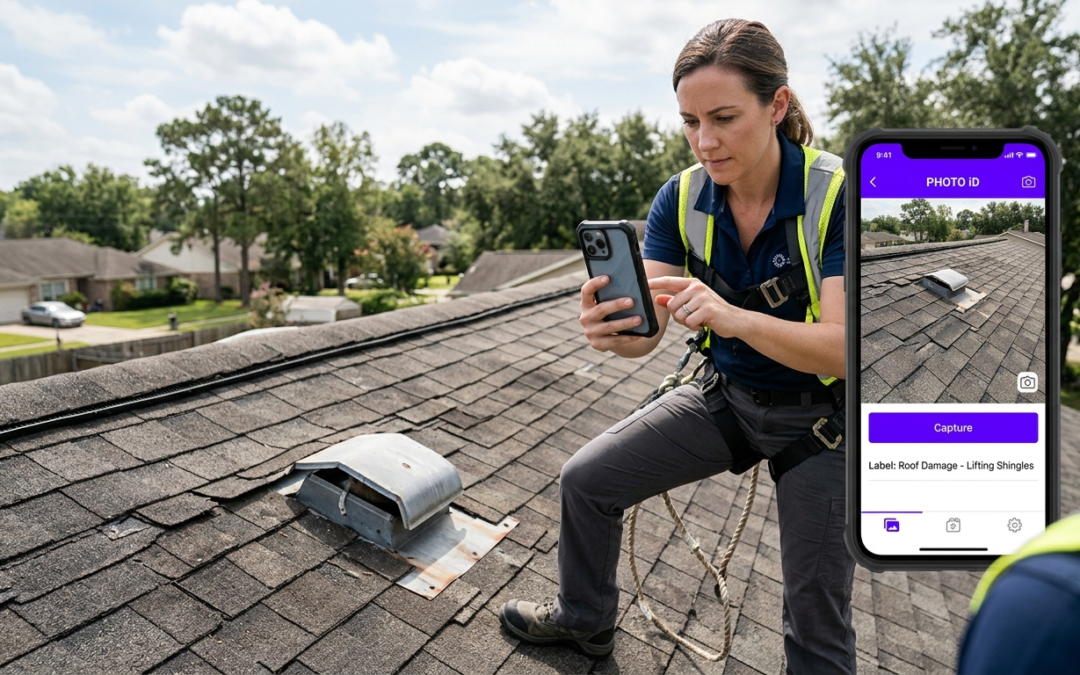
PHOTO iD works where you work: on ladders, in crawl spaces, and during time-pressured inspections. The interface prioritizes one-handed operation and quick access to essential tools.
Large touch targets, voice labeling options, and offline functionality mean weather, lighting, or connectivity issues won’t derail your documentation process.
Fast Labeling: Our “Fastest” Promise in Action
Every photo gets labeled in seconds, not minutes. Preset categories, voice input, and smart suggestions reduce typing while maintaining accuracy. This workflow can cut documentation time by 70% compared to manual methods.
Custom label libraries adapt to your specific work. Property preservation teams use different terminology than roofing contractors. PHOTO iD learns your language.
Speed Benchmark
Field teams document complete inspections in under 15 minutes using PHOTO iD’s workflow, compared to 45+ minutes with traditional methods.
System Integration: Connecting Your Field Data to Core Systems
Reports export directly to PDF or integrate with Guidewire ClaimCenter, Salesforce, Jobber, and JobNimbus for immediate submission. No file conversion, no manual uploads, and no delays between field completion and client delivery.
Zapier connectivity extends integration options, connecting your documentation workflow to the business systems your team already uses.
Who Needs Professional Photo Reports? Industries Transformed by Efficient Documentation
Professional documentation requirements span multiple industries, each with specific needs that generic photo apps can’t address.
Property Preservation: Documenting Scope and Condition with Precision
Property preservation contractors need before, during, and after documentation that clearly shows work scope and completion status. Missing or unclear photos delay payment and create disputes.
PHOTO iD’s systematic approach ensures every property gets documented consistently, with GPS coordinates, timestamps, and detailed condition notes that satisfy client requirements.
Insurance Claims Adjusting: Building Stronger Cases with Clear Evidence
Claims adjusters need structured evidence that supports coverage decisions. Poorly organized photos create delays, disputes, and frustrated policyholders.
This systematic documentation approach provides the context and organization adjusters need, reducing claim processing time and improving approval rates.
Roofing and Restoration: Capturing Damage and Repair Progress
Roofing teams document everything from initial damage assessment through final completion. Clients, insurance companies, and project managers often need different views of the same work.
PHOTO iD generates multiple report formats from the same photo set, eliminating duplicate documentation while meeting each stakeholder’s requirements.
Frequently Asked Questions
How do PDF photo report generators help field teams?
PDF photo report generators transform scattered jobsite photos into organized, professional documentation. They allow field teams to capture, label, and compile reports in minutes. This eliminates chaos from lost photos, missing context, and delayed project approvals, making fieldwork more efficient.
What makes a photo report generator effective for fieldwork?
An effective PDF photo report generator is built for real fieldwork conditions. It includes real-time labeling to add context during capture, built-in field tools like GPS tagging, and customizable workflows. These features ensure documentation is structured at the source, reducing errors and saving significant time.
How much time do automated photo reports save?
Automated PDF photo reports drastically cut down administrative time. While manual photo organization can take 2-3 hours per project, an automated system can complete reports from capture to delivery in 5-10 minutes. This frees up valuable billable time for field teams.
Which industries benefit most from a PDF photo report generator?
Industries with high documentation needs, such as property preservation, construction, and insurance claims, benefit greatly. These tools help contractors, inspectors, and restoration teams precisely document scope and condition. This ensures clear communication and faster project completion across various field operations.
How does PHOTO iD streamline photo documentation?
PHOTO iD is designed for speed and consistency in the field. It offers a mobile-first design, fast labeling with preset categories and voice input, and custom label libraries. This allows teams to document complete inspections quickly and accurately, cutting documentation time significantly.
Can a PDF photo report generator integrate with existing business systems?
Yes, many professional PDF photo report generators offer seamless integrations. PHOTO iD, for example, connects with software like Guidewire, Salesforce, Jobber, and JobNimbus. This ensures field data flows directly into your core operations without manual uploads or delays.
Why is real-time photo labeling important for field reports?
Real-time photo labeling adds context to every image as it’s captured, not hours later at a desk. This eliminates guesswork about location or damage type, ensuring accuracy. It prevents lost productivity from trying to recall details and ensures every photo tells a complete story.