
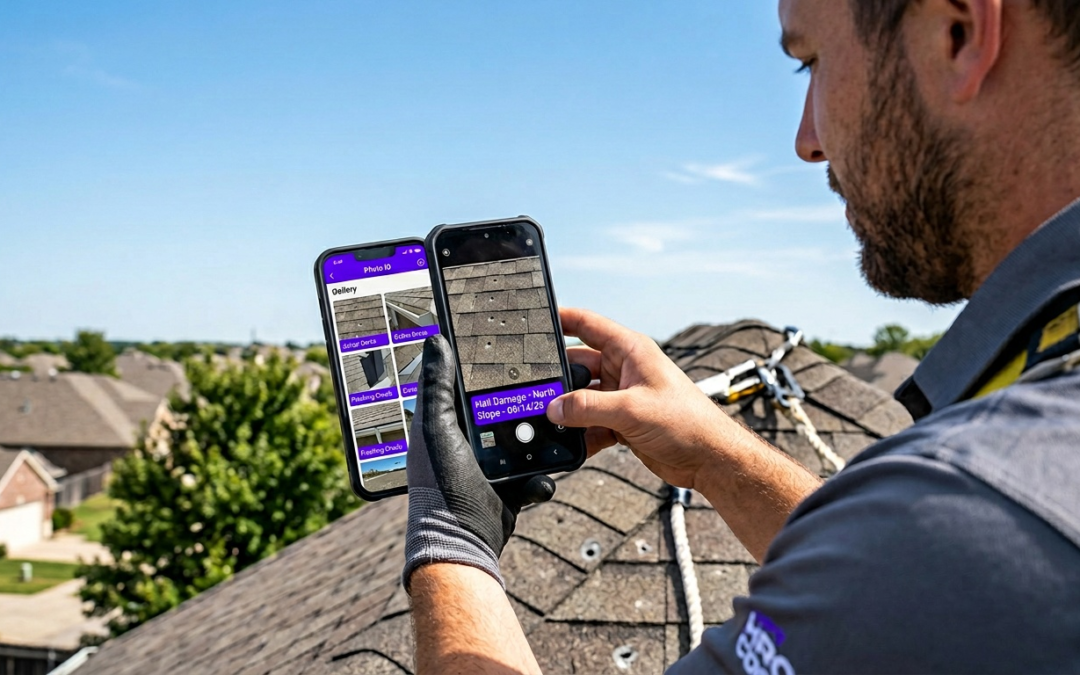
location tagged photo app
Location Tagged Photo App
Key Takeaways
- Location tagged photos eliminate manual data entry errors for field teams.
- Dedicated apps automatically embed precise location data, saving time on every job site.
- Accurate photo location prevents costly disputes and rework.
- Standardizing photo documentation with location tags improves team consistency and accountability.
- Using a specialized app like PHOTO iD streamlines reporting for all field professionals.
Location Tagged Photo App Guide for Field Pros
Why Location Tagged Photo Apps Solve Field Documentation Pain Points
A location tagged photo app automatically embeds GPS coordinates into every image at capture. For field pros, this eliminates manual logging, proves site presence, and produces verifiable documentation that moves claims forward without disputes.
Manual Tagging Wastes Hours on Every Job
Writing addresses on photos after the fact, cross-referencing timestamps, and sorting hundreds of unlabeled images eats hours you cannot bill. On a multi-property week, that cost compounds fast.
Field Reality Check
Inspectors who switch to automated GPS tagging report reclaiming 2 to 4 hours per week previously lost to manual photo organization and relabeling.
Losing GPS Data Hurts Report Accuracy
Consumer camera apps can discard location metadata when photos are compressed, shared by text, or uploaded to cloud storage. By the time images reach a report, the GPS record may be gone entirely. Without verifiable coordinates, adjusters question where and when photos were taken–and that uncertainty stalls approvals.
Inaccurate Locations Delay Claims and Payments
A single location discrepancy triggers adjuster review requests. Each back-and-forth adds days to your payment cycle. Accurate, embedded GPS data removes that friction entirely.
How to Geotag Photos on iPhone with PHOTO iD
Enable GPS Tagging in Seconds
- Install PHOTO iD by U Scope from the App Store or Google Play.
- Open Settings and grant location permissions.
- Start a new job folder. GPS tagging activates automatically on every capture.
- Photograph each area. Coordinates, timestamps, and labels attach in real time.
Need a reference for capturing geotagged photos in the field? The CDFA publishes instructions on how to take geotagged photos that cover location permission basics applicable to any platform.
Capture with a Built-In Pitch Gauge and Compass
PHOTO iD embeds roof pitch readings and compass direction alongside GPS data. Every image carries the site context adjusters need–with zero extra steps on your end.
Download PHOTO iD and start geotagging your first job today.
Streamline Inspections with PHOTO iD Pro Workflow Features
Real-Time Labeling and Custom Workflows
Every photo receives an automatic label at capture: room, damage type, elevation, or any custom category your workflow requires. No post-processing. No guesswork. Labels attach the moment you shoot, so your job folder arrives organized and ready to report.
Export Reports and System Integrations
Once a job folder is complete, PHOTO iD exports structured reports directly to PDF or pushes data into your existing platforms. No manual file transfers. No reformatting. Reports reach your client or adjuster already organized by location, label, and timestamp.
- PDF reports export instantly for direct email delivery.
- Direct integrations with Guidewire (ClaimCenter), Salesforce, Jobber, JobNimbus, and Zapier send data into your existing systems.
- Pre-cataloged, labeled images import cleanly into Xactimate, giving adjusters the structured visual evidence they need to approve estimates faster.
Geotagging Security Risks and Best Practices for Field Teams
Privacy Concerns with Location Data
Embedded GPS coordinates can expose client property addresses inside image metadata. Share an unprotected file by email or public link and anyone with a basic metadata reader can pull that address. For restoration and insurance work, that’s a liability you cannot afford.
“GPS metadata in an unprotected photo is a direct map to your client’s property. Field teams that ignore this risk expose themselves and their clients to serious privacy violations.”
PHOTO iD Controlled Data Handling
PHOTO iD keeps location data inside structured job folders rather than exposing it in raw, shareable files. Reports deliver GPS context to authorized recipients through controlled export channels tied to your workflow integrations. U Scope Technologies is SOC 2 compliant and uses SSL encryption to protect user data at the platform level.
Tips to Protect Client Sites
- Never share raw image files through public links or unsecured messaging apps.
- Export reports only through PHOTO iD structured PDF or integration channels.
- Audit location permissions on every team member’s device at the start of each project.
- Confirm that your client’s data-handling agreement covers GPS-embedded documentation.
Protect your documentation and speed up your claims. Download PHOTO iD now.
Frequently Asked Questions
What is a location tagged photo app?
A location tagged photo app automatically embeds GPS coordinates, timestamps, and other data directly into images as you capture them. For field professionals, this creates verifiable documentation, proving site presence and streamlining reporting. It eliminates the need for manual logging and cross-referencing.
How do I take location tagged photos on my phone?
To take location tagged photos, download a specialized app like PHOTO iD and grant it location permissions. The app will then automatically embed GPS data, timestamps, and labels into every photo you capture. This process activates in real time, ensuring each image has verifiable site context.
Why should field professionals use a location tagged photo app?
Field professionals benefit by eliminating hours spent on manual photo organization and relabeling. These apps provide accurate, embedded GPS data that prevents claims delays and disputes. They ensure every photo carries verifiable site context, moving claims and projects forward efficiently.
What features does PHOTO iD offer for field documentation?
PHOTO iD provides features like real-time labeling, custom workflow templates, and a built-in pitch gauge and compass. It also supports video capture, image editing with annotations, and direct integrations with software such as Guidewire, Salesforce, and Xactimate for streamlined reporting. The app offers unlimited images and cloud storage.
How do location tagged photo apps ensure data accuracy?
Specialized location tagged photo apps prevent the loss of GPS metadata that often occurs with consumer camera apps during compression or sharing. They embed coordinates at capture, ensuring the location record remains intact and verifiable. This accuracy is key for preventing disputes and speeding up payment cycles.
How do these apps help with reporting and system integration?
Apps like PHOTO iD streamline reporting by allowing quick export of PDF reports or direct data integration with existing systems. They support platforms such as Guidewire, Salesforce, JobNimbus, and Xactimate. This means precoded, GPS-tagged images and structured reports import cleanly, saving time and reducing manual reformatting.
Are there privacy considerations when using location tagged photos?
Yes, embedded GPS coordinates can expose client property addresses within image metadata. It is important to be mindful of how you share these files, avoiding unprotected emails or public links. Always follow best practices for data handling to protect sensitive information.