
inspection report generator
What Is an Inspection Report Generator and Why You Need One Now
An inspection report generator is a field tool that converts on-site photos into structured, labeled, submission-ready reports. For property inspectors and contractors, it eliminates hours of manual sorting and delivers documentation that holds up under adjuster review.
The Pain of Manual Reports in Property Inspections
Manual documentation creates a predictable failure chain: unlabeled photos, mismatched file names, missing before-and-after sequences, and reports assembled hours after the inspection ends. Adjusters flag incomplete submissions. Payments stall. You revisit completed jobs.
The core problem is not effort. It is process. Without a structured inspection report generator, every inspector builds a different report in a different order with different photo logic. That inconsistency costs you money.
Core Benefits for Field Professionals
- Reports generated on site, not back at the office
- Photos labeled in real time with location, category, and condition
- Consistent documentation across every inspector on your team
- Faster claim approvals with structured, adjuster-ready photo evidence
- Fewer callbacks and reinspection requests
PHOTO iD: Built for Speed and Accuracy
PHOTO iD by U Scope was designed specifically for field teams that cannot afford documentation errors. It captures, labels, and organizes photos as you shoot, producing structured reports that align with how insurers review and approve claims.
Why Structured Documentation Wins
Insurance adjusters do not need more photos. They need photos that tell a clear, sequential story with location context, damage categorization, and consistent labeling. PHOTO iD delivers that format on every inspection.
Key Features That Make Inspection Report Generators Field-Ready
Real-Time Photo Labeling and Organization
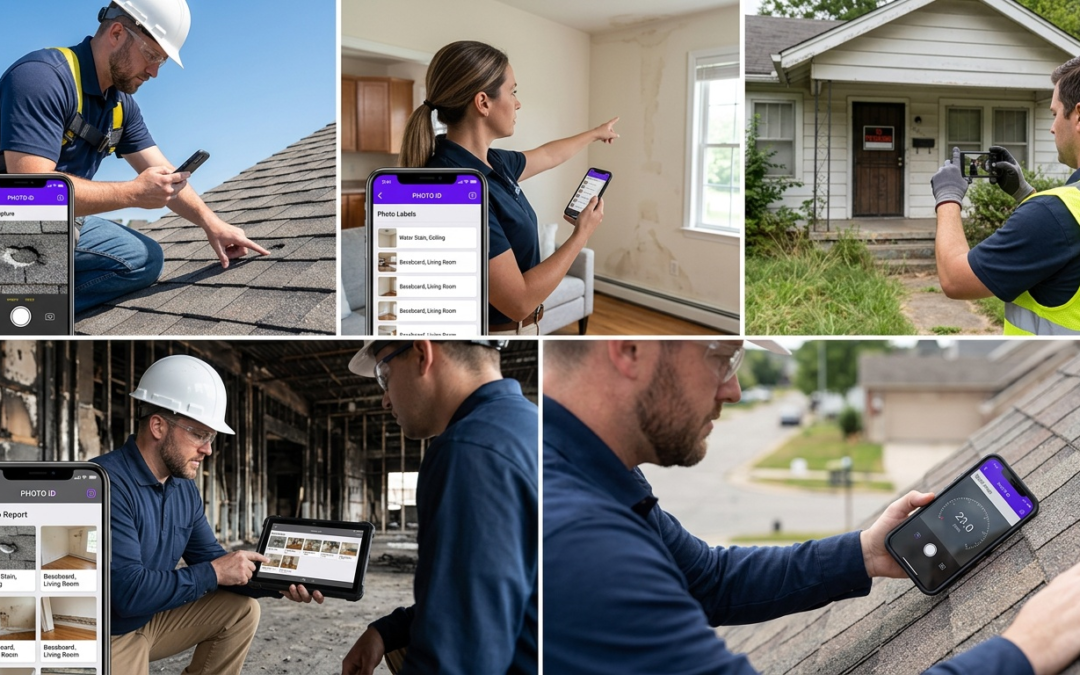
The difference between a rejected claim and an approved one often comes down to photo organization. An effective inspection report generator labels each image at capture: location, damage category, condition, and sequence. PHOTO iD applies this structure automatically, so your report is organized before you leave the property.
Unlabeled photo dumps force adjusters to interpret context. That interpretation creates delays. Pre-labeled, sequenced images eliminate ambiguity and move claims forward without back-and-forth.
Built-In Field Tools Like a Pitch Gauge and Compass
Generic photo apps capture images. PHOTO iD captures evidence. The built-in, in-camera pitch gauge measures roof slope directly from your device. The in-camera compass records orientation. GPS tagging anchors every photo to a precise location. These data points appear inside the report automatically, giving adjusters verifiable measurements without a separate field tool or manual data entry.
For roofing contractors and property inspectors, this removes a common bottleneck: returning to a site because measurement data was not captured during the initial visit.
Offline Access and Automated PDF Exports
Field conditions are not always cooperative. Basements, rural properties, and storm-damaged structures often have no signal. PHOTO iD operates fully offline, capturing and organizing photos without an active connection. Once signal is restored, the app syncs automatically.
Completed inspections export directly to structured PDF reports. Reports also integrate with Guidewire (ClaimCenter), Salesforce, Jobber, and JobNimbus for immediate claim submission without manual reformatting.
Compatibility with Xactimate and Key Integrations
PHOTO iD works seamlessly with Xactimate workflows. Pre-cataloged and labeled images export in a format that moves cleanly into Xactimate, supporting faster, more accurate estimating and quicker claim approvals. Adjusters receive organized visual evidence that maps directly to line items, reducing estimate revisions.
Pros
- Real-time labeling eliminates post-inspection sorting
- Built-in, in-camera pitch gauge and GPS remove manual measurement steps
- Full offline functionality for low-signal environments
- Direct PDF export and CRM integrations speed submission
- Compatible with Xactimate for structured photo import
Cons
- Full feature set requires comfort with mobile devices
How to Generate Inspection Reports from Photos in Minutes
Step-by-Step Workflow with PHOTO iD
- Open PHOTO iD and select or create a job profile before arriving on site.
- Capture photos using built-in categories: exterior, interior, roof, damage, and completed work.
- Labels, GPS coordinates, pitch readings, and compass orientation attach to each image automatically at capture.
- Review the organized photo sequence before leaving the property.
- Export a structured PDF or push directly to Guidewire (ClaimCenter), Jobber, JobNimbus, or Salesforce.
The entire sequence from first photo to a submission-ready report takes minutes, not hours. No office time. No reformatting. No chasing down unlabeled files.
Custom Workflows for Property Preservation and Roofing
Property preservation and roofing inspections follow distinct documentation sequences. PHOTO iD supports custom workflow templates tailored to each trade. Preservation teams capture winterization, lawn maintenance, and securing sequences in a defined order. Roofing contractors document slope measurements, flashing conditions, and storm damage in a format adjusters recognize immediately.
Custom workflows eliminate guesswork about the next photo. Every team member follows the same capture sequence, producing consistent reports regardless of who ran the inspection.
Virtual Inspections for Remote Claims Processing
Remote claims processing demands documentation that stands on its own without an adjuster on site. PHOTO iD’s remote capture and virtual inspection assist features provide GPS-verified locations, labeled damage categories, and sequential before-and-after images that give remote reviewers full visual context.
Carriers and third-party administrators receive a complete, organized file. Requests for additional photos drop significantly when the original submission is structured correctly from the start.
Choose the Right Inspection Report Generator for Your Team
Offline Capabilities and Industry Use Cases
Signal loss is not a rare edge case. It is a daily reality for inspectors working basements, rural properties, and storm-damaged structures. Your inspection report generator must function without connectivity. PHOTO iD captures, labels, and organizes photos fully offline, syncing automatically once signal returns.
- Property preservation: winterization, securing, and debris documentation
- Roofing: slope measurement, storm damage, and material condition reporting
- Insurance claims: before-and-after sequences with GPS-verified locations
- Restoration: moisture mapping and structural damage documentation
Pricing, Trials, and Getting Started with PHOTO iD
Visit PHOTO iD by U Scope to review current plan options and start a trial. The app is free to download and available on both the App Store and Google Play, so your entire team can onboard regardless of device. Setup takes minutes: create a job, configure your workflow, and start capturing structured documentation immediately.
Measure ROI: Cut Hours and Errors Immediately
The return on an inspection report generator is direct and measurable. Fewer adjuster callbacks means fewer hours spent revisiting completed jobs. Consistent photo labeling means fewer rejected submissions. Automated PDF exports eliminate manual report assembly entirely.
- Track reduction in reinspection requests per month
- Measure claim approval speed before and after implementation
- Calculate hours saved on report assembly per inspector per week
Field teams that document with structure get paid faster. That is the clearest measure of whether your current process is working.
Frequently Asked Questions
What problems do manual inspection reports create for field professionals?
Manual reports lead to a chain of issues: unlabeled photos, mismatched file names, and missing sequences. This inconsistency means adjusters flag incomplete submissions, payments stall, and you often revisit completed jobs. The core problem isn’t effort, it’s a lack of structured process.
How does an inspection report generator improve field documentation efficiency?
An inspection report generator converts on-site photos into structured, labeled reports in real time. This eliminates hours of manual sorting back at the office, ensuring consistent documentation across your team. It allows you to generate professional and detailed photo reports before leaving a jobsite.
Can inspection report generators be used without an internet connection?
Yes, effective inspection report generators like PHOTO iD operate fully offline. They capture and organize photos even without an active signal. Once a connection is restored, the app syncs automatically, ensuring your work is saved and ready for export.
What specific tools are included in an inspection report generator like PHOTO iD?
PHOTO iD includes built-in field tools directly in the camera. This means an in-camera pitch gauge measures roof slope, and an in-camera compass records orientation. GPS tagging also anchors every photo to a precise location, providing verifiable measurements automatically.
How do these generators help speed up insurance claim approvals?
Inspection report generators create structured, adjuster-ready photo evidence with real-time labeling and organization. This clear, sequential story with location context and damage categorization reduces ambiguity for adjusters. It supports faster claim approvals and helps decrease adjuster management cost.
Is it possible to customize report workflows for different inspection types?
Yes, PHOTO iD supports custom workflow templates tailored to specific trades like property preservation or roofing. These templates guide team members through a defined capture sequence, ensuring consistent reports. This eliminates guesswork and produces documentation that adjusters immediately recognize.
How quickly can I generate a complete inspection report using one of these systems?
With a system like PHOTO iD, you can generate a submission-ready report in minutes, not hours. Photos are labeled and organized automatically as you shoot them on site. You can then export a structured PDF or push it directly to integrated platforms without any office time or reformatting.