

What if clients decide whether they trust your work before they see the finished result? Learning how to look more professional as a contractor isn’t about expensive gear or a polished image. It’s about the signals clients notice first: clear updates, a prepared jobsite, and confidence that you’ll follow through.
It’s understandable to focus on the quality of the finished work. But unclear estimates, missed updates, or incomplete records can create doubt long before the final walkthrough. A consistent process helps set expectations, prevent avoidable misunderstandings, and show clients you take their project seriously.
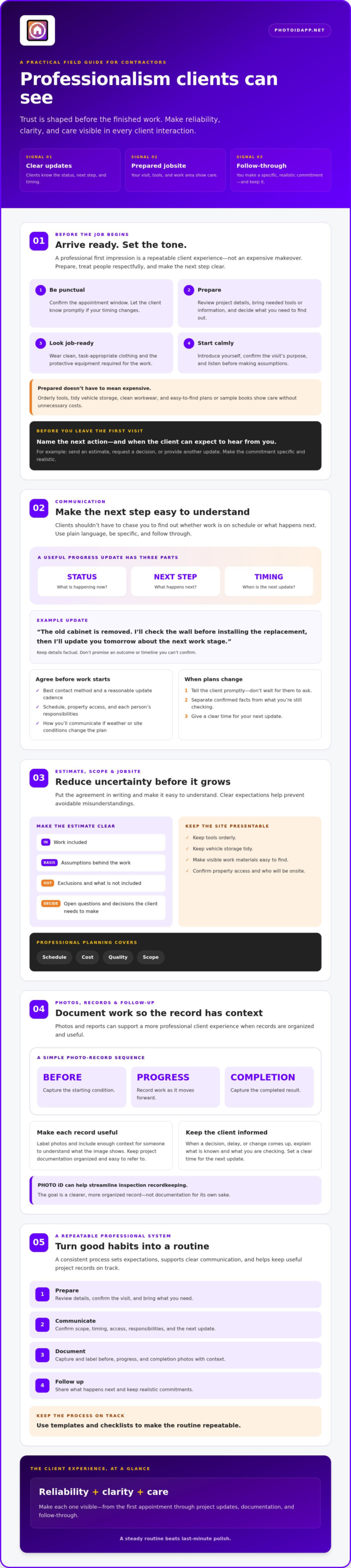
This guide shares five practical steps for making a confident first impression without unnecessary expense. You’ll learn how to communicate clearly, keep your site presentable, manage schedules and commitments, and organize useful project documentation. We’ll also cover how photos and reports can support a professional client experience, including how PHOTO iD can help streamline inspection recordkeeping.
Key Takeaways
- Learn how to look more professional as a contractor by building a consistent client experience, not investing in an expensive makeover.
- Use clear written updates to confirm project scope, timing, site access, and responsibilities before misunderstandings take hold.
- Make estimates easier to understand by outlining the work, assumptions, exclusions, and decisions clients need to make.
- Capture and label before, progress, and completion photos with enough context to make project records more useful.
- Create a repeatable routine for preparing, communicating, documenting, and following up, then use templates and checklists to keep it on track.
How to Look More Professional as a Contractor Before the Job Begins
Professionalism isn’t a costly makeover. It’s a repeatable client experience: arrive prepared, treat people respectfully, and make the next step clear. Those habits can shape a client’s confidence before you pick up a tool. In practice, contractor professionalism is reliability, clarity, and care made visible in every client interaction.
Use this checklist before your next meeting or site visit:
- 1. Be punctual. Confirm the appointment window and promptly let the client know if your timing changes.
- 2. Prepare. Review the project details, bring the tools or information you’ll need, and decide what you need to find out.
- 3. Look job-ready. Wear clean, task-appropriate clothing and the protective equipment required for the work.
- 4. Start calmly. Introduce yourself, confirm the purpose of the visit, and listen before making assumptions.
Make a strong first impression without overspending
You don’t need expensive branding to look prepared. Clean workwear suited to the task, orderly tools, and tidy vehicle storage show care without adding unnecessary costs. Keep visible work materials, such as plans or sample books, easy to find instead of buried under clutter. Then bring the same courtesy to every visit. Consistency is more convincing than a polished logo paired with a missed appointment or rushed greeting.
Prepare clients for the first site visit
Remove uncertainty before you arrive. Confirm the appointment window, how you’ll access the property, and who’ll be onsite. When you arrive, explain what you’ll look at and ask focused questions about the client’s priorities, constraints, and expectations. Planning and scheduling are core parts of construction management, alongside budgeting and quality management. These professional construction management techniques begin with setting clear expectations, even on a small job.
Before leaving, tell the client what happens next. Will you send an estimate, request a decision, or provide another update? Name the next action and when they can expect to hear from you. You don’t need a complicated system. You do need to make a specific, realistic commitment and follow through.
These basics answer the practical question of how to look more professional as a contractor: make it easy for clients to see that you’re organized and considerate. A steady routine beats last-minute polish. Prepare, arrive ready, and close the visit with a clear next step.
Use Clear Communication to Build Contractor Client Trust
Clients shouldn’t have to chase you to find out whether work is on schedule or what happens next. Prompt, plain-language updates reduce uncertainty and give clients a chance to respond before a small issue becomes a bigger misunderstanding. Clear communication is a practical part of how to look more professional as a contractor: keep people informed, be specific, and follow through on what you say.
A useful progress update covers three things: current status, next step, and timing. For example: “The old cabinet is removed. I’ll check the wall before installing the replacement, then I’ll update you tomorrow about the next work stage.” Keep the details factual. Don’t promise an outcome or timeline you can’t confirm.
Set expectations before work starts
Put the agreed scope in writing and make it easy to understand. State what the work includes, note exclusions, and list open questions that still need a decision. Confirm the schedule, access arrangements, and each person’s responsibilities. If weather or site conditions could affect the plan, explain how you’ll communicate a change instead of suggesting the schedule can’t shift.
Agree on the best contact method and a reasonable update cadence before work begins. A quick message may suit routine progress, while a call may be better when a decision is needed. The Construction Management Association of America describes responsibilities that include managing schedule, cost, quality, and scope. Its overview of industry-standard practices reinforces why clear expectations are central to a professional working relationship.
Handle delays and difficult conversations professionally
If a change affects timing, site access, or scope, tell the client promptly. Don’t wait until they ask. Separate confirmed facts from what you’re still checking, then give a clear time for your next update. For instance: “The delivery hasn’t arrived, so installation can’t start as planned. I’m confirming the revised timing and will update you by Thursday afternoon.”
Stay respectful and focus on options or next actions. If the work may need to change, explain why and identify the decision required before proceeding. Keep the message in writing when that helps both parties refer back to what was agreed. A concise record can prevent confusion about who approved a change or what the revised plan covers.
When photos support a progress update, organized records can make your explanation easier to follow. PHOTO iD offers photo organization and report generation tools. Explore its photo documentation tools as one option for preparing job records. Use a tool to support your communication, not replace it. Clear words, realistic timing, and reliable follow-up still build trust.
Make Estimates, Scope, and Jobsite Practices Look Professional
A clear estimate and a well-managed work area make your process easier to understand and your care easier to see. Skip the vague verbal total. Give clients a written outline of the work, what it depends on, and what still needs a decision. These practical habits show how to look more professional as a contractor without adding unnecessary formality.
Write estimates clients can understand
Use plain language to describe each task and, where relevant, the materials involved. Separate confirmed details from assumptions, exclusions, and items that depend on an inspection or the client’s selection. A simple comparison table can help you catch gaps before they become disputes:
| Estimate item | What to clarify |
|---|---|
| Scope | Which tasks are included? |
| Assumptions | What conditions or selections does the estimate rely on? |
| Exclusions | What work is not included? |
| Client decisions | What needs approval or selection before work proceeds? |
If a client requests a change, describe how it affects the agreed scope and document approval before proceeding where appropriate. Don’t present an uncertain item as settled. Flag what needs confirmation and explain what information will resolve it. Clear documentation gives both sides a shared plan to refer to.
Communication also supports clear scope. The Construction Management Association of America’s resource library includes Mastering the Art of Construction Client Communication, a useful reference for keeping project conversations transparent and consistent.
Show respect for the client’s property
Before work starts, decide where tools and materials will go, and protect surfaces that could be affected by the job. Keep access paths reasonably clear so clients can move through the space safely. Manage waste in a way that fits the project, and keep packaging, offcuts, and equipment within the work area.
Finish each work period with a quick reset. Put tools in their designated area, leave the site orderly, and tell the client about any concern that needs attention. A tidy work area isn’t just about appearances. It shows you’re treating someone else’s property with care.
Requirements for licensing, safety, and contracts vary by location and type of work. Verify the rules and obligations that apply to your project instead of relying on a general checklist. A clear estimate and orderly site are valuable habits, but they don’t replace applicable requirements.
Document Contractor Work With Clear Photos and Follow-Up
Photos and concise notes can help clients understand what you found, what work you completed, and what still needs attention. Use them to support your communication, not as a substitute for required project records, approvals, or other documentation. A clear record also gives you and the client a shared reference if questions come up later.
Capture useful job photos, not just more photos
Take before photos to record relevant starting conditions, progress photos to show work as it develops, and completion photos to document the finished work. Include enough context to identify where each image was taken and what it shows. A close-up of a repair may be useful, but pair it with a wider view that makes the location clear. For more ideas on keeping images organized, see this professional photo organization guide.
Use consistent labels that identify the area, task, or observation, and include dates where useful. For example, “Kitchen, sink cabinet, before repair” is easier to find and understand than “Photo 14.” Avoid capturing or sharing unrelated personal details. Respect client privacy, and obtain permission before sharing images when required.
Turn records into a client-ready handoff
Close out the job with a brief summary of completed work, remaining items, and client decisions or next steps. Keep it scannable. A short note can state which task was completed, point to a relevant photo, and identify anything still open. Be precise about unfinished work or follow-up rather than suggesting the project is complete when it isn’t.
Make records easy to retrieve and share with authorized people. Consistent labels, dates, and clear descriptions help clients review the handoff without sorting through a camera roll. For inspection-focused contractors, this home inspection app guide explores tools for organizing photos and reports. PHOTO iD offers photo organization, labeling, and report generation tools. Explore PHOTO iD’s documentation tools as one option for streamlining that workflow.
This is a practical part of how to look more professional as a contractor: make the work easy to understand after you’ve left the site. Capture relevant evidence, label it consistently, and finish with a clear handoff. The goal isn’t to produce more paperwork. It’s to give the client a useful record of what happened and what comes next.
Build a Repeatable Professional Contractor System
Professionalism is easier to maintain when it’s built into your workflow. Turn the habits from the earlier steps into a simple cycle: prepare, communicate, document, and follow up. A repeatable process helps you stay consistent from one job to the next, even when the site gets busy. That’s the practical foundation of how to look more professional as a contractor.
Create a simple checklist for every project
Start with a checklist you can scan before, during, and after each job. Keep it short enough to use, then adjust it to suit the work and the client’s needs.
- Before the visit: Confirm the appointment, review the agreed scope, and prepare tools and site materials.
- During the job: Send client updates at the agreed points and capture relevant photos with clear labels.
- At wrap-up: Record completed work, note open items or decisions, and set a reminder for final follow-up.
Use the checklist to catch routine details before they slip, not to replace your judgment. Review it periodically. If a step repeatedly causes confusion, make it more specific. If a task doesn’t apply to a particular project, leave room to mark it as not applicable. A useful checklist supports your process without creating needless admin.
Choose tools that support your process
Get clear on the task before choosing software. Do you need to organize job photos, label them consistently, produce reports, or keep track of documentation across a team? Start with the specific friction you want to remove. A tool should reinforce sound habits, not stand in for clear communication or careful follow-through.
When comparing construction management software, consider which capabilities fit your operation and the work you need to document. PHOTO iD offers photo labeling, custom inspection templates, report generation, and team management tools that can support documentation workflows. Choose only features that address a real need in your process.
Build the routine first, then decide whether a digital tool can make it easier to repeat. If organizing inspection photos and reports is a priority, explore PHOTO iD as an optional documentation tool. Keep the system simple: prepare clearly, communicate consistently, document the work, and close the loop.
Make Professionalism Part of Every Project
Looking professional doesn’t require an expensive image overhaul. It comes from a dependable process clients can recognize: arrive prepared, communicate clearly, make the scope easy to understand, respect the property, and close the job with useful records. Those consistent habits are the foundation of how to look more professional as a contractor and help clients feel informed throughout the work.
Start with one improvement you can repeat on your next job. Use a simple checklist to prepare, keep clients updated, document relevant work, and follow up on open items. Then refine the routine as you learn what helps your projects run more smoothly. Clear, organized documentation can make the handoff easier, too.
For inspection photos and reports, PHOTO iD offers automated photo labeling with voice-to-text support, custom inspection templates, and instant photo report generation. If those tools fit your documentation needs, explore PHOTO iD for organized inspection photos and reports.
Build trust one interaction at a time. Show up prepared, keep your promises, and let the quality of your process reinforce the quality of your work.
Frequently Asked Questions
How can a contractor look more professional on a budget?
Focus on consistent habits before spending on branding. Arrive on time, wear clean clothing suited to the task, keep tools and visible materials organized, and confirm expectations in writing. Send reliable updates and leave the work area orderly. These practical steps answer how to look more professional as a contractor without a costly makeover. Consider uniforms, vehicle upgrades, or software only when they solve a real business need.
What makes a contractor look unprofessional to clients?
Missed appointments without notice, unclear scope, unexplained delays, messy work areas, and unanswered messages can weaken client confidence. If plans change, explain promptly what’s known, what remains uncertain, and what happens next. Record important decisions so both sides can refer to them. Requirements vary by project and location, so check and follow the applicable contract, safety, and licensing rules for your work.
How should a contractor communicate with a client during a project?
Agree on a contact method and update cadence before work begins. Then send concise updates about progress, schedule changes, decisions needed, and next steps. If an issue arises, state the facts and when you expect to provide more information. Keep the tone respectful and direct. Confirm important scope approvals in writing so the client and contractor have a shared record of what was agreed.
Do contractors need uniforms to look professional?
No. Uniforms can help clients identify a crew, but professional appearance also comes from clean, task-appropriate clothing, required protective equipment, respectful conduct, and clear communication. Start with consistent workwear and simple identification if useful. Branded apparel can be considered later if it fits your business and client expectations. A uniform can’t make up for disorganized work or unreliable follow-through.
Why should contractors take photos of their work?
Relevant photos can show existing conditions, work in progress, and completed areas. They can also give clients helpful context when discussing a finding or change. Photograph the relevant area, label images accurately, and include enough context to understand what each one shows. Respect privacy and get permission before sharing images when required. Photos support project records, but they don’t replace contracts, required inspections, or other applicable documentation.
Can contractor software help a small business look more professional?
Yes, when it addresses a real workflow problem, such as scattered job photos, inconsistent labels, or time-consuming report preparation. First decide what information clients and team members need, then choose tools that support those tasks. PHOTO iD offers automated photo labeling, voice-to-text labeling, custom inspection templates, instant photo report generation, and team management tools. Software can make organized documentation easier to repeat, but it doesn’t replace communication or workmanship.