

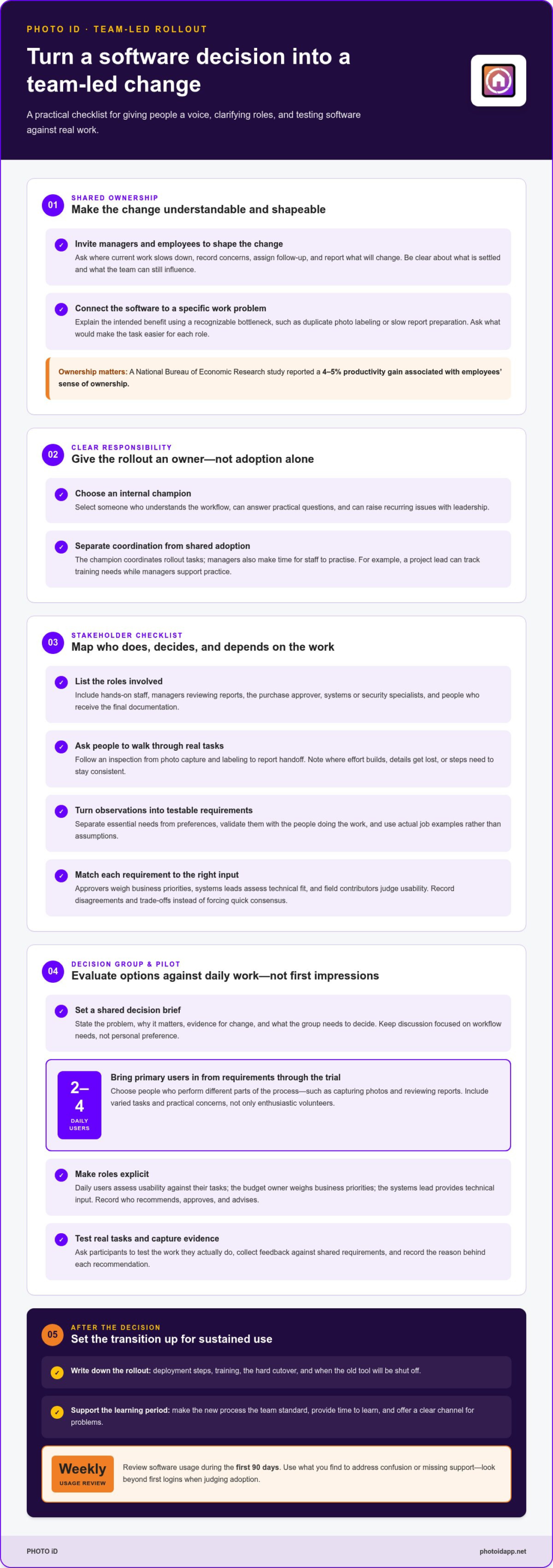
A purchase champion should coordinate the rollout, but shouldn’t carry adoption alone. Getting buy-in from my team for new software starts with involving the people who will use it every day. Build the pilot around 2 to 4 primary daily users, and include them from requirements through the trial.
It’s frustrating to choose software that looks right on paper, only to watch the team return to old workflows. A rollout gains traction when people understand why the change matters, can shape how it works in practice, and see their feedback lead to useful adjustments.
Learn who should own the rollout, which stakeholders need a voice, and how to design a pilot around real work rather than first impressions. You’ll have a practical way to turn a software decision into a team-led change, with clear roles, useful feedback, and a plan for building support.
Key Takeaways
- Give the rollout a clear owner who can connect leadership’s goals to the team’s daily workflow.
- Map decision-makers, approvers, and hands-on contributors before choosing software so key needs surface early.
- Let the people doing the work help evaluate options and shape the decision, not just react to it.
- Design a pilot around real tasks and useful feedback, then look beyond first logins to judge adoption.
Giving management input and ownership of the change
Address employee resistance by asking which task feels harder, listening without arguing, and linking the change to a specific work problem. Set a clear process for raising concerns, then explain how feedback will shape the rollout.
-
Share Change Ownership
Invite managers and employees to shape the change together. Ask a field supervisor where current documentation slows work, then have inspectors describe what a workable onsite process looks like. Record each concern, assign someone to follow up, and report back on what will change. Don’t present a polished decision as open for input. Clarify what’s settled and what the team can still influence.
-
Assign Rollout Responsibility
Choose an internal champion to turn management’s goals into daily action. Pick someone who understands the workflow, can answer practical questions, and can raise recurring issues with leadership. Give this person responsibility for coordinating rollout tasks, but not sole responsibility for adoption. For example, a project lead can track training needs while managers make time for staff to practise.
- Explain the change in terms of work the team recognizes. Show how the software is intended to address a specific bottleneck, such as duplicate photo labeling or slow report preparation. Ask employees what would make the task easier, and capture their preferences before finalizing workflows. Make the potential benefit clear to each role, not just management.
- Set expectations after the decision, then support the transition. Write down deployment steps, training, the hard cutover, and when the old tool will be shut off. Make the new process the team standard, while providing time to learn and a clear channel for problems. Review software usage weekly during the first 90 days, and use what you find to address confusion or missing support.
Involving employees can make them more comfortable with change and shape its direction. A National Bureau of Economic Research study reported a 4-5% productivity gain associated with employees’ sense of ownership.
Identifying stakeholders, approvers, and contributors
Identify team needs by mapping who performs, approves, and depends on each workflow. Then ask those people where current tools slow work, cause errors, or make information hard to find.
-
Identify Stakeholders and Approvers
List every role involved, from field staff capturing photos to managers reviewing reports. Identify who approves the purchase, who handles security or systems, and who receives the final documentation. Confirm that each approval reflects an actual decision right. Don’t confuse seniority with day-to-day expertise or leave out anyone affected by the change.
-
Identify Team Needs
Interview employees about specific tasks before comparing software. Ask an inspector to walk through a typical inspection, from photo capture and labeling to report handoff. Record what takes effort, where details get lost, and which steps must remain consistent. Separate essential requirements from preferences, then validate the list with the people doing the work.
- Turn those observations into testable requirements. If staff repeatedly search for inspection photos, for example, define how they need to organize and retrieve them. If report preparation causes delays, document who creates reports and who reviews them. Use examples from actual jobs, not assumptions about what employees find frustrating. A concise requirements list gives approvers a shared basis for evaluating options.
- Match each requirement to its owner. Ask the approver to weigh business priorities, the systems lead to assess technical fit, and field contributors to judge usability during real work. Record disagreements for discussion instead of forcing quick consensus. This makes trade-offs visible before a decision, such as balancing a manager’s reporting needs with an inspector’s need for straightforward photo organization.
- Bring the requirements into a focused evaluation. For property inspection teams, compare how inspection documentation workflows handle the tasks staff identified, then capture questions for the next review. Keep the criteria visible so feedback stays tied to daily work rather than personal preference.
Selecting stakeholders for the decision process
Bring the people affected by the software into the evaluation before making a final choice. A clear decision group connects business priorities with the realities of daily work.
- Set the decision brief before inviting participants. State the problem, why it matters now, what evidence supports a change, and what the team needs to decide. For example, show where photo labeling or report handoffs create extra work. This gives every stakeholder the same starting point and keeps discussion focused on the workflow rather than personal preferences.
- Include 2 to 4 primary daily users from requirements through the trial. Choose people who perform different parts of the process, such as an inspector capturing photos and a reviewer checking reports. Their input reveals whether a tool fits real field conditions and desk-based review. Don’t select only enthusiastic volunteers; include people with distinct tasks and practical concerns.
- Separate evaluation input from approval authority. Ask the budget owner to decide whether the proposal fits business priorities, and involve the systems lead when technical requirements matter. Daily users should assess usability against their tasks. Write down who recommends, who approves, and who provides specialist input, so a late objection doesn’t reopen a decision everyone thought was settled.
- Give every participant a defined contribution. Ask an inspector to test photo capture, a report reviewer to assess handoffs, and a manager to judge whether the proposed process supports team goals. Collect feedback against shared requirements, then record the reason for each recommendation. This turns comments into decision evidence and helps quieter contributors influence the outcome.
- Close the evaluation with a decision review. Summarize the options against the team’s requirements, note unresolved trade-offs, and invite stakeholders to correct factual gaps. If field staff need fast documentation while managers need consistent reports, for example, discuss how each option handles both. Confirm the approver and decision date before communicating the choice to the wider team.
Designing an influential software pilot
Compare options by asking daily users to complete the same task, then assess task fit, ease of use, and friction points. A useful pilot tests real work and tracks adoption beyond initial logins.
-
Build the Business Case
Connect the software decision to a measurable workflow problem. For example, if report creation takes three hours each week, compare that effort with the time needed using the proposed process. One example estimates automation could save more than 150 hours of work per year for one employee. Show your team the assumptions behind the estimate, and include the work required to adopt the tool.
-
Design the Pilot
Choose 2 to 4 primary daily users and involve them from requirements through the trial. Have them complete a full, realistic task, such as documenting an inspection, organizing photos, and preparing a report. Compare options using the same workflow and criteria. Look beyond first logins: adoption may only become clear in month two or three. Plan your inspection software pilot around the work your team needs to complete.
-
Plan the Rollout and Training
Plan deployment, training, the cutover, and when the old tool will be retired. Base training on each role’s tasks: inspectors can practise field documentation, while report reviewers work through their review steps. Repeat practice where users still get stuck. Introduce the change by explaining its purpose, the expected workflow, and how to raise questions.
-
Reduce Implementation Risks
Track adoption weekly during the first 90 days, not just successful logins. Compare actual use and task completion with the baseline you recorded before the pilot to assess progress and return on investment. Watch for stalled use caused by rollout sequence, unclear ownership, or a missing stakeholder. Once identified and addressed, those problems may be recoverable inside a month.
PHOTO iD: PHOTO iD Mobile App Subscription
PHOTO iD’s Mobile App Subscription supports inspection teams seeking a more consistent way to document property work. Automated Photo Labeling organizes images, Instant Photo Report Generation creates reports, and Custom Inspection Templates structure inspection documentation.
These tools can help your team put pilot decisions into practice. Start with a workflow the team wants to improve, such as labeling inspection photos or preparing reports. Involve the people doing that work as they learn and use the new process. Clear ownership and practical feedback keep the rollout connected to everyday tasks.
If your team is ready to streamline inspection documentation, visit photoidapp.net to explore PHOTO iD.
Turn Team Support Into the Next Step
Make the next step a team commitment, not just a software announcement. Getting buy-in from my team for new software becomes more practical when employees see how their feedback shapes the work ahead. Keep the conversation going after launch: invite people to share what’s working, flag friction, and suggest practical refinements. Ongoing input keeps adoption connected to real tasks.
For inspection teams, PHOTO iD offers a Mobile App Subscription with Automated Photo Labeling and Instant Photo Report Generation. These tools support photo organization and report creation as teams put a new workflow into practice. Match the rollout to the documentation challenges your team wants to address, and share ownership between leadership and daily users.
Take the next step at a pace that fits your team. Contact PHOTO iD about your software rollout and discuss how its inspection tools could support your documentation process. Build the change together, learn from the work, and keep moving forward.
Frequently Asked Questions
Should the person who championed the purchase also own the rollout?
A champion can coordinate the rollout if they have workflow knowledge and time. Keep approval and resourcing with the manager authorized to make those decisions. For example, a champion can maintain a question log and route access issues, while the team lead handles scheduling and policy decisions. This division prevents one person from becoming the only route to answers.
How do I get team buy-in for new software?
A practical way of getting buy-in from my team for new software is to connect the change to a task employees want to improve. Show a field employee a sample job, from photo capture through finished documentation, then ask what could disrupt their routine. Share the feedback and any resulting adjustment. This demonstrates that employee input can shape the new process.
What are the best ways to involve employees in software selection?
Build getting buy-in from my team for new software into the selection process by asking employees to assess realistic tasks, not just watch demonstrations. Have an inspector document a sample property issue while a reviewer checks whether the material is clear and usable. Invite participants to note confusing steps independently before discussing results. Keep usability feedback separate from budget approval responsibilities.
How much training do employees need to adopt new software successfully?
Train employees on the tasks they perform, and repeat practice wherever users still get stuck.