
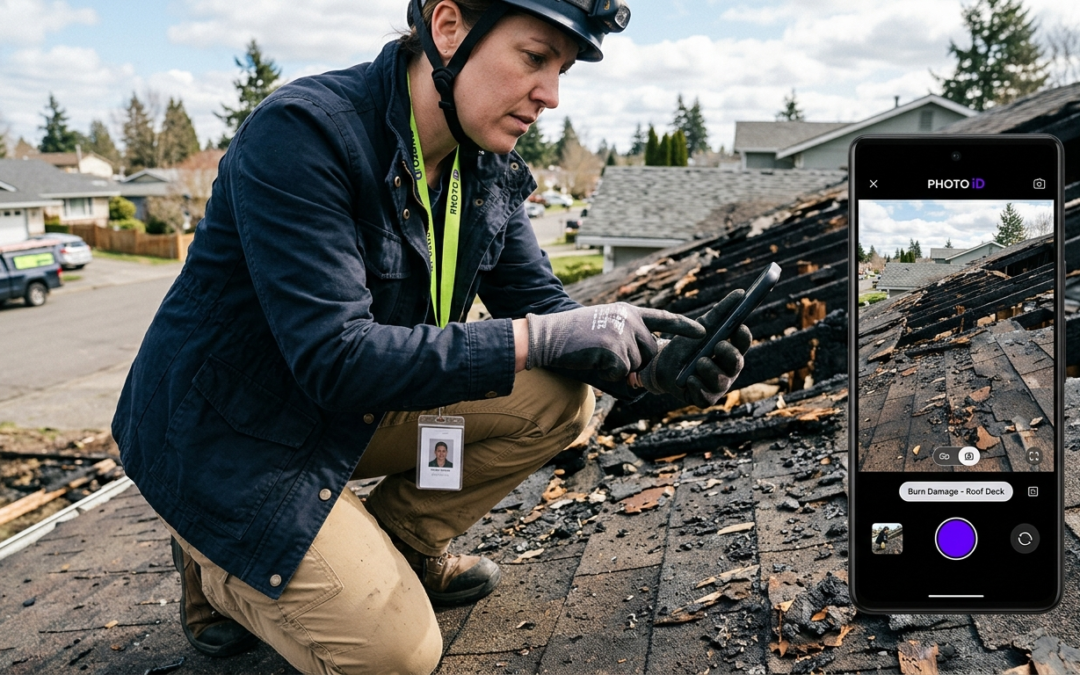
gps tagged construction photos
Quick Answer
GPS tagged construction photos embed precise location coordinates, timestamps, and metadata directly into each image file. This creates strong, court-admissible documentation that reduces location disputes, speeds up insurance claims, and protects your projects from costly he-said-she-said scenarios.
The Unseen Proof: Why GPS Tagged Construction Photos Are Non-Negotiable
What Exactly Are GPS Tagged Construction Photos?
GPS tagged construction photos are images with embedded geolocation data recorded at the moment of capture. Every photo carries coordinates, a timestamp, and device information stored as EXIF metadata. That data travels with the image file, regardless of where the file is sent or stored.
Beyond the Pixel: The Data Baked Into Every Tag
Each tag contains latitude, longitude, altitude, date, time, and device ID. Combined, these fields answer the four questions every insurer, project manager, and attorney asks: What was documented? Where was it located? When was it captured? Who captured it?
The Core Problem: Why Manual Documentation Fails
Manual photo documentation breaks down at scale. Field teams capture hundreds of images per project, then spend hours labeling, sorting, and cross-referencing files. Photos get mislabeled. Timestamps get lost. Location context disappears when files are emailed or uploaded without intact metadata.
The result: delayed claims, disputed invoices, and unanswered RFIs. Every gap in your documentation triggers a follow-up request from the adjuster. Every follow-up adds days to approval timelines.
The Fix: Automated GPS Tagging With PHOTO iD
PHOTO iD by U Scope automates GPS tagging at the point of capture. Every photo taken in the app records location coordinates, timestamps, and custom labels simultaneously–no post-processing, no manual entry, no missing metadata. Field professionals leave the job site with documentation that’s already organized and report-ready.
Why This Matters for Claims
Insurance adjusters approve claims faster when documentation is structured and verifiable. GPS coordinates tied to labeled photos remove ambiguity from every line item–cutting review time and reducing back-and-forth before approval.
Transforming Evidence: How GPS Tags Fortify Your Claims and Projects
Irrefutable Location Proof: Eliminating “Where” and “When” Disputes
GPS tagged construction photos eliminate the two most common dispute triggers: location and timing. When coordinates and timestamps are embedded at capture, no party can credibly contest where work occurred or when it was completed. That metadata is permanent, verifiable, and widely accepted as court-admissible documentation.
Boosting Accuracy and Efficiency in Reporting
Structured GPS data removes the guesswork from report assembly. PHOTO iD organizes images by location and label automatically, so your reports reflect actual site conditions–not a field tech’s memory from three days earlier. Adjusters and project managers receive documentation they can act on immediately.
Key Takeaways
- GPS coordinates embedded at capture cannot be altered retroactively without leaving signs of tampering
- Timestamped photos confirm sequencing for before, during, and after documentation
- Labeled, location-verified images reduce adjuster follow-up requests
- Structured reports export to PDF or sync with Guidewire, Salesforce, Jobber, and JobNimbus
Building Accountability and Transparency on Site
Every GPS tagged photo creates a traceable record tied to a specific team member, device, and location. That accountability layer protects contractors from false claims and gives project owners proof of site activity. When disputes arise, the documentation answers the question before it becomes a legal problem.
Streamlining Progress Tracking and Quality Control
GPS tagged construction photos give project managers a geographic timeline of site activity. Supervisors can verify work completion, identify sequencing gaps, and flag quality issues remotely–using organized, location-stamped images. No site visit required.
The Key Role in Insurance Claims and Dispute Resolution
Insurance adjusters need three things: proof of damage, proof of location, and proof of timing. GPS tagged photos deliver all three in a single file. Pre-cataloged images imported into Xactimate support faster, more accurate estimates because every line item connects to a verified photo. Disputes that once took weeks to resolve can close in days when documentation is airtight.
The Digital Fingerprint: Going Deeper Than Location Data
The Power of EXIF Data
EXIF metadata is the invisible layer attached to every image file. Beyond GPS coordinates, EXIF records device model, lens data, exposure settings, and file creation time. For construction documentation, this helps build a defensible record that a manual log simply cannot replicate.
Context Is Everything: Linking Photos to Project Plans and Notes
Location coordinates alone don’t tell the full story. PHOTO iD attaches custom labels, damage descriptions, and room designations directly to each image at capture. That context connects photos to specific line items, project plans, and inspection notes–so reviewers know exactly what they’re looking at without asking.
Beyond the Snap: Integrating GPS Data With Workflow Automation
PHOTO iD connects with Zapier, Jobber, JobNimbus, Salesforce, and Guidewire ClaimCenter. GPS tagged construction photos captured in the field flow into your existing project management and claims systems without manual uploads or data re-entry. That cuts handoff delays between field capture and office review.
The “No Guesswork” Advantage for Estimating
PHOTO iD is compatible with Xactimate. Pre-cataloged, labeled images import directly into Xactimate estimates, giving adjusters and estimators photo evidence tied to each line item. Reviewers spend less time requesting clarification and more time processing claims.
Practical Challenges: GPS Signal and Privacy
GPS tagging requires location permissions and adequate signal. In low-signal environments, PHOTO iD queues location data locally and syncs once connectivity is restored. When documenting occupied residential properties, confirm local regulations and obtain required authorizations before capturing GPS tagged images on site.
Choosing Your Tool: Mobile-First vs. Traditional GPS Tagging
The Limitations of Standalone GPS Cameras
Dedicated GPS cameras capture location data–and stop there. Files still require manual labeling, sorting, and upload. That workflow adds hours of post-processing per project and reintroduces the same documentation errors that GPS tagging is meant to prevent.
Why Mobile Apps Work Best for Field Professionals
A smartphone running PHOTO iD captures GPS coordinates, applies labels, organizes images, and generates a report-ready output in one continuous workflow. No secondary device. No desktop processing. No delay between capture and delivery.
Key Features to Look for in Photo Documentation Software
- Automatic GPS tagging at the point of capture
- Custom labeling and damage categorization
- Real-time report generation with PDF export
- Integration with claims and project management platforms
- Pitch gauge and measurement tools built into the mobile interface
PHOTO iD: Built for the Field, Designed for Speed
PHOTO iD delivers every feature above in a single field-ready app. Inspectors capture GPS tagged construction photos, apply structured labels, and generate client-ready reports before leaving the job site. Learn more about PHOTO iD and cut documentation delays on your next inspection.
Frequently Asked Questions About GPS Tagged Construction Photos
Can gps tagged construction photos be used as legal evidence?
Yes. Embedded GPS coordinates and timestamps can support a verifiable record that many courts and insurers accept as admissible documentation. Admissibility depends on jurisdiction and the full chain of custody.
Does PHOTO iD work without cell signal?
PHOTO iD can queue location data locally and sync coordinates once connectivity is restored.
Are GPS tagged photos compatible with Xactimate?
PHOTO iD is compatible with Xactimate. Pre-cataloged, labeled images import to support faster, more accurate estimates.
Do I need special equipment to capture GPS tagged photos?
No. Most modern smartphones running PHOTO iD can capture GPS coordinates, timestamps, and custom labels at the point of capture.
What are GPS tagged construction photos?
GPS tagged construction photos are images that automatically embed precise location coordinates, timestamps, and other metadata directly into the file at the moment of capture. This data, stored as EXIF metadata, travels with the image, providing verifiable proof of where and when a photo was taken. It creates strong, court-admissible documentation for your projects.
How do you get GPS tagged photos for construction projects?
The most efficient way is using a specialized mobile app like PHOTO iD. This automates the GPS tagging process at the point of capture, recording location, time, and custom labels simultaneously. It eliminates manual entry and ensures all necessary metadata is embedded without post-processing.
Where can I access or use geotagged construction photos once they're taken?
Once captured, geotagged photos are stored within the image file’s metadata. With a platform like PHOTO iD, these images are organized, labeled, and report-ready, often syncing directly with cloud storage or project management systems. You can export comprehensive reports or share them via web links for easy access by adjusters, project managers, and clients.
Why are GPS tagged photos important for insurance claims and dispute resolution?
GPS tagged photos provide irrefutable proof of location and timing, which are critical for insurance adjusters and dispute resolution. The embedded coordinates and timestamps remove ambiguity, speeding up claim approvals and reducing costly ‘he-said-she-said’ scenarios. This verifiable documentation supports your claim and protects your projects.
What kind of data is embedded in a GPS tagged photo?
Each GPS tagged photo contains latitude, longitude, altitude, date, time, and device ID. This EXIF metadata answers key questions: what was documented, where it was located, when it was captured, and who captured it. This comprehensive data provides a complete digital fingerprint for every image.
Can you prevent photos from being geotagged?
Yes, you can usually disable geotagging in your device’s camera settings or within specific photo apps. However, for construction documentation, disabling geotagging removes critical location proof. For project accountability and faster claim approvals, having GPS data embedded is a significant advantage.
Last reviewed: July 2026