


Do you remember the last time you opened your smartphone gallery to find a specific photo from a job site three weeks ago? You start scrolling. And scrolling. You pass family photos, screenshots of memes, and a blur of 400 identical-looking roof rafters.
Ten minutes later, you’re still looking. Your blood pressure is rising. Your client is waiting on the phone. And you realize: you aren’t just losing a photo; you’re losing money.
When you’re managing a high-volume operation: handling hundreds of inspections and thousands of images: the "standard camera roll" isn’t just inadequate. It’s a liability. Whether you are a restoration pro, a property manager, or a high-volume adjuster, "Photo Debt" is real. It’s the cumulative time and mental energy wasted on disorganized data.
At PHOTO iD by U Scope, we’ve seen teams drown in 20,000+ unorganized property images. We’ve also seen them transition to total clarity in seconds. Here is how you stop the chaos and start winning back your time.
The Hidden Cost of "Photo Chaos"
Most field pros underestimate the damage of a disorganized workflow. They think, "I'll just organize them back at the office." But the "back at the office" work is exactly what's killing your profit margins.
When your photos aren't labeled at the moment of capture, you're relying on memory. And memory fails.
- The Identification Tax: Spending 30 minutes per file just trying to remember which bedroom had the water damage.
- The Claim Denial Risk: Insurance carriers and adjusters are looking for reasons to push back. If your documentation is a disorganized mess, you lose credibility.
- The Admin Bottleneck: Your office staff shouldn't be playing detective. Every hour they spend sorting your photos is an hour they aren't billing or closing new leads.
Are you really willing to work an extra 5–10 hours a week just because your camera app doesn't know the difference between a "Hail Impact" and a "Kitchen Ceiling"?
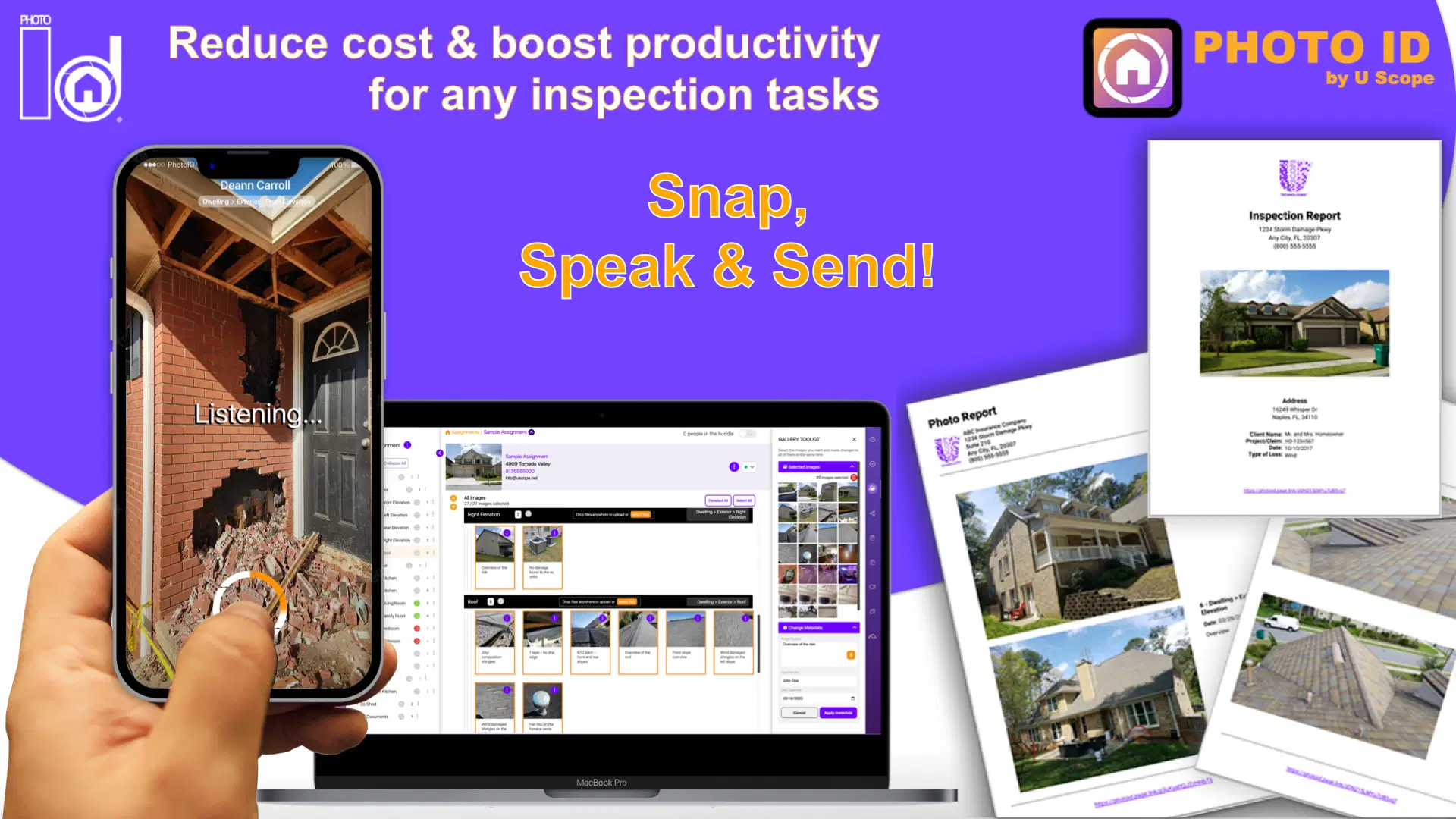
Step 1: Capture with Intent (The "Hands-Free" Revolution)
The secret to organizing 20,000 images isn’t what you do after the inspection: it’s what you do during it.
If you are still typing labels with your thumbs while balancing on a ladder or navigating a crawlspace, you’re doing it wrong. PHOTO iD’s hands-free voice labeling allows you to speak the description of the damage while you take the photo.
Instead of a generic file name like IMG_4829.jpg, your image is instantly tagged as "West Elevation – Wind Damage to Shingles." By the time you get back to your truck, 90% of your reporting work is already done. You can even pre-tag images to specific room or structure categories before you even take the first shot.
Step 2: Instant Categorization via the Cloud
Stop tethering your phone to a laptop. It's 2026; manual uploads are a relic of the past.
As you capture images in the field, PHOTO iD syncs them directly to a centralized cloud-based management dashboard. This means while you are still on-site, your office team can already see the organized catalog.
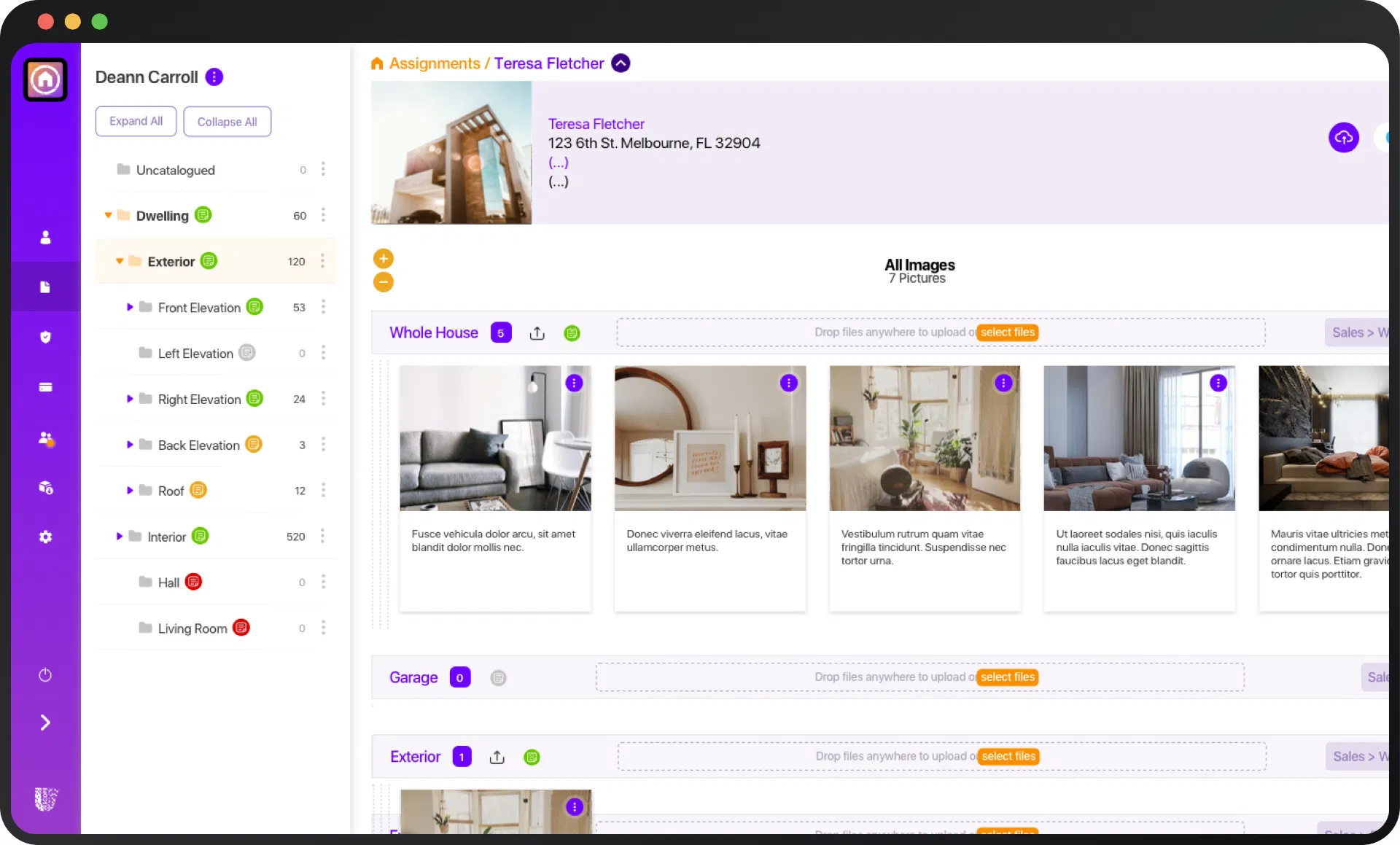
Look at that dashboard. Everything is segmented by category: Exterior, Garage, Kitchen, Roof. When you have 20,000 images across 50 different properties, you don’t need a "folder": you need a searchable, filtered database. PHOTO iD gives you exactly that. You can find any image, from any job, in three clicks or less.
Step 3: Standardize the Workflow
Chaos usually stems from a lack of consistency. If you have three different inspectors, you likely have three different ways of documenting a site. One guy takes 10 photos; another takes 100.
To handle massive volume, you need Custom Workflow Templates. These templates act as a digital checklist for your field team. They ensure that every inspector captures the "Must-Have" shots: like the four corners of the house, the serial number on the HVAC, and the pre-existing damage: in the exact same order every time.
Standardization is the enemy of chaos. When every project follows the same structure, organizing 20,000 images becomes as easy as organizing 20.
Step 4: The Power of Integration (Xactimate & Beyond)
For restoration pros and adjusters, the final hurdle in the "chaos" marathon is getting those images into your estimating software.
How much time do you lose dragging and dropping images into Xactimate? For most, it’s 45–60 minutes per claim. PHOTO iD solves this with a direct export feature. You can export your labeled images directly into Xactimate, maintaining all your labels and categories.
This isn't just a "feature": it’s a massive ROI multiplier. If you handle 10 claims a week, that’s 10 hours of your life back. What could you do with an extra 40 hours a month? Grow your business? See your family? Actually get some sleep?

Professionalism is the Best Marketing
Beyond the time savings, there is the "Client Factor." When you send over a professional, branded PDF photo report within minutes of leaving the job site, you look like a tech-forward powerhouse.
Your clients (and insurance adjusters) don't want a zip file of 300 random images. They want a structured report where every image has a clear label, a timestamp, and a description. Providing this level of clarity isn't just about being organized; it's about being undeniable. When your documentation is this clear, disputes disappear, and you get paid faster.

The Math of Efficiency
Let’s look at the "Hidden Costs" one more time.
- Manual Sorting: 30 mins / job
- Labeling at the Office: 30 mins / job
- Searching for "Lost" Photos: 15 mins / week
- Total Wasted Time: ~75 minutes per project.
If you’re doing 20 projects a month, you’re flushing 25 hours down the toilet. At a professional rate of $100/hr, that’s $2,500 in lost revenue every single month.
Can you afford to keep doing things the old way?
Stop Wasting Time. Start Organizing.
Managing 20,000 images shouldn't be a full-time job. With the right tools, it’s barely even a task.
The transition from chaos to clarity happens the moment you decide to stop using your phone's gallery as a filing cabinet. Whether you're a solo inspector or managing a national field team, PHOTO iD by U Scope is designed to handle the heavy lifting so you can focus on what actually makes you money: the work.
Ready to see the difference for yourself?
Start your free trial of PHOTO iD today and see how easy it is to organize your first 1,000 (or 20,000) images.
Stop scrolling. Start winning. 🚀