
custom inspection checklist
What Is a Custom Inspection Checklist and Why It Matters for Field Teams
A custom inspection checklist is a structured, field-specific documentation tool that guides inspectors through every required observation, photo, and measurement on a job site. Unlike generic templates, a custom checklist maps directly to your workflow, your client requirements, and your reporting standards.
A custom inspection checklist cuts missed steps, inconsistent documentation, and rejected claims by giving your field team a repeatable, job-specific process to follow on every inspection.
Core Elements of Effective Checklists
- Defined inspection categories (exterior, interior, roof, systems)
- Required photo capture points with labeled fields
- GPS and timestamp requirements for location verification
- Condition ratings and measurement fields
- Sign-off and submission steps for accountability
Pain Points It Solves in Property Inspections
Field Reality
Inspectors who rely on mental checklists or paper forms miss key documentation steps. Insurers and clients reject incomplete submissions, forcing costly return visits and delaying payment.
A well-built custom inspection checklist solves three common problems: inconsistent photo documentation, missing field data, and disorganized report delivery. When every team member follows the same structured process, reports hold up under review and approvals move faster.
How to Build Your Custom Inspection Checklist Step by Step
Step 1: Identify Your Inspection Goals
Define the purpose of each inspection before building any fields. A property preservation inspection requires different data points than a roofing damage assessment. Clarity at this stage prevents bloated checklists that slow field teams.
Step 2: Select Essential Fields and Tools
Include only fields that produce reportable data. Required photo capture points, condition ratings, measurements, and location tags are nonnegotiable. Pair your checklist with a mobile documentation tool like PHOTO iD by U Scope to automate labeling and GPS tagging at the point of capture.
- List every required data point for your report output
- Assign a photo requirement to each condition field
- Map fields to your client reporting format
- Add GPS and timestamp requirements to location-sensitive items
Step 3: Test and Refine for Field Use
Run your checklist on two to three live inspections before deploying it across your team. Identify steps that slow inspectors down or produce ambiguous data, then cut or restructure them. A checklist that takes twice as long to complete defeats its purpose.
Industry-Specific Custom Inspection Checklist Examples
Property Preservation Checklist
Property preservation inspections require before-and-after photo documentation for every completed work order. Your custom inspection checklist should capture exterior condition, utility status, interior room-by-room documentation, and debris removal verification with labeled photos at each step.
Roofing and Restoration Inspections
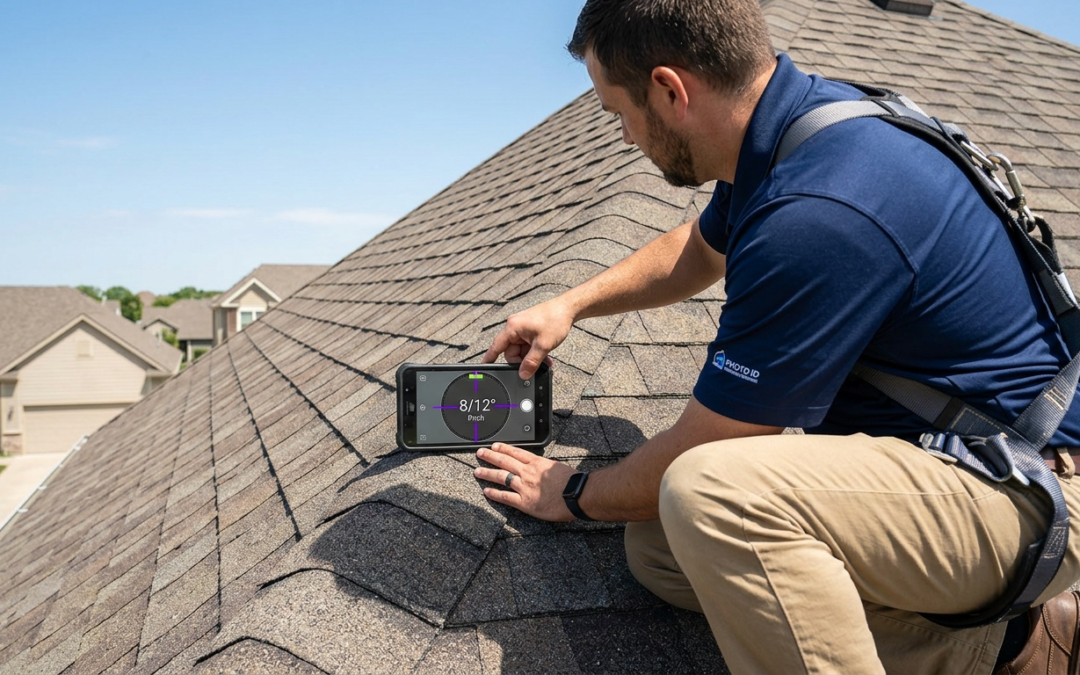
Roofing checklists must include pitch measurements, shingle condition ratings, flashing and valley documentation, and damage-zone photos. PHOTO iD by U Scope includes a built-in pitch gauge that captures roof pitch data in the app, reducing manual calculations and tool switching.
Insurance Claims Documentation
Insurance claim checklists need structured, sequential photo documentation that tells a clear story: pre-loss condition, damage extent, and completed remediation. Pre-cataloged and labeled images from PHOTO iD by U Scope can be exported in Xactimate ESX format, supporting faster estimate approvals through software compatibility.
Streamline Checklists with Mobile Photo Documentation and PHOTO iD
Real-Time Labeling and Organization
PHOTO iD by U Scope labels photos at the moment of capture, reducing post-inspection sorting. Each image is tagged with location, category, and timestamp before you leave the job site.
Built-In Field Tools for Accurate Data
- In-camera pitch gauge for roof measurements
- In-camera compass and GPS tagging for verified location data
- Custom workflow templates aligned to your checklist
- Real-time photo organization by category and room
Export and Compatibility for Fast Reporting
Reports can export to PDF or integrate with Guidewire (ClaimCenter), Salesforce, Jobber, and JobNimbus to support smooth data flow and team collaboration. Structured photo sets can export in Xactimate ESX and Symbility XML formats for estimating.
For detailed safety guidelines on inspection jobsites, refer to OSHA’s Fall Prevention in Construction resource.
Why PHOTO iD Delivers Where Generic Tools Fall Short
Most documentation tools treat photos as attachments. PHOTO iD by U Scope treats them as structured evidence, organized by category, labeled at capture, and ready for immediate report delivery. That difference determines whether your checklist produces a submission that gets approved or one that gets questioned.
Field teams using PHOTO iD by U Scope follow a consistent, repeatable process on every job. Custom workflow templates align to your checklist structure, so inspectors capture what each report requires without guesswork or post-inspection reorganization.
From the Checklist to an Approved Report Without Rework
The gap between a completed inspection and an approved report is where most teams lose time. Sorting unlabeled photos, cross-referencing field notes, and manually building PDF reports can consume hours per job. PHOTO iD by U Scope closes that gap.
- Photos labeled and categorized before you leave the site
- GPS and timestamp data embedded in every image
- Structured photo sets ready for PDF export or direct submission
- Xactimate ESX and Symbility XML export for estimate review
- Integrations with Guidewire (ClaimCenter), Salesforce, Jobber, and JobNimbus
Every item on your checklist maps to a labeled photo and a reportable data point. Reviewers receive documentation that tells a clear, sequential story from initial condition through completed work, with no missing steps and no ambiguity.
Stop rebuilding your workflow after every inspection. Build your checklist once, pair it with PHOTO iD by U Scope, and deliver accurate reports every time.
Frequently Asked Questions
What things are big red flags in an inspection process?
Inconsistent photo documentation, missing field data, and disorganized reports are major red flags in an inspection process. These issues often lead to rejected claims and costly return visits, indicating a lack of a structured approach. A custom inspection checklist prevents these problems by ensuring all required data is captured accurately.
What should be included in an inspection checklist?
An effective custom inspection checklist includes defined inspection categories, required photo capture points with labeled fields, GPS and timestamp requirements, condition ratings, measurement fields, and sign-off steps. Focus on including only fields that produce reportable data to maintain efficiency.
What are the common types of property inspections?
The types of property inspections vary significantly based on industry and purpose. Common examples include property preservation, roofing and restoration, and insurance claims documentation. Each requires a specific custom inspection checklist tailored to its unique data capture needs.
What is the first thing an inspector needs to define for an inspection?
Before building any checklist, an inspector must clearly define the inspection’s goals. Understanding the specific purpose, such as a property preservation inspection versus a roofing damage assessment, ensures the custom inspection checklist is focused and prevents unnecessary data collection.
How can poor inspection documentation negatively impact a property transaction?
Poor inspection documentation, characterized by missing data or inconsistent photos, can lead to rejected claims and delays in approvals. While not directly devaluing a house, these issues can prolong transaction timelines and increase operational costs for field teams. A custom inspection checklist ensures reports hold up under review.
How does PHOTO iD streamline the custom inspection checklist process?
PHOTO iD streamlines the process by labeling photos in real-time at the moment of capture, reducing post-inspection sorting. It includes built-in field tools like an in-camera pitch gauge and GPS tagging for accurate data, aligning directly with custom workflow templates. This ensures structured evidence for faster report delivery and approvals.