

A software pitch wins support when it connects the investment to real inspection costs and organizational needs. If you’re focused on convincing your boss to invest in inspection software, compare the cost of current problems with the proposed investment, then show the expected return. Calculate ROI by subtracting investment costs from the return, dividing by investment costs, and multiplying by 100.
You already know that slow documentation, scattered photos, and inconsistent reports can drain time from fieldwork. The challenge is turning those everyday frustrations into a clear business case leadership can act on. Build a concise proposal that connects inspection problems to measurable costs and potential savings, explains the investment and trade-offs, and shows how better reporting could support staff and customers. Compare the current process with the proposed one, present the evidence in leadership’s terms, and make the next step practical without promising results you haven’t measured.
Key Takeaways
- Start with the inspection workflow problem and show how it affects team output, customer experience, and leadership priorities.
- Shape your leadership pitch with the SCORe storytelling model, keeping the challenge, proposed change, and expected value clear.
- Include direct and indirect incident costs, then account for implementation effort and the measures that help compare investment options.
- Connect software capabilities such as automated photo labeling, instant report generation, and custom templates to your organization’s specific needs.
How to Convince Your Boss to Give You the Right Tools
Build your case around a business problem, supporting evidence, and a workable adoption plan.
-
Define the Business Problem
Describe the workflow gap before discussing software. Record examples such as time spent sorting duplicate photos, delayed reports, missing inspection details, or corrections to documentation. Note when each problem occurs, who handles it, and what work gets displaced. For instance, map the steps for organizing photos and preparing a recent inspection report. Keep the focus on operational impact, not personal preference.
-
Build a Fact-Based Business Case
Gather records that show the scale of the problem, such as report turnaround, correction requests, staff time, and recurring documentation gaps. Explain how you measured each item, and distinguish observed facts from estimates. The U.S. Environmental Protection Agency recommends comparing at least three alternatives. Include the current process, then assess costs, expected benefits, implementation needs, and break-even conditions. A pilot can test a representative workflow against a documented baseline.
-
Show Tangible Business Benefits
Connect each proposed improvement to a business result. For example, organized inspection photos could mean less manual searching, while consistent templates could reduce report corrections. Use your organization’s records to estimate value, and label projections clearly. Include customer experience: explain how clear documentation could help clients understand findings and next steps. When convincing my boss to invest in inspection software, focus on outcomes leadership values, not a feature list.
-
Address Security, Compliance, and Adoption Concerns
For U.S. data security and compliance, identify what data is collected, how it is stored and accessed, and what retention and deletion rules apply. Map relevant legal, contractual, and company requirements with the appropriate internal lead. Adoption risks include workflow disruption, migration effort, uneven use, and training demands. The time needed for implementation and training depends on integrations, templates, workflow changes, and staff coverage, so scope these tasks before scheduling. A pilot can test one representative workflow against its baseline and capture employee feedback. Use those findings when convincing my boss to invest in inspection software.
How do I present to my company leadership?
- Build a SCORe-style story for the meeting: describe the current situation, explain the complication, present a response, and state the expected result. Tie each part to your inspection workflow. For example, show how scattered records complicate report handoffs, then explain what a more consistent process could change. Separate projected results from measured facts so leaders can assess the case clearly.
- Compare software vendors and plans by matching the same requirements against each proposal. Review included users, features, implementation, support, and contract terms, then show the full cost over the period leadership is considering. Costs depend on plan scope, user access, included capabilities, and implementation needs, so compare equivalent offerings rather than relying on a headline price.
- Put the decision data on one page. Include the current workflow, proposed change, expected operational benefit, investment categories, and main adoption risks. Add a simple comparison table and label every figure as recorded, quoted, or projected. If you’re presenting a software demonstration, name who will lead it and describe their relevant inspection or training experience with verifiable examples.
- Close with a specific decision and a forward path. Ask leadership to approve a defined next step, such as evaluating a representative workflow, assigning a pilot owner, or reviewing a written proposal. Make success criteria visible before the evaluation begins, such as report consistency or fewer manual handoffs. A focused inspection software workflow discussion can help turn the proposal into practical next steps.
Explain why the company needs to act by connecting the operational challenge to its consequences. A story about the problem the software aims to solve can make the case relatable, while a simple proposal without unnecessary detail is easier to absorb. Use the story to give context to the decision, not to replace evidence or imply results that haven’t been measured.
Put costs in context instead of presenting a price on its own. Before seeking approval for a product development project, establish credibility by stating what is known, what remains uncertain, and how you reached your recommendation. A direct, well-supported case helps leaders weigh the need for action against the investment and choose an appropriate next step.
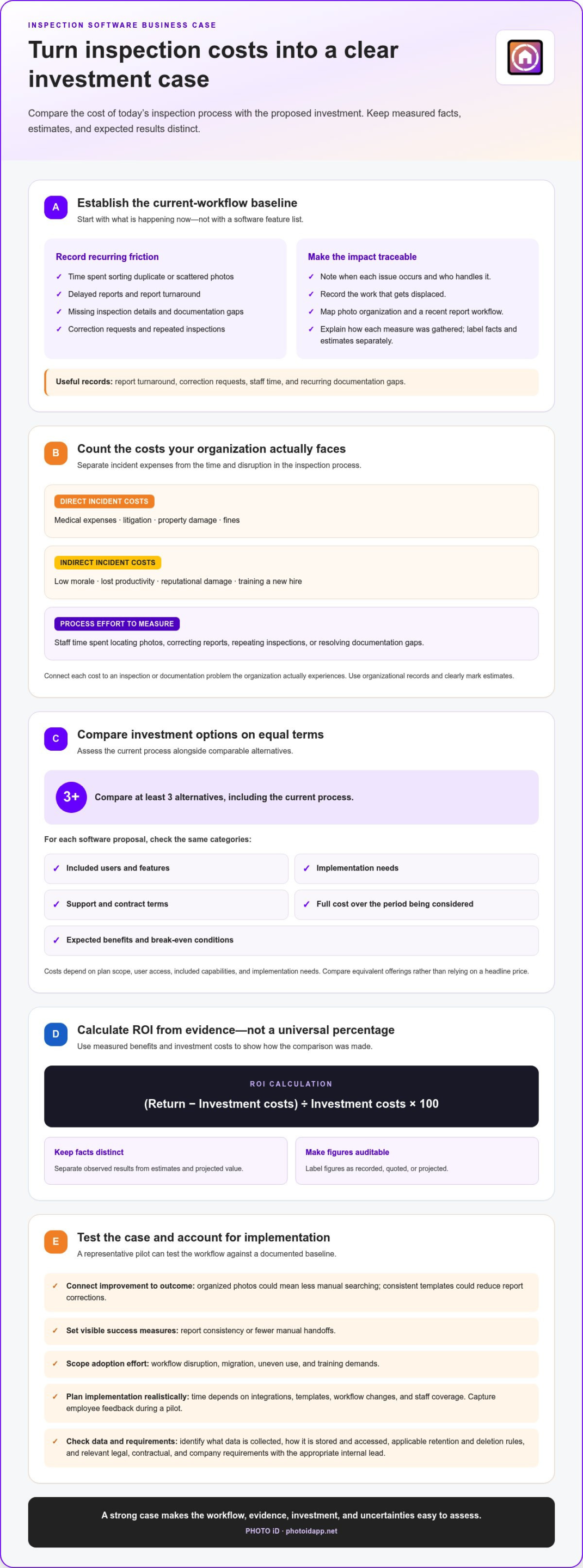
Comparing incident costs with software investment
Compare the investment with the costs of your current inspection process. Inspection software ROI comes from weighing measured benefits against investment costs, not from applying a universal percentage.
- Separate incident expenses into direct and indirect categories. Direct safety-related costs can include medical expenses, litigation, property damage, and fines. Indirect costs can include low morale, lost productivity, reputational damage, and training a new hire. For a useful comparison, connect each cost to an inspection or documentation problem your organization actually faces.
- Measure what the current process consumes. Track staff time spent locating photos, correcting reports, repeating inspections, or resolving documentation gaps. Use your organization’s records and label estimates clearly. For example, compare the time required to complete the same report workflow before and during a controlled software evaluation. This gives everyone a shared baseline for the discussion.
- Build a complete picture of the investment. Include software expenses alongside implementation, training, workflow changes, and ongoing administration. Then compare those costs with measurable changes, such as less manual report work or fewer corrections. The U.S. Environmental Protection Agency identifies return on investment, internal rate of return, payout time, equivalent annual cost, and unit costs as measures for cost analysis.
- Choose a measure that fits the decision. Use payout time when leadership wants to know when benefits could offset the investment. Use unit costs to compare the cost of completing an inspection under each process. Keep assumptions visible, and distinguish recorded savings from projected benefits. This keeps the conversation grounded in evidence rather than optimism.
There is no universal ROI percentage. Compare measurable benefits, such as less manual report work or fewer corrections, with the full cost of software and implementation.
Connecting the investment to organizational needs
Map the inspection workflow to leadership’s goals, then prioritize features that address its specific gaps.
-
Identify Organizational Needs
Start by linking inspection work to a named organizational priority, such as consistent documentation, faster handoffs, or clearer client communication. Talk with field employees, report reviewers, and the manager responsible for the workflow. Compare their needs: inspectors may need easier ways to document work in the field, while reviewers need complete records. Identify the problem behind each request before proposing a tool.
Trace one inspection from assignment through final report. Mark where information is captured, transferred, reviewed, and corrected. For example, if photos arrive without consistent descriptions, show how that affects the reviewer’s next step. Distinguish a team-wide bottleneck from an individual preference, and explain how resolving it supports the organization’s stated priorities.
-
Prioritize Industry-Relevant Features
Choose features by matching each one to a documented workflow need. For property inspections, useful capabilities can include customizable inspection templates, organized photos, virtual inspections, and report-building tools. The right mix depends on what inspectors record, how managers review findings, and what clients need to understand. Don’t prioritize an impressive feature that fails to address a real process gap.
Create a short needs-to-features matrix for leadership. For example, connect inconsistent forms with templates, misplaced images with photo organization, and slow report assembly with report generation. Ask field employees to walk through a representative inspection using the proposed workflow. Note which steps fit naturally and where extra work appears. This review helps leadership assess whether the software fits daily operations.
Use that matrix to explore inspection workflow tools that align with your team’s priorities.
PHOTO iD: PHOTO iD Mobile App Subscription
PHOTO iD’s PHOTO iD Mobile App Subscription supports property inspection documentation when manual photo sorting and report preparation slow the workflow. Automated Photo Labeling organizes inspection images, while Instant Photo Report Generation turns documented findings into reports. Custom Inspection Templates help align inspection records with your team’s process.
Make the proposal specific: show how inspection photos are labeled today, how reports are assembled, and where a consistent template could fit. Then connect the proposed workflow to the needs and measures leadership already values. PHOTO iD is a practical next step when your business case identifies photo organization, report generation, or template consistency as priorities.
Visit photoidapp.net to explore PHOTO iD’s inspection documentation tools.
Turn Your Proposal Into a Practical Next Step
Make the next conversation about action, not another round of abstract debate. Bring leadership a focused proposal, identify who will assess the workflow, and agree on what evidence would support a decision. This gives your team a clear way forward while keeping expectations grounded in the work inspections require.
If you’re convincing your boss to invest in inspection software, connect your recommendation to a workflow the organization wants to improve. PHOTO iD offers a PHOTO iD Mobile App Subscription with Automated Photo Labeling and Instant Photo Report Generation. These capabilities give you concrete tools to discuss when photo organization and report preparation are priorities.
Use the next step to explore whether those tools fit your proposed workflow and decision criteria. Contact PHOTO iD about inspection software and keep building a clear, evidence-led case. You’re ready to move the conversation forward.
Frequently Asked Questions
What are the business benefits of inspection software?
Inspection software can reduce administrative friction, standardize records, and make information easier to retrieve across projects. For example, a supervisor reviewing completed inspections can compare documentation in a consistent format instead of reconciling different files. This can clarify handoffs between field staff and office reviewers, support more consistent customer communication, and help managers identify recurring process gaps during routine reviews.
How to calculate the ROI of inspection software?
Calculate ROI by subtracting investment costs from the financial return, dividing by investment costs, and multiplying by 100%. Include costs such as implementation and staff training alongside the software investment. Estimate returns using changes your organization can measure, such as reduced administrative effort. Keep assumptions separate from recorded results, and use the same evaluation period for both costs and returns.
How to build a business case and presentation for inspection software?
Build a concise case around the decision leadership needs to make. Open with your recommendation, then show an inspection workflow example, the supporting evidence, and the operational change you expect. Include the main trade-offs and explain how the team would assess progress after approval. End with a clear decision request, such as permission to evaluate a defined workflow or assign an internal owner.
How much does inspection software cost for businesses?
Costs vary by plan scope, user access, included capabilities, and implementation needs. Compare proposals against the same requirements and include software, implementation, training, workflow changes, and ongoing administration.