

The best software for independent insurance adjusters isn’t necessarily one platform that tries to do everything. Forcing claims handling, estimating, and field documentation into a single tool can disrupt the workflows you already rely on, while photos and notes still get scattered across assignments.
That’s a familiar headache: you need a clear record from the field, an efficient way to prepare estimates, and tools that fit the claim workflow without creating more busywork. A practical solution is a connected stack built around the jobs you actually do, rather than a one-size-fits-all “best” pick.
This guide compares software by function, including claims platforms, estimating tools, and photo documentation apps. You’ll see where each category fits, what to consider when adding or switching tools, and how to build a workflow that supports collaboration. PHOTO iD focuses on organizing field evidence with real-time photo labels, custom templates, and reports, while working alongside existing adjuster tools. When your tools work together, you can capture, organize, and share assignment details with less friction.
Key Takeaways
- Choose the best software for independent insurance adjusters by matching tools to specific tasks, not by expecting one platform to handle every stage.
- Separate claim administration, estimating, and photo documentation so each tool supports the right part of your workflow.
- Compare software by its core job, useful capabilities, and fit with the processes you already use.
- Map your tasks, find bottlenecks, assess field-image organization needs, and test the workflow before deciding.
- See how PHOTO iD supports field documentation with real-time image labeling, voice-to-text, custom templates, and photo reports.
What Independent Adjusters Need from Claims Software
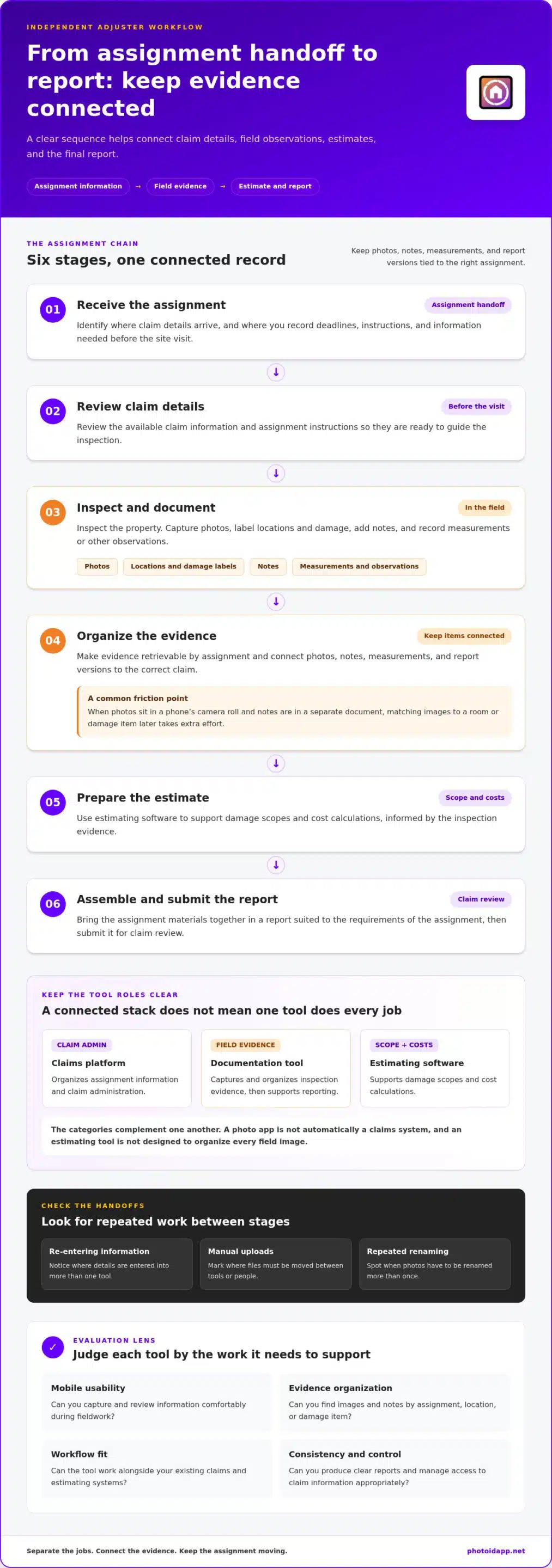
An independent property assignment creates a chain of work: receive the assignment, review available claim details, inspect the property, document observed damage, prepare an estimate, and submit a report. Photos, notes, measurements, and report versions may be created at different stages. Keeping every item connected to the correct assignment makes it easier to retrieve evidence and continue the work without relying on memory.
Adjuster software is a set of digital tools that supports claim administration, damage estimating, and field evidence capture and reporting. These functions can live in separate products. A claims platform helps manage assignment information; estimating software supports scope and cost calculations; documentation tools organize inspection evidence. The best software for independent insurance adjusters fits those distinct needs without forcing one tool to do every job.
Keep the roles clear, too. Agents generally help clients obtain and manage insurance coverage, while adjusters investigate and document claims for evaluation. The Claims Adjuster overview describes the role and its different types. Here, the focus is the independent field adjuster’s work: collect relevant evidence, record observations, and prepare information for claim review.
Map the independent adjuster’s assignment workflow
Start with the assignment handoff. Identify where you receive claim details, record deadlines or instructions, and store the information you need before arriving on site. Then map the field process: capture photos, label locations and damage, add notes, and record measurements or other observations. After the inspection, organize evidence, prepare the estimate, and assemble the report for submission.
Mark every point where information moves between tools or people. For example, if photos sit in a phone’s camera roll while notes live in a separate document, matching each image to a room or damage item later takes extra effort. Keep assignment administration distinct from on-site capture and report preparation, but make sure evidence can move cleanly between those stages. A simple process map can show where you re-enter information, upload files manually, or rename photos more than once.
Decide what “best” means for your work
Set criteria around your actual working conditions. A mobile workflow should make it practical to capture and review information in the field. Documentation should be clear and consistent, while reports should suit the requirements of your assignments. Consider how tools fit your current claim systems, what information they exchange, and how they manage access to claim files. Treat integration, security, and report consistency as evaluation criteria rather than assumptions.
Your setup may be lean. A solo adjuster might prioritize fast capture, organized files, and a straightforward path from inspection to report. If colleagues, desk reviewers, or field partners also handle evidence, consider shared access and collaboration needs. Avoid paying for complexity you won’t use, but don’t overlook the handoffs that matter to your workflow.
- Mobile usability: Can you capture and review information comfortably during fieldwork?
- Evidence organization: Can you find images and notes by assignment, location, or damage item?
- Workflow fit: Can the tool work alongside your existing claims and estimating systems?
- Consistency and control: Can you produce clear reports and manage access to claim information appropriately?
Use these criteria to define the job each tool must perform. That gives you a practical basis for comparing categories and building a stack around your assignments, rather than choosing software based on a broad “best overall” label.
The Main Software Categories Behind an Adjuster’s Workflow
Adjuster tools are easier to evaluate when you separate them by job. A claims platform organizes assignment and claim administration. Estimating software supports damage scopes and cost calculations. Field documentation software captures and organizes inspection evidence, then turns it into usable reports. These categories can work together, but they aren’t interchangeable. A photo app won’t automatically replace a claims system, and an estimating tool isn’t designed to keep every field image organized.
That distinction matters when building an effective adjuster software stack. Start by identifying the task that’s slowing you down, then select the tool category built to handle it. Keep the handoffs in view: claim details guide the inspection, field evidence informs the estimate, and the finished materials support the report.
Claims and assignment management tools
Claims and assignment management software supports the administrative side of an assignment. Depending on the platform and workflow, it may help organize claim records, route assignments, track deadlines, and support carrier-specific processes. VCA ClaimsCore is one example of a platform positioned around claims work and adjusting-firm operations. Its category is claim administration, not on-site photo capture. Think of this type of system as the place to manage assignment information, not a substitute for every field tool.
Keep the boundaries clear. A claims platform may hold the assignment record while a separate documentation tool captures and labels inspection photos. The tools complement each other when field evidence can be delivered into the established claim workflow. PHOTO iD is photo documentation software designed to work alongside existing adjuster tools, not a claims management system.
Estimating and field documentation tools
Estimating software handles a different job: turning damage observations into a structured estimate. Claims-focused estimating platforms support this task, while general business tools may focus on proposals, invoicing, or customer records instead. For adjusters handling vehicle assignments, specialized resources like VinSignal provide instant factory vehicle data from VIN numbers to verify installed options and trim packages during estimate preparation. Choose the estimating category based on the requirements of your assignments and how you currently prepare and submit estimates. Keep it distinct from systems that administer claims or organize inspection images.
Field documentation tools focus on the evidence behind the assessment. They help capture photos, label them with relevant context, organize images by inspection or damage area, and produce photo reports. That structure makes visual evidence easier to review alongside an estimate. Clearly labeled images, for example, can connect a room or exterior section to the observations recorded during the inspection.
PHOTO iD supports this documentation layer with real-time image labeling, voice-to-text labeling, custom inspection templates, and photo reports. It can sit beside the claims and estimating tools already in your workflow. If organizing field evidence is the gap, explore how photo documentation software can fit into the process.
Think in connected categories: administer the assignment, estimate the damage, and document what you observed. Choose tools that support those distinct steps and make the handoffs between them practical.
Compare Adjuster Software by Job, Workflow, and Evidence Handling
Compare tools by the work they perform, not by a broad “all-in-one” label. A claims platform organizes assignment administration, estimating software supports estimate preparation, and field documentation software handles inspection evidence. The right fit depends on where you need support and how smoothly information moves between steps.
| Tool category | Primary job | Useful capabilities to assess | Workflow fit |
|---|---|---|---|
| Claims management | Manage claim records and assignment workflows | Assignment routing, claim information, deadlines, carrier-specific processes | Useful for organizing administrative work and tracking an assignment |
| Estimating | Prepare damage estimates | Tools that support your estimating process and fit how you complete assignments | Used to develop the estimate from inspection findings |
| Photo documentation | Capture and organize field evidence | Image labeling, templates, photo reports, collaboration, and sharing options | Connects inspection observations with visual evidence for review |
These descriptions compare functions, not guaranteed features of every product. VCA ClaimsCore is an example in the claims-platform category. Estimating platforms belong to a separate category focused on preparing damage estimates. PHOTO iD belongs in the photo documentation category. It specializes in organizing field evidence and complements existing adjuster tools; it doesn’t replace claims management or estimating software.
Match software capabilities to the work you do
For claim administration, assess whether the system supports your assignment records, deadlines, and carrier workflows. For estimating, focus on how the software supports your current process, from reviewing inspection findings to preparing the estimate. For field documentation, look for practical ways to label images, apply inspection templates, generate reports, and share evidence with the appropriate people. The best software for independent insurance adjusters is the combination that supports these tasks without confusing their roles.
Picture a roof inspection. The claims tool holds assignment details, the estimating tool supports the damage estimate, and a documentation tool organizes roof and interior images with useful context. Each tool contributes a different piece. Clear labels and a consistent report can help a reviewer understand which evidence relates to each observation.
Check how tools fit together
Test a complete handoff, not each tool in isolation. Can you move from assignment information to field capture, then deliver organized evidence for estimate preparation and review? Consider whether the workflow uses a manual upload, shared reports, or an available integration. PHOTO iD offers API access for third-party integration, but that doesn’t imply a specific named connector.
Compare mobile and web access based on who needs to capture or review information. Mobile capture supports fieldwork, while web access and collaboration can connect field and desk workflows. PHOTO iD supports use on mobile and web, remote capture, and collaboration. Assess how those capabilities fit your process, then choose a stack that keeps evidence clear from capture through report handoff.
If field images are the sticking point, explore PHOTO iD photo documentation as a complement to your current adjuster tools.
Choose Adjuster Software with This Practical Evaluation Checklist
Choose software by testing the work it needs to support, not by counting features on a product page. Follow this sequence to find friction before you commit:
- Map your tasks. Write down what happens from assignment intake through inspection, estimate preparation, and report delivery. Note which systems you already use at each step.
- Identify bottlenecks. Find the slow or error-prone handoffs. Are photos hard to match with notes? Do you spend time renaming images or rebuilding reports? Track the image volume a typical assignment creates and how you need to sort photos by room, elevation, or damage type.
- Compare functions. Match each pain point to the right category: claims administration, estimating, or field documentation. Prioritize tools that address your actual workload rather than overlapping features you won’t use.
- Test the workflow. Use a representative assignment to move through capture, labeling, review, sharing, and report creation. Check the result on the devices and systems you use in practice.
- Decide based on fit. Weigh usability, privacy, access controls, reporting, collaboration, and how the tool fits your existing process. The best software for independent insurance adjusters should make the whole workflow more coherent, not add another disconnected stop.
Test the complete field-to-report process
Run a realistic inspection rather than a quick feature tour. Capture different types of evidence, label the images, review them later, share them with the intended audience, and create a report. Check whether custom templates reflect recurring inspection steps, so the same key details are easier to record from assignment to assignment.
Test remote capture and collaboration against actual needs. If a desk reviewer or another field professional needs to contribute, check whether the handoff works for your process. A home-inspection app guide can offer a related example of how structured field documentation supports repeatable inspections, though adjuster workflows still need to fit claim assignments.
Evaluate adoption, access, and security
Try the workflow on the phone or tablet you carry in the field, then review the output on desktop. Check whether the interface is clear in both settings and whether the right people can access the evidence. PHOTO iD supports mobile and web workflows, collaboration, and multi-factor authentication (MFA). Consider how those capabilities align with your privacy and access-control practices.
PHOTO iD offers a 14-day trial of PRO features, so you can evaluate the documentation workflow before choosing a subscription. Use that time to test actual image volume, organization, templates, and report preparation, not just the setup screen. Try PHOTO iD’s photo documentation workflow with a representative assignment and see how it fits alongside your existing adjuster tools.
Use PHOTO iD to Streamline Independent Adjuster Photo Documentation
PHOTO iD is photo documentation software for independent adjusters and field professionals. It works alongside existing claims and job-tracking tools, focusing on field evidence that can otherwise become hard to sort: images, labels, notes, and reports. Use it to capture and organize documentation without asking a photo tool to replace your estimating or claims platform.
The best software for independent insurance adjusters should fit the full workflow. PHOTO iD supports the documentation layer, from capturing images on site to preparing organized photo reports that can be shared with others involved in the assignment.
Snap, speak, and organize field evidence
Label photos in real time so each image carries useful context as you capture it, such as the relevant inspection area or observation. Voice-to-text labeling lets you add context by speaking rather than typing. This can keep documentation moving when you’re working through an inspection and want to record details while they’re fresh.
Customizable inspection templates help structure recurring documentation steps around your workflow. Use them to create a consistent path through an inspection, then capture unlimited photos and videos as needed. Instead of sorting a large camera roll later, organize evidence as you go and make the resulting documentation easier to review.
Share documentation and move toward a decision
PHOTO iD includes unlimited cloud storage and unlimited photo reports. Mobile and web access supports field and desk workflows, while remote capture can help connect documentation from different locations. Team chat and real-time collaboration support communication around an assignment, and shareable assignment links let you provide access to documentation. These tools support evidence review; claim decisions remain part of the adjuster’s professional work and established process.
Consider a field adjuster documenting several areas of property damage. They can label images during capture, use a template to keep inspection details organized, and compile the evidence into a photo report. A reviewer can then access the shared documentation and discuss the assignment with the field professional. The goal is a clearer handoff, not another disconnected folder of images.
PHOTO iD is designed to complement the claims and estimating tools you already use. It also offers API access for integration with other platforms. To see how its photo documentation workflow fits your assignments, start a 14-day trial of PRO features and test it alongside your current process.
Build a Workflow That Moves with You
Your next step doesn’t have to be a disruptive software overhaul. Start with one real assignment, find the handoff that costs you the most time, and improve that part of the process while keeping the tools that already work. The best software for independent insurance adjusters is the setup that makes field evidence easier to capture, retrieve, and share within your workflow.
PHOTO iD reports 100K+ downloads, 1M+ property inspections, and 20M+ images captured. Its website also reports 30 to 60 minutes saved per job-site task. Test the documentation workflow with your own assignments, then decide whether it fits your field and desk routine.
Start your 14-day PHOTO iD trial and take the next step toward clearer, more organized field documentation.
Frequently Asked Questions
What software do independent insurance adjusters use?
Independent adjusters often combine tools for claim administration, estimating, and field documentation. The best software for independent insurance adjusters depends on the assignment and existing workflow. For example, an adjuster might manage claim details in a carrier or claims platform, prepare a property estimate in estimating software, and use a photo tool to keep roof, room, and exterior images clearly categorized. Choose based on the work each tool needs to support.
Is PHOTO iD claims management software?
No. PHOTO iD is photo documentation software, not claims management or claim-adjusting software. It helps capture and organize inspection evidence, then create photo reports that support review alongside the claim file. An adjuster can use it to keep images and labels connected to an inspection while continuing to manage claim records and estimates in the systems used for those tasks.
Can independent adjusters use PHOTO iD on their own?
Yes. PHOTO iD supports independent contractors as well as team workflows. A solo adjuster can label images with the real-time image labeling camera, add context using voice-to-text, and use customizable templates to organize recurring inspection details. Web access and shareable assignment links can also help the adjuster prepare documentation for review without requiring everyone involved in the claim to use the same field device.
Does PHOTO iD integrate with insurance adjuster tools?
PHOTO iD provides API access for third-party integration and works with existing job-tracking and insurance-adjuster tools. It also supports real-time project sync and shareable assignment links for documentation handoffs. These capabilities can help move field evidence through an established workflow. Integration depends on how your systems are set up, so don’t assume a specific named native connector or that PHOTO iD replaces your claims platform.
How does PHOTO iD help organize claim photos?
PHOTO iD can label images as they’re captured, including through voice-to-text, and group images into pre-categorized sets. Custom inspection templates help structure the information collected during a property visit. The platform supports unlimited photo and video capture, unlimited cloud storage, and unlimited photo reports. For an adjuster, this means evidence from different areas can be organized with context rather than left in an unlabelled camera roll.
Can PHOTO iD support remote property inspections?
Yes. PHOTO iD includes remote capture and virtual inspection capabilities. A field professional can share an assignment link, while a client or tenant can upload documentation through a secure link. Team chat and real-time collaboration help field and desk-based participants discuss project information as it syncs. These tools support remote documentation workflows; they don’t make claim decisions or replace the adjuster’s judgment.
Can I try PHOTO iD before choosing a subscription?
Yes. PHOTO iD offers a 14-day trial of PRO features before you choose a subscription. Use a representative assignment to test the full documentation process: capture images, apply labels and a template, create a report, and share it with the intended reviewer. This hands-on trial can show whether the workflow fits your current tools and helps keep assignment evidence organized.