

The most feature-packed option may be the wrong fit for your field team. Software for managing field inspectors helps teams capture observations, photos, and inspection details in a consistent digital workflow, then organize them into reports and records. The right choice depends on what inspectors document, how they work onsite, and where inspection results need to go next.
Paper forms and scattered photos make it harder to find details, complete reports, and keep field and office teams aligned. A practical system should document work without slowing down the inspection. This guide explains what field inspection software does and how to compare options by industry, team size, workflow, and integrations. You’ll learn which capabilities suit different inspection needs, what to assess, and how to narrow your choices to software your team can use consistently.
Key Takeaways
- See how consistent templates and reporting can make field records easier to capture, review, and use.
- Match software capabilities to the demands of service, compliance, audit, and maintenance inspections.
- Map how inspection findings should move between field teams and your existing project workflows.
- Compare options by industry, team needs, and day-to-day tasks to find a practical fit.
What is field inspection software?
Software for managing field inspectors captures site observations digitally and organizes them into consistent records. Look for templates, offline capture, report workflows, and portfolio views that match how your team documents findings.
Digital Data Collection and Reporting
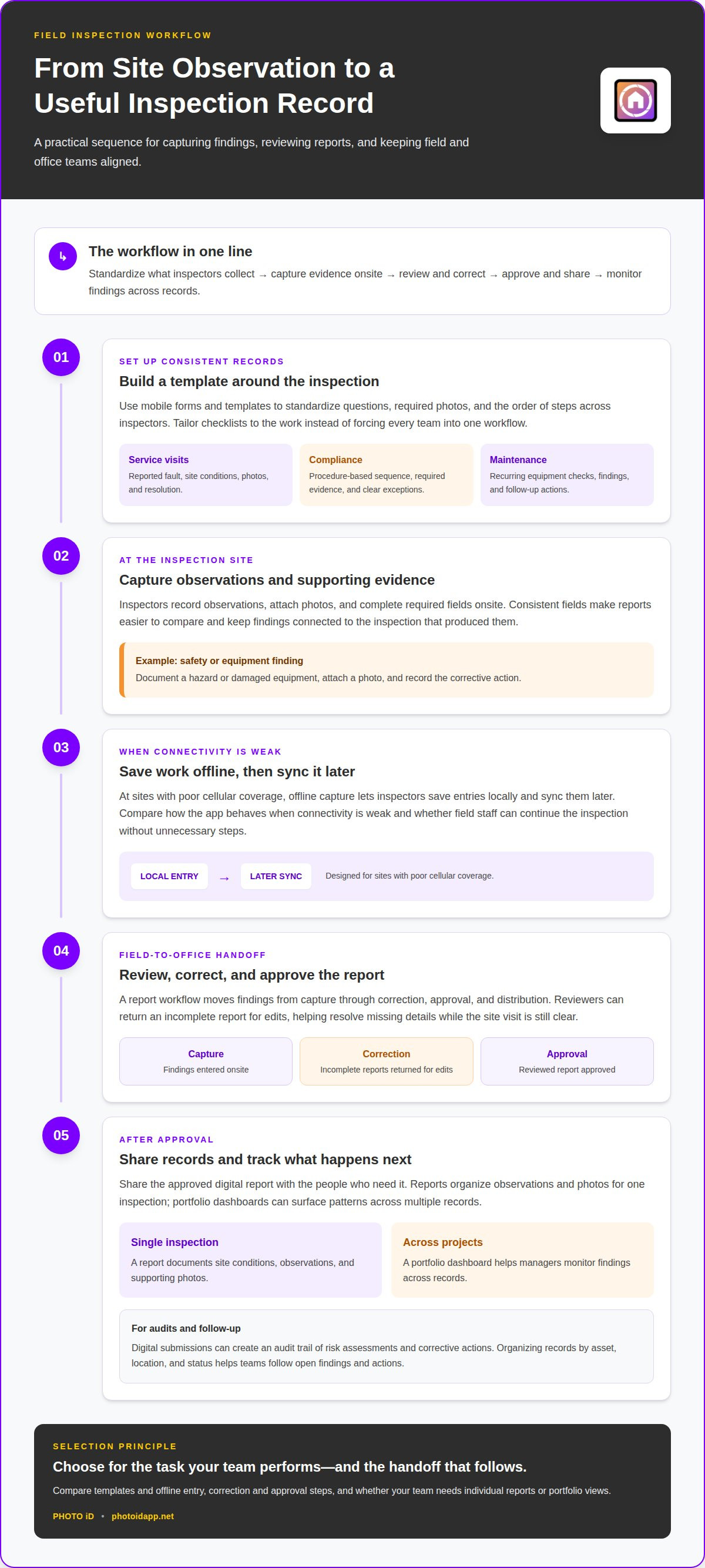
Inspectors use mobile forms to record observations, attach photos, and complete required fields onsite. Templates standardize the questions, photo requirements, and sequence across inspectors, so reports are easier to compare. Offline capture matters at sites with poor cellular coverage: inspectors can save entries locally and sync them later. Compared with dashboards or approval tools, this capability focuses on accurate, consistent collection at the point of inspection.
Report Review and Distribution
A report workflow moves findings from capture through correction, approval, and distribution. Reviewers can return an incomplete report for edits before approval, helping teams resolve missing details while the site visit is still clear. After approval, a digital report can be shared with the people who need the record. Unlike data-capture tools, review workflows focus on accountability and the handoff from field staff to office teams.
Inspection Reports and Dashboards
Inspection reports turn captured data into a record of site conditions, while portfolio dashboards help managers monitor findings across projects. A report can organize observations and supporting photos for a single inspection; a dashboard can surface patterns across multiple records. Some systems also generate issue-tracking reports. Choose this capability when managers need a wider view, rather than only a polished document for one completed visit.
For audits and performance reviews, digital submissions can create an audit trail of risk assessments and corrective actions. Quality audits against ISO 9001 and ISO 13485 look for documented proof that inspection plans were followed and nonconformances were logged. Analytics and benchmarking can help teams compare recurring findings, locations, or inspection results, provided records use consistent fields and categories.
| Option | Primary criterion | Useful for |
|---|---|---|
| Digital capture | Templates and offline entry | Consistent onsite records |
| Review workflow | Correction and approval steps | Controlled report handoffs |
| Reports and dashboards | Individual and portfolio views | Sharing findings and monitoring patterns |
Choose software that supports your team’s main inspection task and the handoff that follows.
Inspection use cases across service, compliance, audit, and maintenance teams
Inspection workflows should reflect the work being documented. A service team records a customer issue and repair actions; a compliance team captures evidence against procedures. Maintenance crews track equipment condition by asset and location, while auditors need records showing what inspectors observed and what happened next.
For service visits, structure the checklist around the work order. Include fields for the reported fault, site conditions, photos, and resolution so technicians capture comparable information across locations. A maintenance team can use a separate checklist for recurring equipment checks, then record findings and follow-up actions. PHOTO iD’s custom inspection templates let teams tailor forms to different inspection types instead of forcing everyone into one workflow.
Compliance management depends on collecting the same required information each time. Set a checklist sequence that reflects the inspection procedure, define required evidence, and record exceptions clearly. Digital quality workflows can give inspectors the current procedure in real time. This helps teams follow consistent steps at each site and keeps findings connected to the inspection that produced them.
For a safety inspection, a field worker might document a hazard, attach a photo, and record the corrective action. A supervisor can review open findings and track whether actions are complete. Maintenance teams can use a similar process for damaged equipment or recurring facility issues. Organizing records by asset, location, and status makes follow-up more direct.
Audit trails help teams follow the sequence from risk assessment to corrective action. For an audit, they need to retrieve the relevant inspection record and see its findings and follow-up. Treat security credentials as a separate selection criterion from inspection compliance: assess your organization’s data-protection requirements and the software’s documented security information. Don’t assume a checklist or audit trail establishes a security certification.
Choose tools that fit the evidence each team must produce, then standardize fields and review steps. For property inspection teams, custom inspection templates can help organize repeatable field documentation.
Enterprise workflows and integrations
Compare how each option moves inspection work from the field to the office. Mobile apps, scheduling, and reporting differ in how they support assignments, photos, connectivity, and review.
Field-to-Office Workflow Management
Field-to-office workflow management connects an inspector’s findings with the records and actions used by office teams. For example, an inspection app can transfer findings into project records and reduce duplicate data entry. Map the handoff from completed field documentation to office review, then identify who handles corrections and follow-up. This matters most when several teams rely on the same inspection result.
Mobile Inspection Workflows
Mobile workflows let inspectors complete forms, capture photos, and submit findings from a device onsite. Compare how easily the app supports the sequence your team follows, from opening an assignment to finishing documentation. Check how it behaves when connectivity is weak, and whether field staff can keep moving without unnecessary steps. This category prioritizes onsite usability over office routing or enterprise reporting.
Assignment management and reporting address different workflow needs. Managers need to coordinate work and understand its status; reporting organizes completed findings for review and sharing. Compare whether the software makes assignments easy to follow and gives office staff the details they need. A clear handoff keeps field work moving through to a usable record.
Approval workflows should make the next action clear. Define who reviews a report, who can return it for correction, and who approves its final version. If digital signatures matter to your process, assess where they fit in that sequence and which records they apply to. Keep approval history connected to the inspection so teams can follow the document’s progress.
For integrations, prioritize the systems that already hold project or inspection records. When software transfers findings into project management platforms, teams can reduce repeated entry and keep records connected. Compare the information transferred, the receiving system, and when the transfer happens. PHOTO iD includes API access to support integration with third-party platforms.
Choosing inspection software by industry and team
The right platform in the United States fits your inspection type, team workflow, and reporting needs. Compare tools by what inspectors document, what managers need to see, and where records must go after each visit.
Construction teams need to find observations by area, not just by report. Look for tools that associate findings with locations or project details. That organization helps managers retrieve a record for a specific site area. If inspectors document progress with frequent photos, prioritize fast capture, clear labeling, and easy retrieval over features the team won’t use.
Property inspection teams often need consistent reports built from photos and repeatable categories. A home inspection workflow may benefit from photo organization and customizable templates. Compliance and audit teams have different priorities: they need inspection data linked to procedures, nonconformances, and corrective actions. Choose a workflow that makes those records easy to trace.
Team size affects the value of collaboration and management tools. A small crew may need straightforward mobile capture and a simple way to share reports. A larger operation may benefit from a team dashboard to oversee work across inspectors and locations. For construction, integrations can also reduce duplicate entry by transferring findings into project records.
- Construction: prioritize location-based findings and project record handoffs.
- Property inspections: prioritize photo organization and repeatable report structure.
- Compliance and maintenance: prioritize procedure-based checklists and action tracking.
Before choosing, trace one real inspection from assignment through final report. Note where manual work slows documentation, where managers lose visibility, and which records need to be retrieved later. Then select the platform type that addresses the biggest workflow gap, rather than the longest feature list. For property teams, streamline photo-based inspection documentation with a workflow built around organized field records.
There isn’t one best platform for every US field team. Shortlist options based on how well they support inspection workflows, record retrieval and reporting, team coordination, and required project handoffs.
PHOTO iD
PHOTO iD helps property inspection teams organize field documentation with a mobile app subscription, automated photo labeling, instant photo report generation, and custom inspection templates. Use these tools when your workflow needs consistent photo records and reports without adding separate manual steps for labeling and assembly.
Templates guide inspectors through recurring inspection types, while automated labeling keeps photos organized with their inspection context. Instant report generation brings captured information into a shareable report. Together, these features connect onsite documentation with finished records.
If you’re comparing inspection workflows for your team, contact PHOTO iD to discuss your documentation needs.
Choose a Workflow Your Team Can Sustain
Start by deciding how fieldwork should move through your team. Before selecting software for managing field inspectors, identify the handoff that most needs improvement and define what a complete inspection record should contain. This gives your team a practical standard for evaluating options without chasing features that don’t support daily work.
Include the people who capture, review, and use inspection records in the decision. Their perspectives can show where a workflow creates friction and which changes would make documentation easier to act on. Keep the goal specific: a process inspectors can follow consistently and office teams can use confidently.
PHOTO iD supports property inspection documentation workflows. Contact PHOTO iD to discuss your needs and explore how its tools may fit your team. Take the next step with a clearer path from fieldwork to organized records.
Frequently Asked Questions
Which field inspection software offers offline access and GPS tracking?
Evaluate photo metadata separately from offline access. Offline access lets inspectors record work when cellular coverage is poor and sync saved records when connectivity returns. Location details and timestamps can help document where and when an observation was recorded. Test a sample inspection to see which details are retained with photos and form entries.
How can companies choose and implement field inspector management software?
Start with one inspection type and map its path from assignment to completed record. Identify who captures information, who reviews it, and which fields are essential. Then configure a representative workflow, train a small group, and gather feedback on mobile use and report handoffs. Expand after the team can complete that workflow consistently, and organize existing records for easy retrieval.
What security and data privacy risks should buyers evaluate?
Evaluate who can view, edit, export, and share inspection records. Consider what happens if a device is lost, a staff member leaves, or a record must be retained or deleted. Ask how access is managed, whether multifactor authentication is available, and how data is protected during storage and transfer. Review how shared links work, especially if clients upload photos or documents. PHOTO iD includes MFA security authentication and shareable assignment links.
What US regulations and industry standards affect digital field inspection records?
Requirements depend on the industry, inspection purpose, and applicable contracts or procedures. For quality audits, ISO 9001 and ISO 13485 audits look for documented evidence that inspection plans were followed and nonconformances were logged. Map each record field to the procedure or requirement it supports, then preserve the related findings and corrective actions together for review.
Which field inspection software works best for small teams versus large organizations?
The best fit depends on workflow complexity, not team size alone. A small team may prioritize easy mobile capture, straightforward templates, and simple report sharing. Larger organizations may need role-based access, dashboards across locations, and integrations that connect findings with project records. For example, compare how each system handles an inspection when one person captures evidence and another team reviews it.