

Manual reporting feels less frustrating when you address the cause, not just the pile of forms. Reducing the frustration of manual reporting starts with separating a temporary snag from a recurring workflow problem, then making a specific change that can help. Ask what makes the task frustrating, and look beyond your first answer.
Repetitive data entry, unclear processes, and reports that take time away from fieldwork can wear people down. Frustration can also point to a practical opportunity: clarify expectations, improve a process, or make documentation easier to complete. Raise concerns constructively, put the problem in context, and identify what is driving the strain. When the workflow needs a rethink, organized photo documentation and reporting tools can reduce manual steps.
Key Takeaways
- Describe the reporting issue clearly, focus on its impact, and make a practical request for change.
- Separate a passing irritation from a recurring problem to decide what response will help most.
- Trace frustration to its root cause, such as repetitive steps or unclear communication, before choosing a fix.
- Explore automation options like photo labeling, custom inspection templates, and instant report generation to streamline documentation.
1. Addressing concerns directly
Start with the situation, then separate the task from the frustration it creates. Ask why the report feels stressful, then ask why again to uncover the root cause. Perhaps entering inspection details twice creates friction because the same information is stored in separate records. Describe the effect without blame: “I feel pressure when I re-enter these notes because it delays the report.” This names the impact and gives others something specific to address.
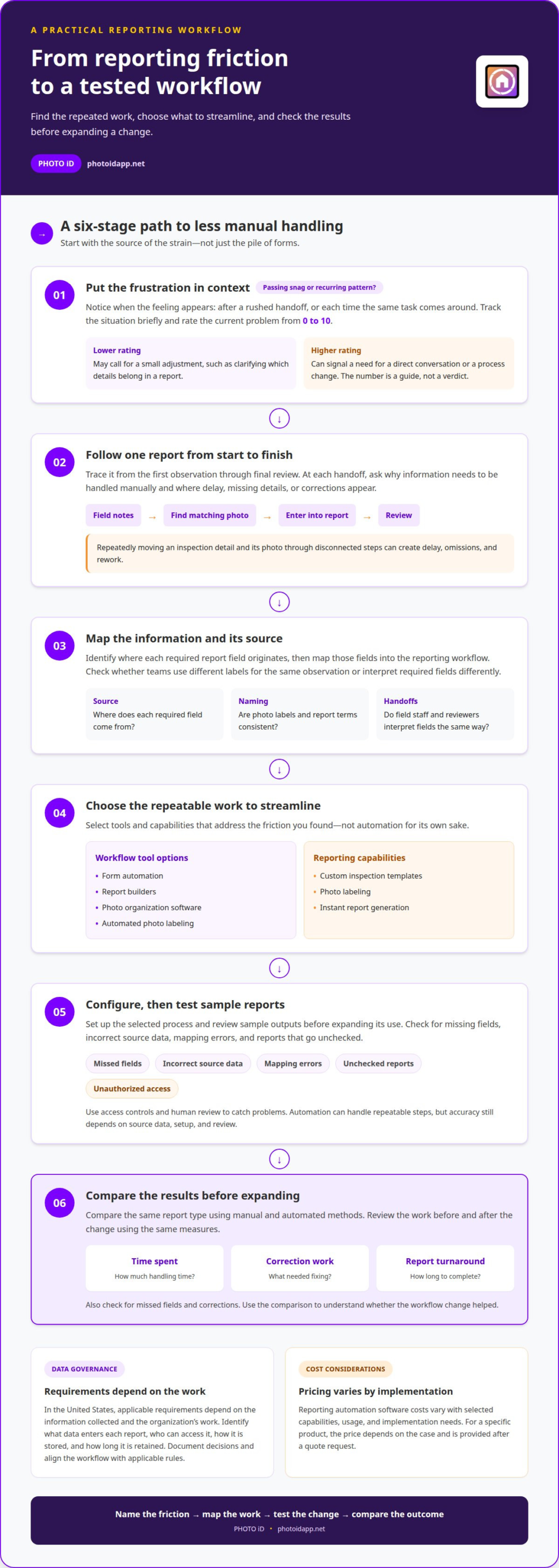
Manual reporting relies on people to enter, organize, and check information; automated reporting can handle repeatable steps. Automation may reduce handling time, but accuracy still depends on source data, setup, and human review. Compare both methods using the same report type, and check for missed fields, corrections, and time spent.
In the United States, applicable data governance and compliance requirements depend on the information collected and the organization’s work. Identify what data enters each report, who can access it, how it is stored, and how long it is retained. Document those decisions and align the workflow with the rules that apply to your organization.
Reporting automation software costs vary by the selected capabilities, usage, and implementation needs. For a specific product, the price depends on the case and is provided after a quote request.
Tools that reduce repetitive work include form automation, report builders, photo organization software, and automated photo labeling. To automate a workflow, map each reporting step, identify repeated tasks, choose what to automate, configure the process, and test sample reports before expanding its use.
Connect reporting tools to existing sources by identifying where each required field originates, then mapping those fields into the report workflow. Common risks include incorrect source data, mapping errors, unauthorized access, and reports that go unchecked. Use access controls and review sample outputs to catch problems. Measure return on investment by comparing time spent, correction work, and report turnaround before and after automation. A clear example can help turn frustration into a solvable process issue.
2. Putting frustration in context
A frustrating report can signal a temporary snag or a persistent workplace problem. Notice when the feeling appears: only after a rushed handoff, or every time the same reporting task comes around? A brief spike may point to a process that needs attention. Recurring stress suggests a deeper cause, such as unclear communication, inconsistent expectations, or repeated steps that interrupt fieldwork. Track the situation briefly to spot patterns instead of treating every difficult day as proof that nothing works.
Rate the current problem on a scale from 0 to 10. A low rating may call for a small adjustment, such as clarifying which details belong in a report. A high rating can signal that the issue needs a direct conversation or a process change. The number isn’t a verdict. It helps separate the immediate emotions from the action that could improve the situation.
Consider the problem alongside other pressures you’re carrying. A delayed report may feel more intense after a difficult inspection or an overloaded schedule. That context doesn’t erase the problem; it helps you choose a response that fits. Ask what you can change now, what needs a team discussion, and what calls for a broader workflow review. Then choose one next step instead of trying to fix everything at once.
Use the result to make a specific request. For example, if unclear handoffs keep creating stress, ask the team to agree on where inspection notes should be recorded. If frustration rises during repetitive photo documentation, examine whether the process can be streamlined. A positive response begins with naming the source and choosing a practical action. To explore a more organized approach to inspection documentation, consider photo-based reporting workflows. Remind yourself that frustration can be useful information: it highlights friction, focuses attention, and points toward a change worth testing.
Consider how the problem feels alongside other upsetting experiences in your life, rather than in isolation. Workplace frustration may be consistent or momentary; even a brief episode can signal a problem and motivate change. Unclear or inconsistent communication can be one source, so noticing when frustration appears may help clarify what needs attention.
3. What causes frustration with manual reporting?
Start with the task that repeatedly slows a report, not the general feeling that paperwork is difficult. Manual processes become frustrating when people move the same inspection details through several disconnected steps. For example, a field professional may write a condition in notes, later find its matching photo, then enter both details into a report. Each handoff creates another chance for delay, missing information, or correction. Reducing the frustration of manual reporting means finding where those repeated steps begin.
Photo handling can add another layer of work. If images have generic file names, someone must open them individually to identify the room, defect, or inspection item. Sorting takes attention away from reviewing the findings. A report can also be harder to assemble when sections use inconsistent labels. One person records “roof stain,” while another enters “ceiling discoloration.” The descriptions may refer to the same observation, but finding and grouping them takes extra effort.
Unclear or inconsistent communication can compound process problems. If field staff and office reviewers interpret a required report field differently, the finished document may need clarification or revision. That rework can make the original task feel pointless. Look for repeated correction requests, skipped fields, and information that regularly arrives in the wrong format. These examples point to workflow friction, not a lack of individual effort.
To find the root cause, follow a report from the first observation to its final review. At each step, ask why the task requires manual handling. If a photo needs repeated sorting, examine how it is labeled and organized. If reviewers keep requesting the same detail, clarify where that information belongs. Inefficient steps that can be automated or improved are a recognized source of workplace frustration. Reducing the frustration of manual reporting starts with fixing the process at its source, then checking whether the same delay or correction still occurs. That gives the team a clear basis for deciding what to streamline next.
4. How can organizations automate manual reporting?
Begin with one reporting workflow, such as documenting a property inspection. Map each action from capturing a finding to delivering the finished report. Mark every repeated entry, handoff, and correction. Then identify which step takes effort without requiring professional judgment. Automate that repeatable work first, while keeping inspectors responsible for interpreting observations and checking important details.
Next, standardize the information entering the report. Use consistent field names for rooms, conditions, and recommendations so teams record comparable details. A custom report builder can structure sections around your organization’s inspection process. Photo organization software and automated labeling can help connect images with relevant observations. Set clear naming conventions, then test them with sample reports from different properties.
Configure the workflow around how teams already collect information. If inspectors capture photos onsite, connect that step to the documentation process instead of creating a separate office task. Instant report generation can reduce manual assembly after required information is entered. Before wider adoption, run a pilot with a small group and compare the reports with those from the existing process. Review omissions, incorrect labels, and edits made during review.
Keep a human review step for findings that need interpretation. Assign responsibility for checking report completeness, correcting inaccurate entries, and resolving unclear observations. Give team members a simple way to flag recurring issues, such as a missing field or mismatched photo. Use those flags to refine the template and instructions. Revisit the workflow when reporting requirements change so outdated fields don’t create extra work.
Start with a repeatable process, test it against real inspections, and refine each step before expanding automation. To streamline field documentation, explore automated inspection reporting as a practical next step.
Automation can also make reporting more sustainable for teams with limited capacity. In organizations with fewer than 100 employees, limited career advancement can be particularly challenging. Reducing repetitive report assembly may give employees more room to focus on work that calls for judgment, but it should not replace development opportunities. Managers can use the change to support learning, broaden responsibilities, and discuss pathways for growth. Make those expectations clear when introducing a new workflow, and ask employees whether the changes are improving both reporting and their experience of the work.
PHOTO iD: PHOTO iD Mobile App Subscription
PHOTO iD Mobile App Subscription helps teams streamline property inspection documentation with tools designed for reporting workflows. Use Automated Photo Labeling to organize images, then generate reports with Instant Photo Report Generation. Custom Inspection Templates can help structure reports around the details your team needs to capture.
Use these tools when repeated photo sorting and report assembly are adding friction to field documentation. PHOTO iD supports a more organized path from inspection photos to a finished report, while your team remains responsible for reviewing details and interpreting findings. Choose a workflow that fits your reporting needs and manage documentation from the field through the final report.
Contact PHOTO iD to discuss a reporting workflow for your team.
Make Better Reporting Part of the Routine
Make documentation a workflow your team can keep improving, not a task people simply endure. Assign someone to notice where friction returns, invite field staff to share practical observations, and revisit the process when reporting needs change. A brief, regular review can help keep templates and team habits aligned with the work happening onsite.
That ongoing attention gives reducing the frustration of manual reporting a stronger foundation: the process can evolve with the team instead of becoming another source of avoidable strain. Focus on clear information, usable workflows, and room for professionals to apply their judgment. Small, thoughtful adjustments can help reporting support the work rather than compete with it.
Ready to explore a more streamlined documentation workflow? Contact PHOTO iD to discuss your needs. Take the next step toward reports that fit your team’s workday.