

What if every inspector could capture the same evidence in the same sequence and leave the site with a report already taking shape? A standardized inspection workflow makes that possible when it connects clear inspection steps with consistent visual documentation. Yet teams still return to the office with inconsistent photos, hours of manual labeling, and reports waiting to be completed.
A process works only when every team member can follow it in the field and produce a consistent record. Capture and organize information when each observation is made, while its context is fresh. PHOTO iD’s automated photo labeling, voice-to-text, and custom templates help move field documentation into instant report generation, reducing manual work between the site visit and the finished report.
In this guide, you’ll learn how to standardize inspection steps, make photo documentation consistent, and build a visual-first workflow that reduces office cleanup. The goal is a process your team can repeat, with uniform records and less work after the visit.
Key Takeaways
- Build a repeatable inspection process with clear steps and documentation standards for every team member.
- Use visual documentation and on-site organization to make evidence easier to review and reports easier to complete.
- Identify where manual photo entry creates delays, then streamline those handoffs to reduce office cleanup.
- Use a standardized inspection workflow to turn field documentation into consistent, client-ready reports.
- PHOTO iD’s custom templates, voice-to-text labeling, and automated photo organization support a more efficient reporting process.
What is a Standardized Inspection Workflow?
A standardized inspection workflow is a repeatable, documented process that guides every inspection through the same sequence and quality standards, regardless of who is in the field. It defines the path from the first observation to the final report: what to check, what evidence to capture, how to label it, and how to record the result.
Think of it as a blueprint for field accuracy. A workflow connects people, tasks, and information in a clear sequence. For a foundational explanation of how these steps fit together, see Understanding Workflow. In an inspection, sequence and context matter: a photo without a clear label can be difficult to interpret after the inspector has left the site.
That’s why standardization goes beyond giving the team a checklist. It defines what a complete inspection looks like and gives every team member a practical way to meet that standard. A standardized inspection workflow turns expectations into consistent field actions and useful records.
The Core Components of Inspection Standards
Strong standards align the sequence, the data, and the visual evidence. Define each element so inspectors know what “complete” means on a busy site.
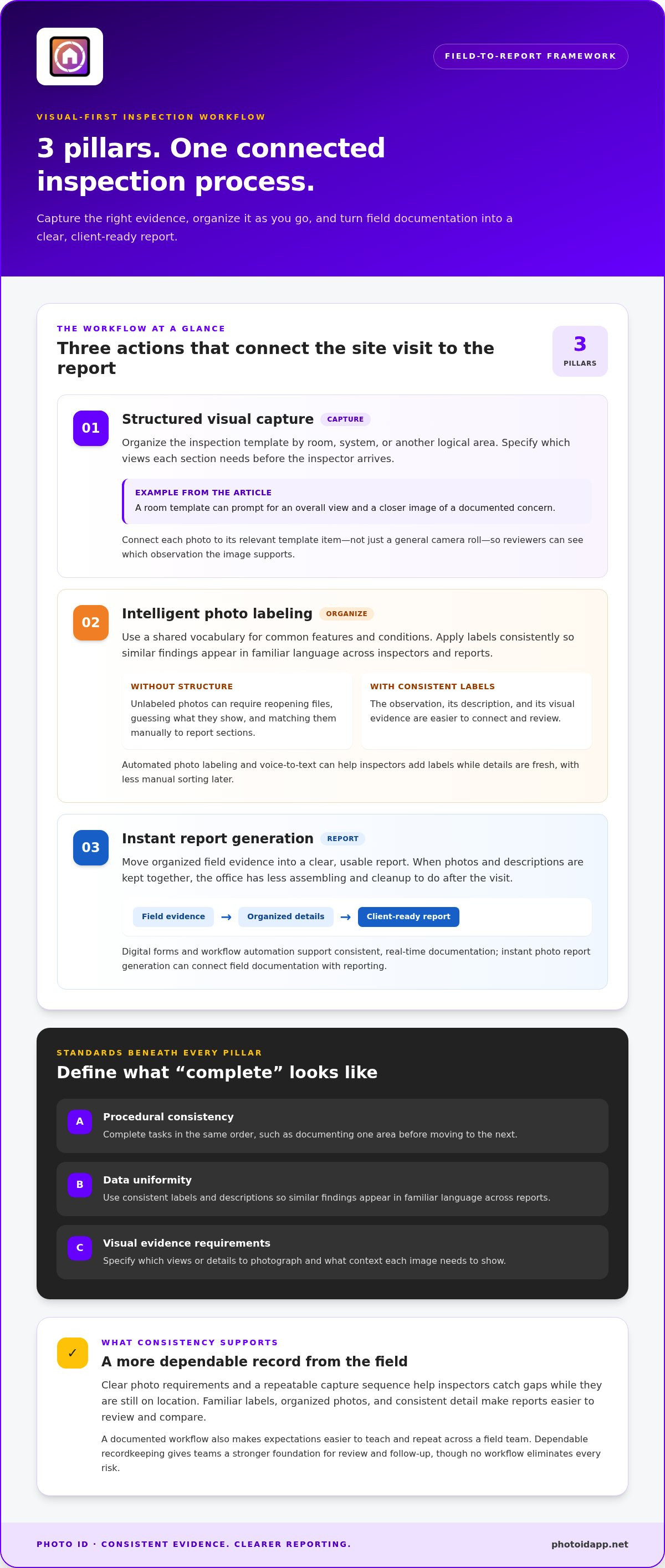
- Procedural consistency: Complete tasks in the same order, such as documenting one area before moving to the next.
- Data uniformity: Use consistent labels and descriptions so similar findings appear in familiar language across reports.
- Visual evidence requirements: Specify which views or details to photograph and what context each image needs to show.
Custom inspection templates and automated photo labeling help put these standards into practice. PHOTO iD lets teams structure documentation around templates and organize images without asking each inspector to invent a naming system.
Why Consistency Wins in Property Assessment
Consistency can help prevent avoidable return visits. If a report is missing a key image or a photo is too blurry to support a finding, someone may need to revisit the site or request more documentation. Clear photo requirements and a repeatable capture sequence help inspectors catch gaps while they’re still on location.
It also gives clients a more predictable experience. Reports with familiar labels, organized photos, and a consistent level of detail are easier to review and compare. That reliability builds confidence in the documentation and the team behind it.
Standardization also supports growth. Without a shared process, adding inspectors can introduce more variation in photo quality, terminology, and report structure. A documented workflow makes expectations easier to teach and repeat across a field team. Digital tools can move the process beyond paper checklists: PHOTO iD combines custom templates, voice-to-text labeling, and instant photo report generation to connect field documentation with reporting.
Clear, consistent records can also help reduce documentation-related liability exposure. They make it easier to show what was observed and what evidence was captured, while limiting gaps caused by inconsistent practices. No workflow eliminates every risk, but dependable recordkeeping gives teams a stronger foundation for review and follow-up.
The 3 Pillars of a Visual-First Standardized Workflow
A checklist can tell an inspector what to check. By itself, it can’t make photos easy to identify, connect evidence to findings, or assemble a clear report. A visual-first standardized inspection workflow links these actions into one field-to-report process: capture the right evidence, organize it as you go, and turn it into a client-ready document. Three pillars make that process practical.
Pillar 1: Structured Visual Capture
Start with the inspection template. Organize it by room, system, or another logical area, then define the visual evidence each section needs. For example, a room template might prompt for an overall view and a closer image of a documented concern. The right views depend on the inspection, but the requirements should be clear before the inspector arrives.
Connect each photo to the relevant template item, not just to a general camera roll. That link gives reviewers context, so they can see which observation the image supports without sorting through unrelated files. PHOTO iD’s custom inspection templates help guide capture and make evidence requirements easier for the whole team to follow.
Pillar 2: Intelligent Photo Labeling
A photo dump is a folder of evidence without a reliable way to navigate it. Unlabeled images force someone to reopen files, guess what they show, and match them manually to report sections. That slows review and creates opportunities for mix-ups. Set a shared vocabulary for common features and conditions, then use it consistently across inspectors and reports.
Automated photo labeling helps apply that structure without requiring the field team to type every description by hand. PHOTO iD combines photo organization with voice-to-text labeling, helping inspectors add labels while details are fresh. This means less manual sorting later and a clearer connection between the observation, its description, and its visual evidence.
Pillar 3: Instant Report Generation
Field documentation is most useful when it reaches the client in a clear, usable format. If photos and descriptions sit in separate places after the visit, someone still has to assemble the story back at the office. Digital forms and workflow automation can support consistent, real-time documentation, as described in Digital Inspection Forms and Workflow Automation.
With instant photo report generation, organized field evidence can move directly into a report instead of waiting for manual compilation. PHOTO iD’s photo organization software connects labeling, templates, and reporting to help reduce that handoff. “Instant” doesn’t mean skipping review. It means the report can be ready sooner because documentation was structured from the start.
Put the pillars together: guide capture, label evidence, and generate the report. PHOTO iD gives field teams tools to connect those steps in one workflow. Explore PHOTO iD’s field documentation platform to see how structured photos and automated reporting can support a smoother process from site visit to client delivery.
Overcoming Bottlenecks in Field Documentation
“Documentation takes longer than the inspection” is a familiar frustration for field teams. The site visit ends, but the work continues: photos need uploading, filenames need deciphering, notes need matching to evidence, and reports wait in a queue. A standardized inspection workflow can reduce that second shift by moving organization closer to the moment each observation is made.
Manual entry creates a backlog that grows with every job. Inspectors may finish the day with a camera roll full of images and a fading memory of what each one shows. The office then has to reconstruct the visit before preparing a report or passing information to the next person. That handoff slows decisions and adds administrative work.
The High Cost of Manual Data Entry
Make the hidden hours visible. Track how much time the team spends uploading, renaming, sorting, and matching photos after each inspection. Compare that work across jobs to see where documentation consumes capacity. There’s also a quality risk: labels entered later from memory can be inconsistent or attached to the wrong image.
A mobile process can reduce this backlog by capturing organized notes and evidence in the field. Home inspection apps bring documentation tools closer to the work itself. PHOTO iD combines automated photo labeling and voice-to-text with instant report generation, helping reduce manual entry between the site visit and the completed report.
Bridge the Gap with Technology
Choose a mobile-first process that keeps the field team and office working from the same organized record. In areas with unreliable connectivity, plan ahead: identify what must be captured on site, how it will be saved, and when it can be synced. Don’t assume every app supports offline work. Make connectivity part of workflow planning and test the process before a busy day.
Voice-to-text can help inspectors record a detailed observation without stopping to type a long note. Guided templates also make onboarding easier: new hires can follow the same prompts and documentation sequence instead of learning through guesswork. That consistency matters during high-volume periods, including post-storm surges, when rushed capture can lead to more office cleanup.
- Protect the standard: Keep required evidence and labels consistent, even when schedules fill up.
- Sort work clearly: Use agreed priorities so urgent files don’t disappear in a growing queue.
- Watch the handoff: Track whether field records reach the desk complete and ready for the next step.
Technology should remove friction, not add another system to build and maintain. PHOTO iD connects field documentation to reporting through templates, automated labeling, and voice-to-text, helping teams move evidence forward with less manual handling. Keep the process simple: capture, organize, and hand off a record the office can use.
Implementing Your Workflow: A 5-Step Checklist
Build your workflow around the way inspections happen in the field, not around a complicated software setup. Start with visible gaps, set clear documentation standards, and test the process on real jobs. Use this five-step checklist to make a standardized inspection workflow a practical routine your team can follow.
- Audit your current process. Trace a recent inspection from the first photo to the finished report. Note where images go missing, get mislabeled, or wait for someone at the office to sort them. Ask field staff and report preparers to identify handoffs that cause rework.
- Define a master template for each inspection type. List the essential areas, systems, and observations for each job. Mark the critical-path photos, the images a reviewer needs to understand a finding and prepare the next step. Arrange prompts in the order an inspector naturally moves through the site.
- Select a platform that supports automated labeling. Look for tools that connect images to inspection items and reduce manual naming. Automated photo labeling can help keep evidence organized as it’s captured, rather than leaving the office to decipher a camera roll.
- Train the team on “Capture, Label, Close.” Capture the required evidence, apply a clear label while the context is fresh, then confirm the item is complete before moving on. Practice voice-to-text labeling so inspectors can record useful descriptions without pausing to type each note.
- Review and refine. Track report turnaround and look for recurring gaps, such as missing views or inconsistent labels. Adjust templates and training based on what the review reveals, then share the updated standard with the whole team.
Map the Process Before You Set the Template
Walk through a typical job on paper or in a simple process map. Identify each inspection stage and the evidence needed to support it. Then build custom inspection templates that mirror that movement, so prompts feel useful in the field rather than like extra admin. Agree on photo-caption language with the report and estimating teams, so consistent terms make evidence easier to interpret and use in the next step.
Test the Tools Under Real Field Conditions
Before rolling out a platform, test the workflow on a representative inspection. Check that the interface is usable in the field and that the team understands how photos, labels, and notes move into the report. If offline work matters for your sites, verify that the platform supports it and that captured information can sync once connectivity returns. PHOTO iD brings templates, voice-to-text, and automated labeling together to support this field-to-report process.
Put the five steps into practice with PHOTO iD’s automated field documentation tools and build a workflow your team can repeat, review, and improve.
How PHOTO iD Automates Your Standardized Workflow
Standardize. Automate. Scale! PHOTO iD connects field documentation and reporting. Custom templates give inspectors a consistent structure to follow. Automated photo labeling reduces manual entry. Instant photo report generation helps move organized evidence from the site visit into a report with fewer administrative steps in between.
That structure matters as a team grows. Instead of relying on each inspector to remember preferred labels or report sections, you can establish a shared template for each inspection type. Team members follow the same prompts, capture information in a familiar format, and create records that are easier for colleagues to review. Consistency becomes part of the workflow, not another task to chase later.
Use Voice-to-Text to Capture Details in the Field
Typing every observation on a mobile device can interrupt an inspection. Voice-to-text labeling offers another way to record information while keeping device interaction brief. An inspector can dictate a concise note, then connect the description to the relevant photo or inspection item. For example, a note might identify a roof’s reported age or describe where a leak appears to originate.
Clear labels help the office understand what an image shows and why it matters. Agree on the terminology your team uses for common features and observations, then apply it consistently. PHOTO iD’s voice-to-text and automated labeling capabilities help reduce manual photo entry and support a more complete field record.
Keep Team Work and Evidence Organized
A Team Management Dashboard gives teams a centralized place to manage inspection work. A shared view can help supervisors coordinate assignments and track project progress, while organized photo documentation makes evidence easier to review. Clear ownership and consistent records reduce the risk of work getting stuck between the field and the office.
For projects that use aerial roof or wall measurements, keeping measurement information connected to the broader documentation process can help teams work from a more coherent record. Aerial roof and wall measurements can be part of a streamlined field workflow.
The goal isn’t to rush an inspection or skip review. It’s to remove avoidable handling after the evidence is captured. With PHOTO iD, templates, voice-to-text, photo organization, and instant reporting support the path from field notes to a client-ready document. Inspectors can spend less time sorting files later, while the office receives information in a more consistent format.
Build the process around your team’s inspection types, define the labels and details that matter, and use the same digital workflow across jobs. PHOTO iD helps turn field documentation into a repeatable system that can support greater volume.
Make Your Next Inspection the Starting Point
Your next inspection is a chance to turn a good process into a repeatable one. Choose a job type, define what a complete record should include, and give your team a clear way to capture and organize that evidence. A standardized inspection workflow becomes more valuable when it works under real field conditions and helps every role move confidently from documentation to delivery.
PHOTO iD’s instant photo report generation helps move organized field documentation into a shareable deliverable. Build that capability into your process so your team can focus more of its time on the inspection itself.
Standardize your workflow today with the PHOTO iD Mobile App! Take the next step, build consistency into the work, and give your team more room to focus on the inspection itself.
Frequently Asked Questions
What are the benefits of a standardized inspection workflow?
A standardized inspection workflow helps teams create records that are easier to review, compare, and hand off. It can also reveal where a process needs improvement. For example, if supervisors notice the same missing detail across several reports, they can update team guidance or template prompts. Clear procedures support consistent documentation without relying on each inspector to remember every reporting preference.
How does automated photo labeling improve inspection speed?
Automated photo labeling reduces the time spent identifying and naming images after a site visit. Instead of opening files one by one to work out what they show, inspectors and reviewers can locate relevant evidence through consistent labels. That can help the team move reports forward, while a shared naming approach makes it easier to search records across jobs.
Can I create custom templates for different types of inspections?
Yes. Custom templates can reflect the distinct information each inspection type requires. A template for an interior assessment, for example, can prompt for different observations than one for an exterior review. PHOTO iD offers custom inspection templates, so teams can tailor their documentation structure to their work and avoid irrelevant fields on every job.
Can a standardized workflow work with estimating and claims platforms?
A standardized workflow can help prepare organized photos, notes, and descriptions for transfer into an estimating or claims process. Define consistent labels and decide how the next reviewer should receive the field record. PHOTO iD supports photo organization and report generation, helping teams create structured documentation for downstream review without assuming a particular third-party integration.
How do I train my field team to follow a new digital workflow?
Start with a practice inspection and have the team complete the same sample task using the new process. Review the resulting records together and clarify any prompts or labels that caused confusion. Keep training focused on the actions people repeat in the field, then make the approved steps easy to reference. A brief feedback loop helps improve adoption without overwhelming the crew.
What is the best app for organizing inspection photos on-site?
Choose an app that connects images with inspection details, rather than simply collecting them in a folder. PHOTO iD combines photo organization with automated labeling, voice-to-text, templates, and report generation. Before adopting a tool, map how your team will locate a photo later, whether by inspection item, location, or observation, and use a consistent structure across jobs.
How does voice-to-text help with inspection documentation?
Voice-to-text lets an inspector dictate a note while keeping device interaction brief. For instance, they can record the location and context of an observation as they document it, rather than trying to reconstruct those details later. Review dictated notes for accuracy, particularly specialized terms or names. PHOTO iD includes voice-to-text labeling to support field note capture and photo documentation.
Will a standardized workflow help reduce insurance claim cycle times?
A standardized process can help reduce documentation-related delays by making field records clearer and easier to review. Complete photos and notes may help the next person move forward without requesting missing information. However, claim timelines depend on more than documentation, so a workflow can’t guarantee a shorter cycle. Focus on consistent, well-organized records to reduce avoidable friction in the handoff.