
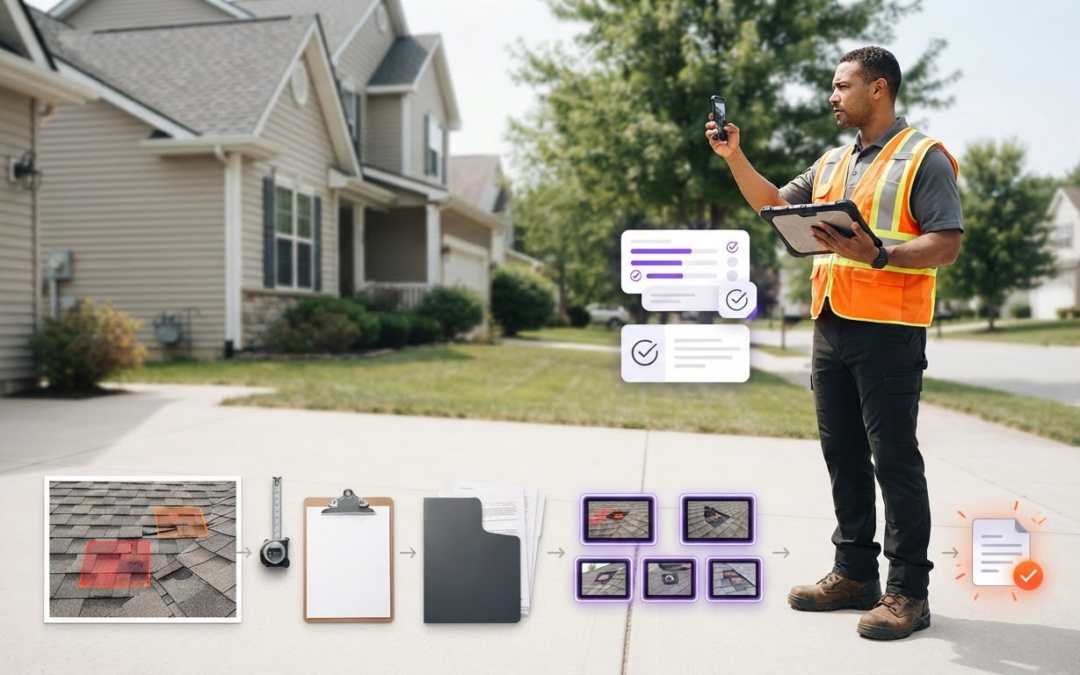
What if the fastest way to move an insurance-job payment forward starts before you send the invoice? If you’re wondering how to get paid faster on insurance jobs, begin with the evidence you capture and how clearly you organize it. A missing photo label, unclear field note, or incomplete report can lead to follow-up questions before billing is reviewed.
Some delays are outside your control. Insurer review, claim decisions, and other parties’ processes can take time. But a complete, easy-to-follow claim file gives your invoice a clearer path and helps you see whether the next step is yours or someone else’s. A consistent field process also saves you from spending hours sorting photos or rebuilding the job story from memory.
This guide covers documentation from the first site visit through invoice follow-up. You’ll learn what to capture, how to organize photos, notes, and reports, and how to track open items across jobs. PHOTO iD helps label photos and generate reports, making it easier to prepare a consistent, well-supported package for handoff.
Key Takeaways
- Separate paperwork delays you can prevent from payment decisions controlled by others, then focus your process on what you can manage.
- Learn how to get paid faster on insurance jobs by building a consistent workflow from opening the job file to tracking the submitted invoice.
- Capture observations and photos onsite to avoid reconstructing job details later and make the handoff to billing clearer.
- Use a final-review and follow-up checklist to record submission dates, requested revisions, responses, and who owns each open item.
- Structured digital documentation can reduce report-preparation friction, but it cannot promise or control insurer payment outcomes.
How to Get Paid Faster on Insurance Jobs Starts with a Complete Job File
There’s a difference between preventing paperwork delays and controlling an insurer’s payment decision. You can’t dictate how a claim is reviewed or processed, but you can make your documentation easier to understand and act on. If you’re researching how to get paid faster on insurance jobs, start with a file that tells a clear, consistent story from the site visit through the invoice.
Payment-ready documentation is an organized record of the job’s scope, dated observations, clearly labeled photos, work performed, and an invoice reviewed for consistency. Treat the file as part of project management: Construction project management involves coordinating scope, time, cost, and quality. A well-structured job record connects fieldwork to billing.
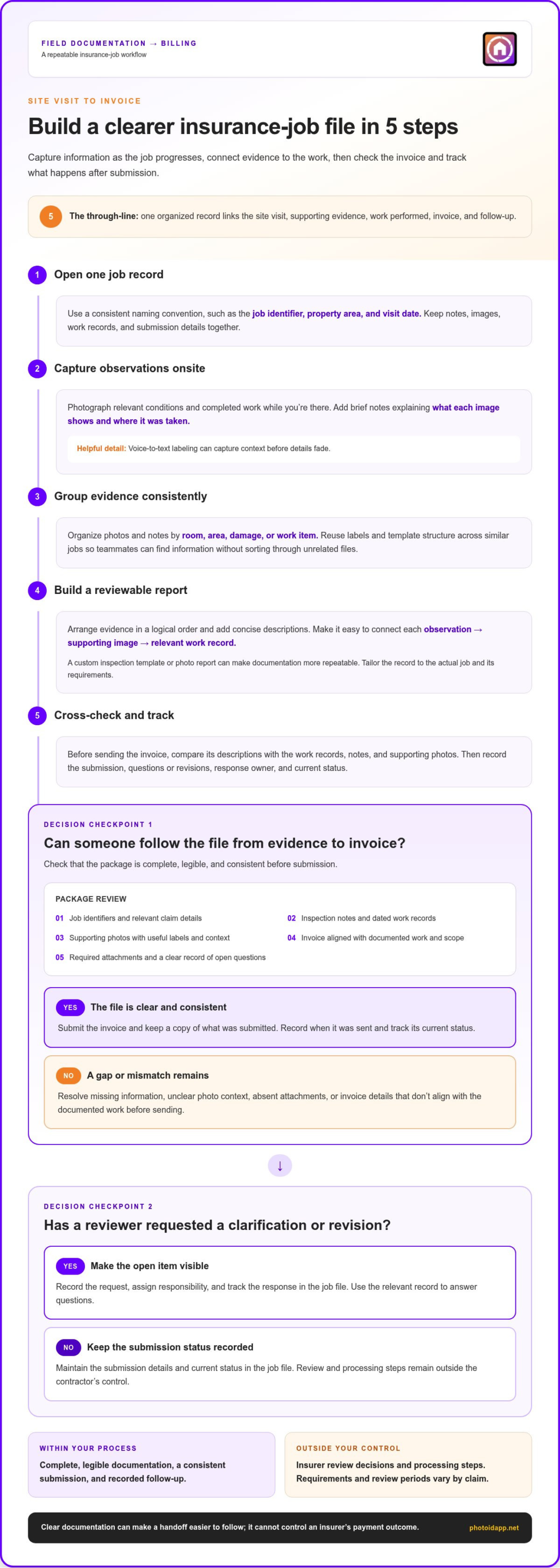
Before submission, check that the package includes:
- Job identifiers and relevant claim details.
- Inspection notes and dated work records.
- Supporting photos with useful labels and context.
- An invoice that matches the documented work and scope.
- Required attachments and a clear record of open questions.
What belongs in an insurance job documentation package?
Build the file around the job, not a loose collection of notes and images. Include the identifiers your team uses to locate the project, observations from the site visit, records of work completed, and relevant supporting photos. Connect each image to a specific location, condition, or completed work item. For example, a sequence showing the area, the damage, and the repair gives the reader more context than a group of unlabeled close-ups.
Keep the record factual. Notes and photos should reflect actual conditions and work, and the package should address the requirements for that claim. If a line item appears on the invoice, make it easy to connect that charge to a work record or supporting evidence. Clear links between scope, evidence, and billing help readers follow the file without guessing.
Which payment delays can contractors help prevent?
Contractors can control whether a submission is complete, legible, and followed up on. They can’t control insurer review decisions or processing steps. Missing attachments, undated records, unclear photo sequences, or invoice line items that don’t align with the documented work may prompt clarification requests. Review the package before sending it, and keep a copy of what was submitted so you can respond with the relevant record if questions arise.
Requirements and review periods vary by claim. Don’t assume every delay is caused by paperwork, but don’t let avoidable gaps obscure the next step. If a reviewer asks a question, record the request, assign responsibility, and track the response in the job file. This makes it easier to see what your team can resolve and what remains outside its control.
Build a Faster Insurance-Job Workflow from Site Visit to Invoice
A repeatable workflow keeps field details connected to the invoice instead of scattered across phones, notes, and folders. Capture information as the job progresses, organize it consistently, then check that the final invoice matches the documented work. This process can make your submission clearer and easier to review, though it won’t control an insurer’s decision.
A reliable insurance-job workflow opens a job record, captures and labels evidence onsite, assembles a structured report, checks the invoice against the file, and tracks follow-up after submission.
- Open one job record. Create a file using a consistent naming convention, such as the job identifier, property area, and visit date. Keep notes, images, work records, and submission details together.
- Capture observations onsite. Photograph relevant conditions and completed work while you’re there. Add brief notes explaining what each image shows and where it was taken. Voice-to-text labeling can help capture context before details fade.
- Group evidence consistently. Organize photos and notes by room, area, damage, or work item. Use the same labels and template structure across similar jobs so teammates can find information without sorting through unrelated files.
- Build a reviewable report. Arrange evidence in a logical order and add concise descriptions. Make sure a reader can connect each observation to its supporting image and relevant work record. A custom inspection template or photo report can make documentation more repeatable.
- Cross-check and track. Before sending the invoice, compare its descriptions with the work records, notes, and supporting photos. Record when you submitted it, any questions or revision requests, who owns the response, and the current status.
Capture and label evidence while the work is happening
Make each photo useful on its own. Include enough context to show the location and condition, then add a label or note explaining how it relates to the work. A close-up may show a damaged section; a wider view can establish where that section is. Consistent labels and voice-to-text notes reduce reliance on memory when you assemble the file later.
Turn field records into a reviewable report
Use repeatable templates to keep key observations from slipping through the cracks, while tailoring the record to the actual job and its requirements. Group related photos and notes, then check that the sequence makes sense to someone who wasn’t onsite. For more on organized field records, read this guide to high-velocity home inspection documentation.
Clear records and consistent written terms also help set expectations with customers. The Federal Trade Commission’s trustworthy contractor best practices offer consumer guidance on contracts, estimates, and payment schedules. PHOTO iD’s documentation tools support onsite photo organization and report preparation.
Does Better Documentation Really Get Insurance Jobs Paid Faster?
Better documentation can reduce preventable friction, but it can’t control an insurer’s review, coverage decision, or payment processing. Clear evidence helps a reviewer understand the work and find supporting details. It doesn’t guarantee approval, reimbursement, or a payment date. The practical goal is to make your part of the process complete, accurate, and easy to follow.
For contractors asking how to get paid faster on insurance jobs, the useful comparison isn’t simply “manual or digital.” Consider how much effort the process takes, how consistently the team follows it, and how easily someone can find the right record.
| Approach | Effort and consistency | Retrievability and visibility |
|---|---|---|
| Reactive documentation | Low effort onsite, but sorting and filling gaps later can take extra work. | Records may be difficult to find or interpret, especially when context relies on memory. |
| Consistent manual process | Repeatable labels and checklists improve consistency, but staff must maintain them by hand. | Organized folders help retrieval, though team visibility depends on how records are shared and updated. |
| Structured digital capture | Templates, voice notes, automated photo labeling, and report generation can reduce repetitive organizing. | Standardized records make evidence easier to locate and provide clearer project oversight. |
What contractors can control, and what they cannot
Focus on complete records, clear images, accurate invoice descriptions, timely submission, and prompt responses to questions. These practices help prevent gaps in your handoff. Claim coverage decisions, adjuster review, and payment processing sit outside your documentation workflow. A well-organized file supports review, but it doesn’t determine the outcome.
| Within your control | Outside your direct control |
|---|---|
| Completeness, clarity, invoice accuracy, submission records, and follow-up | Coverage determinations, review decisions, and payer processing |
Manual versus structured digital documentation
Manual sorting can work when naming rules are applied consistently, but each person still has to label, file, and assemble records. Structured digital capture can apply templates, voice-to-text notes, and automated labels during the field workflow, then support report preparation. PHOTO iD’s tools organize documentation; they don’t decide or guarantee claim payment. Explore professional photo organization for property reports for more ideas on making field evidence easier to manage.
Better documentation makes the contractor’s submission clearer and more trackable, while payment decisions remain with the payer. Choose a process your team can use consistently, then review both the file and the follow-up record as the claim moves forward.
Use This Insurance Job Invoice Submission and Follow-Up Checklist
A consistent closeout routine helps your team send a clear invoice package and keep every open item visible. Use this checklist before submission, then update the same job record as questions and revisions come in. This gives anyone on the team a reliable view of what was sent, what’s pending, and who owns the next step.
Check the invoice package before submission
Review the complete package, not just the invoice. Confirm that each description matches the documented work and that the supporting records make the connection easy to follow.
- Invoice: Check descriptions, quantities, and other details against the work records and documented scope.
- Photos: Confirm images are relevant, readable, labeled, and grouped so the location or work item is clear.
- Notes and attachments: Include the records needed to explain the work and meet the claim’s stated requirements.
- Submission record: Save the final package, note the submission date and method, and record where the team can retrieve it.
- Open questions: Identify anything unresolved and assign an owner before the file leaves your hands.
This final pass is a practical part of how to get paid faster on insurance jobs. It can help prevent avoidable clarification requests, though it can’t determine an insurer’s review or payment decision.
Track follow-ups without losing the claim thread
Keep the submission date, requested revisions, responses, and current status together in one job record. For every open question, assign a person and a next action. A team dashboard can make unassigned follow-ups easier to spot across jobs, but it provides project oversight, not control over payment.
- Log the request: Record the question or correction in clear, specific terms.
- Find the supporting record: Locate the photo, note, work record, or invoice detail that addresses it.
- Respond and update: Send the requested information through the appropriate channel, save a copy of the response, and update the job’s status.
- Keep versions clear: Store revised files with the job record and identify which version was submitted.
For example, if someone requests clarification about a documented work item, respond with the relevant record and label the response so the next teammate can follow the exchange. Requirements and review periods vary by claim, so track the actual next step rather than assuming a standard response or payment window.
PHOTO iD’s photo labeling, templates, and report-generation tools support organized field reports and make the handoff into closeout easier. Explore PHOTO iD documentation tools to bring more structure to your job records.
Make PHOTO iD Part of a More Organized Insurance Job Workflow
Once your process is clear, make field documentation easier to capture and assemble. PHOTO iD is a mobile documentation platform that helps organize photos, notes, and reports as part of your job workflow. Its structured records support invoice preparation, but the platform doesn’t decide whether a claim is approved or control when payment is issued.
Reduce photo sorting and report assembly friction
Capture job photos as you work, then use automated photo labeling to connect images with useful context. Add voice-to-text notes to record observations while they’re fresh instead of trying to reconstruct details later. For example, a label can identify an area or work item, while a short note explains what the image documents. That context can make report preparation more straightforward.
Custom inspection templates help structure recurring documentation tasks, and instant photo report generation can turn organized field records into a report. PHOTO iD also includes aerial roof and wall measurements as documentation capabilities. These tools help organize information for the job file; they don’t establish claim coverage or guarantee a payment outcome.
Create a repeatable process across field teams
Give your team a consistent way to record observations and organize evidence. Templates can standardize recurring inspection workflows while leaving room to document each job’s actual conditions. A shared team management dashboard provides project oversight, helping teams see job records and identify documentation gaps or follow-up items that need an owner.
That visibility supports coordination, not payment control. Your team still needs to review the completed file, submit the invoice through its process, and track requests and responses. When field records are easier to find and report preparation is more structured, the handoff from onsite work to billing can be clearer.
For contractors considering how to get paid faster on insurance jobs, the practical advantage is a more organized documentation workflow, not a promise about insurer decisions. Capture, label, and report with a consistent process, then keep your invoice and follow-up record connected to the job.
Explore PHOTO iD for organized field documentation and build a clearer path from onsite evidence to invoice preparation.
Build a Clearer Path from Fieldwork to Invoice
Knowing how to get paid faster on insurance jobs starts with a process your team can repeat: capture the work as it happens, connect evidence to invoice details, and keep submission follow-ups visible. A complete, well-organized file can reduce avoidable clarification, but it can’t dictate claim approval or payment timing.
Make the handoff easier by keeping photos, notes, work records, and invoice descriptions aligned. Then track what was submitted, what questions remain, and who owns each response. Clear records help your team stay organized and make the next action easier to see.
PHOTO iD supports field documentation with automated photo labeling and voice-to-text labeling, custom inspection templates, and instant photo report generation. A team management dashboard provides project oversight across jobs. These tools support documentation and report preparation, not billing decisions or payment guarantees.
Explore PHOTO iD for organized field documentation and bring more structure to your insurance-job workflow. Start with one consistent job file, keep every detail connected, and give your team a clearer path from site visit to invoice.
Frequently Asked Questions
How can contractors get paid faster on insurance jobs?
Submit a complete, clearly organized invoice package and respond promptly to requests for information. To improve how to get paid faster on insurance jobs, connect the documented work to labeled photos, dated notes, and accurate invoice descriptions before submission. Keep the final package and submission details in one job record, then track open questions, assigned owners, responses, and current status. This can reduce avoidable paperwork friction, but it can’t control claim decisions or payment processing.
What documents should I submit with an insurance job invoice?
Submit the invoice with records that explain and support the work, following the requirements for that claim. A package may include job identifiers, dated inspection notes, work records, relevant labeled photos, and requested attachments. Check that invoice descriptions align with the documented work and that each image has enough context to identify its location or purpose. Save a copy of the exact package submitted and note when and how it was sent.
Can photos help an insurance job invoice get approved faster?
Clear, relevant photos can help a reviewer understand documented conditions and completed work, but they don’t guarantee approval or a faster decision. Label each image with useful context, such as the area shown or the work item it supports. Group related images in a logical sequence and connect them to notes or invoice descriptions. Don’t rely on photos alone when the claim requires other records or explanations.
Why are insurance job invoices delayed?
Invoices may need clarification when records are incomplete, attachments are missing, photos are hard to interpret, or invoice descriptions don’t match the documented work. Delays can also occur during review or payment processing, which contractors don’t control. Check the job file for gaps, record any request for more information, and track the response. Requirements and review periods vary by claim, so avoid assuming every delay has the same cause.
How should contractors follow up on an unpaid insurance invoice?
Follow up by checking the submission record and identifying the current open item. Record the invoice submission date, the status you have, any questions or revision requests, and the next action. Assign an owner to each follow-up. If additional information is requested, send the specific supporting record and save the response with the job file. Keep notes factual and current; don’t assume a standard payment or response window applies to every claim.
Does using documentation software guarantee faster insurance payments?
No. Documentation software can help organize photos, notes, and reports, but it can’t guarantee claim approval, reimbursement, or a payment date. PHOTO iD offers automated photo labeling, voice-to-text labeling, custom inspection templates, instant photo report generation, and a team management dashboard. These features support field documentation and project oversight. Payment decisions and processing remain outside the software’s control.
How can teams organize insurance job photos more efficiently?
Use consistent labels and group photos by job, location, condition, or completed work item. Add context onsite so teammates don’t have to guess what an image shows later. Automated photo labeling and voice-to-text notes can support that process, while templates and photo reports help structure records. Keep organized images with the relevant job file, and use shared project visibility to identify missing documentation or follow-up tasks.