

Winning bids starts with jobsite evidence clients can review quickly. If your scope is vague or your notes and photos are scattered, even a solid estimate can be hard to evaluate. Learning how to win more bids with better documentation starts with making the work visible, specific, and easy to understand.
Price matters, but clients also need to understand what’s included, which conditions you observed, and how your proposed work addresses them. When details are missing, they may need clarification or struggle to compare your bid with others.
Build a clear record from the first site visit. This guide explains how to capture relevant photos and observations, organize evidence, and present a scope clients can review with confidence. Mobile tools such as PHOTO iD can help label photos, record observations with voice-to-text, and assemble consistent reports, so your team can spend less time sorting details and more time preparing a credible bid.
Key Takeaways
- Use a consistent site-visit routine to capture conditions, label evidence, check for gaps, and keep records easy to retrieve.
- Connect photos and field notes to specific scope items so clients can see what the proposed work covers.
- Keep bid packages focused. Clear captions and consistent labels make evidence easier to review.
- Learn how to win more bids with better documentation by making project details clear, verifiable, and easier for clients to compare.
- Build a repeatable team workflow with templates, organized records, and reports that reduce manual assembly.
Why Better Bid Documentation Helps Clients Choose with Confidence
Bid documentation is the organized record behind your proposal. It clarifies the site conditions you observed, the work you’re proposing, what the price covers, and the assumptions behind your estimate. In a formal invitation to tender (ITT), where buyers compare competing offers, this record ties your estimate to the job instead of leaving the client to fill in the gaps.
Compare “repair damaged exterior” with “replace loose flashing at the north wall and seal the adjacent joint.” Add a dated, labeled photo showing the location, and the client can see what you observed and how it relates to the proposed work. This doesn’t guarantee an award, but it makes the scope easier to understand and evaluate.
Clear documentation reduces uncertainty during bid review by showing clients what you observed, what you propose, and how the two connect. That clarity is central to how to win more bids with better documentation: provide useful evidence, not just confident claims.
What counts as useful documentation for a bid?
Useful records include relevant site photos, inspection observations, measurements, scope notes, and stated assumptions. Give each enough context to connect it to a specific location or task. “North wall, flashing above entry” is more useful as a photo label than an unlabeled image. A measurement is more meaningful when its location and purpose are clear.
Keep the package focused. Include records that support the proposed work or explain an existing condition. Unrelated images and files can distract evaluators and make important evidence harder to find.
How does documentation affect a client’s review?
Organized evidence helps clients assess existing conditions and understand what your scope includes. Traceable notes and photos also make it easier to revisit a detail during bid comparisons, rather than relying on memory or searching through a pile of files. This can reduce avoidable clarification and keep the review focused on the proposed work.
Use documentation to support your credibility, not to imply that selection is guaranteed. Clients weigh bids against their requirements and evaluation criteria. Your role is to make the proposed work clear, specific, and verifiable so they can assess it with confidence.
Capture Bid-Ready Jobsite Evidence Before You Leave
A strong bid record starts while you’re still on site. Capture relevant details, label them clearly, and check that the records make sense before you leave. This routine helps prevent scattered photos and forgotten observations from turning into a documentation scramble later.
Which photos and observations should a bid include?
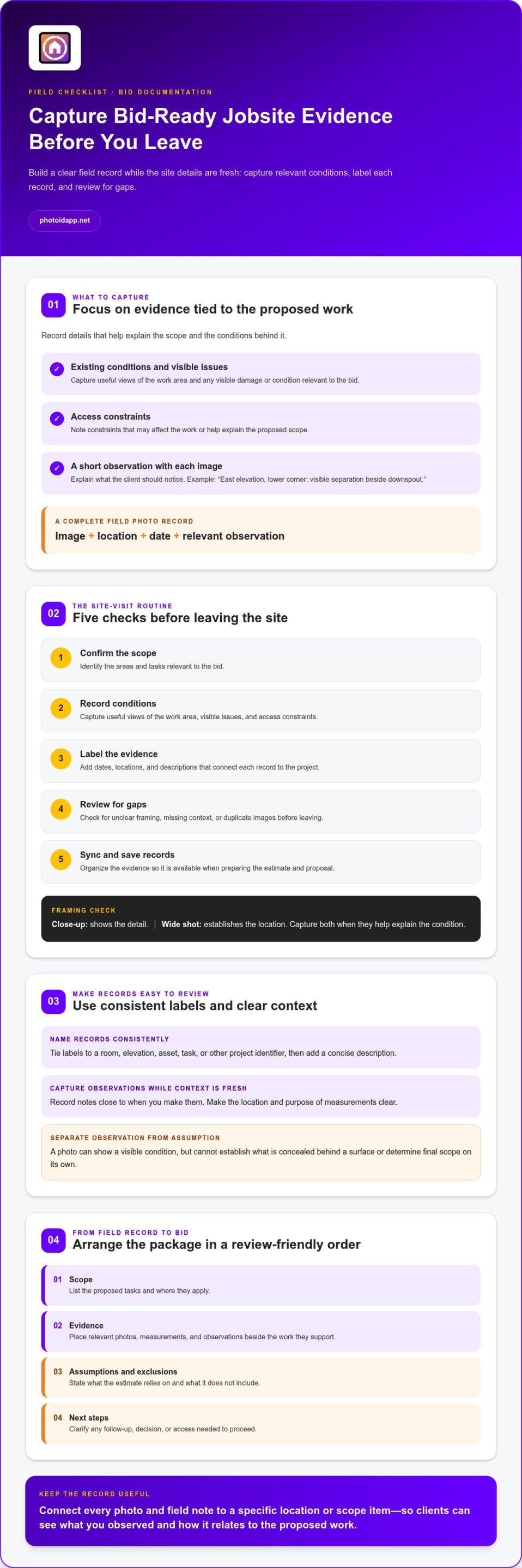
Focus on evidence related to the proposed work: existing conditions, visible damage, access constraints, and details of the work area. Pair each image with a short note explaining what the client should notice. For example, “East elevation, lower corner: visible separation beside downspout” gives a reviewer more context than a photo alone.
A complete field photo record includes the image, its location, the date, and the relevant observation. A photo can show a visible condition, but it can’t establish what’s concealed behind a surface or determine final scope on its own. Record what you observed and distinguish it from assumptions that may need separate assessment.
How can field teams keep evidence organized?
Use the same naming logic across projects. Tie labels to a room, elevation, asset, task, or other project identifier, then add a concise description. Record observations close to when you make them, while the context is fresh. Mobile documentation tools, including a mobile photo documentation workflow, can help teams label images and record notes on site.
Follow this site-visit workflow:
- Confirm the scope. Identify the areas and tasks relevant to the bid.
- Record conditions. Capture useful views of the work area, visible issues, and access constraints.
- Label evidence. Add dates, locations, and descriptions that connect each record to the project.
- Review for gaps. Check for unclear framing, missing context, or duplicate images before leaving.
- Sync records. Organize and save the evidence so it’s available when preparing the estimate and proposal.
A quick review matters. A close-up may show damage but not its location; a wide shot may establish the location but miss the detail. Capture both when they help explain the condition. For more on choosing mobile tools for field records, see our guide to the best home inspection app.
For federal bids, the U.S. Small Business Administration outlines the official process for winning federal contracts. For any project, consistent field records make details easier to retrieve and verify. Capture, label, and review before you leave, then carry that organized evidence into the bid.
Turn Photos and Field Notes into a Clearer Bid Package
Field records help only when clients can connect them to the proposed work. Arrange the bid package so readers can move from scope to supporting evidence, then find assumptions, exclusions, and next steps without hunting through attachments.
A practical order is:
- Scope: List the proposed tasks and where they apply.
- Evidence: Place relevant photos, measurements, and observations beside the work they support.
- Assumptions and exclusions: State what the estimate relies on and what it doesn’t include.
- Next steps: Clarify any follow-up, decision, or access needed to proceed.
Use a consistent template for recurring bids. Familiar headings help clients locate key details, and they let your team assemble packages without rebuilding the structure each time. A custom report template can keep the presentation consistent while leaving room to tailor the scope and evidence to each project.
How should photos support scope and estimates?
Place each relevant image near the scope item it explains, or reference it with a clear photo number. Use neutral captions that describe what’s visible, such as “West stairwell, landing: cracked tile at the outer edge.” Avoid turning an observation into a conclusion the image can’t support.
Keep observed facts separate from estimates, assumptions, and recommendations. A photo may show a visible condition; it doesn’t establish the cause or reveal what’s concealed. Make the distinction clear in your notes so clients can tell what you saw and what your proposed work is based on.
What makes a bid package easier to compare?
Keep headings, line-item references, and labels consistent from one proposal to the next. State inclusions and exclusions plainly rather than relying on what you think the client will infer. For example, identify the specific area covered by a repair and list related work that falls outside the quoted scope.
Traceable evidence helps reviewers connect each proposed task to the site condition it addresses. This makes it easier to compare bids on scope, not just on the bottom-line figure. It supports a clearer review without suggesting that documentation alone determines the award.
For claims-related documentation workflows, keep images connected to observations and estimate details. An organized approach helps teams retrieve relevant records and explain how documented conditions relate to proposed work. PHOTO iD’s photo labeling and report-generation capabilities help bring field images and notes into a structured report, reducing manual sorting as you prepare a client-facing package.
Avoid Documentation Mistakes That Weaken a Bid
Documentation doesn’t have to become a separate end-of-day project. Capture notes and photos as part of the site work already underway. A voice-to-text observation or clear photo label can preserve context while it’s fresh, rather than leaving the team to reconstruct details later.
More evidence isn’t always better. Duplicate images, vague captions, or inconsistent labels can hide the details a reviewer needs. Keep the record focused on the proposed work, and make every photo and note easy to identify. Clear documentation supports a confident review, but clients also weigh price, qualifications, timing, and other selection factors. It doesn’t guarantee an award.
Which documentation gaps create avoidable questions?
Unlabeled photos, missing locations, contradictory notes, and unclear scope boundaries leave reviewers guessing. An undated image without context may be difficult to connect to the project or assess against the estimate. If a condition or measurement is uncertain, identify it as an unresolved assumption rather than presenting it as established fact. Be precise about what you observed and what still needs clarification.
How can teams review a bid package quickly?
Run a final check before submission. Confirm that key scope items have relevant supporting notes or evidence where appropriate. Check that captions match the images and that the estimate doesn’t make claims the records can’t support. Then ask a teammate who wasn’t involved in assembling the package to find the scope, assumptions, and supporting details using the package alone. If they can’t locate them quickly, a client may struggle too.
Use this short pre-submission checklist:
- Completeness: Are the necessary records and scope details included?
- Clarity: Do captions and notes explain what the client should understand?
- Consistency: Are dates, labels, locations, and terminology used uniformly?
- Scope alignment: Do the evidence and estimate support the same proposed work?
Learning how to win more bids with better documentation means making the review easier, not making the package bigger. PHOTO iD’s automated photo labeling, voice-to-text labeling, and instant photo reports help teams organize field records and reduce manual assembly. Explore PHOTO iD’s field documentation tools to build a clearer, more consistent bid workflow.
Make Better Bid Documentation a Repeatable Team Workflow
Turn good documentation into a team habit, not a last-minute cleanup. A consistent process helps field staff capture the right details and gives estimators a reliable record to work from. Keep the cycle simple: prepare templates, capture evidence, organize records, build reports, and review before sending the package.
- Prepare: Set up reusable prompts for common observations, photo labels, and report sections.
- Capture: Record relevant images and notes as part of normal site work.
- Organize: Label and group records so the right evidence is easy to retrieve.
- Build: Use a consistent report structure to connect observations with proposed work.
- Review: Check that records are clear, relevant, and aligned with the bid scope.
Keep the process practical. A brief review before evidence moves into a proposal can catch missing context or unclear notes without creating a lengthy extra task. Standard prompts also help teams record information consistently while leaving room for project-specific details.
How can teams standardize documentation without slowing down?
Give field teams a repeatable starting point. Use prompts for common conditions and consistent labels for locations or tasks. Voice-to-text labeling can capture observations as staff work, helping preserve details without relying on memory. Then add a brief handoff review to confirm the record is understandable and ready for estimating or reporting.
How can PHOTO iD support bid documentation?
PHOTO iD brings key documentation steps into a mobile workflow. Automated photo labeling helps organize images so teams can locate relevant project evidence. Voice-to-text labeling supports onsite observations, while custom templates and instant photo reports help present records in a consistent format. A team management dashboard provides project oversight and helps teams keep documentation organized across their work.
These tools support a clearer process, not a promised bid outcome. The value comes from capturing useful evidence, organizing it, and making it easier to use when preparing a proposal. Build the habit, keep the workflow moving, and make every record easier to find.
Explore PHOTO iD for faster, more organized field documentation and put a repeatable documentation workflow to work for your team.
Make Your Next Bid Easier to Understand
Clear documentation helps clients connect your proposed scope with the conditions you observed. Capture relevant evidence on site, label it with useful context, and organize it so reviewers can follow the work without guesswork. Then check that your photos, notes, assumptions, and estimate tell the same story.
A repeatable team workflow makes that clarity easier to maintain from one project to the next. PHOTO iD supports the process with automated photo labeling and organization, voice-to-text observations, custom inspection templates, instant photo report generation, and a team management dashboard. These tools help structure field records and prepare them for review, but they can’t guarantee a bid will be selected.
Put the approach into practice on your next site visit. Explore PHOTO iD for organized field documentation and make it easier to turn jobsite details into a clear, credible bid. Well-labeled photos and precise notes help your team present the work with greater confidence.
Frequently Asked Questions
How does better documentation help win more bids?
Better documentation makes a bid easier to understand and evaluate. Labeled photos and concise notes connect proposed work to relevant site conditions, while clear assumptions help clients see what the scope covers. Learning how to win more bids with better documentation means reducing guesswork, not guaranteeing an award. Clients still consider price, qualifications, timing, and their priorities, but organized evidence gives them a clearer basis for comparing your proposal.
What documentation should I include with a contractor bid?
Include records that clarify the work you’re proposing, such as relevant site photos, observations, applicable measurements, scope notes, and stated assumptions or exclusions. Identify when and where you captured the evidence, then connect it to the task it supports. Leave unrelated files and conclusions unsupported by the record out of the package. A focused set of useful details is easier for a client to assess than a large, disorganized collection.
How can I make a bid more convincing without lowering my price?
Make the proposed value and scope easier to assess. Describe the work clearly, support relevant conditions with specific evidence, and state assumptions and exclusions plainly. For example, connect a photo of a visible issue to the line item addressing it, rather than expecting the client to infer the relationship. An organized package can reduce ambiguity, but it can’t replace competitive pricing, qualifications, or other factors the client uses to choose a bid.
Do photos help contractors win more work?
Relevant photos can help clients understand site conditions and how they relate to proposed work. Add a label that identifies the location and a neutral caption describing what’s visible. A close-up may show a detail, while a wider view can establish where it is. Avoid overloading the package with duplicates or treating an image as proof of concealed conditions. Photos support the bid when they’re clear, relevant, and placed in context.
How do I organize jobsite photos for a bid?
Use a consistent naming method that connects each image to a project area, asset, or scope item. Add the date and a brief factual observation, then group relevant photos with the estimate or report section they support. Before sending the bid, remove duplicates and check that captions match the images. Make sure a reviewer can locate key evidence without searching unrelated files or trying to remember where each photo was taken.
Can inspection software help contractors prepare better bids?
Field documentation software can help teams capture, label, organize, and present photos and observations. PHOTO iD offers automated photo labeling, voice-to-text labeling, custom inspection templates, instant photo report generation, and a team management dashboard. These tools support a consistent workflow and reduce manual sorting or report assembly. Contractors remain responsible for checking that the scope, estimates, assumptions, and final bid accurately reflect the project.
What is the biggest documentation mistake in a bid?
A common mistake is providing evidence without enough context to connect it to the proposed work. Unlabeled photos, vague notes, contradictory observations, and unclear inclusions can leave clients unsure what the bid covers. Use factual captions, identify locations, and reference evidence alongside the relevant scope item. If a detail is still an assumption, say so clearly. Don’t present it as a confirmed site condition or a conclusion the evidence can’t support.