

What if the problem isn’t that your field team forgets to document, but that the process makes it too easy to miss a detail? If you’re wondering how to ensure my team documents everything, start by making the right actions clear, quick, and repeatable. A photo saved without a job name, a note entered hours later, or a missed inspection detail can turn a completed job into a slow, frustrating review.
Field teams already have enough to manage. Documentation shouldn’t feel like extra work or leave staff guessing what to capture. The fix is a simple workflow with clear minimum standards, consistent ownership, and easy mobile capture, so every job record is complete without adding unnecessary steps.
In this guide, you’ll learn how to set job-by-job documentation standards, make photos and notes easy to match to the right project, and build a review process that gets records ready for reporting. You’ll also see how templates, automated labeling, and centralized records can reduce manual sorting after fieldwork. Give your team a practical system they can follow on a busy jobsite, and give managers confidence in what comes back.
Key Takeaways
- Define what a complete, job-specific record needs to show, and spot the gaps that commonly weaken field documentation.
- Build a simple job-to-handoff workflow with clear responsibility at each stage, so documentation doesn’t fall to one person.
- Compare memory, paper forms, and mobile workflows to find an approach that fits your team’s work and review needs.
- Learn how to ensure my team documents everything with short, role-specific training and prompts that fit naturally into the job.
- See how PHOTO iD’s templates, labeling tools, and reporting features can support a consistent workflow without replacing team standards.
Why teams miss important details, and what complete documentation means
A complete field record is the job-specific information someone needs to understand what work took place, what the team found, and what should happen next. It doesn’t mean documenting every movement or incidental detail. It means capturing the right evidence and context, then making sure the record can be understood after the crew has moved on.
Gaps often appear when photos lack labels, notes don’t explain what they refer to, or workers have different ideas about what “done” means. A rushed handoff can leave questions unanswered, while details reconstructed after hours may be harder to verify. These are often workflow problems, not simply individual mistakes.
What should a complete field record include?
Start with a practical core, then tailor it to the inspection type, client expectations, and your internal process:
- Job identification: enough information to connect the record to the correct project.
- Observations: what was seen, where it was found, and relevant conditions.
- Supporting photos: images that show the observation and are clearly tied to the job.
- Actions and follow-up: what was done, what remains, and who needs to act next.
Context turns evidence into a useful record. “Photo of a damaged panel” gives a reviewer a location and finding; an unexplained close-up may show damage but leave its location and significance unclear. A consistent Standard operating procedure (SOP) can help define what each role captures without requiring every job to produce identical notes.
Why do documentation gaps happen?
Unclear expectations create uneven records. One worker may note a location and next step; another may take a photo and assume the issue is obvious. If the team switches between field tasks, devices, and paperwork, details can be missed or entered later without enough context. That’s a process design challenge as much as a training issue.
Ownership matters, too. If everyone assumes someone else will label the photos or confirm the handoff, those steps can fall through. If one person is expected to record everything, documentation can become a bottleneck. To understand how to ensure my team documents everything, set a clear standard and assign responsibility at each stage, while keeping capture close to the work. That makes omissions easier to catch and reduces the need to reconstruct details after the crew has left.
Create a repeatable documentation workflow from job start to handoff
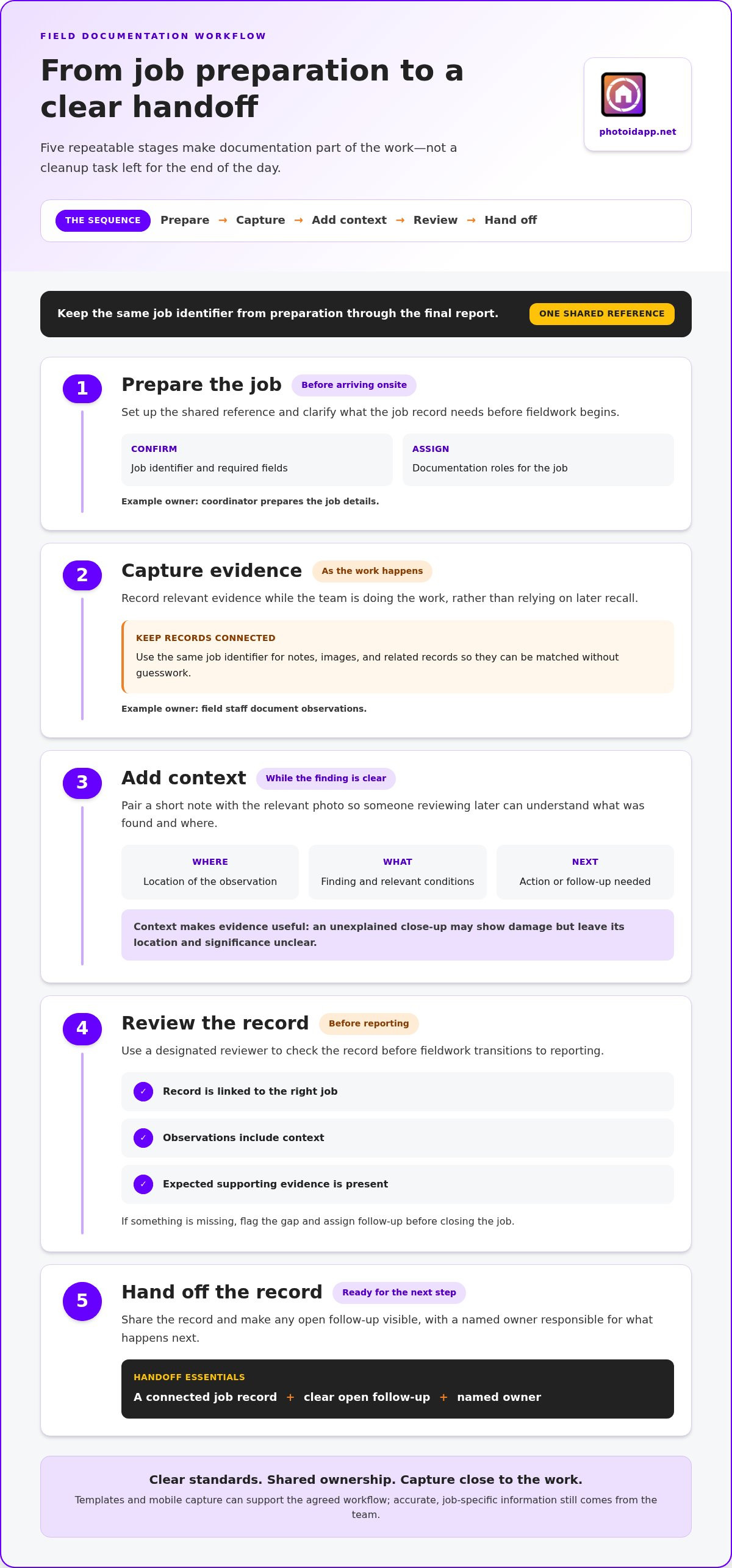
A reliable workflow makes documentation part of the job, not a cleanup task left for the end of the day. Move through five stages: prepare the job, capture evidence, add context, review the record, and hand it off. Give each stage a clear owner, but share the work. For example, a coordinator can prepare job details, field staff can document observations, and a reviewer can check the record before reporting. Structured operational procedures are critical across many professions; in healthcare settings, for example, veterinary professionals can explore Helpful.vet for interactive workflow tools and clinic benchmarks to streamline their daily routines.
Set the standard before the team arrives onsite
Define the minimum fields and evidence for recurring job types. Keep the job identifier, naming conventions, and handoff expectations in one easy-to-find version of the process. A documented standard helps managers communicate changes without crews relying on old copies or informal instructions. The EPA’s official guidance on preparing SOPs can help inform how you formalize repeatable work instructions.
Use one consistent job identifier from preparation through final report. Apply it to notes, images, and related records so a reviewer can connect them without guesswork. Adapt this checklist to each inspection type and your internal requirements:
- Prepare: Confirm the job identifier, required fields, and assigned documentation roles.
- Capture: Record relevant evidence as the work happens.
- Add context: Connect each observation to its location, finding, and next step.
- Review: Check that required details and supporting photos are present.
- Hand off: Share the record and flag any open follow-up with a named owner.
Capture and review information while the job is active
Prompt staff to add a short note alongside a relevant photo, while the finding is still clear. Before fieldwork transitions to reporting, have a designated reviewer check that the record is linked to the right job, observations have context, and expected evidence is included. If something is missing, flag the gap and assign follow-up before closing the job. This small checkpoint can prevent uncertain after-hours reconstruction.
To make how to ensure my team documents everything a practical routine, keep prompts close to natural work moments and make one person accountable for each handoff. Custom inspection templates and mobile capture tools can reinforce the agreed standard; they support the workflow, while staff still need to enter accurate, job-specific information. Explore PHOTO iD field documentation tools as one way to bring capture and reporting into a shared process.
Compare documentation methods: memory, forms, and mobile workflows
The right method depends on the work, the number of records, and how consistently others need to review them. Memory and informal notes are flexible, paper forms add structure, and mobile workflows can connect capture with job details and reporting. No method guarantees a complete record on its own. Clear expectations and a review step still matter.
| Method | Strengths | Limitations | Suitable situations |
|---|---|---|---|
| Memory and informal notes | Quick to start and easy to adapt to changing conditions. | Details may be forgotten, recorded inconsistently, or separated from supporting photos. | Simple tasks where a short record is enough and the team can capture it promptly. |
| Paper forms | Provide a familiar structure and can guide staff through required fields. | Photos and notes may need to be matched later; handwriting or delayed transcription can make review harder. | Low-volume or straightforward work with stable requirements and a clear filing process. |
| Mobile documentation | Can bring job details, observations, photos, and reusable templates together during fieldwork. | Still depends on staff following the standard, labeling accurately, and reviewing the record. | Recurring work where teams need consistent capture and a direct path to organized reports. |
When do paper forms or informal notes fall short?
A paper checklist can capture the required fields, but a photo saved separately may not clearly connect to the right finding or location. If notes are transcribed later, terminology can vary and context can fade. That doesn’t make paper wrong for every team. For occasional, simple jobs, a short form may be practical, provided the process explains how to attach evidence and file the completed record.
What should a mobile documentation workflow make easier?
Look for a workflow that keeps capture close to the job: identify the record, add observations beside relevant photos, apply consistent labels, and move the organized information toward a report. Reusable inspection templates can prompt teams to capture expected details. Voice-to-text labeling can support hands-busy field capture, but staff should review the text for accuracy and context.
A file-sharing tool can send photos from one person to another, but sharing alone doesn’t explain which job an image belongs to, what it shows, or what action follows. A documentation workflow connects those pieces and makes review possible. To explore evaluation criteria for mobile inspection tools, read this home inspection app guide. The best fit is the method your team can use consistently, with clear standards and accountability built in.
Make documentation consistent without slowing down fieldwork
Consistency comes from habits people can use on a busy job, not from adding paperwork at the end of a long shift. Keep training short, tie it to real examples, and place reminders where the work naturally calls for them. A prompt to label a photo while documenting a finding is easier to act on than a lengthy closeout form completed from memory later.
Train the team with examples and clear ownership
Show staff what the standard looks like in practice: a useful observation, a photo with enough context to identify the finding, and a handoff that names any open follow-up. Then clarify who captures each record, who checks it, and who resolves missing information. That shared understanding helps answer how to ensure my team documents everything without making one person responsible for every note and image.
Use a simple onboarding checklist, then revisit it whenever job requirements or workflows change. Include the essentials:
- Where to find the current documentation standard and job requirements.
- How to connect observations and photos to the right job.
- Who reviews records and assigns follow-up for missing details.
Use templates or mobile prompts to reinforce the agreed process, not to replace it. If staff use voice-to-text labeling, demonstrate how to capture a concise label and review it for accuracy. Explore voice-to-text labeling guidance for a focused look at hands-free capture.
Use lightweight checks to improve the process
Build a short closeout check around required records, not extra administration. Confirm that key fields are present, supporting evidence is connected to the job, and unresolved items have an owner. Add prompts at natural transitions, such as after recording a finding or before handing the record to reporting. This keeps the check close to the work and makes gaps easier to address while context is fresh.
Review a small sample of completed records for missing context and recurring friction. Look for patterns: Are the same fields often skipped? Are photo labels unclear? Does a handoff leave follow-up unassigned? Discuss what the process made difficult, then adjust the prompt, template, or training. Share completion patterns to improve the system, not to shame individuals. Documentation reviews work best as a feedback loop: spot the snag, fix the workflow, and check whether the change helps.
PHOTO iD’s custom inspection templates, voice-to-text labeling, and team management dashboard can support consistent capture and oversight. Explore PHOTO iD field documentation tools to see how these capabilities can fit into your team’s process.
Bring your team’s field documentation into one practical workflow
Reliable records come from a connected process: define the standard, assign ownership, capture details in context, review the record, and improve the workflow as the team learns. For organisations tying field activities into wider operational systems, all-in-one software platforms such as Mooov help Australian businesses centralise their day-to-day operations. Technology can make those steps easier to follow, but it can’t replace clear expectations or thoughtful review. Staff still need to record accurate information and connect it to the right job.
Match platform capabilities to the workflow
PHOTO iD brings field capture and report preparation together with tools that support different steps in the process:
- Custom inspection templates help teams follow consistent fields for recurring job types.
- Automated photo labeling supports organized images connected to field documentation.
- Voice-to-text labeling gives staff another way to add context during field capture.
- Instant photo reports help bring captured material into a shareable inspection deliverable.
Use these features to reinforce your standard, not as a substitute for it. A template can prompt for expected details, and labeling can support organization, but the team must still provide accurate observations, check the record, and resolve missing information before handoff.
Start with one team workflow and improve it
Pick a recurring job type and write a concise minimum documentation checklist. Introduce it to the people who prepare, capture, review, and receive the record. Ask field staff what feels clear, what slows them down, and where a prompt or template needs adjustment. Then refine the process and share the current version with everyone who uses it.
This small, practical rollout gives you a way to test the workflow before extending it to other jobs. Review completed records for missing context and repeated gaps, then make targeted changes. That’s a dependable path toward how to ensure my team documents everything: consistent standards, clear ownership, useful tools, and regular feedback.
If you’re ready to bring those steps into one field documentation process, explore PHOTO iD’s field documentation platform.
Make complete field records part of every job
Consistent documentation doesn’t come from asking the team to write more. It comes from setting a clear standard, assigning ownership, and making capture and review part of the work. That’s the practical answer to how to ensure my team documents everything: build a workflow people can follow in the field, then refine it using real feedback.
PHOTO iD can support that process with custom inspection templates for repeatable records, automated photo labeling and voice-to-text labeling for field capture, and instant photo reports for sharing job documentation. The team management dashboard provides real-time project oversight. These tools help organize the workflow, while clear expectations and thoughtful review keep records useful and complete.
Start with one recurring job type. Define what its record needs, make responsibilities clear, and adjust the process when the team finds friction. Small, practical improvements can bring more order to every handoff.
Explore PHOTO iD’s field documentation tools and build a workflow that helps your team capture, organize, and share job details with confidence.
Frequently Asked Questions
How do you make sure employees document every job consistently?
Set one clear minimum standard for each recurring job type, then assign responsibility for capturing, checking, and following up on records. To understand how to ensure my team documents everything, make the process easy to find and use: keep a consistent job identifier, show examples of complete records, and add brief prompts at natural points in the work. Review records for patterns, then adjust the workflow when expectations or job requirements change.
What should a field inspection report include?
A field inspection report should identify the job and record relevant observations, supporting evidence, actions taken, and any follow-up needed. Include enough context for another person to understand what was found, where it was found, and what happens next. The exact fields vary by inspection type and internal or client expectations. A photo may support a finding, but a label or note should explain its job connection and significance.
How can managers improve documentation without slowing down fieldwork?
Keep the standard focused on information people need, and place prompts alongside the task they support. For example, ask staff to add a brief note when they capture a finding rather than relying on a long end-of-day form. Use templates for recurring jobs, then review a sample of completed records for missing context or confusing steps. Fix repeated workflow friction with clearer prompts or role assignments instead of adding extra paperwork.
Are photos enough to document an inspection?
Photos are valuable evidence, but they rarely explain a finding by themselves. A useful record connects each image to the correct job and adds context, such as what the photo shows, where the issue was observed, and whether action or follow-up is needed. A clear label or short note can make an image easier to interpret later. Review photos with the written observations so the evidence supports, rather than replaces, the inspection record.
Can mobile apps help teams capture job details in real time?
Yes. A mobile documentation app can support field capture by bringing job information, notes, photos, and templates into a single workflow. Features such as automated photo labeling and voice-to-text labeling can help staff organize evidence and add context while working. Custom inspection templates can support repeatable records, while report-generation tools can help prepare captured material for sharing. Staff should still review entries for accuracy and completeness before handoff.
How often should managers review field documentation?
Review documentation at a cadence that fits the team’s workload and the importance of catching gaps before records are handed off or used for reporting. A brief closeout check can identify missing information on an individual job, while periodic reviews of a sample can reveal recurring issues across the process. Look for patterns, discuss what made documentation difficult, and refine the standard or prompts. Keep reviews focused on improving records, not blaming staff.
What is the best way to train a team on documentation standards?
Use short, role-specific training built around real job examples. Show what a clear observation, a properly contextualized photo, and a complete handoff look like, then explain who captures, reviews, and resolves missing details. Give new team members an easy-to-follow checklist and make the current standard accessible. Revisit training when job requirements or workflows change. Practical examples help staff apply the expectations in the field, not just remember them in a meeting.