

What if the best field inspection software isn’t the platform with the most features, but the one that turns your evidence into a clear report with less effort? Choosing field inspection software for small business starts with the work your team actually does, from capturing photos onsite to organizing notes and preparing documentation.
If notes, photos, and reports are scattered across devices, each job can create extra admin. Manual documentation takes time away from inspections and client work, while a large platform can bring more complexity than a small team needs. Look for a practical way to keep field evidence organized and move it into reporting.
This guide compares software by workflow, reporting, usability, and fit for small teams. You’ll find practical questions to ask, capabilities to check, and ways to avoid paying for complexity you won’t use.
We’ll also look at PHOTO iD for photo-focused workflows, with mobile documentation, automated photo labeling, custom inspection templates, and instant photo report generation. Start with the work in front of you, then decide how software can make each photo and note easier to use.
Key Takeaways
- Match field inspection software for small business to the jobs your team performs, not to a long feature list.
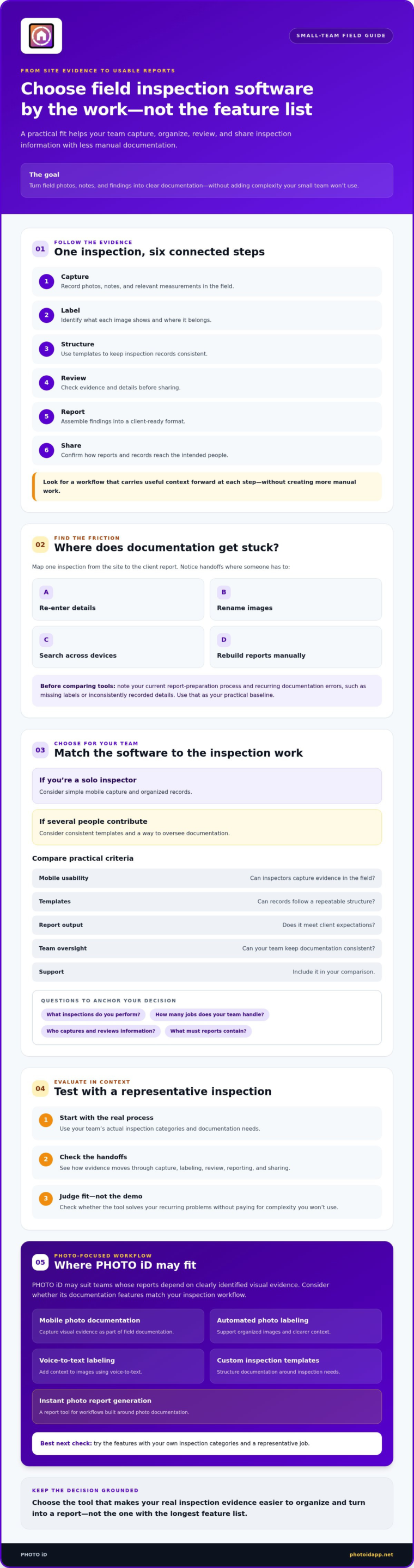
- Follow the workflow from field capture through labeling, review, reporting, and sharing to find where documentation gets stuck.
- Compare tools using practical criteria: mobile usability, templates, report output, team oversight, and support.
- Test shortlisted software with a representative inspection to see how it handles your team’s actual process.
- Consider whether PHOTO iD’s photo labeling, voice-to-text, custom templates, and report tools suit your documentation workflow.
Why small businesses need field inspection software that fits the work
A small inspection team needs documentation to move from the site to the client without turning every job into an office project. Field inspection software can help teams capture, organize, review, and share inspection information. It sits within the broader category of Field service management (FSM), but an inspection-focused workflow centers on evidence and reporting, rather than every function a large service operation might need.
The right fit depends on the inspections you perform, how many jobs your team handles, who captures and reviews information, and what your reports need to contain. A solo inspector may need simple mobile capture and organized records. A small team may also need consistent templates and a way to oversee documentation. Software supports the process, but it doesn’t replace professional judgment or perform the field inspection.
Which field documentation problems should software solve first?
Map one inspection from start to finish. Track how notes, photos, measurements, and findings move from the site to the person preparing the client report. Mark each handoff where someone re-enters details, renames images, searches across devices, or rebuilds a report manually. These repeated steps point to places where software may reduce friction.
Before comparing tools, note your current report preparation process and recurring documentation errors, such as missing labels or inconsistently recorded details. This gives you a practical baseline. It also helps keep a polished product demo from distracting you from the problems your real jobs need to solve.
What does a small business need from an inspection platform?
Field inspection software helps capture, organize, review, and share inspection evidence as it moves from the job site into a usable report. For a small business, prioritize easy mobile capture, consistent records, reports that meet client expectations, and clear team access. Start with capabilities that support your current workflow.
Separate essentials from nice-to-haves. If photos drive your reports, reliable photo organization and repeatable labels may matter more than broad operational features your team won’t use. If several people contribute to a job, consider whether templates and team oversight can keep records consistent. Judge each feature against actual inspection work, not its place on a feature list.
Which field inspection software features turn site evidence into usable reports?
Evaluate the workflow from the moment an inspector records a finding to the moment a client receives documentation. A platform may excel at scheduling or project oversight yet leave photos and notes disconnected from the report. For a small team, the key question is whether each step carries useful context forward without creating more manual work.
- Capture: Record photos, notes, and relevant measurements in the field.
- Label: Identify what each image shows and where it belongs.
- Structure: Use templates to keep inspection records consistent.
- Review: Check evidence and details before sharing.
- Report: Assemble findings into a client-ready format.
- Share: Confirm how reports and records reach the intended people.
Organized field evidence gives teams a clearer, more consistent foundation for inspection reports. Labels help distinguish a photo of a roof edge from one of an interior wall, while templates prompt inspectors to capture information in a repeatable structure. That context helps the person preparing or reviewing a report understand what the evidence shows.
Capture and organize field photos without extra admin
Test mobile capture on a representative job. Can inspectors label images consistently, add context with voice-to-text, and follow a custom template without interrupting their work? Automated photo labeling and organized records can make it easier to find a specific image later. For more guidance on choosing an inspection app, see this home inspection app guide.
PHOTO iD includes mobile photo documentation, automated photo labeling, voice-to-text labeling, and custom inspection templates. These features may suit teams whose reports depend on clearly identified visual evidence. Try them with your own inspection categories, not just sample photos.
Generate reports and keep teams aligned
Check whether report generation uses captured field documentation and whether templates can reflect the inspections your business performs. A photo report tool is not automatically a full project-management, estimating, or compliance platform. Decide which job-management functions you need, then focus on features that support your reporting process.
Assess team oversight separately. A dashboard may help a small business keep work visible, but check whether it shows the details your team needs. Verify sharing, export, and collaboration options directly with each provider before relying on them. PHOTO iD offers instant photo report generation and a team management dashboard; confirm that their functions match your process.
How to compare field inspection software for small business
Compare tools against the work your team needs to complete, not the length of their feature lists. The right field inspection software for small business should make field capture and reporting easier without burying a small team in setup and administration. If configuring and maintaining the platform takes more effort than the workflow gains, it may not be the right fit.
Use a needs-based scorecard instead of a feature-count contest
Start with real jobs. Rank each capability as must-have, useful, or unnecessary. Then compare shortlisted tools on mobile usability, reporting fit, setup effort, and likely team adoption. Ask for a demonstration using your inspection steps, a representative photo set, and a report you actually deliver. A polished demo may hide friction that appears in day-to-day use.
| Criterion | Why it matters | Ask the provider | Evidence to request |
|---|---|---|---|
| Field usability | Capture should fit the pace of an inspection. | Can an inspector record information easily on a typical job? | A live walkthrough using your field workflow. |
| Photo organization | Clear labels preserve each image’s context. | How are photos labeled, sorted, and found? | A sample record using your photo categories. |
| Templates | Consistent prompts help standardize records. | Can forms reflect your inspection needs? | A template built around a real inspection. |
| Report output | Field evidence should carry into client documentation. | How is a report assembled and tailored? | A sample report based on your information. |
| Team oversight | Shared visibility can clarify who handles each step. | What can managers see about team work? | A walkthrough of relevant dashboard views. |
| Support | Help matters during setup and adoption. | What support is included, and under what terms? | Written support details and response expectations. |
Check workflow fit, scale, and business risk
Check whether the platform fits your current roles and expected workload. Don’t assume future features will solve today’s needs. Include the full ownership picture in your comparison: subscription terms, setup and training effort, add-ons, report limits, and staff time spent maintaining the system. Confirm all terms directly with the provider.
Before choosing, ask how you can access and export records, what backup and retention practices apply, and what security terms govern your data. Verify cancellation conditions, support, and trial details in writing. If your inspection work is part of a broader construction process, this construction management software guide can help clarify where project-management needs begin. For photo-focused documentation options, review PHOTO iD’s inspection tools against the same scorecard.
How to evaluate, test, and roll out field inspection software
Don’t choose field inspection software for small business based on a polished demo alone. Test it against real work, then roll it out in stages. A simple process can show whether a tool reduces documentation friction or just moves it somewhere else.
- Document the current process. Note how a typical inspection moves from field capture to finished report, including who handles each handoff.
- Shortlist tools. Keep options that meet your essential workflow and reporting needs.
- Test the same real-world scenario. Use comparable inspection details, photos, and reporting expectations in each platform.
- Train the team. Set shared conventions for labels, templates, and review responsibilities.
- Review the results. Compare the pilot with your baseline and decide what to adjust before wider use.
Run a realistic software trial before committing
Use a representative inspection, not sample data selected for a product demo. Test the complete workflow on the devices staff use: capture evidence, label it, apply a template, prepare a report, and share it using the method your team expects. Note confusing steps, repeated entry, and points where someone has to leave the platform to finish the task.
Verify claims that could affect field use before relying on them. Ask the provider to demonstrate offline behavior, integrations, and export options if they matter to your process. Test each capability directly and confirm any limitations in writing. If roof measurement is central to your work, consult this roof software guide while assessing that workflow.
Train the team and measure whether the change works
Keep the rollout focused. Choose one repeatable inspection workflow, agree on photo-labeling or template conventions, and show each user how to complete their steps. Assign someone to manage onboarding, access permissions, and staff questions so small snags don’t derail adoption.
Set a pilot period that reflects your normal inspection cycle. Compare report preparation and missing documentation with your baseline. Gather feedback from field users and whoever reviews or sends reports. Are records easier to find? Can reports be used without rebuilding them? Is the team following the workflow? Use the answers to refine the setup before expanding use.
For a photo-focused pilot, explore PHOTO iD’s inspection documentation tools and assess them against a real job, your team’s devices, and your reporting process.
When PHOTO iD fits a small business field inspection workflow
PHOTO iD may suit small inspection teams whose work depends on property photos, consistent labels, and client-facing reports. Its focus is documentation: organizing visual evidence and carrying it into reports, rather than covering every operational need a business might have. It may be worth evaluating if scattered images and manual report assembly are central problems in your current process.
Who may benefit from PHOTO iD’s documentation-focused tools?
Consider a team that captures many images during an inspection, then needs to sort them by location or finding before preparing a report. PHOTO iD offers automated photo labeling, voice-to-text labeling, custom inspection templates, instant photo report generation, and a team management dashboard. Templates can help standardize what staff record, while voice-to-text labeling can support adding context in the field. Test these tools against your team’s inspection steps and reporting requirements.
Roofing workflows may also find PHOTO iD’s aerial roof and wall measurements relevant. Confirm how those capabilities fit the way your business captures and uses measurements before deciding whether they’re a match. The important question is whether they address actual work, not simply whether they appear on a feature list.
What should buyers confirm before choosing PHOTO iD?
Check that the available inspection templates and report outputs can support the information your clients expect. Verify current mobile device and operating system support, cloud and team access, data handling and security terms, integrations, export options, subscription details, and cancellation conditions directly with PHOTO iD. Test important workflows in practice, including how field evidence moves into a finished report.
Keep the scope clear. PHOTO iD is inspection documentation software; it doesn’t perform physical inspections or insurance claim adjusting, and its documented capabilities shouldn’t be mistaken for a full general project-management platform. If you need scheduling, estimating, or other business operations in the same system, confirm that those requirements are met rather than assuming they’re included.
If you’re comparing field inspection software for small business and photo-based reporting is a priority, assess PHOTO iD against a representative job and your feature checklist. Explore PHOTO iD to see whether its documentation tools fit your team’s workflow.
Choose a workflow your team can keep moving
The right field inspection software for small business should make it easier to move from onsite evidence to a clear, consistent report. Start with your team’s inspection needs, compare tools against practical criteria, then test the leading option on a representative job. A pilot can show whether the workflow fits before you commit to wider adoption.
For teams centered on photo documentation, PHOTO iD brings together automated photo labeling, voice-to-text labeling, custom inspection templates, instant photo report generation, and a team management dashboard. Confirm that its device support, data-handling terms, and workflow capabilities meet your requirements.
Choose a practical fit, establish a consistent process, and give your team a clearer way to manage the documentation behind every report.
Frequently Asked Questions
What is field inspection software for a small business?
Field inspection software for small business is a mobile or cloud-based tool for capturing, organizing, reviewing, and sharing inspection information. Capabilities vary: some tools focus on photos and reports, while others include broader scheduling, estimating, compliance, or project-management functions. Start with your team’s field-to-report workflow. Choose software that supports the records you need to capture and the reports you need to deliver, without adding unnecessary features or administration.
How do I choose field inspection software for a small business?
Map your current workflow, then identify where documentation slows down or gets lost. Rank essential features before comparing providers. Check mobile capture, photo organization, templates, report output, team oversight, and support. Test shortlisted tools on a realistic inspection using the devices your staff work with. Before committing, confirm device compatibility, security and data export details, subscription terms, and any limitations that could affect your process.
How much does field inspection software cost for a small business?
Costs vary by provider, subscription structure, user count, plan, and included capabilities, so there’s no single price for every small business. Confirm current pricing directly with each provider and ask what the subscription includes. Check for add-ons or other charges, onboarding requirements, cancellation terms, and trial conditions. Also consider the staff time needed to set up and manage the software when comparing overall value.
Can field inspection software work for a one-person business?
Yes, it can be useful for a solo operator if it solves a real documentation or reporting problem without creating extra setup. Prioritize mobile capture, straightforward photo organization, reusable templates, and report creation. Run a typical inspection through the complete workflow, from recording evidence to preparing the report. Check that the available features and subscription terms suit your current workload, not just a future growth plan.
What features should small businesses look for in inspection software?
Start with reliable mobile capture, organized records, inspection-specific templates, and report output that suits your clients. Depending on your work, photo labeling, voice-to-text, team visibility, or measurement tools may also help. Focus on capabilities that solve current workflow problems rather than choosing by feature count. Verify offline access, integrations, export options, device requirements, and security details with each provider; don’t assume those capabilities are included.
Can field inspection software create reports from photos?
Some platforms support photo-based reporting, but the steps and results differ. Ask whether image labels, notes, and template details carry into the report, and whether staff can review the document before sharing it. PHOTO iD offers automated photo labeling and instant photo report generation. Confirm directly with the company how its current reporting workflow handles your inspection evidence and whether the resulting format meets your needs.
What happens if my field team does not adopt the software?
If staff avoid the tool, documentation may remain inconsistent and expected workflow gains can be lost. Involve field users in the evaluation, then test the software on real jobs and the devices they use. Keep the initial process focused, set clear labeling or template conventions, and provide practical onboarding. During a pilot, review adoption and user feedback. Adjust the workflow before expanding use across the business.
Explore PHOTO iD’s field documentation tools and assess them against a representative inspection and your reporting workflow.