
Your site photos are digital clutter until they are labeled. In 2026, manual documentation is no longer just a chore; it’s a liability that triggers payment disputes and stalls your entire operation. Finding the best construction photo app is the only way to stop scrolling through hundreds of unnamed files at the end of a long shift. They say a picture is worth a thousand words, but on a jobsite, an unlabeled photo is just a thousand questions. It’s exhausting, slow, and keeps you chained to your desk long after the crew has gone home.
You deserve a workflow that moves as fast as you do. This guide promises to help you transform visual chaos into organized, actionable project assets in seconds! We’ll master the tools that automate labeling, generate professional reports onsite, and ensure your office team never has to guess about context again. Capture, Categorize, and Conquer. Follow this roadmap to reclaim your time, protect your liability, and bridge the communication gap between the field and the office instantly.
Key Takeaways
- Identify how unnamed photos become project liabilities and learn to calculate the hidden costs of manual sorting.
- Discover how the best construction photo app utilizes voice-to-text and automated labeling to categorize site conditions while keeping your hands free.
- Evaluate your tech stack based on capture speed and offline functionality to ensure documentation never stops, even in remote or subterranean locations.
- Master high-velocity workflows by implementing project-specific templates that generate professional reports directly from the jobsite.
- Restore hours of productive time to your week by choosing a solution built by industry veterans to bridge the gap between field and office.
Stop the Photo Chaos: Why Traditional Construction Documentation Fails
Your camera roll is a graveyard of context. Every day, field teams snap thousands of photos that end up in a disorganized mess. Generic cloud storage like Dropbox or Google Drive is where construction data goes to die. Without structure, these files are digital clutter, wasted storage, and missed opportunities. They don’t protect your business; they complicate it. Effective Construction management requires precision, not a scavenger hunt for a specific JPEG. Unnamed files are liabilities waiting to explode when a subcontractor claims they weren’t responsible for a specific defect.
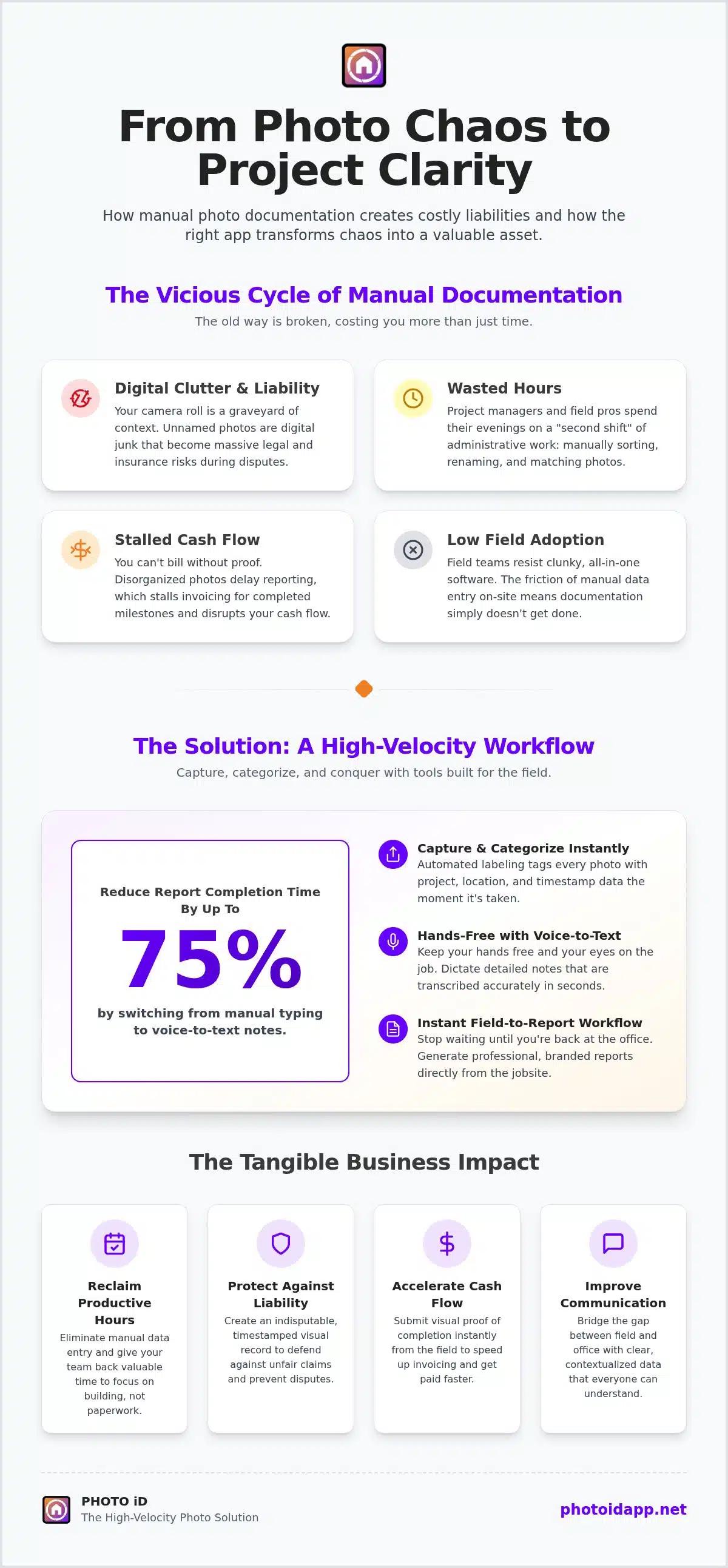
The hidden cost of manual photo sorting is staggering. Project managers spend hours every week renaming, moving, and matching photos to specific line items. This manual labor drains productivity and stalls project momentum. When reporting is delayed, cash flow suffers because you can’t bill for completed milestones without proof. Stakeholders lose trust when you can’t provide instant visual proof of progress or issues during weekly meetings. Finding the best construction photo app isn’t just about taking pictures; it’s about reclaiming those lost hours. You want to leave the jobsite with the work done, not with a homework assignment.
The High Price of Disorganized Field Data
Poor site documentation creates massive legal and insurance risks. If you can’t find the photo of the flashing before the drywall went up, you’re on the hook for the leak. Lost photos lead to expensive rework and missed change orders. The documentation gap is the time between site capture and office utility. Every second that gap exists, your liability grows. Clear, timestamped, and labeled photos are your best defense against unfair claims. They turn “he said, she said” into “here is the proof.” Without this level of detail, you’re essentially flying blind during an audit or a warranty claim.
Why Field Teams Resist Complex Software
Field adoption is the ultimate hurdle. Most all-in-one platforms fail because they’re too slow for a live jobsite. Nobody wants to stand in the sun and type out detailed descriptions on a cracked screen. The friction of manual entry kills documentation before it starts. You need high-velocity tools that match the speed of construction. The best construction photo app should feel like an extension of the work, not a disruption of it. Capture. Label. Finish. That’s the only way to ensure the data actually makes it from the field to the office. Stop forcing field pros to be data entry clerks. They have structures to build and safety to manage; they don’t have time for clunky menus.
The Science of Speed: Automated Labeling and Voice-to-Text Technology
Speed defines the winners in the 2026 construction market. If you’re still spending your evenings typing out descriptions for photos you took at 10 AM, you’re losing money. Automated photo labeling flips the script. It categorizes your images the instant you capture them. This isn’t just storage. It’s active data generation that builds your report in real time. By the time you walk back to your truck, the heavy lifting is done. You’ve effectively eliminated the “second shift” of office work. The best construction photo app treats photos as the primary data source, not just as attachments to a text file.
Traditional workflows are broken because they rely on human memory. You take fifty photos of a foundation, drive back to the office, and then try to remember which crack was on the north wall. Automated labeling removes the guesswork. It tags the location, the project phase, and the specific inspector immediately. This creates a seamless bridge between the physical jobsite and your digital records. It restores order to documentation chaos and ensures that every pixel you capture has immediate utility for your project managers and stakeholders.
Voice-to-Text: The Field Professional’s Best Friend
Mobile keyboards are a nightmare on an active jobsite. Between sun glare, dust, and work gloves, manual typing is a recipe for frustration and errors. Voice-to-text technology is the ultimate relief for field professionals. Modern natural language processing now understands construction-specific terminology with incredible accuracy. Whether you’re documenting “HVAC ducting” or “subterranean waterproofing,” the software captures it without a single keystroke. Industry professionals report that switching to vocal input can reduce report completion time by up to 75%. It keeps your hands free, your eyes on the site, and your focus on safety. Don’t peck at a screen. Speak your observations and let the technology do the transcription.
Template-Driven Organization
Standardization is the key to scaling your business. Custom inspection templates ensure that every crew member captures the same essential data points every time. You don’t have to worry about a junior inspector missing a critical photo of the roof flashing or the electrical panel. These templates guide the user through a logical, high-velocity workflow. Each photo links automatically to a specific line item or project phase. This creates a cohesive narrative for every project that office teams can understand instantly. If you want to experience this level of efficiency, it’s time to integrate the best construction photo app into your daily routine. Capture the data. Categorize the findings. Conquer the workload!
Choosing Your Tech Stack: Essential Features for Construction Photo Apps
Selecting the right tools determines whether your project documentation succeeds or fails. You need a balance between capture speed and reporting depth. If the app is too complex, field adoption drops to zero. If it’s too simple, you lack the data needed for professional reports. The best construction photo app must bridge this gap by offering high-velocity capture that feeds directly into comprehensive documentation. It’s about more than just taking pictures; it’s about building a digital asset that protects your bottom line.
Offline support is a non-negotiable requirement for the modern jobsite. Construction doesn’t always happen where there’s a strong 5G signal. Whether you’re in a subterranean parking garage or a remote rural site, your software must work without a connection. Data should sync automatically once you’re back in range. Furthermore, leadership needs oversight through real-time dashboards to manage multiple teams simultaneously. This bird’s-eye view allows project managers to spot bottlenecks before they become expensive delays. Speed, Oversight, Success!
Integration potential is the final piece of the tech stack puzzle. Your visual data shouldn’t be trapped in a silo. Look for platforms that move data seamlessly into other essential industry management and estimating tools. This connectivity ensures that your photos support your estimates and project management workflows without manual re-entry. When your tech stack talks to itself, you save time, reduce errors, and keep your projects moving forward at high velocity.
Field-First vs. Office-First Software
A field-first interface is built for the person wearing gloves. It prioritizes big buttons, voice commands, and minimal taps. If a new subcontractor cannot learn the app in five minutes, it’s the wrong tool for your crew. Field adoption is the only metric that matters. Instant report generation onsite accelerates project milestones by providing immediate proof of work to stakeholders and clients. You want to leave the jobsite with the paperwork finished, not with a homework assignment for later tonight.
Advanced Capabilities: Beyond Simple Photos
Modern apps offer more than just a camera. Look for advanced features like aerial measurements for roof and wall assessments. These allow you to gather precise data without ever leaving the ground, and for projects requiring absolute geospatial fidelity, high-precision GNSS correction services from WizNET can ensure your documentation is perfectly mapped. Virtual inspection tools enable remote oversight, allowing project managers to collaborate with field teams in real time from anywhere in the country. Centralized dashboards restore order by providing a high-level view of every active site in your portfolio. This is how you scale your business without losing control of the details.
From Field to Report: Streamlining Site Documentation Workflows
Efficiency is a sequence. It starts before you even step onto the jobsite. By implementing a structured workflow, you transform the best construction photo app from a simple camera into a high-powered production line for data. First, set up project-specific templates. These act as your digital guardrails. They ensure every inspector follows the same logic, whether they are checking a foundation or a finished roof. Without these templates, you’re just taking pictures. With them, you’re building a legal and operational record that protects your profit.
Standardizing Your Inspection Process
Consistency is the enemy of disputes. Develop a standardized shot list for every site visit to eliminate gaps in your documentation. Custom templates prevent your team from forgetting critical angles, such as the plumbing behind a wall before it’s closed up. Train your crew on high-velocity capture techniques where they move through the site with purpose. This standardized approach ensures that the office team receives identical data formats from every field tech. It makes comparison and analysis instant rather than a chore. Capture the data. Categorize the findings. Conquer the workload!
The second step happens during the walk-through. Use voice commands to label every image as it is captured. This real-time categorization removes the need for office-side sorting. Enhance your site data accuracy by utilizing integrated aerial measurements. You can capture roof and wall dimensions precisely without climbing a ladder or pulling a tape. This is documentation at the speed of thought. It combines visual proof with physical data, creating a comprehensive project asset in seconds! It’s about moving fast without missing the details that matter most for your bottom line.
Collaborative Reporting and Team Oversight
Documentation is only useful if it’s shared. Use team dashboards to monitor project progress in real time without ever leaving your desk. The field app syncs instantly with your office headquarters, providing a live feed of jobsite conditions. This transparency allows leadership to manage multiple teams and sites with absolute clarity. You can control permissions and access for subcontractors, ensuring they see only what they need to see. This keeps your data secure and your stakeholders informed. No more waiting for weekly meetings to understand what happened on a Tuesday morning.
The final step is the most rewarding. Generate and distribute professional PDF photo reports the moment you finish the walk-through. Don’t wait for the end of the week to bill your clients. Send the proof immediately and keep your cash flow moving. To start streamlining your onsite workflows today, download the best construction photo app and experience the relief of a finished report before you even start your truck. Leave the jobsite with your documentation done and your reputation intact!
Scaling Efficiency: Why PHOTO iD is the High-Velocity Solution
Scaling your business requires a departure from manual habits. If your growth is capped by the time it takes to sort through site images, you’ve hit a documentation bottleneck. PHOTO iD acts as the high-velocity engine that powers your expansion. Built by industry veterans for field professionals, this platform solves the problems that generic software ignores. It turns every site visit into a streamlined data collection event. Finding the best construction photo app means choosing a partner that respects your time and your expertise. Document, Deliver, Dominate!
Automated labeling restores hours of productive time to your week. Think about what your project managers could achieve with an extra five to ten hours of headspace. Instead of wrestling with unnamed files, they can focus on high-value tasks like winning more bids and managing stakeholder relationships. Site photos stop being a chore and start being professional assets that demonstrate your mastery of the craft. This transition from digital clutter to organized intelligence is the hallmark of a market leader. It’s time to stop the chaos and start the momentum!
Restoring Order to Construction Documentation
The psychological relief of an organized project dashboard is immense. There’s a profound sense of confidence that comes from knowing every detail is captured, labeled, and ready for review. When you empower your team with tools they actually enjoy using, field adoption skyrockets. They feel the difference. They see the results. Your company quickly earns a reputation as a tech-forward leader, attracting better talent and higher-tier clients. Professionalism isn’t just about the work you do; it’s about how you prove it. Restoring order is the first step toward total site control.
Ready for High-Velocity Results!
The impact of switching to an automated system is immediate. You’ll see a drastic reduction in claim cycle times and a significant acceleration in payment approvals. When stakeholders receive a professional, organized report within minutes of a site visit, they pay faster. It’s that simple. Don’t let your documentation hold your cash flow hostage. By integrating the best construction photo app into your daily workflow, you ensure that every project is a success. Experience the speed, simplicity, and power of PHOTO iD today. Capture the data. Categorize the findings. Conquer the workload! Take the leap and transform your field operations into a high-velocity success story. Your future self will thank you for the saved hours!
Master Your Site Documentation Now
Manual sorting is a relic of the past. By embracing automated workflows and voice-to-text technology, you transform site photos from digital clutter into powerful project assets. You’ve learned how the best construction photo app bridges the gap between field capture and office utility. It’s time to stop the second shift of data entry. Leave the jobsite with your reports already finished!
PHOTO iD was built by industry experts who understand the daily grind of field teams. You can eliminate hours of manual office work and enjoy instant report generation onsite. Don’t let disorganized data stall your cash flow or damage your project’s reputation. It’s time to work smarter, move faster, and build better.
Start your high-velocity documentation journey with PHOTO iD today! Reclaim your time, protect your liability, and lead your company with digital confidence. You have the tools. Now, take the action!
Frequently Asked Questions
What is the best way to organize construction photos?
The best way to organize construction photos is to categorize them at the point of capture using automated labeling. Instead of dumping images into generic cloud folders, use a system that tags each file with project names, room locations, and specific timestamps instantly. This eliminates the “second shift” of sorting files at your desk. PHOTO iD ensures your visual assets are structured and searchable from the second you press the shutter button!
How does voice-to-text labeling work in a noisy construction environment?
Can construction photo software integrate with other industry-standard tools?
High-velocity documentation relies on seamless data flow between your field app and your project management or estimating software. Top-tier solutions allow you to move your labeled photos and reports directly into other essential industry platforms without manual re-entry. To further optimize your workflow, you can explore Structural Engineering Software Licensing to see how GMatrix-7 provides specialized design modules that complement your digital records. This connectivity ensures that your visual proof supports your estimates and submittals instantly, reducing errors and keeping your entire team synchronized across every project phase.
You can generate a comprehensive, professional photo report directly from the jobsite using the best construction photo app. Once your photos are captured and labeled via voice-to-text, the software compiles them into a structured PDF format instantly. You can review, sign, and distribute the finished document to stakeholders before you even leave the site. This immediate delivery accelerates payment approvals and provides instant relief from the burden of evening paperwork.
How do aerial measurements work within a photo management app?
Aerial measurements are integrated directly into the mobile interface, allowing you to gather precise roof and wall dimensions without ladders or tape measures. The app uses advanced imaging data to calculate surface areas and slopes with professional accuracy. This feature streamlines the estimating process and enhances safety by keeping your team on the ground. It turns a standard site walk into a data-rich assessment that feeds directly into your project reports and estimates.
What happens if I lose internet connection while taking site photos?
Reliable software provides full offline support for remote or subterranean jobsites where cellular signals are weak. You can continue capturing, labeling, and organizing your photos without any interruption. The app stores all data locally on your device and automatically syncs with the cloud once you return to a service area. This ensures that your documentation remains consistent and high-velocity, regardless of the site’s connectivity challenges or technical limitations. Capture. Sync. Succeed!
Why is automated labeling better than manual tagging for construction?
Automated labeling is superior because it removes human error and memory failure from the documentation chain. Manual tagging is slow, inconsistent, and often gets skipped when the jobsite gets busy. Automation ensures every photo is categorized correctly at the point of capture, creating a reliable audit trail. This consistency protects your business during disputes and ensures that office teams can understand the context of every image without asking a dozen follow-up questions.
How much time can my team save by using an inspection app?
Switching to a specialized best construction photo app can save your team hours of administrative work every single week. Industry professionals often report a 75% reduction in report completion time when moving from manual sorting to automated voice labeling. By finishing reports onsite, you eliminate the need for a “second shift” of office work. This time savings allows your project managers to focus on high-value tasks, winning more bids, and scaling your operations.