
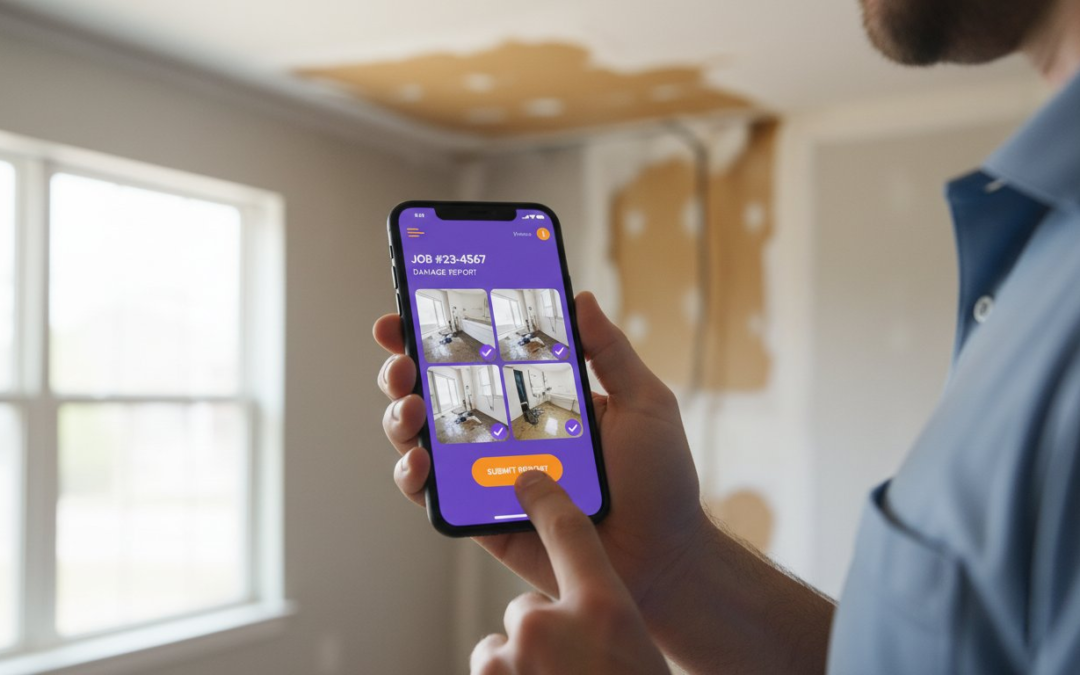
Did you know that over 60,000 insurance claims were litigated in Florida alone in 2024? Most of these disputes boil down to a single failure: poor evidence. Finding the right app for water damage photo documentation isn’t just a tech upgrade. It’s your primary defense against denied claims and delayed payments. You need a tool that turns every snapshot into a defensible narrative the moment you press the shutter.
We understand the grind. You’re tired of spending hours after a long shift labeling photos or arguing with adjusters over blurry images. It’s frustrating when field techs send back inconsistent documentation that slows down your entire billing cycle. You need to restore order to the chaos of onsite inspections without adding more work to your plate. You deserve a system that is fast, reliable, and professional.
This 2026 buyer’s guide shows you exactly how to automate your workflow to get claims approved faster. We’ll explore the essential features that define the best software today. Get ready to master instant report generation, automated photo labeling, and seamless Xactimate integration. Capture. Label. Submit. It’s time to let technology handle the heavy lifting so you can focus on the job at hand and get paid what you’re worth.
Key Takeaways
- Stop the manual grind. Discover why disorganized photos trigger audits and how to eliminate the documentation bottleneck forever!
- Identify the five non-negotiable features for your next app for water damage photo documentation; focus on automated labeling and hands-free voice-to-text.
- Deploy the “Two-Tap” rule. Help your field technicians capture high-quality evidence without slowing down their physical work.
- Streamline your workflow instantly. Move from on-site assessment to carrier-ready reports using pre-configured water damage templates and real-time labeling.
- Build a defensible narrative. See how software designed by industry adjusters can turn your photos into a powerful tool for claim approval!
Why Documentation is the #1 Bottleneck in Water Mitigation
Documentation is the invisible engine of your restoration business. If it stalls, your cash flow stops. Most field teams struggle with “Photo Fatigue,” the literal exhaustion of managing 200 or more images per project. When these photos remain unlabeled, they become a liability rather than an asset. Disorganized files trigger carrier audits. They invite payment disputes. They turn a simple job into a months-long battle for your hard-earned money.
The hidden cost of manual documentation is staggering. Think about the “office nights” spent hunched over a laptop, dragging and dropping files into folders. This manual sorting is a profit killer. By 2026 standards, carriers expect real-time, structured visual storytelling. They don’t want a dump of random snapshots. They want a chronological, labeled, and timestamped record. Using a professional app for water damage photo documentation ensures that your evidence is ready before you even leave the driveway.
Stop guessing. Start documenting. Professionalism isn’t just about how well you dry a structure; it’s about how well you prove it. Before you can document the fix, you must understand the scope of the emergency. What is Water Damage? It is a complex interaction of moisture and materials that requires a structured narrative to justify your equipment and labor. Without that narrative, your invoice is just a suggestion.
The High Cost of Incomplete Claims
Missing a single photo of a pre-existing condition can cost you thousands. If you can’t prove the damage was there before you started, you’re liable for the bill. Incomplete claims are the leading cause of reduced payouts. Carriers look for gaps in your story to justify “adjusting” your total. Lack of timestamps creates even more friction, making it impossible to prove the timeline of mitigation. You must bridge the gap between field capture and office estimation instantly. Capture the evidence. Label the detail. Secure the payment!
From Chaos to Clarity in Disaster Scenarios
The first 24 hours of a mitigation job are pure chaos. You’re focused on extraction, demolition, and setting equipment. In this high-pressure environment, “snapshotting” isn’t enough. You need professional documentation that builds a defensible record of the loss. A defensible record is more than just a picture; it’s a piece of evidence that an adjuster cannot ignore. Move from the chaos of a wet basement to the clarity of a structured report. Make your documentation bulletproof. Keep your hands free. Get the job done right!
5 Non-Negotiable Features for Water Damage Photo Apps
Speed is your greatest asset in the restoration industry. When the water is rising, you don’t have time for clunky menus or tiny keyboards. The right app for water damage photo documentation must do the heavy lifting for you. It should be a partner, not a chore. Look for these five pillars of efficiency to ensure your business stays profitable and your techs stay productive.
- Automated Photo Labeling: Manual typing is a relic of the past. Your software should recognize the room, the asset, and the damage type automatically. This eliminates human error and keeps the workflow moving. Capture the image. Let the AI label it. Move to the next room!
- Voice-to-Text Integration: Hands stay busy in a flood zone. You’re wearing gloves, carrying equipment, and navigating debris. Voice-to-text allows you to narrate the loss in real-time.
- Instant Report Generation: Waiting until the end of the week to build reports is a recipe for disaster. You need a PDF ready before the truck leaves the driveway. This speed impresses adjusters and accelerates the approval process.
- Moisture Mapping Support: Every photo needs context. Link your images directly to atmospheric readings and moisture levels. This alignment ensures you meet IICRC industry standards for professional restoration. It proves your drying plan is working.
- Cloud Synchronization: The office shouldn’t have to call the tech for updates. Real-time sync ensures that as soon as a photo is taken, the estimator can see it. This transparency builds trust and eliminates redundant communication.
The Power of Voice-to-Text Labeling
Typing on a mobile screen is nearly impossible when you’re geared up in full PPE. Sweat, moisture, and gloves make touchscreens a nightmare. Voice captions solve this problem instantly. As you speak, the app converts your words into searchable image tags. This creates a rich, detailed record without slowing down your physical work. Voice-to-text is the ultimate field efficiency tool for the modern restorer. It’s fast. It’s accurate. It’s essential!
Automated Organization and Templates
Don’t start from scratch on every job. Use pre-built “Water Mitigation” photo templates to guide your team through the process. These templates ensure that techs capture the source, the affected area, and the drying progress in the correct order. This category-based organization saves hours of sorting later. If you want to see this in action, check out how automated photo organization transforms your field operations. Auto-guidance prevents missed shots and keeps every claim on track for a full payout.
Evaluating the Best Apps for Water Damage Photos in 2026
Choosing an app for water damage photo documentation is a strategic decision for your bottom line. You don’t just need a camera; you need a workflow. General construction tools might track a punch list, but they fail during a high-stakes mitigation job. You need software that understands the difference between a dry-out and a build-back. Demand a tool that prioritizes speed, accuracy, and total integration!
Field technicians are your front line. If a tool is hard to use, they won’t use it. We advocate for the “Two-Tap” rule: a tech should be able to capture and label any photo in two taps or less. This keeps the momentum going during the demolition and extraction phases. Speed. Simplicity. Success! When your team can document a loss without breaking their rhythm, your data quality skyrockets.
Restoration-Specific vs. General Photo Apps
General apps like Dropbox or Google Photos are black holes for data. They lack the industry-specific metadata needed to justify a Category 3 water loss. They don’t offer structured labeling or time-stamped verification. A specialized app for water damage photo documentation handles moisture mapping and IICRC standards natively. It organizes your visual evidence into a structured narrative that adjusters can actually use. Don’t settle for a generic gallery when you need a defensible record.
Integration: The Key to Faster Payouts
Integration is where the magic happens. A professional app must talk to your other tools. Look for a “Direct-to-Xactimate” image import workflow to slash estimation time. When your photos flow directly into your estimate, you eliminate hours of manual uploading. API connections to CRM systems like DASH or Encircle reduce double-entry errors. This connectivity ensures that the office sees exactly what the tech sees, the moment they see it.
Think about the carrier adjuster. They are overworked and looking for reasons to close files quickly. Providing them with a shareable web link to a structured photo report makes their job easy. When you make the adjuster’s life easier, you get your checks faster. It is a simple equation of efficiency. Connect your systems. Sync your data. Win the claim!
Managing ten jobsites should be as easy as managing one. A centralized team management dashboard allows you to oversee multiple crews from a single screen. Review reports instantly. Track progress in real-time. Ensure every tech is following the custom inspection templates you’ve set. Scalability isn’t just about doing more work; it is about maintaining high standards while you grow. Master your documentation, and you master your business!
Streamlining the Workflow: From Field Capture to Carrier Approval
Efficiency is the difference between a profitable month and a paperwork nightmare. You need a linear process that moves as fast as your crews. A high-performance app for water damage photo documentation transforms the chaotic reality of a jobsite into a structured digital asset. Follow these five steps to master your workflow and secure faster approvals!
- Step 1: On-Site Assessment. Launch your pre-configured water damage templates the moment you step through the door. These templates guide your team to capture every essential detail without hesitation. Start strong. Stay organized. Finish fast!
- Step 2: Real-Time Labeling. Use voice-to-text commands to describe the damage as you see it. This eliminates the need for manual typing and ensures your descriptions are fresh and accurate. Narrate the loss. Capture the proof. Move on!
- Step 3: Instant Cloud Sync. Stop waiting for techs to return to the office. Every photo syncs to the cloud immediately, allowing your estimators to start the scope while the equipment is still being set.
- Step 4: One-Click Report Generation. Generate a professional PDF report with a single tap. Your reports come pre-loaded with timestamps and GPS data to satisfy the most demanding adjusters.
- Step 5: Direct Xactimate Export. Move your images directly into Xactimate for seamless claim processing. No more dragging and dropping. No more manual uploads. Just pure productivity!
Mastering On-Site Documentation
Focus your lens on the story of the loss. Capture “The Source” of the water and document “The Path” of migration through the structure. Use built-in annotation tools to highlight hidden moisture behind baseboards or mold growth in wall cavities. This level of detail removes all doubt from the adjuster’s mind. Embedded GPS coordinates and tamper-proof timestamps validate claim authenticity by providing an undeniable digital footprint of the loss. Clear evidence leads to clear payments!
Closing the Loop with the Office
The team management dashboard is your mission control. Project managers can review field photos in real-time to catch missing shots before the tech leaves the site. This transparency drastically reduces the back-and-forth communication that usually stalls a project. By closing the gap between the field and the office, you shorten the overall claim cycle time. Ready to transform your workflow? Get started with our app for water damage photo documentation and see the difference in your bottom line today! Speed up your approvals. Scale your operations. Secure your profit!
Stop Labeling Manually: Why PHOTO iD is the Professional Choice
The manual grind is over. If you want to scale your restoration business, you cannot afford to have your best techs stuck in “labeling limbo.” PHOTO iD is the professional choice because it was engineered to solve the exact frustrations we’ve discussed. It is more than an app for water damage photo documentation; it is a full-scale efficiency engine. It restores order to your jobsite and puts money back in your pocket faster than ever before!
Our “Claims Coach” advantage sets us apart. We didn’t just build a photo tool; we built a system based on the expertise of industry adjusters. We know exactly what carriers look for when they review a file. Our custom templates are designed specifically for IICRC-standard mitigation, ensuring your team captures the right data the first time. No more missing shots. No more denied line items. Just professional results!
Managing a growing team requires total visibility. Our Team Management Dashboard empowers you to oversee every project from a single screen. You can review field progress, verify photo quality, and ensure compliance without leaving your desk. This centralized control eliminates the guesswork. It keeps your crews accountable. It keeps your business moving forward!
Automated Labeling That Works
Our voice-to-text and auto-labeling engine is the heart of the platform. It is designed for the high-stress environment of disaster recovery where every second counts. Industry professionals report that using PHOTO iD reduces photo labeling time by up to 75%. This massive time savings allows your team to move to the next job while the competition is still typing. Reliability. Speed. Simplicity. These are the markers of a truly modern restoration business.
Ready to Revolutionize Your Documentation?
The ROI of switching to PHOTO iD is immediate. You save labor hours in the field and reduce the administrative burden in the office. Most importantly, you build a defensible narrative that adjusters respect and approve. Stop fighting with disorganized files and start winning your claims. We invite you to see the power of automation for yourself. Book a demo or start your free trial today. It is time to take control of your documentation and your future. Get Started with PHOTO iD Today!
Master Your Mitigation Workflow and Get Paid Faster
Success in the restoration industry isn’t just about drying out a structure; it’s about proving you did the work. You’ve seen how manual labeling kills productivity and how disorganized documentation invites carrier disputes. By choosing a dedicated app for water damage photo documentation, you bridge the gap between the field and the office instantly. You turn every snapshot into a defensible asset that adjusters cannot ignore.
Don’t let paperwork be the bottleneck of your growth. Our solution is built by industry veterans who understand the daily grind of the jobsite. Experience up to 75% faster photo labeling and enjoy a seamless Xactimate image import that slashes your estimation time. It’s time to stop the manual struggle and start scaling with confidence. Capture. Label. Lead!
Automate Your Water Damage Reports Now!
The future of restoration is digital, fast, and automated. Take the first step toward a more profitable business today. Your team deserves better tools, and your bottom line deserves better results. Let’s get to work!
Frequently Asked Questions
What is the best app for water damage photo documentation for small teams?
PHOTO iD is the premier app for water damage photo documentation for small teams. It provides a centralized dashboard that allows you to manage multiple technicians without the need for expensive enterprise setups. Capture. Label. Sync. It is the fastest way to professionalize your small business and scale your operations!
Can I import photos from a water damage app directly into Xactimate?
Yes, you can import your photos directly into Xactimate to streamline your estimation. This integration eliminates the tedious process of dragging and dropping files manually from a desktop folder. It ensures your line items match your visual evidence perfectly and slashes your administrative time.
Does voice-to-text labeling work in loud environments like a basement with air movers?
Voice-to-text technology is built to handle the heavy noise of a jobsite. Modern AI engines filter out the hum of air movers and dehumidifiers to capture your captions clearly. You can document the loss while the equipment is running without missing a single detail!
How do water damage apps help with moisture mapping?
These apps link moisture readings directly to specific photos of the affected materials. This creates a visual moisture map that proves the structure is drying according to IICRC standards. It provides the technical data adjusters need to approve your equipment usage and labor costs.
Is it better to use a dedicated inspection app or just my phone camera?
A dedicated app for water damage photo documentation is far superior to a standard phone camera gallery. Phone cameras lack the automated labeling, GPS verification, and industry-specific metadata required for insurance claims. Don’t settle for a messy gallery when you need a defensible record of the loss.
Do these apps work offline if there is no internet on the jobsite?
Professional restoration apps work offline to ensure you never lose data. You can capture and label photos in basements or remote areas without a signal. The app stores your data locally and syncs it to the cloud automatically once you reconnect to Wi-Fi or cellular data.
Can I customize the photo labels for different types of water losses?
You can fully customize your labels and templates to match the specific category of the loss. Whether you are dealing with a clean water pipe burst or a Category 3 sewage backup, custom templates ensure you use the right terminology. This consistency keeps your documentation professional and carrier-ready!
How much time can I save per job using automated photo labeling?
You can save up to 75% of your total documentation time per project. By using an app for water damage photo documentation with automated labeling, you move from capture to report generation in seconds. This efficiency allows your crews to handle more jobs every week and increases your overall profitability.