
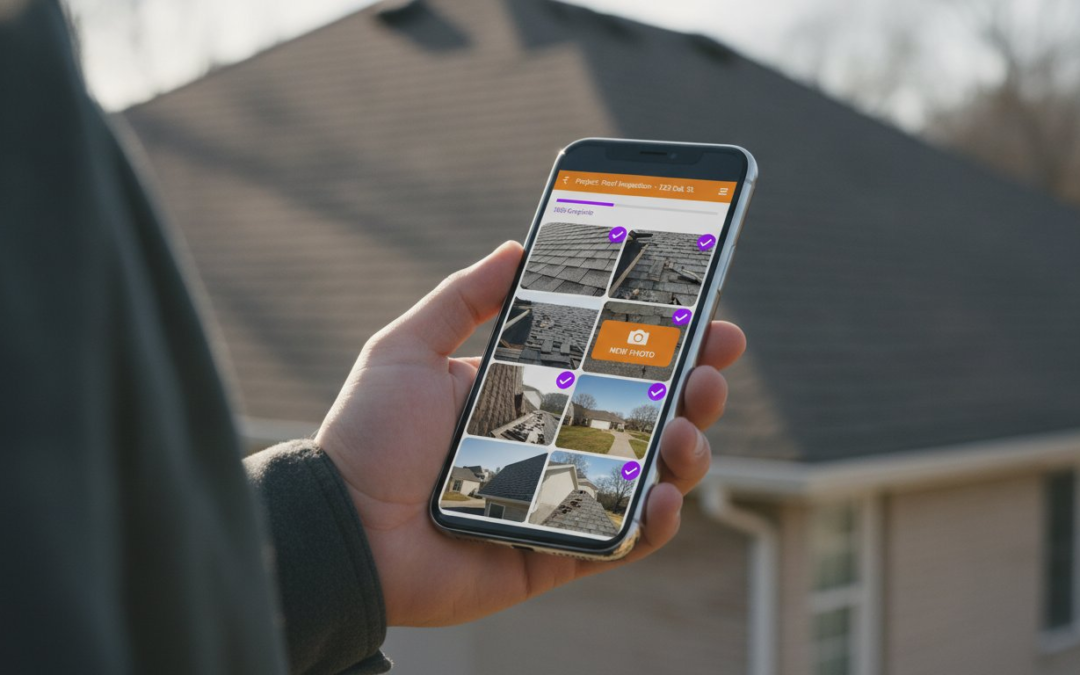
Stop treating your evenings like an unpaid second shift for administrative data entry. You know the drill. You finish a long day of field inspections only to spend hours dragging, dropping, and manually labeling images at your desk. It is a grueling bottleneck that kills your productivity, slows down your claim cycles, and invites the kind of human error that leads to frustrating pushbacks. You deserve a workflow that respects your time and your expertise.
We agree that the old way of handling Xactimate photo documentation is broken. This article promises to show you how to eliminate that manual grind by automating your reporting from the moment you snap the first picture. You will learn to capture, label, and sync. It is that simple. We will explore how integrating field-first automation directly into Xactimate 2026.6.1000 helps you close claims 40% faster while maintaining professional IICRC-standard documentation effortlessly. It is time to restore order to the chaos of onsite inspections, eliminate the administrative burden, and finally get your nights back.
Key Takeaways
- Reclaim your evenings by automating the entire reporting cycle and ending the manual labeling bottleneck.
- Sync field data directly to the Verisk ecosystem using your XactNet address to streamline Xactimate photo documentation.
- Eliminate field keyboards forever with voice-to-text labeling and custom inspection templates that organize data in real-time.
- Deploy AI-powered capture tools to ensure every image is professional, IICRC-standard, and ready for immediate review.
- Close claims 40% faster and maximize your annual earnings by slashing supplements and back-and-forth carrier delays.
Stop the Manual Madness: Why Xactimate Integration is Vital in 2026
The “Photo Bottleneck” is the silent thief of every field adjuster’s productivity. It’s the hours you lose every week to mindless administrative tasks that don’t add value to your expertise. In 2026, integration isn’t just a luxury feature; it’s a survival requirement. True integration means the seamless, frictionless flow of field data directly into the Verisk Ecosystem. We are moving beyond the era of local storage and manual uploads. Cloud-integrated documentation is the new industry standard, ensuring that every piece of data you capture on-site is immediately available where it matters most. Our goal is clear and uncompromising: zero manual data entry between the inspection site and the final estimate.
The Cost of the ‘Second Shift’
Stop working for free. Every evening you spend labeling photos at your desk is an unpaid “second shift” that eats into your profit and your personal life. If you spend just 30 seconds labeling each photo across five claims a day, you are losing over an hour of your life every single night. That is time you aren’t being paid for. Beyond the clock, manual Xactimate photo documentation is a breeding ground for human error. One misplaced photo or a misspelled label can lead to a rejected claim, a frustrated carrier, and a delayed payment. You need a system that ensures professional, IICRC-compliant photo organization without the manual grind. High-quality documentation should be a byproduct of your inspection, not a separate project you tackle when you’re already exhausted.
Verisk and Third-Party Synergy
PHOTO iD acts as the high-velocity bridge between the physical jobsite and your digital estimate. It serves as the primary data collector, ensuring that every image is wrapped in the metadata and timestamps required for modern claim integrity. Carriers in 2026 demand more than just a picture; they demand proof of time, location, and context. This is where “Smart Sync” changes the game. Instead of a chaotic pile of files, your photos arrive in Xactimate already knowing their place. They are categorized, labeled, and ready for review. This synergy eliminates the friction of traditional reporting. You capture the data once. You sync it once. You close the claim. It’s about working smarter, moving faster, and reclaiming the hours you used to lose to the screen. Stop dragging. Stop dropping. Start syncing!
Seamless Sync: Connecting PHOTO iD to the Verisk Ecosystem
Integration should not be a technical hurdle. It should be a bridge. By connecting the PHOTO iD mobile app directly to Xactimate Online, you create a high-speed pipeline for your field data. This is the “Set It and Forget It” promise of 2026. Once your connection is established, the manual labor of moving, sorting, and uploading files disappears. Your Xactimate photo documentation becomes a background process that executes while you are still walking the property. It is about creating a unified environment where your mobile device and your estimating software speak the same language. Link your tools. Sync your data. Scale your business.
Configuring Your XactNet Address
Your XactNet address is the digital GPS for your claim data. Without it, your documentation has no destination. You can find this unique identifier within your Xactimate Professional license settings under the user profile tab. Simply copy that address and paste it into your PHOTO iD account settings. If you manage a large team or handle assignments for multiple adjusting firms, you can register and manage several XactNet addresses within a single PHOTO iD dashboard. This flexibility allows you to route specific inspections to the correct carrier or firm without the headache of logging in and out of different accounts. If you encounter a connection hurdle, double-check that your Xactimate 2026.6.1000 version is fully updated and that your XactNet address is currently active.
- Locate your unique XactNet identifier in your license settings.
- Paste the address into the PHOTO iD dashboard for instant pairing.
- Route documentation to multiple firms from a single mobile interface.
Cloud-to-Cloud Data Transfer
Security is non-negotiable in the insurance industry. During transit, your claim data is protected by rigorous encryption protocols that safeguard sensitive homeowner information and site photos. This cloud-to-cloud transfer is not just about moving files; it is about maintaining the integrity of your work. As photos move from the mobile app to the Xactimate image gallery, every category and label stays exactly where you put it. The order of your inspection is preserved, ensuring that the estimator or file reviewer sees the property exactly as you did. Automated Sync is the instant delivery of labeled assets from your phone to your final estimate. It eliminates the delay between the field and the office. If you are ready to experience this level of efficiency, consider starting a PHOTO iD mobile app subscription to see the sync in action. This is the future of property assessment. It is fast, it is secure, and it is built for the modern professional.
The Workflow Revolution: From Onsite Inspection to XactAnalysis
Efficiency starts the moment you step out of the truck. No more clipboards. No more mental checklists. You need a process that guides you through the property with clinical precision. This is the workflow revolution. It transforms the way you approach Xactimate photo documentation by moving the administrative work to the site, where it belongs. By the time you leave the driveway, the hardest part of your job is already finished. You are no longer just an observer. You are a high-speed data manager.
Follow these five steps to master the modern inspection:
- Step 1: Open PHOTO iD onsite and select your custom inspection template. These templates act as your digital guide, ensuring every necessary angle is covered without exception.
- Step 2: Capture photos using the high-performance in-app camera. Real-time labeling is active, so every shutter click creates a named, organized file instantly.
- Step 3: Use voice-to-text to narrate the damage. Describe the loss while the evidence is right in front of you. It is faster, more accurate, and more detailed than any office-based recollection.
- Step 4: Hit ‘Sync’ to push the organized report to your Xactimate project. Your data moves securely through the cloud while you move to your next appointment.
- Step 5: Open Xactimate at your convenience. You will find your images already categorized, labeled, and sorted within the image gallery.
Capturing with Intent
Organization is the foundation of a defensible estimate. Use category-specific folders like Roof, Kitchen, or Exterior to pre-sort your data while you walk. This isn’t just about photos. Integrate aerial roof and wall measurements into the same project to ensure pinpoint accuracy. When you maintain a consistent narrative throughout your documentation, you drastically reduce carrier pushback and supplements. You aren’t just taking pictures. You are building a professional story of the loss that stands up to scrutiny.
Instant Report Generation
While you work, the app is quietly building a professional PDF report in the background. This instant documentation serves as a vital backup and a clear reference point for desk adjusters or file reviewers. If you are managing a firm, use the Team Management Dashboard to oversee multiple sites in real-time. You can track progress, verify quality, and ensure every field professional is meeting your standards. It is total visibility. It is total control. It is the end of the documentation bottleneck. Capture, label, sync!
Beyond Basic Uploads: Leveraging AI and Voice-to-Text for Xactimate
Integration is only as strong as your data collection. If you are still fumbling with a mobile keyboard while perched on a roof, your Xactimate photo documentation process is still broken. High-speed estimating requires automation at the source. AI and voice-to-text tools are the secret sauce that turn a standard inspection into a high-velocity data stream. These technologies recognize room types and damage patterns automatically, ensuring your estimate is built on a foundation of precision. Do not just upload photos. Automate the intelligence behind them.
Hands-Free Labeling in the Field
Adopt the “Speak, Snap, Done” rhythm to revolutionize your site visits. This workflow can speed up your inspections by 50% by removing the friction of manual typing. Voice-to-text labeling is not just a convenience; it is a specialized tool that understands complex industry jargon and precise measurements. Whether you are documenting “R-38 blown-in insulation” or “5/8-inch Type X drywall,” the app captures it accurately. This reduces physical fatigue, especially during grueling CAT deployments or high-volume claim cycles. You stay focused on the damage, not the screen. Talk your way through the inspection. Capture the details. Move to the next job!
- Speak the label clearly while the damage is in view.
- Snap the photo to anchor the description to the asset.
- Done. Your data is ready for the estimate.
Custom Templates for Every Claim Type
Efficiency is about alignment. Build custom inspection templates that mirror Xactimate’s standard line-item flow. This makes the transition from the field to the estimate seamless and logical. For water losses, you can incorporate moisture mapping directly into the integrated report, keeping all vital data in one place. Custom Templates are the blueprint for error-free estimates. They ensure you never miss a required photo and that every image is categorized correctly for the carrier before you even leave the site. It is about consistency, accuracy, and speed.
Ready to eliminate the field keyboard forever? Start using Voice-to-Text Labeling today and watch your productivity soar. Stop typing and start talking. Your estimates will be more detailed, your carriers will be happier, and your nights will finally be your own. This is how the modern adjuster wins in 2026. Embrace the tech. Master the workflow. Scale your success!
Closing the Claim: Maximize Your ROI with Integrated Documentation
Your income is directly tied to your output. In the high-stakes environment of 2026, the adjusters who earn the most are the ones who move the fastest without sacrificing accuracy. Integrated Xactimate photo documentation is the engine that drives this professional growth. By eliminating the manual labeling bottleneck, you open the door to higher claim volumes and significantly increased annual earnings. You are no longer just a “photo taker” on a jobsite. You have transformed into a high-velocity claim closer who delivers results while others are still sorting through their digital folders. Capture. Sync. Earn!
Integrated photos do more than just save time; they protect your bottom line. By delivering organized, labeled, and timestamped data directly into Xactimate, you drastically reduce the need for supplements and the exhausting back-and-forth with carriers. Clean data packets are nearly impossible to dispute. They provide a clear, professional narrative that builds immediate trust with file reviewers. This is your ultimate competitive advantage. While your peers are struggling with clunky interfaces and unpaid administrative nights, you are submitting finalized estimates with surgical precision. This efficiency is vital as the insurtech market is projected to reach $23.5 billion this year.
Reducing Claim Cycle Times
Carriers and restoration firms are under immense pressure to resolve claims quickly. They prioritize adjusters who provide clean, integrated data packets that require zero office-side cleanup. This speed translates directly into higher customer satisfaction and stronger professional trust. If you are running a restoration firm, use the Team Management Dashboard to scale your operations without adding heavy administrative overhead. You can manage more adjusters, review more sites, and close more claims in less time. It is total visibility. It is total control. It is total growth.
Getting Started with PHOTO iD and Xactimate
The transition to a fully automated workflow is simple. You don’t have to overhaul your entire business model overnight to see a massive ROI. Start with a trial. Test the sync. Experience the speed. We provide comprehensive support to help you set up your first Xactimate sync and configure your custom inspection templates for maximum impact. Experience the relief of a streamlined workday and the satisfaction of a cleared desk. Empower your workflow-start your PHOTO iD integration today!
Master Your Workflow and Reclaim Your Evenings
The days of manual data entry are over. You’ve seen how the right technology transforms your property assessments from a chore into a high-speed production line. By adopting a field-first approach to Xactimate photo documentation, you eliminate the administrative bottlenecks that used to kill your profitability. You can now sync data instantly, label photos with your voice, and close claims with total confidence. It’s a game-changing shift that puts you back in control of your schedule. Capture. Sync. Earn!
Restoration firms and independent adjusters are already scaling their operations using these automated tools. As an official Verisk and Xactimate integration partner, PHOTO iD provides the reliable bridge you need between the jobsite and the estimate. Founded by industry veteran Ken Perry, this platform is built by pros for pros. It’s currently used by thousands of field professionals to slash cycle times and maximize ROI. Stop struggling with clunky interfaces. Start working with a partner that understands the value of your time.
Your next inspection should be your fastest one yet. Don’t let another evening slip away to manual labeling. Take the first step toward a more efficient, profitable future right now. Start Your Free Trial of PHOTO iD Today! Embrace the speed. Master the sync. Win the day!
Frequently Asked Questions
How do I connect PHOTO iD to my Xactimate account?
You connect the platforms by entering your unique XactNet address into the PHOTO iD dashboard settings. This creates a secure, direct link for your data packets. Once paired, your mobile app sends labeled photos directly to the cloud for retrieval within the Verisk ecosystem. It is a simple “set it and forget it” process that ensures your field work reaches the estimate without manual intervention. Link your accounts today and start syncing!
Does PHOTO iD work with both Xactimate Online and Desktop versions?
Yes, the integration supports both Xactimate Online and the Desktop version via the cloud. Because the sync happens at the project level, your organized assets are available regardless of which version you use to write the estimate. This flexibility is essential for adjusters who move between office setups and field laptops. Your data stays consistent, accessible, and perfectly organized across all platforms. It is the ultimate tool for the modern mobile professional.
Can I use voice-to-text labeling for all my inspection photos?
You can use voice-to-text labeling for every single photo you capture during an inspection. This feature allows you to narrate damage descriptions hands-free while you are still looking at the loss. It handles complex industry terminology with ease, ensuring your Xactimate photo documentation is detailed and professional. Speak your labels, snap your pictures, and move on. It is the fastest way to document a property without a keyboard.
What is an XactNet address and where do I find it in Xactimate?
An XactNet address is your unique identifier within the Verisk network that routes claim data to your specific account. You can find it by opening Xactimate and navigating to the User Profile or instance settings tab. Copy this address exactly and paste it into PHOTO iD to enable the sync. This ID ensures that your high-quality field data always lands in the correct project folder every single time you hit sync.
Will my photos automatically appear in the Xactimate image gallery after syncing?
Your photos appear in the Xactimate image gallery as soon as the project sync is complete. They arrive already sorted into categories and labeled with the descriptions you provided in the field. This eliminates the need for manual sorting or dragging and dropping files at your desk. You simply open the project and find a fully organized visual record ready for your line items. It is instant organization for high-speed estimating!
Does the integration support moisture mapping and aerial measurements?
The integration fully supports moisture mapping and aerial roof or wall measurements within the same project. You can capture moisture readings and aerial data in PHOTO iD and sync them alongside your standard photos. This creates a comprehensive, IICRC-compliant documentation packet that satisfies carrier requirements. Having all your data in one integrated report reduces supplements and speeds up the entire approval process. Capture every detail in one seamless workflow.
Is there a limit to the number of photos I can sync to a single Xactimate project?
There is no technical limit to the number of photos you can sync from PHOTO iD to a single project. You can document the largest commercial losses or complex CAT claims without worrying about data caps. However, you should always follow carrier-specific guidelines regarding the total number of images required for a standard estimate. Our system handles high-volume uploads with speed and reliability, ensuring every image is preserved for the final report.
How much time can I realistically save using Xactimate integration compared to manual entry?
You can realistically save 30 to 60 minutes per claim by using integrated Xactimate photo documentation. For a standard five-claim day, that is up to five hours of administrative work eliminated every single evening. By automating the labeling and sorting process onsite, you finish your work when you leave the property. Stop working the second shift and start reclaiming your personal time with field-first automation that works as hard as you do.