
photo app vs report builder for contractors
Photo Apps vs Report Builders: Core Differences for Contractors
You need a tool that either captures and organizes photos fast, or generates comprehensive project reports. This choice determines whether your team saves time or fights software daily.
What Defines a Photo App
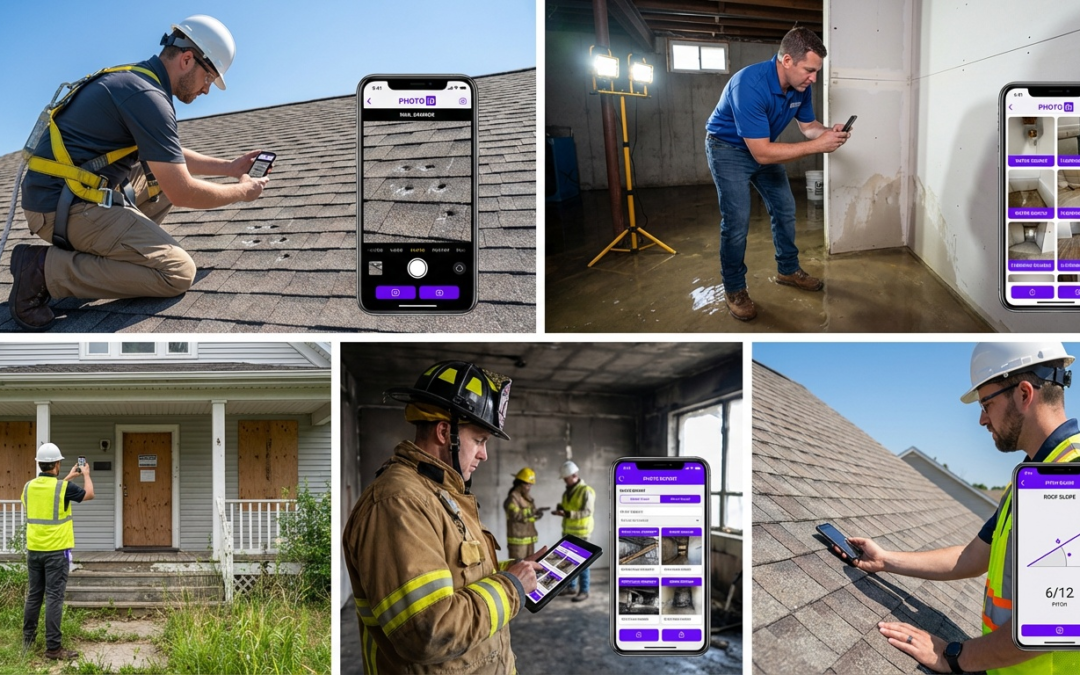
A photo app solves one problem: getting field photos captured, labeled, and delivered without manual sorting. PHOTO iD by U Scope – Main Website is built specifically for property inspectors, restoration contractors, and roofing teams that need instant photo organization. Real-time labeling, GPS tagging, and direct integration into estimating systems like Xactimate–that’s the focus.
You capture. The app organizes. Your documentation’s ready for invoicing or claims submission.
What Sets Report Builders Apart
Report builders like Raken and Procore document entire projects: daily logs, time tracking, safety reports, and multimedia notes. They collect photos as one piece within broader workflows. When you need to track labor hours, weather conditions, and equipment usage alongside images, these platforms deliver.
The trade-off? More input per task. Capturing a quick photo set for an insurance adjuster becomes a multi-step process through menus designed for full project narratives.
Why the Choice Impacts Your Field Workflow
If your team spends most field time documenting conditions for estimates, claims, or compliance, a specialized photo tool delivers faster results. Managing large projects that require daily activity logs and team coordination? A report builder justifies its complexity.
| Feature | Photo Apps | Report Builders |
|---|---|---|
| Primary Focus | Photo capture and organization | Comprehensive project documentation |
| Speed for Photo-Only Tasks | Seconds per image | Minutes per image set |
| Integration Targets | Estimating and CRM systems | Project management suites |
| Learning Curve | Minimal, field-ready immediately | Steeper, requires training |
Field Pain Points: Manual Photo Handling Slows You Down
You finish a job, return to the office, and spend an hour sorting through hundreds of unnamed photos. This manual process creates bottlenecks that delay billing, confuse teams, and increase compliance risk.
Disorganized Photos Lead to Billing Delays
Insurance adjusters and property managers reject invoices when photo documentation lacks clear labels or context. You can’t bill for work you can’t prove with organized evidence. Manual photo sorting extends payment cycles by days, hurting cash flow.
Team Collaboration Gaps Cause Rework
Field techs upload photos to generic cloud folders without structure. Office staff waste time asking: Which property? What room? When was this taken?
This back-and-forth creates rework, missed details, and frustrated team members who repeat the same explanations daily.
Compliance Risks from Poor Documentation
Property preservation and restoration contracts require timestamped, location-verified photos for regulatory compliance. Missing metadata or inconsistent file naming exposes your business to audit failures and contract disputes. Manual systems can’t guarantee the accuracy that insurers and agencies demand.
Benefits of Automated Photo Systems
- Eliminate post-job sorting time
- Ensure consistent labeling across teams
- Reduce billing cycle delays
- Maintain compliance-ready metadata
Costs of Manual Photo Handling
- Hours lost to file organization weekly
- Higher claim rejection rates
- Team frustration and communication gaps
- Audit and compliance vulnerabilities
PHOTO iD Photo App: Speed and Organization in Your Pocket
Specialized photo tools eliminate the administrative burden slowing field teams. PHOTO iD by U Scope – Main Website delivers instant organization through features built specifically for contractors who document properties–not teams managing multi-phase construction projects.
Real-Time Labeling and Custom Workflows
Real-time labeling means photos receive accurate identifiers the moment you capture them. No post-job renaming sessions. PHOTO iD supports custom workflows tailored to your industry–insurance claims, property preservation work, or roofing inspections. Each photo automatically includes location data, timestamps, and your predefined labels.
Documentation time drops from hours to minutes. Your team captures images on site, and the system delivers organized files ready for immediate submission.
Built-In Tools Like a Pitch Gauge for Accurate Capture
PHOTO iD includes an in-camera pitch gauge for roofing contractors, supporting accurate measurements without separate equipment. GPS tagging verifies location for compliance requirements. The interface stays simple enough for fast adoption–no training delays.
Direct Integrations with Xactimate and Salesforce
PHOTO iD connects directly to Xactimate for estimating, Salesforce for customer relationship management, and Guidewire for insurance workflows. Photos flow into your existing systems without manual transfers or format conversions.
Field documentation feeds directly into billing, claims processing, and client communication. Office staff don’t touch the files.
Efficiency Multiplier: Contractors using specialized photo apps often report major reductions in documentation time compared with manual methods, which can speed up billing cycles and reduce administrative overhead.
Report Builders for Contractors: When Full Workflows Fit
Report builders serve contractors managing complex projects that require daily documentation beyond photo capture. Their strengths and limitations clarify when they justify the complexity.
Strengths in Daily Logs and Project Tracking
Platforms like Raken and Procore capture complete project narratives: crew attendance, equipment usage, weather conditions, safety incidents, and progress photos in unified daily reports. General contractors coordinating multiple trades benefit from centralized communication and accountability documentation.
These systems create audit trails for large projects where liability and coordination matter as much as visual documentation.
Limitations for Quick Photo-Only Tasks
Report builders add friction when you need fast photo documentation. Capturing a simple before-and-after set requires navigation through project selection, report creation, and metadata entry designed for full logs. For insurance inspectors or restoration contractors focused on visual evidence, this process wastes time.
The learning curve increases costs. Training teams on full project management platforms takes days. Photo-specific tools reach adoption in hours.
Top Options like Raken and Procore Reviewed
Raken focuses on daily reporting with mobile-friendly interfaces for field supervisors documenting labor and progress. Procore offers enterprise-grade project management, with photo tools as one component within broader construction administration. Both require subscription commitments and ongoing training.
When speed and photo organization drive your business requirements, these platforms don’t fit.
Choose Right: Photo App, Report Builder, or Both?
Your decision depends on whether photos serve as primary deliverables or supporting documentation within larger project workflows.
Decision Framework for Your Team Size and Needs
Choose a photo app when your team completes multiple short-duration jobs daily and needs fast documentation turnaround. Insurance inspectors, property preservation contractors, and roofing assessors fit this profile.
Choose report builders when you manage weeks-long projects with multiple stakeholders who need coordinated daily updates.
Small teams gain immediate value from photo-focused tools. Large organizations may deploy both: photo apps for field documentation and report builders for project coordination.
Real-World Scenarios from Property Preservation to Roofing
A property preservation contractor completing 15 inspections weekly needs photos organized by address and delivered the same day. PHOTO iD solves this need. A commercial general contractor managing a six-month build needs daily logs coordinating ten subcontractors–that’s when report builders make sense.
Roofing contractors fall between these extremes. Assessment and claims work benefits from photo apps. Large replacement projects may warrant report builders for progress tracking.
Next Steps: Streamline Your Workflow Today
Match tools to your actual field requirements. Test whether your current process spends more time on photo organization or project reporting. That answer points to the right solution.
Stop wasting hours sorting photos manually. See how PHOTO iD by U Scope automates field documentation for contractors that need speed and accuracy. Start organizing smarter today.
Why Integration Ecosystem Matters More Than Feature Count
Contractors don’t lose time from lacking features. They lose time transferring data between disconnected systems. How tools connect to your existing workflow matters more than how many buttons they offer.
PHOTO iD’s Direct Path to Billing and Claims
PHOTO iD connects directly to Xactimate, Salesforce, and Guidewire without middleware or export steps. Field photos flow into estimates, CRM records, and insurance portals automatically. This removes the office bottleneck where staff manually attach files to claims or customer records.
Report builders often require manual export then import into separate estimating or billing systems. Each transfer point adds delay and error risk.
When Report Builder Integration Justifies Complexity
Large commercial projects benefit from report builders that sync with accounting systems, subcontractor portals, and owner dashboards. Procore’s ecosystem connects project documentation to financial tracking and contract management–valuable when coordinating million-dollar builds with multiple stakeholders.
This depth becomes overhead for contractors completing quick-turnaround jobs where photos are the primary deliverable.
True Cost Analysis: Subscription Price vs Time Savings
Subscription fees are surface costs. Calculate total expense by measuring time saved or wasted per job.
Photo App ROI for High-Volume Contractors
A contractor completing ten inspections weekly saves 45 minutes per job through automated photo organization. That’s 7.5 hours weekly recovered. At $50 hourly billing rates, you reclaim $375 in productive capacity–$19,500 annually. Photo app subscriptions cost $300 to $600 per year.
ROI shows up within weeks for teams handling multiple jobs per day.
Report Builder Cost Structure and Break-Even
Report builders charge $200 to $400 monthly per user, plus implementation and training costs. Break-even requires projects large enough that coordination value outweighs documentation efficiency losses. General contractors managing concurrent multi-week projects justify this investment. Restoration contractors completing same-day jobs rarely can.
Final Verdict: Match Your Tool to Your Mission
Define your primary field objective. Tools built for different purposes create friction when misapplied.
PHOTO iD Wins for Documentation-First Contractors
Property inspectors, insurance restoration specialists, and roofing assessors need photos organized and delivered immediately. PHOTO iD by U Scope reduces administrative delay through purpose-built features: real-time labeling, compliance-ready metadata, and direct integration to estimating systems.
No training overhead. No unused features. No workflow interruption.
Time savings show up within days of adoption.
Report Builders for Project Coordination Needs
General contractors managing extended timelines with multiple trades benefit from daily logs that document labor, safety, and progress in unified reports. Report builders make sense only when coordination complexity justifies the learning curve and subscription cost.
Hybrid Approach: Deploy Both Strategically
Large contracting firms may use photo apps for quick assessment and claims work while maintaining report builders for major projects. This dual approach assigns each tool to the right tasks rather than forcing one solution across incompatible workflows.
Smaller operations gain more by selecting the tool matching their dominant activity rather than paying for capabilities they rarely use.
Decision Clarity: If photos are the primary deliverable to clients or insurers, specialized photo apps deliver faster results and better ROI. If photos support broader project documentation, report builders can justify their complexity. A mismatch between tool and mission costs time and money every day.
Stop fighting software that doesn’t match your field reality. Evaluate whether your team spends more time capturing evidence or coordinating projects, then choose the tool built for that purpose.
Construction projects benefit from clear and organized documentation to meet compliance and operational efficiency requirements. For more information on best practices in construction project documentation, refer to the construction project documentation guidelines.
Frequently Asked Questions
What’s the best app for contractors to manage construction photos?
For contractors focused on documenting conditions for estimates or claims, a specialized photo app like PHOTO iD is key. It prioritizes speed, real-time labeling, and direct integration with estimating systems. This avoids the post-job mess of manual photo sorting.
What kind of app helps independent contractors with field documentation?
Independent contractors needing fast, organized photo documentation for estimates, claims, or compliance will benefit from a dedicated photo app. PHOTO iD, for example, offers features like real-time labeling, GPS tagging, and custom workflows to streamline field work. It helps ensure documentation is ready for submission without manual sorting.
Which app type is best when I need comprehensive project reports?
If your work requires comprehensive project reports, including daily logs, time tracking, and safety reports alongside photos, a report builder like Raken or Procore is a better fit. These platforms collect photos as one part of a broader project narrative. They handle the full scope of project documentation.
What are the top apps for overall construction project management?
For full construction project management, apps like Raken and Procore offer comprehensive features beyond just photos. They help manage daily activities, track labor hours, and document equipment usage. These tools are designed for managing large projects with many moving parts.
What’s the main difference between a photo app and a report builder for contractors?
A photo app focuses on quickly capturing, labeling, and organizing photos for estimates or claims, eliminating manual sorting. A report builder, like Raken, handles comprehensive project documentation, with photos as one component within broader daily logs and time tracking. Your primary use case should guide your choice.
How can a specialized photo app improve my billing and compliance?
A specialized photo app like PHOTO iD eliminates post-job sorting, ensuring consistent labeling and metadata. This reduces billing cycle delays because documentation is instantly ready for adjusters or clients. It also helps maintain compliance-ready photos with features like GPS tagging and timestamps, reducing audit risks.